| Windows 7: External Drive locked after comp swap |
08 Oct 2010
|
#1 | | Windows 7 professional 64 bit |
External Drive locked after comp swap alright, heres the issue,
a seagate 500 GB external with all my music on it worked perfectly fine wiht my XP System, i then moved it over to my new Windows 7 system, worked great still. Swaped it into a windows Vista laptop to run music off it for my buddies wedding, the vista one asked me to change owner priv's, this took 15 min and worked well for the wedding.
now i go home and hook the drive back into it's native system, and now it will not access at all, i have attempted to run a CACLS on the drive and it says that the "data is invaid
command line i am attempting to run looks as follows
cacls "h:" /E /t /c /g administrators:f
i have taken ownership of the drive and tried mutliple diffrent combinations of user priv settings and no matter what i am being denied access to my music.
i ran a takeown and it went well, but did not fix my problem,
what i am asking is, is there a simple way to essentially restore my drives security settings to default after vista messed everything up so i can access my music again? nothing i have tried worked so far... or maybe i am tired and missed something simple, but as it stands right now, i am an admin, ownership is admin, permissions are set for powerusers, admin, admins, everyone, and my admin username,
i can open folders without prompts, but cannot do anything else.
thank you in advance. and please spare no extream, the only thing i will not do is format the drive... no one wants to lose 460 GB of music... | My System Specs |
| System Manufacturer/Model Number Self OS Windows 7 professional 64 bit CPU AMD Phenom II X4 955 3.21Ghz Motherboard Asus Memory 8 GB Corsair Graphics Card ATI Radeon 5800 Serise Sound Card Sound Blaster Plat Monitor(s) Displays Acer 22" AL2216W Screen Resolution 1680x1050 Keyboard Logitech G19 Gaming Keyboard Mouse Logitech G9 Mouse PSU 900W Earth Watt unit Case Coolmaster Cooling Basic Air with 5 fans, 80mm and 1 120 mm Hard Drives 2 1.5 Tb Sata internal (functioning well)
1 500Gb Seagate External (functioning, but issues with Win 7 permisions
1 1TB Seagate external, Functioning |
09 Oct 2010
|
#2 | | W7 Professional x64 Portland, OR |
You need ownership to give yourself permissions. Right click on the drive after unzipping and double clicking "Add_take_ownership" and merging it. Then you can give yourself read/write/modify permissions.
Last edited by LiquidSnak; 09 Oct 2010 at 12:03 AM..
Reason: in depth
| My System Specs | | System Manufacturer/Model Number Pugh Technologies OS W7 Professional x64 CPU AMD Athlon II X3 445 Rana 3.10 GHz Motherboard MSI 870A-G54 Memory PNY XLR DDR3 1600 4x2GB Graphics Card NVIDIA GeForce GTS 450 (fermi) 1GB GDDR5 Sound Card Realtek ALC892 onboard Monitor(s) Displays ASUS VE205t, Viewsonic VX2035WM Screen Resolution 1600x900, 1600x1050 Keyboard Logitec 55 Mouse Razer Deathadder PSU Antec EarthWatts EA650 650W Case ThermalTake Armor A90 Mid Tower Cooling 3x 120mm in, 1x 120mm & 200mm out, self built hydro-cooler Hard Drives 977GB Hitachi Hitachi HDS721010CLA332
244GB Western Digital WDC WD2500AAJS-65B4A0
488GB Western Digital WDC WD5000AAJS-00A8B0
488GB Western Digital WDC WD5000AAKS-00UU3A0 Internet Speed 20 Mbps D/L, 9 Mbps U/L |
09 Oct 2010
|
#3 | | Windows 7 professional 64 bit |
that a good suggestion, but if you look i already had taken ownership of everything,
i have ownership of everything, i have granted permissions to everything from the top level down
all the folder are accessible to everyone now, which is what i want. the files however are not, and they are not taking the permissions that i configure to the folder, sub folders and files. i got your handy Dll, it works nice, but did not change a thing as i had already done that through the command prompt on my own...
now all i can think of is having to go to all 150,000 songs and iduvidually changing their permission access, which i will not do, because that is a collosol waste of time | My System Specs | | System Manufacturer/Model Number Self OS Windows 7 professional 64 bit CPU AMD Phenom II X4 955 3.21Ghz Motherboard Asus Memory 8 GB Corsair Graphics Card ATI Radeon 5800 Serise Sound Card Sound Blaster Plat Monitor(s) Displays Acer 22" AL2216W Screen Resolution 1680x1050 Keyboard Logitech G19 Gaming Keyboard Mouse Logitech G9 Mouse PSU 900W Earth Watt unit Case Coolmaster Cooling Basic Air with 5 fans, 80mm and 1 120 mm Hard Drives 2 1.5 Tb Sata internal (functioning well)
1 500Gb Seagate External (functioning, but issues with Win 7 permisions
1 1TB Seagate external, Functioning |
09 Oct 2010
|
#4 | | W7 Professional x64 Portland, OR |
Yup, missed that bit.
Ok, so there is an easy way, after some research of my own:
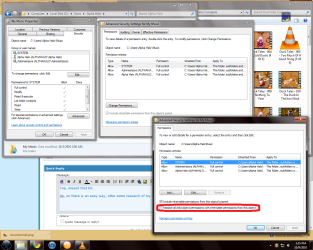
Open the properties of the drive you want to change your permissions on, and go into advanced security settings, then change permissions. Check the circled box, and apply. Don't forget to add/edit yourself to the permissions list as having full control using the add or edit button. | My System Specs | | System Manufacturer/Model Number Pugh Technologies OS W7 Professional x64 CPU AMD Athlon II X3 445 Rana 3.10 GHz Motherboard MSI 870A-G54 Memory PNY XLR DDR3 1600 4x2GB Graphics Card NVIDIA GeForce GTS 450 (fermi) 1GB GDDR5 Sound Card Realtek ALC892 onboard Monitor(s) Displays ASUS VE205t, Viewsonic VX2035WM Screen Resolution 1600x900, 1600x1050 Keyboard Logitec 55 Mouse Razer Deathadder PSU Antec EarthWatts EA650 650W Case ThermalTake Armor A90 Mid Tower Cooling 3x 120mm in, 1x 120mm & 200mm out, self built hydro-cooler Hard Drives 977GB Hitachi Hitachi HDS721010CLA332
244GB Western Digital WDC WD2500AAJS-65B4A0
488GB Western Digital WDC WD5000AAJS-00A8B0
488GB Western Digital WDC WD5000AAKS-00UU3A0 Internet Speed 20 Mbps D/L, 9 Mbps U/L |
10 Oct 2010
|
#5 | | Windows 7 professional 64 bit |
1: ducktales! AWESOME!
2: gave it a shot, what you suggested, i did not understand what the child permissions were, and i got an error in the move, and i am not sure why, here is a screen shot so maybe you can see an error i made which i cannot because i am ready to throw my entire computer out the window and not really the best person to be looking for an error that is causing this.... thanks for all your help so far... i am fairly sure this would have worked if this error did not show up...
Edit: Removed screen shot because i got it all working now, thanks so much, you were absolutly right with that child object permission dealy that you suggested. i noticed that through some error that some of the folder were getting the changes and some were not, this led to an invesitgation where some had permissions set for all and some had all the profiles but no access levels, with that changed, the error disappeared and then i was able to do the child object as you suggested and on a quick scan of a few folders it appears to be functioning properly again!
thank you very much!
Last edited by pyro5050; 10 Oct 2010 at 12:15 PM..
Reason: got it working had to let know
| My System Specs | | System Manufacturer/Model Number Self OS Windows 7 professional 64 bit CPU AMD Phenom II X4 955 3.21Ghz Motherboard Asus Memory 8 GB Corsair Graphics Card ATI Radeon 5800 Serise Sound Card Sound Blaster Plat Monitor(s) Displays Acer 22" AL2216W Screen Resolution 1680x1050 Keyboard Logitech G19 Gaming Keyboard Mouse Logitech G9 Mouse PSU 900W Earth Watt unit Case Coolmaster Cooling Basic Air with 5 fans, 80mm and 1 120 mm Hard Drives 2 1.5 Tb Sata internal (functioning well)
1 500Gb Seagate External (functioning, but issues with Win 7 permisions
1 1TB Seagate external, Functioning |
10 Oct 2010
|
#6 | | W7 Professional x64 Portland, OR |
Glad I could help out | My System Specs | | System Manufacturer/Model Number Pugh Technologies OS W7 Professional x64 CPU AMD Athlon II X3 445 Rana 3.10 GHz Motherboard MSI 870A-G54 Memory PNY XLR DDR3 1600 4x2GB Graphics Card NVIDIA GeForce GTS 450 (fermi) 1GB GDDR5 Sound Card Realtek ALC892 onboard Monitor(s) Displays ASUS VE205t, Viewsonic VX2035WM Screen Resolution 1600x900, 1600x1050 Keyboard Logitec 55 Mouse Razer Deathadder PSU Antec EarthWatts EA650 650W Case ThermalTake Armor A90 Mid Tower Cooling 3x 120mm in, 1x 120mm & 200mm out, self built hydro-cooler Hard Drives 977GB Hitachi Hitachi HDS721010CLA332
244GB Western Digital WDC WD2500AAJS-65B4A0
488GB Western Digital WDC WD5000AAJS-00A8B0
488GB Western Digital WDC WD5000AAKS-00UU3A0 Internet Speed 20 Mbps D/L, 9 Mbps U/L External Drive locked after comp swap problems? All times are GMT -5. The time now is 06:48 AM. | |