Windows 7 Forums Search
Welcome to Windows 7 Forums. Our forum is dedicated to helping you find solutions with any problems, errors or issues you are experiencing with Windows 7. The Windows 7 forum also covers news and updates and has an extensive Windows 7 tutorial section that covers a wide range of tips and tricks.


Windows 7 - Internal SATA drives are treated as removable drives

 
10-11-2010   #1


Win 7 Ultimate 32bit


Internal SATA drives are treated as removable drives

On my Windoiws 7 Ultimate desktop PC, all my SATA hard drives are show up as removable from day 1. This is not a big problem but an anonyance. When I click "Safely Remove Hardware and Eject Media", all my fixed drives are listed along with the USB drive. Anyway to change the drive type of my internal drives to the proper type?
Thanks.

My System SpecsSystem Spec
10-11-2010   #2


Windows 7 64-bit Home


mine does the same thing. each of my partitions show up.
My System SpecsSystem Spec
10-11-2010   #3


Windows 7 Ultimate AMD64


I think that is a function of the drivers. Did you install the manufacturers supplied drivers of go with the default windows drivers? To be honest I just guessing, my SATA drive doesn't show up as removable. My motherboard also doesn't have any esata ports, it that matters.
My System SpecsSystem Spec
.


10-11-2010   #4


win 7 X64 Ultimate SP1


External

Made me curious, I checked mine. Only one drive show up out of three. It has the MS driver. I have external ports and the one drive hooked to them does't show.
My System SpecsSystem Spec
10-11-2010   #6


Windows 7 64-bit Home


id rather just deal with it than start messing with the registry, but thats just me...
My System SpecsSystem Spec
10-12-2010   #7


Windows 7 Ultimate AMD64


I'd say that windows wouldn't let you eject the drive that windows is installed too, and if you did eject one of your other drives a reboot would get it back. Still, I think it would bother me enough that I would try editing the registry. I'd back up that key first though, just in case I made a typo.
My System SpecsSystem Spec
10-12-2010   #8


Win 7 Ultimate 32bit


If a PC only has one or two partitions/drives, there is no need to do this registry edit. Because I have several fixed drives, I have to "hunt" for the USB drive among all my internal drives when I want to remove it.
My System SpecsSystem Spec
10-12-2010   #9


Windows 7 Home Premium 64bit


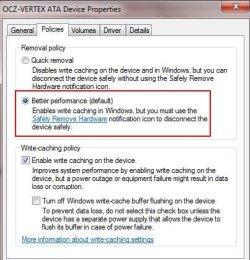
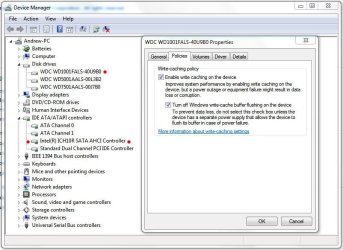
I believe the hotplugging is a feature of the AHCI driver.

Check in the Device Manager under Disk Drives -> Right Click Drive and choose Properties and look under the Policies tab.

"You should also see each drive with these options in the Devices & Printers section as well.
Attached Thumbnails
Internal SATA drives are treated as removable drives-capture.jpg  
My System SpecsSystem Spec
10-12-2010   #10


Windows 7 x64 pro/ Windows 7 x86 Pro/ XP SP3 x86


Even with the Safely remove icon, windows wouldnt let you eject the system drive. If it bothers you guys, try the Icon Remover, that'll hide the icon in the tray.

IconRemover - freeware tool for complete removal of 'Safely Remove Hardware' Icon
My System SpecsSystem Spec
Reply

 Internal SATA drives are treated as removable drives problems?


Thread Tools


Similar Threads for: Internal SATA drives are treated as removable drives
Thread Forum
Solved Phantom removable drives Hardware & Devices
Removable drives Hardware & Devices
Disable Scan and Fix for Removable Drives General Discussion
Solved Empty Removable Drives showing grayed out General Discussion
DVD drives not showing as removable devices Hardware & Devices


All times are GMT -5. The time now is 06:20 AM.


Windows 7 Forums is an independent web site and has not been authorized,
sponsored, or otherwise approved by Microsoft Corporation.
"Windows 7" and related materials are trademarks of Microsoft Corp.
© Designer Media Ltd
  

1 2 3 4 5 6 7 8 9 10 11 12 13 14 15 16 17 18 19 20 21 22 23 24 25 26 27 28 29 30