|
Welcome to Windows 7 Forums. Our forum is dedicated to helping you find solutions with any problems, errors or issues you are experiencing with Windows 7. The Windows 7 forum also covers news and updates and has an extensive Windows 7 tutorial section that covers a wide range of tips and tricks.
Windows 7 - Only 3 Gb of usable ram |
10-19-2010
|
#1 | | Windows 7 Home Premium 64-bit |
Only 3 Gb of usable ram I have 4 gb of RAM installed but it says (3.00 GB Usable). Does this mean that last 1 GB stick is useless? I'm on win 7 32-bit.
| My System Specs | | System Manufacturer/Model Number Fujitsu AH530 OS Windows 7 Home Premium 64-bit CPU Intel Core i5 460M 2.53 Ghz Memory 8 GB DDR3 1066 Mhz Graphics Card Intel HD Graphics (Core i5) Screen Resolution 1366 x 768 Hard Drives 500 GB |
10-19-2010
|
#2 | | Xp Pro SP3 x64, Win7 x86 (Ult 7600), Win7 x64 Ult 7600, TechNet RTM on AMD x64 (2.8Ghz) |
Can you give us a screen snip ?
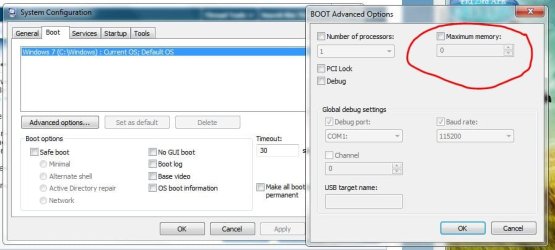
Do you have Max Memory set to Zero (0) ? Memory - Set Maximum Amount Used by Windows 7
Last edited by Brink; 10-20-2010 at 12:04 PM..
Reason: added link
| My System Specs | | System Manufacturer/Model Number Built them myself, Science Experiments ! OS Xp Pro SP3 x64, Win7 x86 (Ult 7600), Win7 x64 Ult 7600, TechNet RTM on AMD x64 (2.8Ghz) CPU AMD-64 3000mhz, AMD-32 2400mhz, AMD-64 3200mhz, AMDx64 2.8G Motherboard SIS 755, ECS-K8M890M-M (Ult 7600), & others Memory 2gb, 4gb on the Ult 7600, 4gb on Technet RTM Graphics Card Draw my own Graphics, several nVidia cards Sound Card on motherboard Monitor(s) Displays 19" flat scr, 19" Acer widescr, 22" Emprex Widescr, 23" Acer Screen Resolution 1280 x 1024, 1440 x 900, 1920 x 1080 Keyboard Compaq & Dell recycled from GoodWill Mouse Made in China Optical Wired Mouse PSU 430w, 550w, 600w, etc Case All Generic Full Towers Cooling Open Air & a few fans Hard Drives 6 pata Ide HD's & 2 Sata HD's
added 80gb external on Ult 7600 computer,
several extra 1tb & 2TB SATA HD's Internet Speed Fast Cable InterNet Other Info Linksys Routers, switches, & Hubs
Too Many USB Flash Drives to count, Biggest is 64GB !
Eight computers in my home network.
Twelve computers at my business network.
Linked via TeamViewer !
Lots of old used spare computer parts everywhere! |
10-19-2010
|
#3 | | Win7 Ultimate SP1 x64 / Windows 8 CP / Android |

Quote: Originally Posted by thomas1028 I have 4 gb of RAM installed but it says (3.00 GB Usable). Does this mean that last 1 GB stick is useless? I'm on win 7 32-bit. 32-bit systems will only use up to 3.0-3.25GB of RAM
You SHOULD use a 64-bit version of Windows7 to use all your RAM | My System Specs | | System Manufacturer/Model Number Custom Build OS Win7 Ultimate SP1 x64 / Windows 8 CP / Android CPU Intel Core 2 Quad Q8200 OC'd 3.08GHz Motherboard Asus Rampage formula LGA775 Memory 8GB DDR2 900Mhz Graphics Card Zotac GTX 460OC 2GB GDDR5/Asus EN9600GT 1GB DDR3 PhyX Sound Card Supreme FX2 Monitor(s) Displays AOC 22' Screen Resolution 1680x1050 Keyboard Prolink keyboard Mouse Prolink optical mouse PSU Cooler Master GX 650W Cooling Cooler Master V6 + 3X fans Hard Drives 3X500GB hitachi, 2TB internal, 500GB Seagate FreeAgent, 640GB Samsung Internet Speed 1MiB/s Other Info 5.1 System + 2.1 System |
10-20-2010
|
#4 | | Windows 7 Home Premium 64-bit |
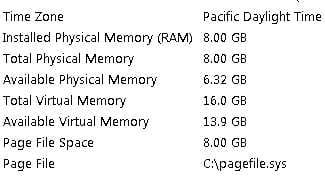
DocBrown, yes I have it set to zero and it is unchecked just like in the pic u posted. Right next to where it says installed memory it says "4.00 GB (3.00 GB usable) in the system info. The main question I am trying to ask here is are the last 1 GB of ram that I installed going to be useless, meaning it wont speed up my comp and its just dead weight? If it is then I might as well return it to the store. | My System Specs | | System Manufacturer/Model Number Fujitsu AH530 OS Windows 7 Home Premium 64-bit CPU Intel Core i5 460M 2.53 Ghz Memory 8 GB DDR3 1066 Mhz Graphics Card Intel HD Graphics (Core i5) Screen Resolution 1366 x 768 Hard Drives 500 GB |
10-20-2010
|
#5 | | Windows 7 Ultimate x64 SP1 |
Hello Thomas,
Do you have a integrated graphics chip on your motherboard? Laptops/notebooks do, and sometimes a desktop will.
If so, then in the BIOS settings you may have that 1GB of RAM set to be dedicated to it. Unless you have installed a separate graphics card to use instead, then this setting should not be changed.
Hope this helps,
Shawn | My System Specs | | System Manufacturer/Model Number Self built custom OS Windows 7 Ultimate x64 SP1 CPU Intel i7-980X 3.3 Ghz (3.48 Ghz OC'd) Motherboard ASUS P6X58D Premium Memory 12 GB (2GBx6) DDR3 PC3-16000 2000 MHz Kingston HyperX Graphics Card Sapphire HD5870 Eyefinity 6 2GB Sound Card Realtek HD Audio ALC889 Integrated Chip Monitor(s) Displays 3x 27" Asus VE278Q Screen Resolution 1920x1080 Keyboard Logitech Cordless Desktop MX 5500 Revolution Mouse Logitech Cordless Desktop MX 5500 Revolution PSU OCZ Series Gold OCZZ1000M 1000W Case Corsair Obsidian 800D Cooling Thermalright Ultra 120 Extreme Copper CPU heat sink w/120 MM Hard Drives 160GB OCZ RevoDrive X2
** 2 x 1TB Samsung HDD HD154UI SATA Internet Speed 50 Mb/s Download and 2 Mb/s Upload Other Info Microsoft LifeCam Cinema
** Lite-On iHBS212 12x BD Writer
** Samsung CLX-3175FW Printer
** Netgear WNDR3800 Router
** Motorola SBG6580 Cable Modem
** 2x APC Back-UPS XS 1500 |
10-20-2010
|
#6 | | |

Quote: Originally Posted by yowanvista 
Quote: Originally Posted by thomas1028 I have 4 gb of RAM installed but it says (3.00 GB Usable). Does this mean that last 1 GB stick is useless? I'm on win 7 32-bit. 32-bit systems will only use up to 3.0-3.25GB of RAM
You SHOULD use a 64-bit version of Windows7 to use all your RAM That might not even get you all of your RAM. The MB BIOS and chipset need to support at least 8GB of RAM and they must also support the memory remapping feature (the follwoing link to the MS KB article): The system memory that is reported in the System Information dialog box in Windows Vista is less than you expect if 4 GB of RAM is installed
Without the memory remap and support for 8GB, even though your graphics card has its own memory, it will use part of that 4GB of 32 bit address space as a map into your video memory, and makes it unavailable to you (hard to swallow but that is the way it is). I believe the memory remapping lets the 64 bit OS map the video memory above the 4GB of your physical memory, giving you full use of the 4GB. This applies only for 64 bit Windows 7, there is nothing you can do about it in 32 bit Windows 7.
- Gene | My System Specs | | System Manufacturer/Model Number Home built (GeneO industries)/Model 2 OS Windows 7 64 bit SP1 CPU i5 2500k @ 4.5 GHz, 1.256V 120 GFlop (with AVX) Motherboard ASUS P8Z68-V PRO/GEN3 Memory 16GB (4GBx4) 1600MHz G.skill Ripjaws X 8-8-8-24 Graphics Card Asus Nvidia ENGTS450, 1GB 4030 MHz DDR5 clock, 915 Mhz GPU Sound Card Onboard Realtek HD Monitor(s) Displays NEC Spectraview 2490WUXi-SV Screen Resolution 1920 x 1200 Keyboard HP Wireless Mouse HP wireless PSU Antec TruePower New 650W Case Fractal Design "Define R3" Cooling CM Hyper 212+ push/pull, 5 120mm, 1 140mm case fans Hard Drives Crucial 128GB M4 (system), 2x WD Caviar 1TB Black internal (data), 1x Seagate 750G Barracuda Internal (backups), 1x WD Blue 6Gb/s 320GB Internal, 1x Corsair F40 SSD for cache, 1x 2TB eSata WD20EARS Green, 2x 500GB Seagate external USB, 1x 350GB exte Internet Speed 25.7 Mb/s down, 4.5 Mb/s up Other Info USB 3.0 x4 , SATA III x4, eSATA x3, SATA II x4, USB 2.0 x8. 2 Samsung DVD R/W drives.
WEI: CPU 7.7, Memory 7.9, Graphics 7.4, Disk 7.9 |
10-20-2010
|
#7 | | Windows 7 Home Premium 64 Bit |
It depends on the Operating system as well as the Hardware. A 64 bit system can use up to 12 - 16 gigs I believe. To get this full advantage, you need to have hardware that can also handle this large amount of memory, if it cannot, then you just get the 3 gigs you can use, and the other 1 gig sits there not being used. | My System Specs | | System Manufacturer/Model Number HP OS Windows 7 Home Premium 64 Bit CPU AMD Memory 4 Gig Graphics Card ATI Sound Card Beats Audio Monitor(s) Displays 17 inch Screen Resolution 1440 x 900 Cooling Air |
10-20-2010
|
#8 | | Vista and Windows7, sometimes Ubuntu and Fedora |
| My System Specs | | System Manufacturer/Model Number HP, Dell, Gateway - 2 laptops and 2 desktops OS Vista and Windows7, sometimes Ubuntu and Fedora CPU from 1.6GHz Duo to 2.5GHz Quad Monitor(s) Displays 2x HP w2207 Keyboard with trackball - no mices Mouse terrible devices, who wants them Hard Drives 5x HDD, 2x SSD, 6x Externals Internet Speed DSL 6000 |
10-20-2010
|
#9 | | Windows 7 Home Premium 64bit sp1 |
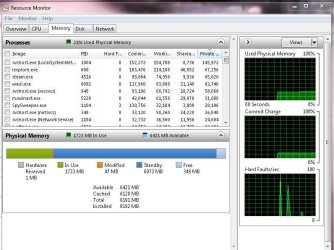
This is a ongoing topic even if you use 64bit style os you still have atleast some memory on standby if you use more then 4 gigs then it still will leave you about a 1.50 gigs short of all you're ram
I guess the possability of all 4 gigs being used going to 64 bit but yet again when you run 64 bit and only have 4 gigs it will max to about 3.85 gig usage and still hold back 20% of one gig it is using that memeory in case you need a little boost
I hope what i am saying to you all makes sense I am useing 8 gigs of ram and usable is only 6.75 so i am missing 1.25 gigs which is allocated in standby waiting for the day i have a program that needs it
Other then that no real performance bump will be gained even thought you would have access to all 4 gigs just look at it like you're saving cash for a rainy day cause that is what windows is doing for you even though you don't want it too | My System Specs | | System Manufacturer/Model Number Built by me Bulldozer series Generation FX OS Windows 7 Home Premium 64bit sp1 CPU BullDozer 8120-30p Oc'ed BE 4.5Ghz 1.44 V-core Motherboard MSI 990FXA-GD80 Memory 8 Gigs of Corsair Vengeance Ram 1600mhz-Oc'ed 1760 Mhz Graphics Card Radeon Diamond Hd 6870 1gb Msi Twin frozer Hd6870 1gb X-fire Sound Card THX tru souround sound audio Monitor(s) Displays 22" envision 1050dp hdmi 37in vizio hdmi dual monitors Screen Resolution 1680x1050 22"- 1920x1080 37" Keyboard Logitech wireless keyboard Mouse Logitech wireless mouse PSU AX850w Corsair Gold 80plus certified crosfire/sli Case 2-CoolerMaster Elite 371 Yes same case for 2 different Pc's Cooling Antec 620 Water cooling system and 4 120 mm LED fans Hard Drives Corsair 80 Gb SSD Seagate baracuda 500 Gb WD Mybook 500Gb Internet Speed Cable 20+ mb Other Info I have 2 systems Bulldozer AM3+ 8120-30P Oc'ed 4.5Ghz AM2+ 925 deneb 2.8 to 3.2 Ghz Both stable Both Gaming Rigs Diamond/MSI HD 6870 1Gb X-fire and Diamond HD5770 1Gb Also Hp Notebook 1.65 ghz Dual core amd E-450 8gb Patriot Ram DDR3 Discrete Gpu Hd6320 dedicated ram 1973 mb 15.5 screen |
10-20-2010
|
#10 | | |

Quote: Originally Posted by Solarstarshines This is a ongoing topic even if you use 64bit style os you still have atleast some memory on standby if you use more then 4 gigs then it still will leave you about a 1.50 gigs short of all you're ram
I guess the possability of all 4 gigs being used going to 64 bit but yet again when you run 64 bit and only have 4 gigs it will max to about 3.85 gig usage and still hold back 20% of one gig it is using that memeory in case you need a little boost
I hope what i am saying to you all makes sense I am using 8 gigs of ram and usable is only 6.75 so i am missing 1.25 gigs which is allocated in standby waiting for the day i have a program that needs it
Other then that no real performance bump will be gained even thought you would have access to all 4 gigs just look at it like you're saving cash for a rainy day cause that is what windows is doing for you even though you don't want it too  Well I never heard of "reserved space for a boost", where did that come from? What is probably happening with your 8GB being only having a usable 6.75 GB is that your chipset only supports 8GB of addressing, so the upper part o that 8GB is used to map your video RAM to the kernel address space as well as other hardware whose memory must be mapped into kernel space, and hence that range of addresses is not usable. For instance, the Intel 975X chipset only supports up to 8GB, so your graphics card and other memory mapped devices will have to use up some of that 8GB of address space.
Rule of thumb (for 64 bit OS) is, I believe, that maximum the usable memory = the maximum memory supported by your chipset minus the video ram size. Plus the BIOS must support remapping under certain circumstances). The most a 32 bit OS will support = 4GB - video ram size.
Her are some examples (assuming 64 bit windows)
1. Your chipset supports 8GB and your BIOS remapping. You can get upt to 8GB minus video ram usable memory
2. your chipset supports 4GB of ram: you will get a max usable memory of 4GB minus video ram size
Read the link to the Microsoft KB article I posted above and search for Microsoft windows memory management to understand how this works.
- Gene | My System Specs | | System Manufacturer/Model Number Home built (GeneO industries)/Model 2 OS Windows 7 64 bit SP1 CPU i5 2500k @ 4.5 GHz, 1.256V 120 GFlop (with AVX) Motherboard ASUS P8Z68-V PRO/GEN3 Memory 16GB (4GBx4) 1600MHz G.skill Ripjaws X 8-8-8-24 Graphics Card Asus Nvidia ENGTS450, 1GB 4030 MHz DDR5 clock, 915 Mhz GPU Sound Card Onboard Realtek HD Monitor(s) Displays NEC Spectraview 2490WUXi-SV Screen Resolution 1920 x 1200 Keyboard HP Wireless Mouse HP wireless PSU Antec TruePower New 650W Case Fractal Design "Define R3" Cooling CM Hyper 212+ push/pull, 5 120mm, 1 140mm case fans Hard Drives Crucial 128GB M4 (system), 2x WD Caviar 1TB Black internal (data), 1x Seagate 750G Barracuda Internal (backups), 1x WD Blue 6Gb/s 320GB Internal, 1x Corsair F40 SSD for cache, 1x 2TB eSata WD20EARS Green, 2x 500GB Seagate external USB, 1x 350GB exte Internet Speed 25.7 Mb/s down, 4.5 Mb/s up Other Info USB 3.0 x4 , SATA III x4, eSATA x3, SATA II x4, USB 2.0 x8. 2 Samsung DVD R/W drives.
WEI: CPU 7.7, Memory 7.9, Graphics 7.4, Disk 7.9 Only 3 Gb of usable ram problems? All times are GMT -5. The time now is 06:21 AM. |  |