| Windows 7: Need Help for Adding New HDD |
28 Oct 2010
|
#1 | | Windows 7 Home Premium 32-Bit - Build 7600 SP1 Houston, Texas |
Need Help for Adding New HDD I currently have one 160 GB C:\ drive that both my Win 7, Programs and Docs are on. I want to add a 500 GB drive, make 50 GB of it my C:\ for the OS -- 225 GB of it my D:\ for Programs -- 225 GB my E:\ for Docs. I would then make the 160 GB drive a 30 GB F:\ for OS backup and 130 GB G:\ for Doc backup. Since the backups are compressed, I assume the numbers would work for the foreseeable future. == I have a few questions on this. == First, do the partition numbers sound right? -- Second, What do I have to do to change the drive letters to make the new 500 GB my C:, D: and E:? I am not backing up my Program files, because if there were a problem in the future, they would have to be reinstalled anyway, is that correct?
== One final question. This is the HD I have my eye on. WD Caviar Blue SE16 3.5in 500GB SATA 3.0Gb/s Hard Drive WD5000AAKS Western Digital Hard Disk Drive HDD HD 7200 RPM 16MB Cache-Best Computer Online Store Houston Buy Discount Prices Texas-Directron.com I am not sure what SATA means except that it has a different type wire than IDE. This would fit OK with my motherboard, correct? Thanks for all of your help. | My System Specs |
| System Manufacturer/Model Number Custom Build OS Windows 7 Home Premium 32-Bit - Build 7600 SP1 CPU Intel Core i3-2120 3.30Ghz Motherboard Asus P8Z68-V LX Intel Z68 Socket H2 ATX Memory Kingston 4 GB DDR3 1333 mhz Graphics Card Zotac GeForce 9400 GT 512MB Sound Card Sound Blaster Audigy SE 24-Bit Monitor(s) Displays Samsung Sync Master 940 = 19 inch Screen Resolution 1440 X 900 Keyboard Microsoft Natural 4000 Mouse Microsoft Custom Optical 3000 PSU 500 watt Case NZXT Apollo - Silver with Clear Side Panel Cooling Three 120 mm Fans Hard Drives OCZ Vertex 3 120 GB Sata 3 SSD ==
Western Digital 160 GB Caviar Blue 7200 RPM ==
Western Digital 500 GB Caviar Green 7200 RPM == Internet Speed AT&T Fiber Optic Wireless Network Other Info 120 mm Blue LED Fan -- Three Blue LED Lazer Light Sticks |
28 Oct 2010
|
#2 | | Operating System : Windows 7 Home Premium Edition 6.01.7600 SP1 (x64) MILTON KEYNES |

Quote: Originally Posted by bigmck I currently have one 160 GB C:\ drive that both my Win 7, Programs and Docs are on. I want to add a 500 GB drive, make 50 GB of it my C:\ for the OS -- 225 GB of it my D:\ for Programs -- 225 GB my E:\ for Docs. I would then make the 160 GB drive a 30 GB F:\ for OS backup and 130 GB G:\ for Doc backup. Since the backups are compressed, I assume the numbers would work for the foreseeable future. == I have a few questions on this. == First, do the partition numbers sound right? -- Second, What do I have to do to change the drive letters to make the new 500 GB my C:, D: and E:? I am not backing up my Program files, because if there were a problem in the future, they would have to be reinstalled anyway, is that correct?
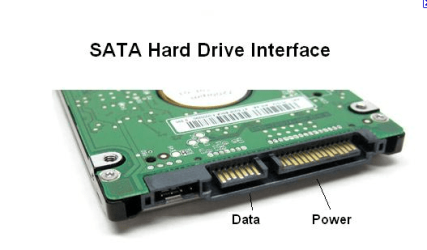
== One final question. This is the HD I have my eye on. WD Caviar Blue SE16 3.5in 500GB SATA 3.0Gb/s Hard Drive WD5000AAKS Western Digital Hard Disk Drive HDD HD 7200 RPM 16MB Cache-Best Computer Online Store Houston Buy Discount Prices Texas-Directron.com I am not sure what SATA means except that it has a different type wire than IDE. This would fit OK with my motherboard, correct? Thanks for all of your help. What is SATA or Serial ATA? | My System Specs | | System Manufacturer/Model Number packard bell IXTREME M5722 OS Operating System : Windows 7 Home Premium Edition 6.01.7600 SP1 (x64) CPU Processor : Intel Core 2 Quad Q8300 @ 2500 MHz Motherboard Mainboard : Packard Bell (Acer EG43M ) Memory Physical Memory :8GB Corsair4x 2GB 800MHz C5 DDR2 Graphics Card Video Card : XFX 6700 AMD Monitor(s) Displays Maestro 234DL - BenQ V2220 - BenQ VW2420H Screen Resolution Current Display :1920x1080p pixels at 60 Hz in HD LED Keyboard Gigabyte Aivia K8100 Mouse TRUST-Wireless Laser Mouse - Carbon edition MI-7770C PSU XFX ProSeries 550W PSU Case PACKARD BELL IXTREME Cooling System Blower Current: 150mA Air Flow16CFM ;Akasa 90mm rear Hard Drives Hard Disks : WDC (1000 GB)
Drive C: (Hard Disk) : 428 GB available on 491 GB
Drive D: (Hard Disk) : 426 GB available on 492 GB
SAMSUNG spinpoint HD103SJ 1000.2 GB
(X 2) KINGSTON SSD NOW V 30GB Internet Speed TP-LINK > TL-WN951N / AV500 Gigabit Powerline Adapters Other Info EXTRA COOLING>(FAN CONTROLLER) PC Bay Cooler 3 x 40mm fans; Akasa AK-HD-BL Blue hard drive cooler 2 x 40 mm fan 4500 rpm 29.7 dBA
Bios> American Megatrends Inc.
Version : P01-A1
Date : 08/31/2009 |
28 Oct 2010
|
#3 | | |
Don't forget, you are going to lose some space for things such as the system reserved space for the boot files(100mb) | My System Specs | | |
28 Oct 2010
|
#4 | | Windows7 Pro 64bit SP-1; Windows XP Pro 32bit Grafton,IL |
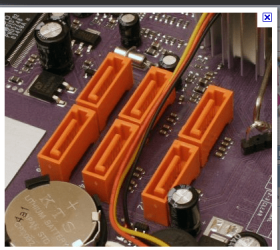
Here is your mother board.
Yes it has two SATA-2 3.0Gbs ports on the mother board for the hard drive you listed in post #1 to plug into.
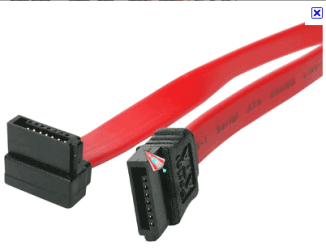
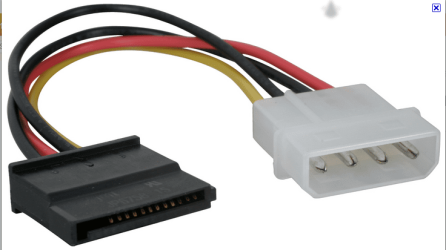
You will need a power cable and a data cable like Brianzion posted.
They are not included with the hard drive. ECS Web Site
Data cable. | My System Specs | | System Manufacturer/Model Number Hopalong/ Godzilla OS Windows7 Pro 64bit SP-1; Windows XP Pro 32bit CPU Intel Core i7-870 Lynnfield 2.93GHz LGA 1156 95W Quad-Core Motherboard ASUS P7P55D-E PRO Memory 8GB@1400MHz Crucial Ballistix DDR3-1600 4x2GB Graphics Card ASUS ENGTX460 DirectCU/2DI/1GD5 1GB 256-bit GDDR5 Sound Card VIA Onboard Monitor(s) Displays Asus VS248H-P 24"; Samsung SyncMaster 941BW 19"ws Screen Resolution 1920x1080; 1440x900 Keyboard Logitech K-320 Mouse Kensington PSU COOLER MASTER Silent Pro RS850-AMBAJ3-US 850W Modular Case COOLER MASTER HAF 932 RC-932-KKN5-GP Black Cooling Scythe "Mugen-2 Rev.B" (2 ScytheKaze-Jyuni PWM fans) Hard Drives Samsung 830 120GB SSD
Intel 320 120GB SSD
Western Digital Caviar Black WD7501AALS 750GB 7200 RPM SATA 3.0Gb/s
Western Digital Caviar Black WD6401AALS 640GB 7200 RPM SATA 3.0Gb/s Antivirus Avast Inernet Suite Browser IE 9 ; Chrome |
28 Oct 2010
|
#5 | | Windows 7 Ultimate 64 Southern California |
bigmck,
Go with at least 32mb cache. Western Digital WD5001AALS Caviar Black Hard Drive - 500GB, 7200 rpm, 32MB, SATA-3G at TigerDirect
and if your upgrading how about score a 1tb drive? Western Digital WD1002FAEX Caviar Black Hard Drive - 1TB, 7200RPM, 64MB, SATA 6Gbs at TigerDirect
Now my personal preference. Hitachi OS00163 Deskstar IDK7K Internal Hard Drive - 1TB, 7200RPM, 32MB, SATA-3G 0S00163 at TigerDirect
Good luck ! | My System Specs | | System Manufacturer/Model Number A blend of brains, brawn and dumb luck, ask me about rig #2 ! OS Windows 7 Ultimate 64 CPU i7 3770k OC'd 4.6 @ 1.17v, still love my FX 8120 Motherboard MSI P67A-GD80 b3 Memory 16 gb Crucial Ballistix Tracer DDR3 9-9-9-27 @ 2000 Graphics Card XFX Radeon 7870 Sound Card On board HD audio with lossless 24 bit/192 sample rate Monitor(s) Displays (2) LG LED 23" 1920 x 1080 2ms Monitors via mini d-port Screen Resolution 1680 X 1050 p Keyboard (2) Logitech Illuminated Keyboards (1) usb (1) wireless K800 Mouse Logitech G9x & T-BC21 - nano nx for the laptop PSU Ultra X4 modular 1050 watt 80% silver rating & APC 1200 RS Case CoolerMaster Storm Styker Cooling 6 case fans 140mm & 120mm, Thermaltake h2o extreme Hard Drives Samsung 256 gb 830 SSD sata III
(2) 1 tb Hitachi deskmates/sata II
(1) 1 tb WD green/sata II
(2) 2 tb WD My Book/esata
(1) 500 gb Sea. Freeagent/esata
(2) 250 gb Sea. Freeagent go's/usb
(1) WD 2 tb Green 64 sata III
(1) 120 gb OCZ Vertex SS Internet Speed Upgraded from bottom of the barrel to bareable Other Info 4 Noctua case fans + 3 Noctua in p/p on H100 cooler
Integrated hot swap drive bays for 2.5" Drives
(2) Lite-on dvd/cd optical 22X
Integrated fan controller and led on/off
HP Officejet Pro L7680 all-n-one
HP 4 laserjet (the beast)
Hot swappable 3.5" hard drive bay
Belkin Play N600 HD router
Asus USB 3 & sata 6 PCIe card
Vantec IDE to sata adptr./Ultra sata adptr
HP Probook i3 laptop |
28 Oct 2010
|
#6 | | Operating System : Windows 7 Home Premium Edition 6.01.7600 SP1 (x64) MILTON KEYNES |
| My System Specs | | System Manufacturer/Model Number packard bell IXTREME M5722 OS Operating System : Windows 7 Home Premium Edition 6.01.7600 SP1 (x64) CPU Processor : Intel Core 2 Quad Q8300 @ 2500 MHz Motherboard Mainboard : Packard Bell (Acer EG43M ) Memory Physical Memory :8GB Corsair4x 2GB 800MHz C5 DDR2 Graphics Card Video Card : XFX 6700 AMD Monitor(s) Displays Maestro 234DL - BenQ V2220 - BenQ VW2420H Screen Resolution Current Display :1920x1080p pixels at 60 Hz in HD LED Keyboard Gigabyte Aivia K8100 Mouse TRUST-Wireless Laser Mouse - Carbon edition MI-7770C PSU XFX ProSeries 550W PSU Case PACKARD BELL IXTREME Cooling System Blower Current: 150mA Air Flow16CFM ;Akasa 90mm rear Hard Drives Hard Disks : WDC (1000 GB)
Drive C: (Hard Disk) : 428 GB available on 491 GB
Drive D: (Hard Disk) : 426 GB available on 492 GB
SAMSUNG spinpoint HD103SJ 1000.2 GB
(X 2) KINGSTON SSD NOW V 30GB Internet Speed TP-LINK > TL-WN951N / AV500 Gigabit Powerline Adapters Other Info EXTRA COOLING>(FAN CONTROLLER) PC Bay Cooler 3 x 40mm fans; Akasa AK-HD-BL Blue hard drive cooler 2 x 40 mm fan 4500 rpm 29.7 dBA
Bios> American Megatrends Inc.
Version : P01-A1
Date : 08/31/2009 |
28 Oct 2010
|
#7 | | Windows 7 Home Premium 64bit sp1 Laguna Hills Southern California |
I myself personaly have 6 sata ports which im thinking of taking use of i mean why not ?
i have three open ports left why not make them all hard drives that would be very insane and i have the slots for atleast 2 more hard drives possibly add a third drive like a blueray but from what i seen before windows only reconizes 2 rom drives the hard drives might be different can someone give me a answer cause i tested it out through ide and it didnt work i have three roms installed right now 2 lg dvd burners and a nec dvd player and cd burner 1 rom sata the other two ide also the second ide rom is unplugged just to let you know
it won't let the system boot when it is plugged | My System Specs | | Computer type PC/Desktop System Manufacturer/Model Number Built by me FX - Series Scorpious OS Windows 7 Home Premium 64bit sp1 CPU Vishera FX 8350 Oc' 4.812Ghz 1.488 V-core full load 50c Motherboard Asus Sabertooth 990fx rev 2.0 Memory 16gb Corsair Vengeance ram 1600mhz Oc'ed to 1750mhz Graphics Card VisionTek HD7970 Ghz.ed Bios Crossfire 1150/1560 power 10% Sound Card AC97 Monitor(s) Displays 27" ViewSonic 1920/1080dp hdmi 37in vizio hdmi dual monitors Screen Resolution 1920x1080 27"- 1920x1080 37" Keyboard Logitech wireless keyboard Mouse Logitech wireless mouse PSU HX1050w Corsair Silver 80plus certified crosfire/sli Case Thermaltake Element V Cooling Antec 620 Water cooling system and 4 120 mm LED fans Hard Drives Ocz Agility 120Gb SSD Seagate baracuda 500 Gb WD Mybook 500Gb Internet Speed Cable 25+ mb Antivirus WebRoot Spysweeper with Antivirus Browser IE-9, Chrome, Opera Other Info I have 2 systems FX AM3+ 8350-K15 Oc'ed 4.812Ghz AM2+ 965 BE Stock 3.4 Ghz Both stable Both Gaming Rigs Also Hp Notebook 1.65 ghz Dual core amd E-450 8gb Patriot Ram DDR3 Discrete Gpu Hd6320 dedicated ram 1973 mb 15.5 screen |
28 Oct 2010
|
#8 | | Windows 7 Ultimate 64 bit NC |
Personally I would go with a SSD for the OS only and then use your old drive for backups. Then get a 500 GB drive for storage (programs, document, etc. etc.). | My System Specs | | System Manufacturer/Model Number Custom built OS Windows 7 Ultimate 64 bit CPU AMD Phenom II X4 965 Black Edition Motherboard Gigabyte GA-MA790X-DS4 Memory GSkill 4 X 2 GB PC 8500 Graphics Card XFX Radeon HD 6790 D Sound Card On board RealTek HD Monitor(s) Displays Dual monitors:Samsung SyncMaster S20B300 Screen Resolution 1600 X 900 Keyboard Logitech G510 Mouse Razor DeathAdder PSU Ultra X4 750 watt fully modular Case Thermaltake Overseer RX 1 full tower Cooling Core-Contact 92 mm CPU Cooler Hard Drives Seagate Barracuda 1TB (primary)
Seagate Barracuda 2 X 320 GB Internet Speed 50/5 Mbps UL/DL Other Info Optical: Super Muliti DVD burner w/lightscribe, Hauppauge WinTV HVR-1800 |
28 Oct 2010
|
#9 | | Windows 7 Ultimate 64 Southern California |
I second the SSD but it is a much bigger purchase price. From a performance standpoint no contest but do go Sata III and used a PCIe sata III adapter such as ! ASUS U3S6 PCI Express Expansion Card - 2x USB 3.0, 2x SATA-6G at TigerDirect.com
You get two Sata III internal and two USB 3 external, works great ! | My System Specs | | System Manufacturer/Model Number A blend of brains, brawn and dumb luck, ask me about rig #2 ! OS Windows 7 Ultimate 64 CPU i7 3770k OC'd 4.6 @ 1.17v, still love my FX 8120 Motherboard MSI P67A-GD80 b3 Memory 16 gb Crucial Ballistix Tracer DDR3 9-9-9-27 @ 2000 Graphics Card XFX Radeon 7870 Sound Card On board HD audio with lossless 24 bit/192 sample rate Monitor(s) Displays (2) LG LED 23" 1920 x 1080 2ms Monitors via mini d-port Screen Resolution 1680 X 1050 p Keyboard (2) Logitech Illuminated Keyboards (1) usb (1) wireless K800 Mouse Logitech G9x & T-BC21 - nano nx for the laptop PSU Ultra X4 modular 1050 watt 80% silver rating & APC 1200 RS Case CoolerMaster Storm Styker Cooling 6 case fans 140mm & 120mm, Thermaltake h2o extreme Hard Drives Samsung 256 gb 830 SSD sata III
(2) 1 tb Hitachi deskmates/sata II
(1) 1 tb WD green/sata II
(2) 2 tb WD My Book/esata
(1) 500 gb Sea. Freeagent/esata
(2) 250 gb Sea. Freeagent go's/usb
(1) WD 2 tb Green 64 sata III
(1) 120 gb OCZ Vertex SS Internet Speed Upgraded from bottom of the barrel to bareable Other Info 4 Noctua case fans + 3 Noctua in p/p on H100 cooler
Integrated hot swap drive bays for 2.5" Drives
(2) Lite-on dvd/cd optical 22X
Integrated fan controller and led on/off
HP Officejet Pro L7680 all-n-one
HP 4 laserjet (the beast)
Hot swappable 3.5" hard drive bay
Belkin Play N600 HD router
Asus USB 3 & sata 6 PCIe card
Vantec IDE to sata adptr./Ultra sata adptr
HP Probook i3 laptop |
28 Oct 2010
|
#10 | | Windows 7x64 Home Premium SP1 x 2 Australia |
If your heart's set on 500GB ok.
But why not just get 1TB (eg. Caviar Black or Seagate Barracuda). What are they US$100 or less. "...I am not backing up my Program files, because if there were a problem in the future, they would have to be reinstalled anyway, is that correct? "
NO! Unless I'm missing something. Keep a couple of system images. When disaster strikes restore and everything's back OS, your programs - the works within say 20 minutes. (a little longer if you need to stick in a new HDD). | My System Specs | | System Manufacturer/Model Number Own build (+ Recased Acer Aspire x1800) OS Windows 7x64 Home Premium SP1 x 2 CPU Intel i7 2600k Motherboard ASUS P8Z68 Deluxe Memory G.Skill Ripjaws (DDR3-1600) 2x4GB Graphics Card Nvidia GeForce GTS 450; Intel HD Graphics 3000(GT2+) Monitor(s) Displays Dell Ultrasharp IPS panel U2311H, Samsung SyncMaster P2350 Screen Resolution 1920x1080 Keyboard Logitech MK520 (wireless) Mouse Logitech MK520 PSU Seasonic M12II 520W Case Lian Li Lancool PC-K60 Cooling Case: 1x120mm, 3x140mm CPU: Hyper 212+ Hard Drives Crucial M4 128GB (000F), Seagates 1TB Barracuda ST31000528AS + Internet Speed 6-7 Mbps Antivirus Norton NIS, Malwarebytes on 2 (MSE on 3rd PC) Browser FireFox Other Info Audio: Logitech Z523 2.1 Need Help for Adding New HDD problems? All times are GMT -5. The time now is 05:30 AM. | |