When i started a SMART Scan i got the error...
See the end of this message for details on invoking
just-in-time (JIT) debugging instead of this dialog box.
************** Exception Text **************
System.InvalidCastException: Unable to cast object of type 'System.Windows.Forms.Label' to type 'System.Windows.Forms.ProgressBar'.
at SeaToolsforWindows.frmSTXMain.updateRowProgress(Int32 row, Int32 progress)
at SeaToolsforWindows.frmSTXMain.Timer_Tick(Object sender, EventArgs e)
at System.Windows.Forms.Timer.OnTick(EventArgs e)
at System.Windows.Forms.Timer.TimerNativeWindow.WndProc(Message& m)
at System.Windows.Forms.NativeWindow.Callback(IntPtr hWnd, Int32 msg, IntPtr wparam, IntPtr lparam)
************** Loaded Assemblies **************
mscorlib
Assembly Version: 2.0.0.0
Win32 Version: 2.0.50727.4952 (win7RTMGDR.050727-4900)
CodeBase: file:///C:/Windows/Microsoft.NET/Framework/v2.0.50727/mscorlib.dll
----------------------------------------
SeaToolsforWindows
Assembly Version: 1.2.0.4
Win32 Version: 1.2.0.4
CodeBase: file:///C:/Program%20Files%20(x86)/Seagate/SeaTools%20for%20Windows/SeaToolsforWindows.exe
----------------------------------------
Microsoft.VisualBasic
Assembly Version: 8.0.0.0
Win32 Version: 8.0.50727.4927 (NetFXspW7.050727-4900)
CodeBase: file:///C:/Windows/assembly/GAC_MSIL/Microsoft.VisualBasic/8.0.0.0__b03f5f7f11d50a3a/Microsoft.VisualBasic.dll
----------------------------------------
System
Assembly Version: 2.0.0.0
Win32 Version: 2.0.50727.4927 (NetFXspW7.050727-4900)
CodeBase: file:///C:/Windows/assembly/GAC_MSIL/System/2.0.0.0__b77a5c561934e089/System.dll
----------------------------------------
System.Windows.Forms
Assembly Version: 2.0.0.0
Win32 Version: 2.0.50727.4927 (NetFXspW7.050727-4900)
CodeBase: file:///C:/Windows/assembly/GAC_MSIL/System.Windows.Forms/2.0.0.0__b77a5c561934e089/System.Windows.Forms.dll
----------------------------------------
System.Drawing
Assembly Version: 2.0.0.0
Win32 Version: 2.0.50727.4927 (NetFXspW7.050727-4900)
CodeBase: file:///C:/Windows/assembly/GAC_MSIL/System.Drawing/2.0.0.0__b03f5f7f11d50a3a/System.Drawing.dll
----------------------------------------
System.Runtime.Remoting
Assembly Version: 2.0.0.0
Win32 Version: 2.0.50727.4927 (NetFXspW7.050727-4900)
CodeBase: file:///C:/Windows/assembly/GAC_MSIL/System.Runtime.Remoting/2.0.0.0__b77a5c561934e089/System.Runtime.Remoting.dll
----------------------------------------
System.Xml
Assembly Version: 2.0.0.0
Win32 Version: 2.0.50727.4927 (NetFXspW7.050727-4900)
CodeBase: file:///C:/Windows/assembly/GAC_MSIL/System.Xml/2.0.0.0__b77a5c561934e089/System.Xml.dll
----------------------------------------
SpawnCLR
Assembly Version: 1.0.3895.18174
Win32 Version:
CodeBase: file:///C:/Program%20Files%20(x86)/Seagate/SeaTools%20for%20Windows/SpawnCLR.DLL
----------------------------------------
msvcm80
Assembly Version: 8.0.50727.4927
Win32 Version: 8.00.50727.4927
CodeBase: file:///C:/Windows/WinSxS/x86_microsoft.vc80.crt_1fc8b3b9a1e18e3b_8.0.50727.4927_none_d08a205e442db5b5/msvcm80.dll
----------------------------------------
System.Management
Assembly Version: 2.0.0.0
Win32 Version: 2.0.50727.4927 (NetFXspW7.050727-4900)
CodeBase: file:///C:/Windows/assembly/GAC_MSIL/System.Management/2.0.0.0__b03f5f7f11d50a3a/System.Management.dll
----------------------------------------
CustomMarshalers
Assembly Version: 2.0.0.0
Win32 Version: 2.0.50727.4927 (NetFXspW7.050727-4900)
CodeBase: file:///C:/Windows/assembly/GAC_32/CustomMarshalers/2.0.0.0__b03f5f7f11d50a3a/CustomMarshalers.dll
----------------------------------------
************** JIT Debugging **************
To enable just-in-time (JIT) debugging, the .config file for this
application or computer (machine.config) must have the
jitDebugging value set in the system.windows.forms section.
The application must also be compiled with debugging
enabled.
For example:
<configuration>
<system.windows.forms jitDebugging="true" />
</configuration>
When JIT debugging is enabled, any unhandled exception
will be sent to the JIT debugger registered on the computer
rather than be handled by this dialog box.


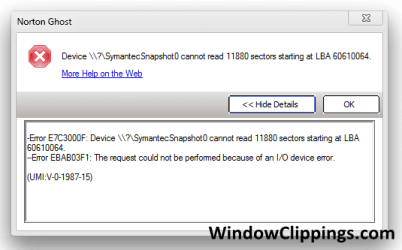


 If it works, you have bad sectors:


