Windows 7 Forums Search
Welcome to Windows 7 Forums. Our forum is dedicated to helping you find solutions with any problems, errors or issues you are experiencing with Windows 7. The Windows 7 forum also covers news and updates and has an extensive Windows 7 tutorial section that covers a wide range of tips and tricks.


Windows 7 - my ram (1600 mhz) is showing as 1066mhz

 
11-18-2010   #1


windows 7 Ultimate 64-bit


my ram (1600 mhz) is showing as 1066mhz

i just finished putting my rig together, and to my surprise my ram is telling me something i dont understand...

here are my cpu-z stats:

Intel Core i7 930
Windows 7 Ultimate Edition (Build 7600)
CPU Arch : 1 CPU - 4 Cores - 8 Threads
CPU PSN : Intel Core i7 CPU 930 @ 2.80GHz
CPU EXT : MMX, SSE (1, 2, 3, 3S, 4.1, 4.2), EM64T, VT-x
CPUID : 6.A.5 / Extended : 6.1A
CPU Cache : L1 : 4 x 32 / 4 x 32 KB - L2 : 4 x 256 KB
CPU Cache : L3 : 8192 KB
Core : Bloomfield (45 nm) / Stepping : D0
Freq : 1619.22 MHz (134.93 * 12)

MB Brand : Gigabyte
MB Model : X58A-UD5
NB : Intel X58 rev 13
SB : Intel 82801JR (ICH10R) rev 00

GPU Type : Radeon HD 5750
GPU Clocks : Core 156 MHz / RAM 1000 MHz
DirectX Version : 11.0

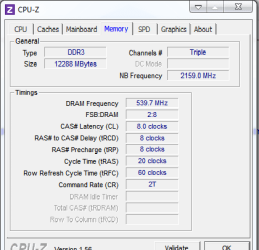
RAM : 12288 MB DDR3 Triple Channel
RAM Speed : 539.7 MHz (2:8) @ 8-8-8-20
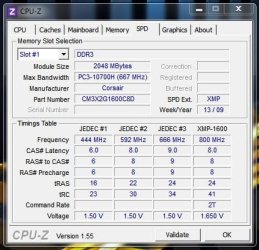
Slot 1 : 2048MB (10700)
Slot 1 Manufacturer : Corsair
Slot 2 : 2048MB (10700)
Slot 2 Manufacturer : Corsair
Slot 3 : 2048MB (10700)
Slot 3 Manufacturer : Corsair
Slot 4 : 2048MB (10700)
Slot 4 Manufacturer : Corsair
Slot 5 : 2048MB (10700)
Slot 5 Manufacturer : Corsair
Slot 6 : 2048MB (10700)
Slot 6 Manufacturer : Corsair

also i think my cpu is not giving all it should...

does this mean i am forced to OC?

please someone tell me waht i have to do...

Thanx!

My System SpecsSystem Spec
11-18-2010   #2


Windows 7 Home Premium SP1 (64-bit)


Is the BIOS automatically configuring the values of the RAM Modules??

And the Frequency of the CPU could be Intel SpeedStep, check on the bios if it's enabled, you could turn it off and check if now you're running with 100% frequency..

Somebody correct me if i'm wrong please
My System SpecsSystem Spec
11-18-2010   #3


Systems 1 and 2: Windows 7 Enterprise x64, Win 8 Developer


Check your bios settings:

Memory
XMP profile
auto voltage at
SPD auto showing =
My System SpecsSystem Spec
.


11-18-2010   #4


Windows 7 Ultimate x64 SP1


I actually have that board along with Corsair's Dominator RAM - Corsair TR3X6G1600C8D Dominator 6 GB 3 x 2 GB PC3-12800 1600MHz. See system specs.

Anyway If you don't have XMP enabled you could try enabling it.... or, you could set the parimeters manually, which is what I do. I have my memory running at 1600MHz and it shows in both the BIOS and CPU-Z.

One thing though, since your running with 12gig of RAM, I not sure you'll get all the modules to run at 1600. You might want to ask about that here.... GIGABYTE and here.... Memory - The Corsair Support Forums

BTW I'm running my i7-930 @ 3.52GHz (with turbo enabled) My settings are.....

CPU Clock ratio.... x21 (22 Turbo mode)

Base Clock... 160

QPI Clock... 36
Uncore Freq... 3360
Uncore clock... x21

RAM....

Performance Enhance.... Turbo
Extreme Memory Profile (XMP)..... Disabled
System Memory Multiplier.... x10
DRAM Timings.... 8-8-8-20-1

Memory voltage is 1.640v

Hope this helps
My System SpecsSystem Spec
11-18-2010   #5


Windows 7 Ultimate x64 SP1


OK, re-reading your post....

Quote   Quote: Originally Posted by janno View Post
here are my cpu-z stats:

Intel Core i7 930
Windows 7 Ultimate Edition (Build 7600)
CPU Arch : 1 CPU - 4 Cores - 8 Threads
CPU PSN : Intel Core i7 CPU 930 @ 2.80GHz
CPU EXT : MMX, SSE (1, 2, 3, 3S, 4.1, 4.2), EM64T, VT-x
CPUID : 6.A.5 / Extended : 6.1A
CPU Cache : L1 : 4 x 32 / 4 x 32 KB - L2 : 4 x 256 KB
CPU Cache : L3 : 8192 KB
Core : Bloomfield (45 nm) / Stepping : D0
Freq : 1619.22 MHz (134.93 * 12)
That's basically saying your system is running in power down mode. That's nothing to worry about. If you had a load, and it stayed like that, than you'd have to worry.

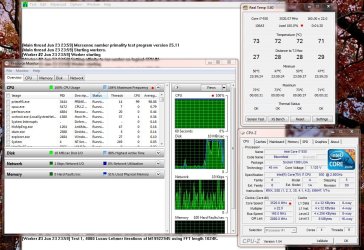
If you look at these two images, you'll see the CPU working with a full load aond one resting without a load. Notice the CPU speeds....

With load...
my ram (1600 mhz) is showing as 1066mhz-cpu-load-use.jpg

Without load...
my ram (1600 mhz) is showing as 1066mhz-cpu-readings-without-load.jpg

Also see this post - Wrong clock speed!
My System SpecsSystem Spec
11-18-2010   #6


Windows 7 64 bit SP1


I don't understand. 539.7 x 3 = 1619 MHz for triple channel. Where are you getting it is 1066?

- Gene
My System SpecsSystem Spec
11-18-2010   #7


windows 7 Ultimate 64-bit


what software do you use to test with and without load?

Quote   Quote: Originally Posted by sygnus21 View Post
OK, re-reading your post....

Quote   Quote: Originally Posted by janno View Post
here are my cpu-z stats:

Intel Core i7 930
Windows 7 Ultimate Edition (Build 7600)
CPU Arch : 1 CPU - 4 Cores - 8 Threads
CPU PSN : Intel Core i7 CPU 930 @ 2.80GHz
CPU EXT : MMX, SSE (1, 2, 3, 3S, 4.1, 4.2), EM64T, VT-x
CPUID : 6.A.5 / Extended : 6.1A
CPU Cache : L1 : 4 x 32 / 4 x 32 KB - L2 : 4 x 256 KB
CPU Cache : L3 : 8192 KB
Core : Bloomfield (45 nm) / Stepping : D0
Freq : 1619.22 MHz (134.93 * 12)
That's basically saying your system is running in power down mode. That's nothing to worry about. If you had a load, and it stayed like that, than you'd have to worry.

If you look at these two images, you'll see the CPU working with a full load aond one resting without a load. Notice the CPU speeds....

With load...
Attachment 115288

Without load...
Attachment 115289

Also see this post - Wrong clock speed!
My System SpecsSystem Spec
11-18-2010   #8


windows 7 Ultimate 64-bit


Quote   Quote: Originally Posted by GeneO View Post
I don't understand. 539.7 x 3 = 1619 MHz for triple channel. Where are you getting it is 1066?

- Gene
when it boots, it says thats its running at 1066mhz...

in the bios it says its running at 1066mhz...

so i was thinking that would be the case
My System SpecsSystem Spec
11-18-2010   #9


Windows 7 Ultimate x64 SP1


Quote   Quote: Originally Posted by GeneO View Post
I don't understand. 539.7 x 3 = 1619 MHz for triple channel. Where are you getting it is 1066?

- Gene
It doesn't work like that. Tripple channel is for the fact that the system is designed to run the memory in tripple channel. aka.... 3 memory sticks (X58 boards).

Quite a few people have a misunderstanding of "tripple" channel. The memory is still dual channel memory, it's just run in a tripple configuration.

P55 chipsets use the same memory.... dual channel, they just don't run them in tripple configuration.

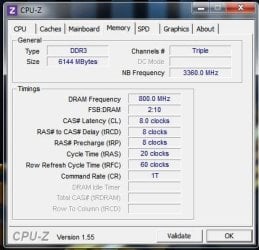
Anyways it would be 800 x 2= 1600 as seen here.....

my ram (1600 mhz) is showing as 1066mhz-capture.jpg
My System SpecsSystem Spec
11-18-2010   #10


Windows 7 x64 Ultimate


Some people are starting to confuse CPU freq with memory buss freq.

The 1066 is your memory buss freq, that is the default for the processor/MB you have, it will only go over that if you specifically overclock your system. People buy 1600 mhz ram in order to be able to overclock but you don't have to and may not even want to run it that fast (excessive heat, premature ram death and system instability may result). It's pretty rare to get a stable memory buss speed of 1600.

On the other hand your CPU speed will go up and down from about 1600 (just a coincidence) to 2800 to 3400Mhz depending on the CPU model. (Again without overclocking)

Most ram sold today is 1600 or even higher, but that doesn't mean that you can even attain those speeds, just think of it as generous overhead. Ram speed in itself really doesn't get you much anyway. Better overclocking often results in OCing the CPU but keeping the ram set to a lower speed for improved stability and the difference in anything other than a pure memory benchmark is virtually nothing with the speed at 1066 or 1600.
My System SpecsSystem Spec
Reply

 my ram (1600 mhz) is showing as 1066mhz problems?


Thread Tools


Similar Threads for: my ram (1600 mhz) is showing as 1066mhz
Thread Forum
ddr3 1600 mhx showing as 1066mhz Overclocking and Case Mods
wintv hvr 1600 no qam signal? Media Center
Hvr 1600 Drivers
Upgrading RAM ~ says RAM is 400Mhz when it's 1066Mhz Hardware & Devices
how to make my memo run @ 1600 ? Performance & Maintenance


All times are GMT -5. The time now is 06:26 AM.


Windows 7 Forums is an independent web site and has not been authorized,
sponsored, or otherwise approved by Microsoft Corporation.
"Windows 7" and related materials are trademarks of Microsoft Corp.
© Designer Media Ltd
  

1 2 3 4 5 6 7 8 9 10 11 12 13 14 15 16 17 18 19 20 21 22 23 24 25 26 27 28 29 30