
Solved Hi- 8 giga ram won't load windows but 6 does?

you mean you calling for more help on the forum?
or me calling for a tech guy? ;)

No I would call for more help on this forum. There are some very knowledgeable people on here.

Jim :geek:

EDIT: Looks like we have a couple guys helping already. :D
 

My Computer My Computer

At a glance

Windows 8.1 Pro w/Media Center 64bit, Windows...Phenom II X6 1100TCrucial Balistic 8gb DDR3-1866 CL9MSI R6850 Cyclone IGD5 PE
Computer type
PC/Desktop
Computer Manufacturer/Model Number
Home Built
OS
Windows 8.1 Pro w/Media Center 64bit, Windows 7 HP 64bit
CPU
Phenom II X6 1100T
Motherboard
ASUS M5A99X EVO
Memory
Crucial Balistic 8gb DDR3-1866 CL9
Graphics Card(s)
MSI R6850 Cyclone IGD5 PE
Sound Card
On Board
Monitor(s) Displays
ASUS VE258Q 25" LED with DVI-HDMI-DisplayPort
Screen Resolution
1920 x 1080
Hard Drives
Two WD Cavier Black 2TB Sata III, WD My Book Essential 2TB USB 3.0
PSU
Seasonic X650 80 Plus GOLD Modular
Case
Corsair 400R
Cooling
Antec Kuhler H2O 620, Two 120mm and four 140mm
Keyboard
Logitech K120
Mouse
Logitech Marble Mouse USB, Logitech Precision Game Pad
Internet Speed
15MB
Antivirus
Norton IS 2013, Malwarebytes Pro Beta 2
Browser
IE-11, FF-27
Other Info
APC UPS ES 750, Netgear WNR3500L Gigabit & Wireless N Router with SamKnows Test Program, Motorola SB6120 Gigabit Cable Modem. Brother HL-2170W Laser Printer, Epson V300 Scanner
hi and hello my first check would be to check memory in msconfig

  1. type msconfig in start menu and click on result
  2. go to boot and click advanced options
  3. in maximum memory make sure the box is UNTICKED
  4. click ok
  5. click apply
  6. click ok
  7. reboot if asked by windows
 

Attachments

  • mem1.PNG
    mem1.PNG
    25.1 KB · Views: 11

My Computer My Computer

At a glance

Operating System : Windows 7 Home Premium Edi...Processor : Intel Core 2 Quad Q8300 @ 2500 MHzPhysical Memory :8GB Corsair4x 2GB 800MHz C5 ...Video Card : XFX 6700 AMD
Computer Manufacturer/Model Number
packard bell IXTREME M5722
OS
Operating System : Windows 7 Home Premium Edition 6.01.7600 SP1 (x64)
CPU
Processor : Intel Core 2 Quad Q8300 @ 2500 MHz
Motherboard
Mainboard : Packard Bell (Acer EG43M )
Memory
Physical Memory :8GB Corsair4x 2GB 800MHz C5 DDR2
Graphics Card(s)
Video Card : XFX 6700 AMD
Monitor(s) Displays
Maestro 234DL - BenQ V2220 - BenQ VW2420H
Screen Resolution
Current Display :1920x1080p pixels at 60 Hz in HD LED
Hard Drives
Hard Disks : WDC (1000 GB)
Drive C: (Hard Disk) : 428 GB available on 491 GB
Drive D: (Hard Disk) : 426 GB available on 492 GB
SAMSUNG spinpoint HD103SJ 1000.2 GB
(X 2) KINGSTON SSD NOW V 30GB
PSU
XFX ProSeries 550W PSU
Case
PACKARD BELL IXTREME
Cooling
System Blower Current: 150mA Air Flow16CFM ;Akasa 90mm rear
Keyboard
Gigabyte Aivia K8100
Mouse
TRUST-Wireless Laser Mouse - Carbon edition MI-7770C
Internet Speed
TP-LINK > TL-WN951N / AV500 Gigabit Powerline Adapters
Browser
chrome dev
Other Info
EXTRA COOLING>(FAN CONTROLLER) PC Bay Cooler 3 x 40mm fans; Akasa AK-HD-BL Blue hard drive cooler 2 x 40 mm fan 4500 rpm 29.7 dBA
Bios> American Megatrends Inc.
Version : P01-A1
Date : 08/31/2009
Also could you post a pic from resmon and we can see what windows has allocated your ram to

  1. type resmon in start menu search box
  2. enter on keyboard
  3. left hand pane in results click on resmon
  4. click on Memory in the top tab bar
 

Attachments

  • resmon sunday.PNG
    resmon sunday.PNG
    43.6 KB · Views: 4

My Computer My Computer

At a glance

Operating System : Windows 7 Home Premium Edi...Processor : Intel Core 2 Quad Q8300 @ 2500 MHzPhysical Memory :8GB Corsair4x 2GB 800MHz C5 ...Video Card : XFX 6700 AMD
Computer Manufacturer/Model Number
packard bell IXTREME M5722
OS
Operating System : Windows 7 Home Premium Edition 6.01.7600 SP1 (x64)
CPU
Processor : Intel Core 2 Quad Q8300 @ 2500 MHz
Motherboard
Mainboard : Packard Bell (Acer EG43M )
Memory
Physical Memory :8GB Corsair4x 2GB 800MHz C5 DDR2
Graphics Card(s)
Video Card : XFX 6700 AMD
Monitor(s) Displays
Maestro 234DL - BenQ V2220 - BenQ VW2420H
Screen Resolution
Current Display :1920x1080p pixels at 60 Hz in HD LED
Hard Drives
Hard Disks : WDC (1000 GB)
Drive C: (Hard Disk) : 428 GB available on 491 GB
Drive D: (Hard Disk) : 426 GB available on 492 GB
SAMSUNG spinpoint HD103SJ 1000.2 GB
(X 2) KINGSTON SSD NOW V 30GB
PSU
XFX ProSeries 550W PSU
Case
PACKARD BELL IXTREME
Cooling
System Blower Current: 150mA Air Flow16CFM ;Akasa 90mm rear
Keyboard
Gigabyte Aivia K8100
Mouse
TRUST-Wireless Laser Mouse - Carbon edition MI-7770C
Internet Speed
TP-LINK > TL-WN951N / AV500 Gigabit Powerline Adapters
Browser
chrome dev
Other Info
EXTRA COOLING>(FAN CONTROLLER) PC Bay Cooler 3 x 40mm fans; Akasa AK-HD-BL Blue hard drive cooler 2 x 40 mm fan 4500 rpm 29.7 dBA
Bios> American Megatrends Inc.
Version : P01-A1
Date : 08/31/2009
Your in good hands at the moment so I'll say goodnight. Its 2AM here and I need to get an early start on a project in the morning.

Jim :geek:
 

My Computer My Computer

At a glance

Windows 8.1 Pro w/Media Center 64bit, Windows...Phenom II X6 1100TCrucial Balistic 8gb DDR3-1866 CL9MSI R6850 Cyclone IGD5 PE
Computer type
PC/Desktop
Computer Manufacturer/Model Number
Home Built
OS
Windows 8.1 Pro w/Media Center 64bit, Windows 7 HP 64bit
CPU
Phenom II X6 1100T
Motherboard
ASUS M5A99X EVO
Memory
Crucial Balistic 8gb DDR3-1866 CL9
Graphics Card(s)
MSI R6850 Cyclone IGD5 PE
Sound Card
On Board
Monitor(s) Displays
ASUS VE258Q 25" LED with DVI-HDMI-DisplayPort
Screen Resolution
1920 x 1080
Hard Drives
Two WD Cavier Black 2TB Sata III, WD My Book Essential 2TB USB 3.0
PSU
Seasonic X650 80 Plus GOLD Modular
Case
Corsair 400R
Cooling
Antec Kuhler H2O 620, Two 120mm and four 140mm
Keyboard
Logitech K120
Mouse
Logitech Marble Mouse USB, Logitech Precision Game Pad
Internet Speed
15MB
Antivirus
Norton IS 2013, Malwarebytes Pro Beta 2
Browser
IE-11, FF-27
Other Info
APC UPS ES 750, Netgear WNR3500L Gigabit & Wireless N Router with SamKnows Test Program, Motorola SB6120 Gigabit Cable Modem. Brother HL-2170W Laser Printer, Epson V300 Scanner

Attachments

  • rammonscreenshot.jpg
    rammonscreenshot.jpg
    84 KB · Views: 7

My Computer My Computer

At a glance

Operating System : Windows 7 Home Premium Edi...Processor : Intel Core 2 Quad Q8300 @ 2500 MHzPhysical Memory :8GB Corsair4x 2GB 800MHz C5 ...Video Card : XFX 6700 AMD
Computer Manufacturer/Model Number
packard bell IXTREME M5722
OS
Operating System : Windows 7 Home Premium Edition 6.01.7600 SP1 (x64)
CPU
Processor : Intel Core 2 Quad Q8300 @ 2500 MHz
Motherboard
Mainboard : Packard Bell (Acer EG43M )
Memory
Physical Memory :8GB Corsair4x 2GB 800MHz C5 DDR2
Graphics Card(s)
Video Card : XFX 6700 AMD
Monitor(s) Displays
Maestro 234DL - BenQ V2220 - BenQ VW2420H
Screen Resolution
Current Display :1920x1080p pixels at 60 Hz in HD LED
Hard Drives
Hard Disks : WDC (1000 GB)
Drive C: (Hard Disk) : 428 GB available on 491 GB
Drive D: (Hard Disk) : 426 GB available on 492 GB
SAMSUNG spinpoint HD103SJ 1000.2 GB
(X 2) KINGSTON SSD NOW V 30GB
PSU
XFX ProSeries 550W PSU
Case
PACKARD BELL IXTREME
Cooling
System Blower Current: 150mA Air Flow16CFM ;Akasa 90mm rear
Keyboard
Gigabyte Aivia K8100
Mouse
TRUST-Wireless Laser Mouse - Carbon edition MI-7770C
Internet Speed
TP-LINK > TL-WN951N / AV500 Gigabit Powerline Adapters
Browser
chrome dev
Other Info
EXTRA COOLING>(FAN CONTROLLER) PC Bay Cooler 3 x 40mm fans; Akasa AK-HD-BL Blue hard drive cooler 2 x 40 mm fan 4500 rpm 29.7 dBA
Bios> American Megatrends Inc.
Version : P01-A1
Date : 08/31/2009
I'll get right to it :)
Thanks for your help and care until now.
 

My Computer My Computer

At a glance

windows 7 ultimate x64Intel(R) Core(TM)2 Quad Q6600 @ 2.40GHz8 GBNvidia GEforce 8600 GT
OS
windows 7 ultimate x64
CPU
Intel(R) Core(TM)2 Quad Q6600 @ 2.40GHz
Motherboard
Gigabyte GA-P35-Ds3p
Memory
8 GB
Graphics Card(s)
Nvidia GEforce 8600 GT
Sound Card
Realtec
Monitor(s) Displays
1- MAG DVI 2- Samsung 2450 DVI-HDMI
Screen Resolution
1- 1440x900 2- 19200x1080 HD
Go to Msconfig and uncheck Max memory(Start>Run>msconfig>Boot>Advanced Options)

You could also post a screenshot of the memory tab in Resource Monitor

there you go: (sorry for the dual monitors view)
max memory was unchecked
 

Attachments

  • resource memory.png
    resource memory.png
    201.1 KB · Views: 8

My Computer My Computer

At a glance

windows 7 ultimate x64Intel(R) Core(TM)2 Quad Q6600 @ 2.40GHz8 GBNvidia GEforce 8600 GT
OS
windows 7 ultimate x64
CPU
Intel(R) Core(TM)2 Quad Q6600 @ 2.40GHz
Motherboard
Gigabyte GA-P35-Ds3p
Memory
8 GB
Graphics Card(s)
Nvidia GEforce 8600 GT
Sound Card
Realtec
Monitor(s) Displays
1- MAG DVI 2- Samsung 2450 DVI-HDMI
Screen Resolution
1- 1440x900 2- 19200x1080 HD
Here is a link to a very good free program to test your ram RAMMON by passmark (choose 64BIT download)


i ran rammon and all three sticks passed ok and identical
(i know that the 4th one is used for a few days and works perfect)
 

Attachments

My Computer My Computer

At a glance

windows 7 ultimate x64Intel(R) Core(TM)2 Quad Q6600 @ 2.40GHz8 GBNvidia GEforce 8600 GT
OS
windows 7 ultimate x64
CPU
Intel(R) Core(TM)2 Quad Q6600 @ 2.40GHz
Motherboard
Gigabyte GA-P35-Ds3p
Memory
8 GB
Graphics Card(s)
Nvidia GEforce 8600 GT
Sound Card
Realtec
Monitor(s) Displays
1- MAG DVI 2- Samsung 2450 DVI-HDMI
Screen Resolution
1- 1440x900 2- 19200x1080 HD
looks like you have a bad slot not working :( does any ram work in suspected bad slot?
 

My Computer My Computer

At a glance

Operating System : Windows 7 Home Premium Edi...Processor : Intel Core 2 Quad Q8300 @ 2500 MHzPhysical Memory :8GB Corsair4x 2GB 800MHz C5 ...Video Card : XFX 6700 AMD
Computer Manufacturer/Model Number
packard bell IXTREME M5722
OS
Operating System : Windows 7 Home Premium Edition 6.01.7600 SP1 (x64)
CPU
Processor : Intel Core 2 Quad Q8300 @ 2500 MHz
Motherboard
Mainboard : Packard Bell (Acer EG43M )
Memory
Physical Memory :8GB Corsair4x 2GB 800MHz C5 DDR2
Graphics Card(s)
Video Card : XFX 6700 AMD
Monitor(s) Displays
Maestro 234DL - BenQ V2220 - BenQ VW2420H
Screen Resolution
Current Display :1920x1080p pixels at 60 Hz in HD LED
Hard Drives
Hard Disks : WDC (1000 GB)
Drive C: (Hard Disk) : 428 GB available on 491 GB
Drive D: (Hard Disk) : 426 GB available on 492 GB
SAMSUNG spinpoint HD103SJ 1000.2 GB
(X 2) KINGSTON SSD NOW V 30GB
PSU
XFX ProSeries 550W PSU
Case
PACKARD BELL IXTREME
Cooling
System Blower Current: 150mA Air Flow16CFM ;Akasa 90mm rear
Keyboard
Gigabyte Aivia K8100
Mouse
TRUST-Wireless Laser Mouse - Carbon edition MI-7770C
Internet Speed
TP-LINK > TL-WN951N / AV500 Gigabit Powerline Adapters
Browser
chrome dev
Other Info
EXTRA COOLING>(FAN CONTROLLER) PC Bay Cooler 3 x 40mm fans; Akasa AK-HD-BL Blue hard drive cooler 2 x 40 mm fan 4500 rpm 29.7 dBA
Bios> American Megatrends Inc.
Version : P01-A1
Date : 08/31/2009
looks like you have a bad slot not working :( does any ram work in suspected bad slot?

yup this slot is working, checked that already. all slots and all sticks are ok.
remember i cannot upload windows with the 8 giga (when 4th stick inserted)
 

My Computer My Computer

At a glance

windows 7 ultimate x64Intel(R) Core(TM)2 Quad Q6600 @ 2.40GHz8 GBNvidia GEforce 8600 GT
OS
windows 7 ultimate x64
CPU
Intel(R) Core(TM)2 Quad Q6600 @ 2.40GHz
Motherboard
Gigabyte GA-P35-Ds3p
Memory
8 GB
Graphics Card(s)
Nvidia GEforce 8600 GT
Sound Card
Realtec
Monitor(s) Displays
1- MAG DVI 2- Samsung 2450 DVI-HDMI
Screen Resolution
1- 1440x900 2- 19200x1080 HD
i expect you have tried removing all ram and replacing them by moving the ram around in different slots?
 

My Computer My Computer

At a glance

Operating System : Windows 7 Home Premium Edi...Processor : Intel Core 2 Quad Q8300 @ 2500 MHzPhysical Memory :8GB Corsair4x 2GB 800MHz C5 ...Video Card : XFX 6700 AMD
Computer Manufacturer/Model Number
packard bell IXTREME M5722
OS
Operating System : Windows 7 Home Premium Edition 6.01.7600 SP1 (x64)
CPU
Processor : Intel Core 2 Quad Q8300 @ 2500 MHz
Motherboard
Mainboard : Packard Bell (Acer EG43M )
Memory
Physical Memory :8GB Corsair4x 2GB 800MHz C5 DDR2
Graphics Card(s)
Video Card : XFX 6700 AMD
Monitor(s) Displays
Maestro 234DL - BenQ V2220 - BenQ VW2420H
Screen Resolution
Current Display :1920x1080p pixels at 60 Hz in HD LED
Hard Drives
Hard Disks : WDC (1000 GB)
Drive C: (Hard Disk) : 428 GB available on 491 GB
Drive D: (Hard Disk) : 426 GB available on 492 GB
SAMSUNG spinpoint HD103SJ 1000.2 GB
(X 2) KINGSTON SSD NOW V 30GB
PSU
XFX ProSeries 550W PSU
Case
PACKARD BELL IXTREME
Cooling
System Blower Current: 150mA Air Flow16CFM ;Akasa 90mm rear
Keyboard
Gigabyte Aivia K8100
Mouse
TRUST-Wireless Laser Mouse - Carbon edition MI-7770C
Internet Speed
TP-LINK > TL-WN951N / AV500 Gigabit Powerline Adapters
Browser
chrome dev
Other Info
EXTRA COOLING>(FAN CONTROLLER) PC Bay Cooler 3 x 40mm fans; Akasa AK-HD-BL Blue hard drive cooler 2 x 40 mm fan 4500 rpm 29.7 dBA
Bios> American Megatrends Inc.
Version : P01-A1
Date : 08/31/2009
have a read of this :ar: The usable memory may be less than the installed memory on Windows 7-based computers

Windows 7 memory reporting
Windows 7 reports how much physical memory is currently installed on your computer. Windows NT-based operating systems before Windows Vista Service P1 report how much memory is available to the operating system. The available memory reported in these earlier versions of Windows does not include hardware reserved memory. This is a reporting change only.

You will see this reporting change in Windows Vista SP1 and later versions of Windows in the following locations:
The RAM value in Welcome Center
The Memory value at the bottom of the My Computer windows
The Memory value in the System Properties windows
The Total amount of system memory value of the View and Print Details page of the Performance Information and Tools item in Control Panel
Additionally, the System Information tool (Msinfo32.exe) displays the following entries on the System Summary page:
Installed Physical Memory (RAM)
Total Physical Memory
Available Physical Memory

Msinfo32.exe type this in start menu search box and click on it in results
 

My Computer My Computer

At a glance

Operating System : Windows 7 Home Premium Edi...Processor : Intel Core 2 Quad Q8300 @ 2500 MHzPhysical Memory :8GB Corsair4x 2GB 800MHz C5 ...Video Card : XFX 6700 AMD
Computer Manufacturer/Model Number
packard bell IXTREME M5722
OS
Operating System : Windows 7 Home Premium Edition 6.01.7600 SP1 (x64)
CPU
Processor : Intel Core 2 Quad Q8300 @ 2500 MHz
Motherboard
Mainboard : Packard Bell (Acer EG43M )
Memory
Physical Memory :8GB Corsair4x 2GB 800MHz C5 DDR2
Graphics Card(s)
Video Card : XFX 6700 AMD
Monitor(s) Displays
Maestro 234DL - BenQ V2220 - BenQ VW2420H
Screen Resolution
Current Display :1920x1080p pixels at 60 Hz in HD LED
Hard Drives
Hard Disks : WDC (1000 GB)
Drive C: (Hard Disk) : 428 GB available on 491 GB
Drive D: (Hard Disk) : 426 GB available on 492 GB
SAMSUNG spinpoint HD103SJ 1000.2 GB
(X 2) KINGSTON SSD NOW V 30GB
PSU
XFX ProSeries 550W PSU
Case
PACKARD BELL IXTREME
Cooling
System Blower Current: 150mA Air Flow16CFM ;Akasa 90mm rear
Keyboard
Gigabyte Aivia K8100
Mouse
TRUST-Wireless Laser Mouse - Carbon edition MI-7770C
Internet Speed
TP-LINK > TL-WN951N / AV500 Gigabit Powerline Adapters
Browser
chrome dev
Other Info
EXTRA COOLING>(FAN CONTROLLER) PC Bay Cooler 3 x 40mm fans; Akasa AK-HD-BL Blue hard drive cooler 2 x 40 mm fan 4500 rpm 29.7 dBA
Bios> American Megatrends Inc.
Version : P01-A1
Date : 08/31/2009
i expect you have tried removing all ram and replacing them by moving the ram around in different slots?

yes.. when i use 6 giga, i changed slots when experimenting and all worked perfectly.

* listen, the one thing i haven't checked yet is all this bios business.
can you please tell me or link me on how to deal with all that? i suspect that it all comes from there. (i'm a noob to dealing with bios and afraid to harm the MB- BUT i will make changes if i know exactly how. the tech shop i went to just want to make money from this. i recon i can manage dealing with bios + i have USP :))
 

My Computer My Computer

At a glance

windows 7 ultimate x64Intel(R) Core(TM)2 Quad Q6600 @ 2.40GHz8 GBNvidia GEforce 8600 GT
OS
windows 7 ultimate x64
CPU
Intel(R) Core(TM)2 Quad Q6600 @ 2.40GHz
Motherboard
Gigabyte GA-P35-Ds3p
Memory
8 GB
Graphics Card(s)
Nvidia GEforce 8600 GT
Sound Card
Realtec
Monitor(s) Displays
1- MAG DVI 2- Samsung 2450 DVI-HDMI
Screen Resolution
1- 1440x900 2- 19200x1080 HD

My Computer My Computer

At a glance

Operating System : Windows 7 Home Premium Edi...Processor : Intel Core 2 Quad Q8300 @ 2500 MHzPhysical Memory :8GB Corsair4x 2GB 800MHz C5 ...Video Card : XFX 6700 AMD
Computer Manufacturer/Model Number
packard bell IXTREME M5722
OS
Operating System : Windows 7 Home Premium Edition 6.01.7600 SP1 (x64)
CPU
Processor : Intel Core 2 Quad Q8300 @ 2500 MHz
Motherboard
Mainboard : Packard Bell (Acer EG43M )
Memory
Physical Memory :8GB Corsair4x 2GB 800MHz C5 DDR2
Graphics Card(s)
Video Card : XFX 6700 AMD
Monitor(s) Displays
Maestro 234DL - BenQ V2220 - BenQ VW2420H
Screen Resolution
Current Display :1920x1080p pixels at 60 Hz in HD LED
Hard Drives
Hard Disks : WDC (1000 GB)
Drive C: (Hard Disk) : 428 GB available on 491 GB
Drive D: (Hard Disk) : 426 GB available on 492 GB
SAMSUNG spinpoint HD103SJ 1000.2 GB
(X 2) KINGSTON SSD NOW V 30GB
PSU
XFX ProSeries 550W PSU
Case
PACKARD BELL IXTREME
Cooling
System Blower Current: 150mA Air Flow16CFM ;Akasa 90mm rear
Keyboard
Gigabyte Aivia K8100
Mouse
TRUST-Wireless Laser Mouse - Carbon edition MI-7770C
Internet Speed
TP-LINK > TL-WN951N / AV500 Gigabit Powerline Adapters
Browser
chrome dev
Other Info
EXTRA COOLING>(FAN CONTROLLER) PC Bay Cooler 3 x 40mm fans; Akasa AK-HD-BL Blue hard drive cooler 2 x 40 mm fan 4500 rpm 29.7 dBA
Bios> American Megatrends Inc.
Version : P01-A1
Date : 08/31/2009
Check BIOS settings

The problem may occur because some BIOS settings are incorrect.
Enable the memory remapping feature

Check the BIOS settings to see whether the memory remapping feature is enabled. Memory remapping gives Windows access to more memory. You can enable the memory remapping feature in the BIOS by booting to the system setup. See the User's Guide for your computer for instructions on how to boot to system setup on your computer. The name for the memory remapping feature may be different for different hardware vendors. This can be listed as memory remapping, memory extension, or something similar. Be aware that your computer may not support the memory remapping feature.
Change the AGP video aperture size in the BIOS settings

Check the BIOS settings to see how much memory that you have allocated to AGP video aperture. This is the memory that the system is sharing with the video card that is used for texture mapping and rendering. This memory would not be used by the system, because it is locked by the video card. You can adjust the AGP video aperture size in the BIOS. Standard settings are "32MB,""64MB,""128MB,"and "Auto." After you change this setting in the BIOS, restart your computer, and then check the usable memory. You can test each setting to see which offers the best results.
 

My Computer My Computer

At a glance

Operating System : Windows 7 Home Premium Edi...Processor : Intel Core 2 Quad Q8300 @ 2500 MHzPhysical Memory :8GB Corsair4x 2GB 800MHz C5 ...Video Card : XFX 6700 AMD
Computer Manufacturer/Model Number
packard bell IXTREME M5722
OS
Operating System : Windows 7 Home Premium Edition 6.01.7600 SP1 (x64)
CPU
Processor : Intel Core 2 Quad Q8300 @ 2500 MHz
Motherboard
Mainboard : Packard Bell (Acer EG43M )
Memory
Physical Memory :8GB Corsair4x 2GB 800MHz C5 DDR2
Graphics Card(s)
Video Card : XFX 6700 AMD
Monitor(s) Displays
Maestro 234DL - BenQ V2220 - BenQ VW2420H
Screen Resolution
Current Display :1920x1080p pixels at 60 Hz in HD LED
Hard Drives
Hard Disks : WDC (1000 GB)
Drive C: (Hard Disk) : 428 GB available on 491 GB
Drive D: (Hard Disk) : 426 GB available on 492 GB
SAMSUNG spinpoint HD103SJ 1000.2 GB
(X 2) KINGSTON SSD NOW V 30GB
PSU
XFX ProSeries 550W PSU
Case
PACKARD BELL IXTREME
Cooling
System Blower Current: 150mA Air Flow16CFM ;Akasa 90mm rear
Keyboard
Gigabyte Aivia K8100
Mouse
TRUST-Wireless Laser Mouse - Carbon edition MI-7770C
Internet Speed
TP-LINK > TL-WN951N / AV500 Gigabit Powerline Adapters
Browser
chrome dev
Other Info
EXTRA COOLING>(FAN CONTROLLER) PC Bay Cooler 3 x 40mm fans; Akasa AK-HD-BL Blue hard drive cooler 2 x 40 mm fan 4500 rpm 29.7 dBA
Bios> American Megatrends Inc.
Version : P01-A1
Date : 08/31/2009
i will check those features now.. so you saw all the info i uploaded and it looks ok?
is it worth doing a bios update on this ga-p35-ds3p? the bios shows f4.
what is the safest way of doing that? with @bios? i hope i won't ruin everything.
 

My Computer My Computer

At a glance

windows 7 ultimate x64Intel(R) Core(TM)2 Quad Q6600 @ 2.40GHz8 GBNvidia GEforce 8600 GT
OS
windows 7 ultimate x64
CPU
Intel(R) Core(TM)2 Quad Q6600 @ 2.40GHz
Motherboard
Gigabyte GA-P35-Ds3p
Memory
8 GB
Graphics Card(s)
Nvidia GEforce 8600 GT
Sound Card
Realtec
Monitor(s) Displays
1- MAG DVI 2- Samsung 2450 DVI-HDMI
Screen Resolution
1- 1440x900 2- 19200x1080 HD
i will check those features now.. so you saw all the info i uploaded and it looks ok?
is it worth doing a bios update on this ga-p35-ds3p? the bios shows f4.
what is the safest way of doing that? with @bios? i hope i won't ruin everything.

Procedures vary depending on the BIOS manufacturer. If you think you need to update your BIOS, check the information that came with your computer or go to the computer manufacturer's website.

Warning

Be careful when changing BIOS settings. The BIOS interface is designed for advanced users, and it's possible to change a setting that could prevent your computer from starting correctly.

Updating BIOS should only be done if necessary (to solve a compatibility problem, for example). It can be a complicated process, and if an error occurs, your computer could be rendered inoperable. Be sure to follow the manufacturer's instructions exactly.
 
Last edited:

My Computer My Computer

At a glance

Operating System : Windows 7 Home Premium Edi...Processor : Intel Core 2 Quad Q8300 @ 2500 MHzPhysical Memory :8GB Corsair4x 2GB 800MHz C5 ...Video Card : XFX 6700 AMD
Computer Manufacturer/Model Number
packard bell IXTREME M5722
OS
Operating System : Windows 7 Home Premium Edition 6.01.7600 SP1 (x64)
CPU
Processor : Intel Core 2 Quad Q8300 @ 2500 MHz
Motherboard
Mainboard : Packard Bell (Acer EG43M )
Memory
Physical Memory :8GB Corsair4x 2GB 800MHz C5 DDR2
Graphics Card(s)
Video Card : XFX 6700 AMD
Monitor(s) Displays
Maestro 234DL - BenQ V2220 - BenQ VW2420H
Screen Resolution
Current Display :1920x1080p pixels at 60 Hz in HD LED
Hard Drives
Hard Disks : WDC (1000 GB)
Drive C: (Hard Disk) : 428 GB available on 491 GB
Drive D: (Hard Disk) : 426 GB available on 492 GB
SAMSUNG spinpoint HD103SJ 1000.2 GB
(X 2) KINGSTON SSD NOW V 30GB
PSU
XFX ProSeries 550W PSU
Case
PACKARD BELL IXTREME
Cooling
System Blower Current: 150mA Air Flow16CFM ;Akasa 90mm rear
Keyboard
Gigabyte Aivia K8100
Mouse
TRUST-Wireless Laser Mouse - Carbon edition MI-7770C
Internet Speed
TP-LINK > TL-WN951N / AV500 Gigabit Powerline Adapters
Browser
chrome dev
Other Info
EXTRA COOLING>(FAN CONTROLLER) PC Bay Cooler 3 x 40mm fans; Akasa AK-HD-BL Blue hard drive cooler 2 x 40 mm fan 4500 rpm 29.7 dBA
Bios> American Megatrends Inc.
Version : P01-A1
Date : 08/31/2009
ok :)
updated the bios.
before i start checking the ram, why is my fan suddenly works on max power (& noise) after the bios update?
 

My Computer My Computer

At a glance

windows 7 ultimate x64Intel(R) Core(TM)2 Quad Q6600 @ 2.40GHz8 GBNvidia GEforce 8600 GT
OS
windows 7 ultimate x64
CPU
Intel(R) Core(TM)2 Quad Q6600 @ 2.40GHz
Motherboard
Gigabyte GA-P35-Ds3p
Memory
8 GB
Graphics Card(s)
Nvidia GEforce 8600 GT
Sound Card
Realtec
Monitor(s) Displays
1- MAG DVI 2- Samsung 2450 DVI-HDMI
Screen Resolution
1- 1440x900 2- 19200x1080 HD
YES!!
updating the bios solved the ram problem. 8 giga up and running.
thanks guys for all your help :)

now just to solve this horrible fan that works max power like crazy
 

My Computer My Computer

At a glance

windows 7 ultimate x64Intel(R) Core(TM)2 Quad Q6600 @ 2.40GHz8 GBNvidia GEforce 8600 GT
OS
windows 7 ultimate x64
CPU
Intel(R) Core(TM)2 Quad Q6600 @ 2.40GHz
Motherboard
Gigabyte GA-P35-Ds3p
Memory
8 GB
Graphics Card(s)
Nvidia GEforce 8600 GT
Sound Card
Realtec
Monitor(s) Displays
1- MAG DVI 2- Samsung 2450 DVI-HDMI
Screen Resolution
1- 1440x900 2- 19200x1080 HD
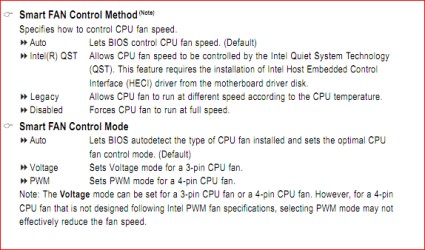
Look in the bios under "PC Health Status" for these 2 settings,

fancontrol1.PNG

Probably find that both have been set to Auto; I would start with changing the first one to "Intel QST" and see if that quiets it down. If not and the fan is a 4 pin (doesn't work with 3 pin) change the second setting to PWM.
 

My Computer My Computer

At a glance

Win 7 Ultimate x64FX-8350 @ 4.6 GHz so farADATA XPG V1 Series Black 8GB DDR3 1600Sapphire R9 270x Dual-X
Computer type
PC/Desktop
Computer Manufacturer/Model Number
Me
OS
Win 7 Ultimate x64
CPU
FX-8350 @ 4.6 GHz so far
Motherboard
Asus M5A97 EVO
Memory
ADATA XPG V1 Series Black 8GB DDR3 1600
Graphics Card(s)
Sapphire R9 270x Dual-X
Sound Card
Xonar DGX w/ Corsair Vengence 1300
Monitor(s) Displays
Acer S232HL Abid
Screen Resolution
1920x1080
Hard Drives
120 GB OCZ Vertex 3
500 GB Seagate 7200.12
PSU
Antec Earthwatts 650W Green
Case
Antec Three Hundred
Cooling
Cooler Master 212 EVO
Keyboard
Logitech G510
Mouse
Logitech G500s
Internet Speed
35000/3000
Back
Top