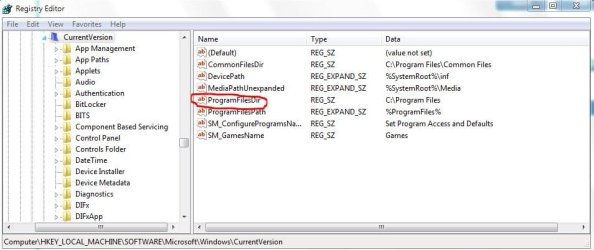
Well i just put in a 120 GB hdd in my new computer, and i want to install programs on it. How do i do that? I seen a tutorial around here i thought where it will tell me how to even change the default installation path, but i cant find it.
My Computer
At a glance
Windows 8.1 Pro x64Intel Core i5-4570 CPU @ 3.20GHz8GB DDR3-1596 - Dual ChannelNVIDIA GeForce GTX 750 Ti SC
- Computer type
- PC/Desktop
- Computer Manufacturer/Model Number
- Custom
- OS
- Windows 8.1 Pro x64
- CPU
- Intel Core i5-4570 CPU @ 3.20GHz
- Motherboard
- Gigabyte Z87-D3HP-CF
- Memory
- 8GB DDR3-1596 - Dual Channel
- Graphics Card(s)
- NVIDIA GeForce GTX 750 Ti SC
- Sound Card
- Onboard
- Monitor(s) Displays
- Samsung
- Screen Resolution
- 1920x1080
- Hard Drives
- SSD - 120GB
Second - 1TB
- Antivirus
- MSE
- Browser
- Chrome