| Windows 7: Cooling & Fan Positioning |
24 Dec 2010
|
#1 | | Windows 7 64bit A bit south o' Boston |
Cooling & Fan Positioning I understand that the golden rule is:
Top and back: Exhausy
Front, bottom and side: Intake
However, my setup seems a bit odd.
So, as you can see the CPU fan is blowing downwards, towards the video card which itself has a fan blowing downwards. Both of these are blowing towards the side fan, which I have configured as intake.
I purchased that CPU cooler because I was always seeing high temps with the standard heatsink. I'm not seeing much of a difference.
So I'm wondering if I should turn that side fan around and make it an exhaust. I know it's recommended in some situations, so I'm wondering if this is one. That's an awful lot of hot air blowing downwards, struggling to find it's way upwards - that CPU cooler is a strong fan.
Ideas? Thougts? | My System Specs |
| Computer type PC/Desktop OS Windows 7 64bit CPU AMD Phenom II X4 955 Black Edition Deneb 3.2GHz Quad-Core Motherboard ASUS M4A77TD AM3 AMD 770 ATX Memory G.SKILL Ripjaws DDR3 SDRAM DDR3 1600 (PC3 12800) Graphics Card SAPPHIRE 100284L Radeon HD 5750 1GB 128-bit GDDR5 PCI-E Sound Card Audigy Monitor(s) Displays 2 x 22" Widescreens Keyboard Microsoft Comfort Curve Keyboard 2000 v1.0 Mouse Logitech G5 w/ full 36g weighted cartridge Case Cooler Master Elite 310 ATX Cooling Arctic Cooling Freezer 7 Pro Rev.2 92mm Liquid Cooling Hard Drives System Drive: OCZ Vertex 3.20 120GB SSD
Internal: 2x 1TB Seagates
External: 1 TB Seagate |
24 Dec 2010
|
#2 | | Windows 7 Ultimate 64 Southern California |
I like it ! Really the golden rule should be same volume of cold air in as hot air out. Then the other concern is circulation in the case and dead zones ! | My System Specs | | System Manufacturer/Model Number A blend of brains, brawn and dumb luck, ask me about rig #2 ! OS Windows 7 Ultimate 64 CPU i7 3770k OC'd 4.6 @ 1.17v, still love my FX 8120 Motherboard MSI P67A-GD80 b3 Memory 16 gb Crucial Ballistix Tracer DDR3 9-9-9-27 @ 2000 Graphics Card XFX Radeon 7870 Sound Card On board HD audio with lossless 24 bit/192 sample rate Monitor(s) Displays (2) LG LED 23" 1920 x 1080 2ms Monitors via mini d-port Screen Resolution 1680 X 1050 p Keyboard (2) Logitech Illuminated Keyboards (1) usb (1) wireless K800 Mouse Logitech G9x & T-BC21 - nano nx for the laptop PSU Ultra X4 modular 1050 watt 80% silver rating & APC 1200 RS Case CoolerMaster Storm Styker Cooling 6 case fans 140mm & 120mm, Thermaltake h2o extreme Hard Drives Samsung 256 gb 830 SSD sata III
(2) 1 tb Hitachi deskmates/sata II
(1) 1 tb WD green/sata II
(2) 2 tb WD My Book/esata
(1) 500 gb Sea. Freeagent/esata
(2) 250 gb Sea. Freeagent go's/usb
(1) WD 2 tb Green 64 sata III
(1) 120 gb OCZ Vertex SS Internet Speed Upgraded from bottom of the barrel to bareable Other Info 4 Noctua case fans + 3 Noctua in p/p on H100 cooler
Integrated hot swap drive bays for 2.5" Drives
(2) Lite-on dvd/cd optical 22X
Integrated fan controller and led on/off
HP Officejet Pro L7680 all-n-one
HP 4 laserjet (the beast)
Hot swappable 3.5" hard drive bay
Belkin Play N600 HD router
Asus USB 3 & sata 6 PCIe card
Vantec IDE to sata adptr./Ultra sata adptr
HP Probook i3 laptop |
24 Dec 2010
|
#3 | | Windows 7 Ultimate x64 Service Pack 1 Doncaster, UK |
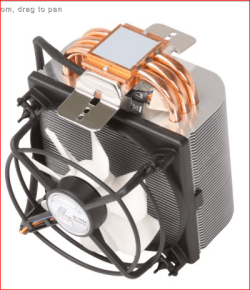
Fans in the system should be arranged to assist the natural flow of air through the case. This is generally from the front (bottom) and side to the rear and top. Where possible, all internal fans should follow this protocol. Looking at the image of your heatsink and fan, I think you've mounted it upside down. In this orientation, the fan is effectively disrupting the natural flow of air through the case. Can you reattach it so that the fan is on top? | My System Specs | | Computer type PC/Desktop System Manufacturer/Model Number Dwarf Dwf/11/2012 OS Windows 7 Ultimate x64 Service Pack 1 CPU Intel Core-i5-3570K 4-core @ 3.4GHz (Ivy Bridge) (OC 4.2GHz) Motherboard ASRock Z77 Extreme4-M Memory 4 x 4GB DDR3-1600 Corsair Vengeance CMZ8GX3M2A1600C9B (16GB) Graphics Card 2 x AMD Radeon HD7770 1GB CrossFired (OC 1100MHz/1250MHz) Sound Card Realtek High Definition on board solution (ALC 898) Monitor(s) Displays ViewSonic VA1912w Widescreen (VGA) Screen Resolution 1440x900 Keyboard Microsoft Comfort Curve Keyboard 3000 (USB) Mouse Microsoft Comfort Mouse 3000 for Business (USB) PSU XFX Pro Series 850W Semi-Modular Case Gigabyte IF233 Cooling 1 x 120mm Front Inlet 1 x 120mm Rear Exhaust Hard Drives OCZ Agility 3 SSD 120GB SATA III x2 (RAID 0)
Samsung HD501LJ 500GB SATA II x2
Hitachi HDS721010CLA332 1TB SATA II
Iomega 1.5TB Ext USB 2.0
WD 2.0TB Ext USB 3.0 Internet Speed NetGear DG834Gv3 ADSL Modem/Router (Ethernet) ~4.0 Mb/s (O2) Antivirus Avast! 8.0.1483 Browser IE 9 Other Info Optical Drive: HL-DT-ST BD-RE BH10LS30 SATA Bluray
Lexmark S305 Printer/Scanner/Copier (USB)
CTF-430 Tablet & Pen
WEI Score: 7.7/7.9/7.4/7.4/7.9
Asus Eee PC 1011PX Netbook (Windows 7 x86 Starter) |
24 Dec 2010
|
#4 | | Windows 7 Ultimate 64 Southern California |
Quote: Fans in the system should be arranged to assist the natural flow of air through the case. This is generally from the front (bottom) and side to the rear and top. Where possible, all internal fans should follow this protocol. Looking at the image of your heatsink and fan, I think you've mounted it upside down. In this orientation, the fan is effectively disrupting the natural flow of air through the case. Can you reattach it so that the fan is on top? +1 to this ! Enhancing natural convection air flow is what most of us go for. But as these fans are very forceful if you're not dealing with OC'g or SLI/Crossfire then options abound ! | My System Specs | | System Manufacturer/Model Number A blend of brains, brawn and dumb luck, ask me about rig #2 ! OS Windows 7 Ultimate 64 CPU i7 3770k OC'd 4.6 @ 1.17v, still love my FX 8120 Motherboard MSI P67A-GD80 b3 Memory 16 gb Crucial Ballistix Tracer DDR3 9-9-9-27 @ 2000 Graphics Card XFX Radeon 7870 Sound Card On board HD audio with lossless 24 bit/192 sample rate Monitor(s) Displays (2) LG LED 23" 1920 x 1080 2ms Monitors via mini d-port Screen Resolution 1680 X 1050 p Keyboard (2) Logitech Illuminated Keyboards (1) usb (1) wireless K800 Mouse Logitech G9x & T-BC21 - nano nx for the laptop PSU Ultra X4 modular 1050 watt 80% silver rating & APC 1200 RS Case CoolerMaster Storm Styker Cooling 6 case fans 140mm & 120mm, Thermaltake h2o extreme Hard Drives Samsung 256 gb 830 SSD sata III
(2) 1 tb Hitachi deskmates/sata II
(1) 1 tb WD green/sata II
(2) 2 tb WD My Book/esata
(1) 500 gb Sea. Freeagent/esata
(2) 250 gb Sea. Freeagent go's/usb
(1) WD 2 tb Green 64 sata III
(1) 120 gb OCZ Vertex SS Internet Speed Upgraded from bottom of the barrel to bareable Other Info 4 Noctua case fans + 3 Noctua in p/p on H100 cooler
Integrated hot swap drive bays for 2.5" Drives
(2) Lite-on dvd/cd optical 22X
Integrated fan controller and led on/off
HP Officejet Pro L7680 all-n-one
HP 4 laserjet (the beast)
Hot swappable 3.5" hard drive bay
Belkin Play N600 HD router
Asus USB 3 & sata 6 PCIe card
Vantec IDE to sata adptr./Ultra sata adptr
HP Probook i3 laptop |
24 Dec 2010
|
#5 | | Windows 7 64bit A bit south o' Boston |

Quote: Originally Posted by Dwarf Looking at the image of your heatsink and fan, I think you've mounted it upside down. In this orientation, the fan is effectively disrupting the natural flow of air through the case. Can you reattach it so that the fan is on top? That's what I was beginning to suspect. I didn't really look at their "directions" except to reference the direction in which they recommend the fan point, and it appeared as though their diagram had the fan pointing in the direction of the other slots (PCI etc).
But I think it is blowing the wrong way...so I'll see if I can turn it around (damn, more thermal compund) and then I'll reattach the side fan to be intake.
With that CPU cooler, there's no reason why I shouldn't be seeing lower temps, so it's obviously PEBKAC. | My System Specs | | Computer type PC/Desktop OS Windows 7 64bit CPU AMD Phenom II X4 955 Black Edition Deneb 3.2GHz Quad-Core Motherboard ASUS M4A77TD AM3 AMD 770 ATX Memory G.SKILL Ripjaws DDR3 SDRAM DDR3 1600 (PC3 12800) Graphics Card SAPPHIRE 100284L Radeon HD 5750 1GB 128-bit GDDR5 PCI-E Sound Card Audigy Monitor(s) Displays 2 x 22" Widescreens Keyboard Microsoft Comfort Curve Keyboard 2000 v1.0 Mouse Logitech G5 w/ full 36g weighted cartridge Case Cooler Master Elite 310 ATX Cooling Arctic Cooling Freezer 7 Pro Rev.2 92mm Liquid Cooling Hard Drives System Drive: OCZ Vertex 3.20 120GB SSD
Internal: 2x 1TB Seagates
External: 1 TB Seagate |
24 Dec 2010
|
#6 | | windows 7 x 64 ult Los Cabos, BCS, Mx |
Wrong Direction I have that same cpu cooler..Freezer 64 Pro. You should have it mounted (if possible) so that the fan is blowing through the fins toward the back exhaust fan.
These instructions are in the install guide, so I take it you did not install it, or it is not possible because of clearance issues with ram or whatever.
I have mine installed as suggested and added a small intake fan in the front of my case in two empty adjacent bays that let air flow directly into the Freezer 64 fan and my temps dropped by an easy 8c from the already low the Freezer gave. My temps are around 30c running my Athlon 64x2 5600+ doing regular stuff.
Spin that baby 90 degrees and pump that air to the back. The Freezer 64 Pros' are great coolers and I recommend them to anyone.
Last edited by toddincabo; 24 Dec 2010 at 05:29 PM..
Reason: forgot info
| My System Specs | | System Manufacturer/Model Number Microsoft OS windows 7 x 64 ult CPU Phenom II x4 840 Motherboard Gigabyte GA-990FXA-UD3 Memory Corsair XMS3 2x4 GB Graphics Card HIS Radeon 5770 Sound Card Realtek onboard Monitor(s) Displays Acer P221w + Samsung T220 HD Screen Resolution 1024x768 Keyboard Logitech G15 v1 + Belkin n52te SpeedPad Mouse Logitech M570 Wireless Trackball PSU 430w Corsair Builders Series Case HP Cooling Freezer 64 Pro v1 Hard Drives Various Internet Speed 1000mbs Other Info Extra front intake fan installed in two of my 5.2" bays which blows directly into my Freezer Pro CPU fan. Dropped temp nearly 10c. |
24 Dec 2010
|
#7 | | Windows 7 64bit A bit south o' Boston |

Quote: Originally Posted by toddincabo I have that same cpu cooler..Freezer 64 Pro. You should have it mounted (if possible) so that the fan is blowing through the fins toward the back exhaust fan.
These instructions are in the install guide, so I take it you did not install it, or it is not possible because of clearance issues with ram or whatever.
Spin that baby 80 degrees and pump that air to the back. The Freezer 64 Pros' are great coolers and I recommend them to anyone. I most certainly did install it...
It appeared - to me - that the diagram in the instructions showed the fan blowing towards the slots.
Perhaps I misread it, and had taken the suggestion from the previous poster.
But thanks.
Last edited by Norwood; 24 Dec 2010 at 03:30 PM..
| My System Specs | | Computer type PC/Desktop OS Windows 7 64bit CPU AMD Phenom II X4 955 Black Edition Deneb 3.2GHz Quad-Core Motherboard ASUS M4A77TD AM3 AMD 770 ATX Memory G.SKILL Ripjaws DDR3 SDRAM DDR3 1600 (PC3 12800) Graphics Card SAPPHIRE 100284L Radeon HD 5750 1GB 128-bit GDDR5 PCI-E Sound Card Audigy Monitor(s) Displays 2 x 22" Widescreens Keyboard Microsoft Comfort Curve Keyboard 2000 v1.0 Mouse Logitech G5 w/ full 36g weighted cartridge Case Cooler Master Elite 310 ATX Cooling Arctic Cooling Freezer 7 Pro Rev.2 92mm Liquid Cooling Hard Drives System Drive: OCZ Vertex 3.20 120GB SSD
Internal: 2x 1TB Seagates
External: 1 TB Seagate |
24 Dec 2010
|
#8 | | Win 7 Ultimate x64 Etobicoke, Ontario |
toddincabo, Norwood has the Rev2 of the AC Freezer Pro and it only goes on that way,
unless the mounting bracket on the motherboard is turned 90° (and on most AM2/AM2+/AM3 boards the bracket is the same, it is very rare to get one that is rotated). On an AMD based board if you want a AC Freezer Pro and have the fan facing front to back, you need to find (if you can seeing as they have been discontinued) the older one like this, Newegg.com - Open Box: ARCTIC COOLING Freezer 64 Pro 92mm Ceramic CPU Cooler
P.S. Seeing as no one mentioned it, Quote: So, as you can see the CPU fan is blowing downwards, towards the video card which itself has a fan blowing downwards. Both of these are blowing towards the side fan, which I have configured as intake. both of those fans are in fact blowing upwards, not down. They may be oriented to the bottom of the case, but they are not blowing that way. | My System Specs | | System Manufacturer/Model Number Me OS Win 7 Ultimate x64 CPU Phenom II x4 955 @ 4 GHz. Motherboard Asus M5A97 EVO Memory 2x2 GB Kingston HyperX DDR3 1600 Graphics Card Sapphire HD 6850 Sound Card Xonar DGX w/ Logitech X-530 Monitor(s) Displays Acer S232HL Abid Screen Resolution 1920x1080 Keyboard Logitech Wave Mouse Logitech G5 v2 PSU Antec Earthwatts 650W Green Case Antec Three Hundred Cooling Cooler Master 212 EVO Hard Drives 120 GB OCZ Vertex 3
500 GB Seagate 7200.12 Internet Speed 24000/1000 |
24 Dec 2010
|
#9 | | windows 7 x 64 ult Los Cabos, BCS, Mx |
[QUOTE=stormy13;1145714]toddincabo, Norwood has the Rev2 of the AC Freezer Pro and it only goes on that way,
Wow , that sucks | My System Specs | | System Manufacturer/Model Number Microsoft OS windows 7 x 64 ult CPU Phenom II x4 840 Motherboard Gigabyte GA-990FXA-UD3 Memory Corsair XMS3 2x4 GB Graphics Card HIS Radeon 5770 Sound Card Realtek onboard Monitor(s) Displays Acer P221w + Samsung T220 HD Screen Resolution 1024x768 Keyboard Logitech G15 v1 + Belkin n52te SpeedPad Mouse Logitech M570 Wireless Trackball PSU 430w Corsair Builders Series Case HP Cooling Freezer 64 Pro v1 Hard Drives Various Internet Speed 1000mbs Other Info Extra front intake fan installed in two of my 5.2" bays which blows directly into my Freezer Pro CPU fan. Dropped temp nearly 10c. |
24 Dec 2010
|
#10 | | Windows 7 64bit A bit south o' Boston |
Ok, that was a mistake.
Turning the heatsink around caused the temp to skyrocket simply browsing with Firefox. I must have had it on correctly to begin with...just as the pictures in the directions showed.
Which brings me back to my original question...if stormy13 is saying that the video card and CPU coolers fans are, in fact, blowing this way: Pic
Then it would make sense for that side fan to be an intake...but I don't see how the video card fan is blowing air through the card, as opposed to away from it. | My System Specs | | Computer type PC/Desktop OS Windows 7 64bit CPU AMD Phenom II X4 955 Black Edition Deneb 3.2GHz Quad-Core Motherboard ASUS M4A77TD AM3 AMD 770 ATX Memory G.SKILL Ripjaws DDR3 SDRAM DDR3 1600 (PC3 12800) Graphics Card SAPPHIRE 100284L Radeon HD 5750 1GB 128-bit GDDR5 PCI-E Sound Card Audigy Monitor(s) Displays 2 x 22" Widescreens Keyboard Microsoft Comfort Curve Keyboard 2000 v1.0 Mouse Logitech G5 w/ full 36g weighted cartridge Case Cooler Master Elite 310 ATX Cooling Arctic Cooling Freezer 7 Pro Rev.2 92mm Liquid Cooling Hard Drives System Drive: OCZ Vertex 3.20 120GB SSD
Internal: 2x 1TB Seagates
External: 1 TB Seagate Cooling & Fan Positioning problems? All times are GMT -5. The time now is 12:39 PM. | |