| Windows 7: usb 3.0 EXTREMELY slow transfer rates |
05 Jan 2011
|
#1 | | Windows 7 Ultimate x64 (SP1) |
usb 3.0 EXTREMELY slow transfer rates Dear Forum Users,
I have just purchased an external WD 500GB usb 3.0 hard drive.
My motherboard does not natively support usb 3.0 so in addition I also bought a usb 3.0 controller which I connected to one of those mini PCI slots on my motherboard which gave me 2 usb 3.0 ports.
(My MB model: GIGABYTE - Motherboard - Socket 1156 - GA-P55-UD5 (rev. 1.0))
After hooking up the drive to the usb 3.0 slot I wanted to test the transfer rates by copying a 12GB folder to my new usb 3.0 external hard drive.
I was shocked at how SLOW the transfer rate actually was! On average it was only about 15-20 MB/sec which is pitiful.
Now of course I realize that the maximum transfer speed is determined by the weakest link (i.e. the slowest hard drive), but this is what I don't understand either, since both my internal drives are SATA II 3Gb/s drives (WD Caviar Blue 500GB and WD Caviar Green 1TB), so that should at the very LEAST give me about 100-150MB/s transfer rates, so how come it's SO SLOW as to give me only 15MB/s average??!
After doing the above tests I decided just for the sake of it to try and copy 2 700MB AVI files from one internal drive to the other (source drive is the WD Caviar Green 1TB and destination drive is the WD Caviar Blue 500GB). The results were equally as SHOCKING! Shockingly SLOW that is... It gave me a burst in the first few seconds of about 168MB/s, but then it settled down on about 20MB/s throughout the rest of the file transfer!
Again, this is with both drives being SATA II 3.0Gb/s drives. I think I may have stumbled upon a much bigger problem! Why are my internal drives SO SLOW???
Anyone have any ideas as to why this is happening?
Thank you very much!!!
quanzaboy | My System Specs |
| OS Windows 7 Ultimate x64 (SP1) CPU Intel Core i5 760 OC @ 4.0GHz Motherboard Gigabyte GA-P55-UD5 Memory A-Data 4GB DDR3 OC @ 1600MHz Graphics Card ASUS ENGTX580 DCII Sound Card Realtek HD Audio (On Board) Monitor(s) Displays Dell 2209WA Screen Resolution 1680x1050 PSU 600W Case Thermaltake Element G Cooling Noctua NH-D14 Hard Drives OCZ Vertex 3 SSD 120GB | WD Caviar Blue 500GB | WD Caviar Green 1000GB Internet Speed 12Mbps |
05 Jan 2011
|
#2 | | Windows7 Pro 64bit SP-1; Windows XP Pro 32bit Grafton,IL |
The pci slot itself is probably the bottleneck.
Check the Gigabyte web site and see what the transfer speeds are on the PCI slots for your mother board.
Specifically the one you are using for the PCI card.
Different PCI slots have different speeds. PCI, PCI-1.0, PCI-2.0 etc.
Mike | My System Specs | | System Manufacturer/Model Number Hopalong/ Godzilla OS Windows7 Pro 64bit SP-1; Windows XP Pro 32bit CPU Intel Core i7-870 Lynnfield 2.93GHz LGA 1156 95W Quad-Core Motherboard ASUS P7P55D-E PRO Memory 8GB@1400MHz Crucial Ballistix DDR3-1600 4x2GB Graphics Card ASUS ENGTX460 DirectCU/2DI/1GD5 1GB 256-bit GDDR5 Sound Card VIA Onboard Monitor(s) Displays Asus VS248H-P 24"; Samsung SyncMaster 941BW 19"ws Screen Resolution 1920x1080; 1440x900 Keyboard Logitech K-320 Mouse Kensington PSU COOLER MASTER Silent Pro RS850-AMBAJ3-US 850W Modular Case COOLER MASTER HAF 932 RC-932-KKN5-GP Black Cooling Scythe "Mugen-2 Rev.B" (2 ScytheKaze-Jyuni PWM fans) Hard Drives Samsung 830 120GB SSD
Intel 320 120GB SSD
Western Digital Caviar Black WD7501AALS 750GB 7200 RPM SATA 3.0Gb/s
Western Digital Caviar Black WD6401AALS 640GB 7200 RPM SATA 3.0Gb/s Antivirus Avast Inernet Suite Browser IE 9 ; Chrome |
05 Jan 2011
|
#3 | | Windows 7 Ultimate SP1 (x64) South Australia |
Hi Quanzaboy,
Can we just check a few things please?
Can you perform the following drive speed benchmark for each drive:
1. Open an elevated command prompt
- click Start Orb then type cmd in the search box
- right click on cmd and select Run as administrator
2. In the Command prompt window, type winsat disk -drive <drive letter>
- to test E: just type winsat disk -drive e
- to test C: just type winsat drive (you do not need to type C here)
3. Post the results here
Regards,
Golden
EDIT : Just saw Mike's post. I agree the slot is probably the bottleneck.
Last edited by Golden; 10 Jan 2011 at 06:17 AM..
Reason: Corrected syntax of winsat command
| My System Specs | | Computer type PC/Desktop System Manufacturer/Model Number Golden Mk. I.3 OS Windows 7 Ultimate SP1 (x64) CPU Intel i7 860 @ 2.80 GHz Motherboard Gigabyte P55A-UD3R Rev.1. Award BIOS F13 Memory 16GB Corsair Vengance DDR3 @ 661 MHz Dual Channel (9-9-9-24) Graphics Card EVGA NVidia GTX 560 1024MB Sound Card Realtek Integrated Monitor(s) Displays Dual Samsung SyncMaster 2494HS Screen Resolution 1920*1080 and 1920*1080 Keyboard Logitech G110 Mouse Logitech MX518 PSU Thermaltake ToughPower QFan 750W Case Thermaltake Element S VK60001W2Z Cooling Corsair H60 Water Cooling, 2*230mm and 2*80mm case fans Hard Drives 1*OCZ Vertex 2 60GB SSD;
2*Samsung F3 SpinPoint 1TB in RAID0;
3*Samsung F1 SpinPoint 1TB in RAID5;
1*Western Digital 500GB External USB 3.0
1*Seagate 500GB External USB 2.0 Internet Speed Not fast enough!!! Antivirus MSE and Malwarebytes Pro Browser Chrome Version 25 Other Info Laptop: ASUS X54C, Intel Core i3-2330M @ 2.0Ghz, 4GB RAM, Intel HD on-board graphics, Windows 7 Professional SP1 (x64), LinuxMint 14 (x64), PepperMint 3 (x86) |
05 Jan 2011
|
#4 | | Vista, Windows7, Mint Mate, Zorin, Windows 8 Florida in winter, Black Forest/Germany |
When you copy between the 2 internal HDDs, you have to realize that the bus is shared and the system has to multiplex between the 2 drives. That could explain the performance for that test. For the PCI/USB3 I have no explanation. Maybe Mike's suggestion gets you somewhere.
PS; the test that Golden suggests gives you the raw speed of the drive, but not the effect of the interference on the bus. | My System Specs | | System Manufacturer/Model Number HP, Dell, Gateway, Toshiba - 4 laptops and 2 desktops OS Vista, Windows7, Mint Mate, Zorin, Windows 8 CPU from 1.6GHz Duo to i7 Monitor(s) Displays 2x HP w2207 Keyboard with trackball - no mices Mouse Trackball mice Hard Drives 5x HDD, 7x SSD, 12x Externals Internet Speed DSL 6000 |
05 Jan 2011
|
#5 | | Several, including Windows 7 x64 Ultimate |
Sounds like you don't have the right hard disc drivers installed for your motherboard.
Had the same problem on my board after some hardware upgrades.
By the way, eSATA is a lot faster than USB3.0 ( which is still very buggy with the NEC chips).
Here is a comparison, all using the same disc but on various ports and using various drivers;
Using USB 2.0
Using USB 3.0
( Doesn't work properly, drops into legacy mode, problem with hardware ).
Using eSATA
Even a working USB 3.0 interface is not as fast as eSATA. So a bit pointless really. I decided not to bother with any USB 3.0 hardware for myself after quite a lot of testing.
Regards....Mike Connor
EDIT : PS. you can get the HDTune utility here for free; http://www.hdtune.com/download.html
You need to set up the BIOS correctly, and if you use extra hardware you need to use the right slot/port for it.
Check the storage interface ports for your board; http://www.gigabyte.com/products/pro...px?pid=3159#sp
and the drivers; http://www.gigabyte.com/products/pro...px?pid=3159#dl | My System Specs | | OS Several, including Windows 7 x64 Ultimate |
05 Jan 2011
|
#6 | | Several, including Windows 7 x64 Ultimate |
Just for info, here is the test on an internal drive;
These are not very fast drives. If you try to time transfers between the internal drives you will get skewed results because they use the same bus.
Regards....Mike Connor | My System Specs | | OS Several, including Windows 7 x64 Ultimate |
05 Jan 2011
|
#7 | | Win 7 Ultimate x64 Central Florida |
Hi Quanzaboy
For whatever its worth I tried using HDTUNE to test my USB 3.0 Drives speed but the program aborts and gives me a "Read Error". Probably because its a 3 TB Drive. So I used the ATTO Benchmark instead which didnt have the same problem.
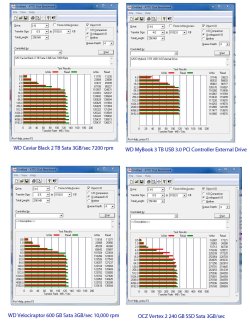
Just for a comparison here are benchies of 4 of my drives -
1) A WD Caviar Black 2 TB Sata 3GB/sec @ 7200 rpm (with 64 MB cache)
2) A WD MyBook 3 TB USB 3.0 PCI controller driven External Drive
3) A WD Velociraptor 600 GB Sata 3GB/sec @ 10,000 rpm
4) An OCZ Vertex 2 240 GB SSD (Sata 3 GB/sec)
Curiously enough the ATTO benchmark shows all 3 of the mechanical disks to have roughly the same performance. The fastest one by far is the OCZ SSD. I think your Caviar Green and Blue may both be 5400 rpm drives ??? but your scores still seem too low - try the free ATTO benchmarker - good luck   | My System Specs | | System Manufacturer/Model Number Alienware Aurora OS Win 7 Ultimate x64 CPU Core I7 980X O.C. to 4.0 Ghz Motherboard Custom Intel mATX (Bios ver A10) Memory 12GB 1600 mhz triple channel DDR3 - Kingston Graphics Card ATI Radeon HD 5970 2GB Video Card Sound Card Creative Labs Titanium sound blaster Monitor(s) Displays 30" Dell LCD Screen Resolution 2560 x 1600 Keyboard Logitech G15 (original version) Mouse Logitech MX1000 Laser - Wireless PSU 850 Watt Case Alienware Aurora Cooling Water Hard Drives 240 GB OCZ Vertex 2 SSD
256 GB Samsung V2 SSD
2TB WD Black Caviar 7200 rpm SATA3
600GB WD Velociraptor 10,000 rpm SATA3
3TB WD MyBook Essential USB 3.0 7200 rpm External Internet Speed Cable 22 Mb/sec download Other Info USB 3.0,
Blue Ray DVD Read/Writer
Bose Companion 3 Speakers
WRT54G Wireless Router |
05 Jan 2011
|
#8 | | |

Quote: Originally Posted by quanzaboy Now of course I realize that the maximum transfer speed is determined by the weakest link (i.e. the slowest hard drive), but this is what I don't understand either, since both my internal drives are SATA II 3Gb/s drives (WD Caviar Blue 500GB and WD Caviar Green 1TB), so that should at the very LEAST give me about 100-150MB/s transfer rates, so how come it's SO SLOW as to give me only 15MB/s average??!  A caviar Blue or Green would likely test in the max sequential realm of about 85-90MB/sec. 
Quote: Originally Posted by quanzaboy After doing the above tests I decided just for the sake of it to try and copy 2 700MB AVI files from one internal drive to the other (source drive is the WD Caviar Green 1TB and destination drive is the WD Caviar Blue 500GB). The results were equally as SHOCKING! Shockingly SLOW that is... It gave me a burst in the first few seconds of about 168MB/s, but then it settled down on about 20MB/s throughout the rest of the file transfer! Yeah, this should be much faster than this. I would expect 60-80MB/sec between the 2 physical drives.
I would check to ensure that WRITE CACHING is enabled on the Caviar Blue. | My System Specs | | System Manufacturer/Model Number Self-Built in July 2009 OS Windows 7 Ultimate x64 CPU Intel Q9550 2.83Ghz OC'd to 3.40Ghz Motherboard Gigabyte GA-EP45-UD3R rev. 1.1, F12 BIOS Memory 8GB G.Skill PI DDR2-800, 4-4-4-12 timings Graphics Card EVGA 1280MB Nvidia GeForce GTX570 Sound Card Realtek ALC899A 8 channel onboard audio Monitor(s) Displays 23" Acer x233H Screen Resolution 1920x1080 Keyboard ABS M1 Mechanical Mouse Logitech G9 Laser Mouse PSU Corsair 620HX modular Case Antec P182 Cooling stock Hard Drives Intel X25-M 80GB Gen 2 SSD
Western Digital 1TB Caviar Black, 32MB cache. WD1001FALS Internet Speed 15/2 cable modem Other Info Windows and Linux enthusiast. Logitech G35 Headset. |
05 Jan 2011
|
#9 | | Vista, Windows7, Mint Mate, Zorin, Windows 8 Florida in winter, Black Forest/Germany |

Quote: Originally Posted by thehappyman Hi Quanzaboy
For whatever its worth I tried using HDTUNE to test my USB 3.0 Drives speed but the program aborts and gives me a "Read Error". Probably because its a 3 TB Drive. So I used the ATTO Benchmark instead which didnt have the same problem.
Just for a comparison here are benchies of 4 of my drives -
1) A WD Caviar Black 2 TB Sata 3GB/sec @ 7200 rpm (with 64 MB cache)
2) A WD MyBook 3 TB USB 3.0 PCI controller driven External Drive
3) A WD Velociraptor 600 GB Sata 3GB/sec @ 10,000 rpm
4) An OCZ Vertex 2 240 GB SSD (Sata 3 GB/sec)
Curiously enough the ATTO benchmark shows all 3 of the mechanical disks to have roughly the same performance. The fastest one by far is the OCZ SSD. I think your Caviar Green and Blue may both be 5400 rpm drives ??? but your scores still seem too low - try the free ATTO benchmarker - good luck   Attachment 129361 The one that is really disappointing is the Raptor. I was about to buy one to put into my USB3 enclosure. But after seeing your data, I think I can save my money and go for a less expensive solution. | My System Specs | | System Manufacturer/Model Number HP, Dell, Gateway, Toshiba - 4 laptops and 2 desktops OS Vista, Windows7, Mint Mate, Zorin, Windows 8 CPU from 1.6GHz Duo to i7 Monitor(s) Displays 2x HP w2207 Keyboard with trackball - no mices Mouse Trackball mice Hard Drives 5x HDD, 7x SSD, 12x Externals Internet Speed DSL 6000 |
05 Jan 2011
|
#10 | | |
Quote: By the way, eSATA is a lot faster than USB3.0 ( which is still very buggy with the NEC chips). I have a 3.0 USB mobo. I don't have any 3.0 devices and i didn't buy the mobo for that. and of course i knew 3.0 would be backwards compatible with USB 2.0 devices, but i never thought about the possibility it might be buggy. Question is, in games my mouse does something it never did before which is a buggy sort of issue. Could this be due to having USB 3.0 on the mobo? | My System Specs | | OS windows 7 pro 64 bit CPU i5 760 Motherboard GIGABYTE GA-P55A-UD3 Memory 4GB G skill DDR3 1600 Graphics Card XFX 5850 Sound Card audigy 2 ZS Monitor(s) Displays samsung 22" 1650x1080 PSU Corsair TX650w Hard Drives Patriot SSD 120GB Inferno
maxtor 300GB IDE storage drive usb 3.0 EXTREMELY slow transfer rates problems? All times are GMT -5. The time now is 02:25 PM. | |