
| Windows 7: To Watercool or not to Watercool... |
08 Jan 2011
|
#1 | | Windows 7 Professional 64bit Saskatchewan, Canada |
To Watercool or not to Watercool... Ok.... Maybe I'm being paranoid but I think my system is running a bit to warm.. If I go to bios it says CPU temp is 41-42C. Desktop temps using CoreTemp it says it's mid 40's idling. When under load I've seen mid 70's. If I've done my research correct my CPU max temp is 67.9C. I wonder sometimes if I should change from my cool looking massive Zalman to the H70 or somethiing like that. Check my system specs and let me know what you guys think. I think I might be losing it here.. | My System Specs |
| System Manufacturer/Model Number Generic Homebuilt OS Windows 7 Professional 64bit CPU Int i7 950 [3.06] O.C @3.36ghz Quad Core (HT) = 7.6 WEI Motherboard ATX LGA1366 DDR3 Asus Rampage III Formula Memory DDR3 6GB/Kit PC3-16000 Patriot @ 1733 mhz = 7.9 WEI Graphics Card NVIDIA GTS450 1GB PCI-E Zotac = 7.2 WEI Sound Card X-Fi 2 Built-in 8-Channel High Definition Monitor(s) Displays K-24 mdwb Screen Resolution 1920 x1200 Keyboard Multimedia USB Logitech Wave Mouse Logitech M500 PSU 600W Coolermaster eXtremePower Plus Case Coolermaster Centurion 590 Cooling Zalman CNPS10X Extreme Hard Drives Crucial C300 2.5" 64GB SATA 3.x MLC Int. SSD. = 7.9 WEI, WD 320 Gig SATA 2.x 16mb Int., SeaGate 500 Gig SATA 1.x 8mb Int., 1.5TB WD SATA 2.x 64MB Green Ext., 1TB WD SATA 2.x 32MB Black Ext., SeaGate 400 Gig IDE Ext. Other Info Windows Experience Index = 7.2 overall |
09 Jan 2011
|
#3 | | Windows 7 Ultimate 64 Southern California |
Zero fault for wanting cool temps and the H50 and H70 are fantastic products along with the Cool-it line as well. But really your temps aren't extreme and maybe you can look at any other case issues you could be having. Let re-visit how your case fans and openings are laid out as well as the make of your current fans. | My System Specs | | System Manufacturer/Model Number A blend of brains, brawn and dumb luck, ask me about rig #2 ! OS Windows 7 Ultimate 64 CPU i7 3770k OC'd 4.6 @ 1.17v, still love my FX 8120 Motherboard MSI P67A-GD80 b3 Memory 16 gb Crucial Ballistix Tracer DDR3 9-9-9-27 @ 2000 Graphics Card XFX Radeon 7870 Sound Card On board HD audio with lossless 24 bit/192 sample rate Monitor(s) Displays (2) LG LED 23" 1920 x 1080 2ms Monitors via mini d-port Screen Resolution 1680 X 1050 p Keyboard (2) Logitech Illuminated Keyboards (1) usb (1) wireless K800 Mouse Logitech G9x & T-BC21 - nano nx for the laptop PSU Ultra X4 modular 1050 watt 80% silver rating & APC 1200 RS Case CoolerMaster Storm Styker Cooling 6 case fans 140mm & 120mm, Thermaltake h2o extreme Hard Drives Samsung 256 gb 830 SSD sata III
(2) 1 tb Hitachi deskmates/sata II
(1) 1 tb WD green/sata II
(2) 2 tb WD My Book/esata
(1) 500 gb Sea. Freeagent/esata
(2) 250 gb Sea. Freeagent go's/usb
(1) WD 2 tb Green 64 sata III
(1) 120 gb OCZ Vertex SS Internet Speed Upgraded from bottom of the barrel to bareable Other Info 4 Noctua case fans + 3 Noctua in p/p on H100 cooler
Integrated hot swap drive bays for 2.5" Drives
(2) Lite-on dvd/cd optical 22X
Integrated fan controller and led on/off
HP Officejet Pro L7680 all-n-one
HP 4 laserjet (the beast)
Hot swappable 3.5" hard drive bay
Belkin Play N600 HD router
Asus USB 3 & sata 6 PCIe card
Vantec IDE to sata adptr./Ultra sata adptr
HP Probook i3 laptop |
09 Jan 2011
|
#4 | | Windows 7 Pro x64 Bit United States |
I agree with linnemeyerhere. | My System Specs | | System Manufacturer/Model Number HP Dv 5215us OS Windows 7 Pro x64 Bit Memory 2 GB DDR 333 Ram Graphics Card ATI 200m Screen Resolution 1280 x 800 |
09 Jan 2011
|
#5 | | |

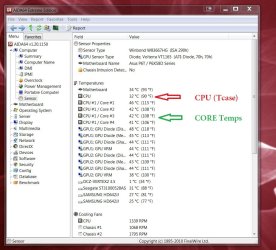
Quote: Originally Posted by Beginning Desktop temps using CoreTemp it says it's mid 40's idling. When under load I've seen mid 70's. If I've done my research correct my CPU max temp is 67.9C. Do not confuse the CPU temp max 67.9C (Tcase) with the individual Core temperatures.
Individual Core temperatures, as reported by apps like Core temp, are always are good 10c+ higher than than the 'overall' CPU (Tcase) temps. Basically, a core temperature that reports higher than the the Tcase (CPU) temp is not a cause for alarm.
Your BIOS shows the CPU temp, Core temp shows the core temperatures.
For example:
The 67.9C temp you should be concerned with is the CPU temp and not the Core Temps.
If your CPU temp is hitting the 70's - then you have a reason to be concerned. | My System Specs | | Computer type PC/Desktop System Manufacturer/Model Number SmartEyeball Custom Systems OS 8 Pro x64 CPU i7 3770K 4.6GHz Motherboard ASUS P8Z77 WS (great board good slot placement) Memory 16GB G.Skill Trident X 2400mhz Graphics Card 2x Gigabyte GTX 670 OC WindForce SLI Sound Card X-FI Forte 7.1 + ATH-AD900 Headphones Monitor(s) Displays x3 Dell U2410 / 58" Samsung / "40 Sony Screen Resolution 1920*1200 / 1920*1080 Keyboard Topre Realforce // Ducky Shine MX Black // Filco Ninja TKL Mouse Razer Imperator + Thermaltake Theron PSU Corsair AX1200W Case Thermaltake Level 10 GT Snow Edition Cooling Noctua NH-D14 Hard Drives 2x Intel 520 240GB (RAID 0) * 2x WD Caviar Blacks 2TB (RAID 0) * 2TB WD Caviar Black Antivirus MSE Browser Opera, Chrome, FF Other Info GT Extreme V2 Sim Racing Cockpit + 40" LCD and K/B Mouse stand ▼
Fanatec CSR Elite Wheel + Clubsport Pedals + CSR shifter/7GS ▼
Buttkicker v2 Seat Rumbler with Dedicated 5.1 and Sub Woofer attached to frame ▼
=
Bloody Big Grin |
09 Jan 2011
|
#6 | | Windows 7 Professional 64bit Saskatchewan, Canada |
Ok... So if I understand this snip right my CPU is running at a nice temperature regardless what the core temps say? | My System Specs | | System Manufacturer/Model Number Generic Homebuilt OS Windows 7 Professional 64bit CPU Int i7 950 [3.06] O.C @3.36ghz Quad Core (HT) = 7.6 WEI Motherboard ATX LGA1366 DDR3 Asus Rampage III Formula Memory DDR3 6GB/Kit PC3-16000 Patriot @ 1733 mhz = 7.9 WEI Graphics Card NVIDIA GTS450 1GB PCI-E Zotac = 7.2 WEI Sound Card X-Fi 2 Built-in 8-Channel High Definition Monitor(s) Displays K-24 mdwb Screen Resolution 1920 x1200 Keyboard Multimedia USB Logitech Wave Mouse Logitech M500 PSU 600W Coolermaster eXtremePower Plus Case Coolermaster Centurion 590 Cooling Zalman CNPS10X Extreme Hard Drives Crucial C300 2.5" 64GB SATA 3.x MLC Int. SSD. = 7.9 WEI, WD 320 Gig SATA 2.x 16mb Int., SeaGate 500 Gig SATA 1.x 8mb Int., 1.5TB WD SATA 2.x 64MB Green Ext., 1TB WD SATA 2.x 32MB Black Ext., SeaGate 400 Gig IDE Ext. Other Info Windows Experience Index = 7.2 overall |
09 Jan 2011
|
#7 | | |
Yes.
Although (disregarding core 1) the other three cores suggest an uneven thermal spread / cooler tension issue.
It is normal for for core 1 to be higher than others, but the other three (unless under load at the moment of that screen shot) point towards an element of unevenness. Under proper idle conditions, they should be closer to the core 4 reading.
The mobo sensor suggests a decent ambient case temp. Core 2,3 should be more in line with core 4 - But - even if left alone, everything is still within 'safe and comfy' specs.
(Core 1 is invariably hotter, since by default it does 'more work' than the rest'.)
From that screenie, your chip is not in danger at all - however it does tend to indicate that:
A) the thermal paste is not evenly spread - or -
B) The cooler mounts are unevenly tensioned.
Core 2,3,4 should generally be a lot closer temp wise together than they currently are.
I assume this at stock voltage / no overclocking and did you build this rig yourself?
Watercooling is not necessary from those temps at all. | My System Specs | | Computer type PC/Desktop System Manufacturer/Model Number SmartEyeball Custom Systems OS 8 Pro x64 CPU i7 3770K 4.6GHz Motherboard ASUS P8Z77 WS (great board good slot placement) Memory 16GB G.Skill Trident X 2400mhz Graphics Card 2x Gigabyte GTX 670 OC WindForce SLI Sound Card X-FI Forte 7.1 + ATH-AD900 Headphones Monitor(s) Displays x3 Dell U2410 / 58" Samsung / "40 Sony Screen Resolution 1920*1200 / 1920*1080 Keyboard Topre Realforce // Ducky Shine MX Black // Filco Ninja TKL Mouse Razer Imperator + Thermaltake Theron PSU Corsair AX1200W Case Thermaltake Level 10 GT Snow Edition Cooling Noctua NH-D14 Hard Drives 2x Intel 520 240GB (RAID 0) * 2x WD Caviar Blacks 2TB (RAID 0) * 2TB WD Caviar Black Antivirus MSE Browser Opera, Chrome, FF Other Info GT Extreme V2 Sim Racing Cockpit + 40" LCD and K/B Mouse stand ▼
Fanatec CSR Elite Wheel + Clubsport Pedals + CSR shifter/7GS ▼
Buttkicker v2 Seat Rumbler with Dedicated 5.1 and Sub Woofer attached to frame ▼
=
Bloody Big Grin |
09 Jan 2011
|
#8 | | Windows 7 Professional 64bit Saskatchewan, Canada |
Ok... here is a little update. Those other CPU temps I was chatting about yesterday... Lets disregard those, I was playing around 'CPU Level Up' In my bios in Extreme Tweaker. I had the think running @ 3.70Ghz..
Now today I set the 'CPU Level Up' back to auto so now we are running @ 3.06Ghz. I'm only OC'ing the ram, can set it to 2133Mhz. It seems to run that speed with no hiccups. I left it idling for about 3 hours. When I check the CPU temp in Bios it reads 31.5C.. I guess this is good as the updated snip of AIDA64 tells me it's about the same..
As for the core temps to be out of order. I'll have a go at replacing the paste under the cooler some time shortly and see what we come up with. And yes I built it myself. | My System Specs | | System Manufacturer/Model Number Generic Homebuilt OS Windows 7 Professional 64bit CPU Int i7 950 [3.06] O.C @3.36ghz Quad Core (HT) = 7.6 WEI Motherboard ATX LGA1366 DDR3 Asus Rampage III Formula Memory DDR3 6GB/Kit PC3-16000 Patriot @ 1733 mhz = 7.9 WEI Graphics Card NVIDIA GTS450 1GB PCI-E Zotac = 7.2 WEI Sound Card X-Fi 2 Built-in 8-Channel High Definition Monitor(s) Displays K-24 mdwb Screen Resolution 1920 x1200 Keyboard Multimedia USB Logitech Wave Mouse Logitech M500 PSU 600W Coolermaster eXtremePower Plus Case Coolermaster Centurion 590 Cooling Zalman CNPS10X Extreme Hard Drives Crucial C300 2.5" 64GB SATA 3.x MLC Int. SSD. = 7.9 WEI, WD 320 Gig SATA 2.x 16mb Int., SeaGate 500 Gig SATA 1.x 8mb Int., 1.5TB WD SATA 2.x 64MB Green Ext., 1TB WD SATA 2.x 32MB Black Ext., SeaGate 400 Gig IDE Ext. Other Info Windows Experience Index = 7.2 overall |
09 Jan 2011
|
#9 | | |

Quote: Originally Posted by Beginning Ok.... Maybe I'm being paranoid but I think my system is running a bit to warm.. If I go to bios it says CPU temp is 41-42C. Desktop temps using CoreTemp it says it's mid 40's idling. When under load I've seen mid 70's. If I've done my research correct my CPU max temp is 67.9C. I wonder sometimes if I should change from my cool looking massive Zalman to the H70 or somethiing like that. Check my system specs and let me know what you guys think. I think I might be losing it here.. Actually the Intel stated Tcase temperature is 67.9C. The Tcase temperature is measured at the center of the heatspreader with a thermistor. The core temperatures will generally be significantly higher than TCase.
My research is showing that the tjMaxx is around 100C for all i7 variants. So, mid 70's under load is no problem whatsoever.
Edit: Sorry, for some reason I didn't see the last 3 posts when I put this up. My scroll apparently wasn't scrolling. Others have covered the Tcase issue with you and the fact that the number you are seeing and what Intel lists on their site might be a big deceiving. | My System Specs | | System Manufacturer/Model Number Self-Built in July 2009 OS Windows 7 Ultimate x64 CPU Intel Q9550 2.83Ghz OC'd to 3.40Ghz Motherboard Gigabyte GA-EP45-UD3R rev. 1.1, F12 BIOS Memory 8GB G.Skill PI DDR2-800, 4-4-4-12 timings Graphics Card EVGA 1280MB Nvidia GeForce GTX570 Sound Card Realtek ALC899A 8 channel onboard audio Monitor(s) Displays 23" Acer x233H Screen Resolution 1920x1080 Keyboard ABS M1 Mechanical Mouse Logitech G9 Laser Mouse PSU Corsair 620HX modular Case Antec P182 Cooling stock Hard Drives Intel X25-M 80GB Gen 2 SSD
Western Digital 1TB Caviar Black, 32MB cache. WD1001FALS Internet Speed 15/2 cable modem Other Info Windows and Linux enthusiast. Logitech G35 Headset. |
09 Jan 2011
|
#10 | | Windows 7 Ultimate 64 Southern California |
Beginning, Good for you. I would for sure though pull the heatsink off and redo the thermal paste if for no other reason than to make sure you got good coverage the first time. If you didn't and need help with it just let us know ! | My System Specs | | System Manufacturer/Model Number A blend of brains, brawn and dumb luck, ask me about rig #2 ! OS Windows 7 Ultimate 64 CPU i7 3770k OC'd 4.6 @ 1.17v, still love my FX 8120 Motherboard MSI P67A-GD80 b3 Memory 16 gb Crucial Ballistix Tracer DDR3 9-9-9-27 @ 2000 Graphics Card XFX Radeon 7870 Sound Card On board HD audio with lossless 24 bit/192 sample rate Monitor(s) Displays (2) LG LED 23" 1920 x 1080 2ms Monitors via mini d-port Screen Resolution 1680 X 1050 p Keyboard (2) Logitech Illuminated Keyboards (1) usb (1) wireless K800 Mouse Logitech G9x & T-BC21 - nano nx for the laptop PSU Ultra X4 modular 1050 watt 80% silver rating & APC 1200 RS Case CoolerMaster Storm Styker Cooling 6 case fans 140mm & 120mm, Thermaltake h2o extreme Hard Drives Samsung 256 gb 830 SSD sata III
(2) 1 tb Hitachi deskmates/sata II
(1) 1 tb WD green/sata II
(2) 2 tb WD My Book/esata
(1) 500 gb Sea. Freeagent/esata
(2) 250 gb Sea. Freeagent go's/usb
(1) WD 2 tb Green 64 sata III
(1) 120 gb OCZ Vertex SS Internet Speed Upgraded from bottom of the barrel to bareable Other Info 4 Noctua case fans + 3 Noctua in p/p on H100 cooler
Integrated hot swap drive bays for 2.5" Drives
(2) Lite-on dvd/cd optical 22X
Integrated fan controller and led on/off
HP Officejet Pro L7680 all-n-one
HP 4 laserjet (the beast)
Hot swappable 3.5" hard drive bay
Belkin Play N600 HD router
Asus USB 3 & sata 6 PCIe card
Vantec IDE to sata adptr./Ultra sata adptr
HP Probook i3 laptop To Watercool or not to Watercool... problems? All times are GMT -5. The time now is 02:08 AM. | |