Windows 7 Forums


Windows 7: Not showing CPU FSB speed

26 Jan 2011   #1

Win 7 32 bit
 
 
Not showing CPU FSB speed

I have ASUS P5B-MX Motherboard, Intel 946GZ Chipset. Intel Core 2 Duo E7200, 1066 MHz FSB bus. DDR2 SD RAM compatible (2 Banks/slots).

Recently i changed my RAM from 1 GB DDR2 RAM to 2 GB DDR2 RAM in a single slot.
Previously in Windows 7 it used to show
Processor : Intel Core 2 Duo CPU E7200 @2.53 MHz 3.6 Mhz.
but now it is showing it as
Processor : Intel Core 2 Duo CPU E7200 @2.53 Mhz 2.53 Mhz.

I suppose it is not showing the additional FSB 1066 Mhz speed.

Please help!!!

My System SpecsSystem Spec

26 Jan 2011   #2

Microsoft Windows 7 Ultimate x64 (Build 7601 SP1)
Bulgaria, Europe


Download CPU-Z and see what it tells you. When you launch it, click on "Clocks (Core #0)" to change which core it shows.
My System SpecsSystem Spec
13 Feb 2011   #3

Win 7 32 bit
 
 
Not Showing CPU FSB Speed

Thanks for your help. I will download it and check the exact specifications.

Meanwhile, i have also checked the settings in my BIOS. it shows same.
Intel Core 2 Duo E7200 2.53 Mhz 2.53 Mhz.

I think it should show 3.66 Mhz. So it is not only a Windows 7 problem.

What may be the issue?
My System SpecsSystem Spec
.


13 Feb 2011   #4

Win 7 32 bit
 
 
CPU-Z report of my computer system

Intel Core 2 Duo E7200
CPU Arch : 1 CPU - 2 Cores - 2 Threads
CPU PSN : Intel Core2 Duo CPU E7200 @ 2.53GHz
CPU EXT : MMX, SSE (1, 2, 3, 3S, 4.1), EM64T
CPUID : 6.7.6 / Extended : 6.17
CPU Cache : L1 : 2 x 32 / 2 x 32 KB - L2 : 3072 KB
Core : Wolfdale (45 nm) / Stepping : M0

Freq : 1600.1 MHz (266.68 * 6)


MB Brand : Asus
MB Model : P5N-MX
NB : NVIDIA GeForce 7050 rev A2
SB : NVIDIA nForce 610i rev A2

GPU Type : NVIDIA GeForce 7050 / NVIDIA nForce 610i (Microsoft Corporation - WDDM)
DirectX Version : 11.0


RAM : 2048 MB DDR2 Single Channel
RAM Speed : 400 MHz (2:3) @ 5-4-4-17
Slot 1 : 2048MB (6400)
Slot 1 Manufacturer : Noname
My System SpecsSystem Spec
13 Feb 2011   #5

Windows 7 ultimate 64 bit / XP Home sp3
Gulf Coast Texas


Sounds as if your board is reporting your CPU's rated speed. 3.66 Would be overclocked and it would only show that if the settings were not set at default. CPU-Z will also only report the 2.53 in most cases unless the CPU is under full load unless you have the Thermal throttling turned off in the bios.

CPU-z is reporting your ram at 800Mhz speed you will have to change the timings and possibly the voltage to get it to run at 1066 if the board supports that speed ram.
Fabe
My System SpecsSystem Spec
13 Feb 2011   #6

Win 7 32 bit
 
 
Not Showing CPU FSB Speed

Where am i supposed to load the default settings? In the BIOS ?

or should i update using ASUS EZ Flash 2 software....will it work?
My System SpecsSystem Spec
13 Feb 2011   #7

Win 7 32 bit


What should be the exact timing and voltage settings to run it at 1066 Mhz ?
My System SpecsSystem Spec
13 Feb 2011   #8

Windows 7 ultimate 64 bit / XP Home sp3
Gulf Coast Texas


Quote   Quote: Originally Posted by mihir View Post
What should be the exact timing and voltage settings to run it at 1066 Mhz ?
For that I suggest you check with the manufaturers web site or site's specifically for overlcoking boards to get the proper timings as they all differ.
Providing your board says it can run your Ram at 1066 speeds.
Go to your boards site a nd download the manual and look at what is the QVL list (Qualified Vendors List) for what Ram to use.
Fabe
My System SpecsSystem Spec
13 Feb 2011   #9

Win 7 Ultimate x64
Etobicoke, Ontario


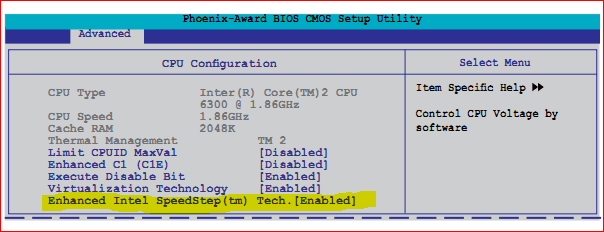
One word, Speedstep,

Not showing CPU FSB speed-speedstep.png

SpeedStep - Wikipedia, the free encyclopedia

which is enabled by default in the bios on your motherboard according to the manual.

Quote:
Providing your board says it can run your Ram at 1066 speeds.
It doesn't,

ASUSTeK Computer Inc. - Motherboards - ASUS P5N-MX

Quote:
2 x DIMM, Max. 4 GB, DDR2 800/667/533 Non-ECC,Un-buffered Memory
*800 is overclocking speed
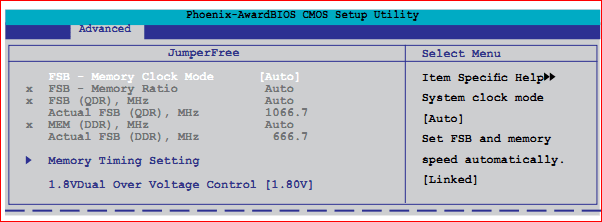
It only supports up to 667 MHz ram, and has to be "overclocked" to run at 800 MHz. If you don't have the manual download it from the Asus link above and go to page 2-21 and it explains the settings and what needs to be changes to get the ram to run at a higher frequency,

Not showing CPU FSB speed-memspeed1.png
My System SpecsSystem Spec
13 Feb 2011   #10

Windows 7 Home Premium 64 bit
Oklahoma


I have a question, if he's only running one 2ghz stick of ram that means it's running in single channel, which means it probably won't run at 1066 am i thinking wrong
My System SpecsSystem Spec
Reply

 Not showing CPU FSB speed problems?


Thread Tools


Similar help and support threads for: Not showing CPU FSB speed
Thread Forum
Solved Speed test gives vey good speed but down speed is just 2-3 kb Network & Sharing
Wireless Router Speed Connection VS Actual Internet Service Speed Network & Sharing
all CPU meter showing lower clock speed? Hardware & Devices
DDR3 RAM not showing correct speed Hardware & Devices
Windows 7 showing wrong CPU speed. Performance & Maintenance


All times are GMT -5. The time now is 04:46 AM.


Seven Forums Android App Seven Forums IOS App Follow us on Facebook

Windows 7 Forums is an independent web site and has not been authorized,
sponsored, or otherwise approved by Microsoft Corporation.
"Windows 7" and related materials are trademarks of Microsoft Corp.
© Designer Media Ltd
  

1 2 3 4 5 6 7 8 9 10 11 12 13 14 15 16 17 18 19 20 21 22 23 24 25 26 27 28 29 30 31 32