
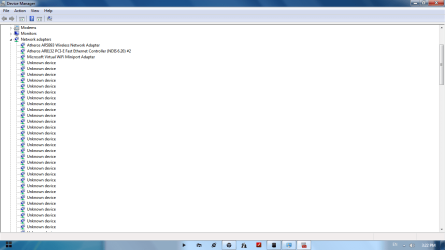
When i Went through my device manager i notices that there is about 150 unknown devices in network adapters list i slows my computer so much
when i check out the details the hardware id was found to be eset_epfwndismp
So i thought it is becos of eset firewall security so i removed eset and check out wht hpned bt no way i still find those unknown devices still now
i searched for registry to check weather eset is fully removed or is there any reg file left ova thre i noticed
HKEY_LOCAL_MACHINE\SYSTEM\ControlSet001\Enum\Root\ESET_EPFWNDISMP
is stil thre.. and i try to delete the key and i am unable to delete i tried with changing permission alsooo
I am using windows 7 home premium 64bit
RAM 4gb
Hard disk 320
dual core processr 2.2 GHz, 800 MHz FSB
Thank you in advanced
when i check out the details the hardware id was found to be eset_epfwndismp
So i thought it is becos of eset firewall security so i removed eset and check out wht hpned bt no way i still find those unknown devices still now
i searched for registry to check weather eset is fully removed or is there any reg file left ova thre i noticed
HKEY_LOCAL_MACHINE\SYSTEM\ControlSet001\Enum\Root\ESET_EPFWNDISMP
is stil thre.. and i try to delete the key and i am unable to delete i tried with changing permission alsooo
I am using windows 7 home premium 64bit
RAM 4gb
Hard disk 320
dual core processr 2.2 GHz, 800 MHz FSB
Thank you in advanced
Attachments


My Computer
At a glance
Windows 7 Home Premium 64 bit
- OS
- Windows 7 Home Premium 64 bit


 rb: and typing regedit.exe into the search box. Next, either right click on the program and click Run as administrator or simply press Ctrl + Shift + Enter/Return. Provide administrative credentials when prompted. This is because the key in question is in the HKLM branch, and to modify the contents of this area of the registry it needs to invoked with administrative privileges.