CD/DVD player will not automatically load programs

quicksun

New member
Hi,
I have a problem trying to automatically load software when I put it in my CD player. I can open the files on the CD after I put the CD into the CD player, but my computer stopped automatically running the install program when I try to install new programs. I have a Repair Disk that I would like to run to fix this problem, but I can't start it up to repair the files. Also, there is no "Setup" file when I look at the files on the Repair Disk. Any suggestion as to how to get around this problem?
Thanks,
quicksun
 

My Computer

Computer Manufacturer/Model Number
ASUS
OS
Windows 7 Home Premium 64 bit
CPU
Intel i5 CPU [email protected]
Motherboard
CG5275
Memory
8GB
Graphics Card(s)
None
Sound Card
None
Monitor(s) Displays
HP w2408h
Hard Drives
750GB, 1TB
PSU
600 Watt
Cooling
5" fan
Hello quicksun and welcome to SF!

Go to Start/Control Panel/AutoPlay

This will pop up a whole slue of choices regarding the AutoPlay feature.

Hope this helps!
 

My Computer

Computer Manufacturer/Model Number
OEM - Me
OS
Windows 7 Home Premium x64
CPU
AMD Phenom II X6 1600T
Motherboard
GigaByte GZ-990FXA-UD3
Memory
16GB PC3-10700 (1342MHz)
Graphics Card(s)
ATI Radeon 5770 HD (x2) CrossFire
Sound Card
On-board RealTek chipset
Monitor(s) Displays
3x Hanns-G 1920x1080 Monitors
Screen Resolution
3x Hanns-G 1920x1080 Monitors
Hard Drives
Intel 25-V SSD 40GB: 218 MB/s AT: 0.1ms
Intel X-25M SSD 80GB: 230MB/s AT: 0.1ms
Seagate 750GB: 133 MB/s AT: 13ms (perpendicular storage)
Buffalo HD-PCTU3 1TB External drive
PSU
OCZ Stealth X Stream 750W
Case
Cheap (unknown)
Cooling
Stock
Keyboard
HP USB
Mouse
LogiTech USB
Internet Speed
1.5 Mbps - Slow - At the tail-end of a rural network
Other Info
Printer: Epson Stylus C-84
Scanner: HP 3500C Flatbed
DVD-RW: Plextor
DVD-ROM: Unknown
WEI: 7.4
Hi,

As well as the advice above I'd recommend the following...

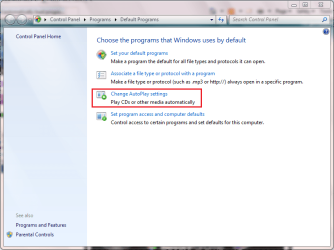
Click Start then 'Default Programs'
Capture.PNG

Click 'Change AutoPlay Settings'
Capture1.PNG

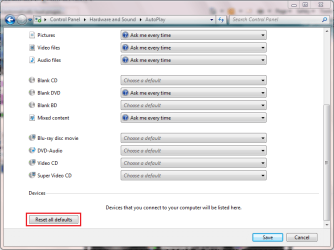
Scroll down to the bottom of the page & click 'Reset all defaults'
2.PNG

Now, insert your disk and you should have your options back, including the option to select a default action.


Hope it helps :)
 

My Computer

Computer Manufacturer/Model Number
Compaq Desktop
OS
Windows 7 Ultimate x64
CPU
AMD Sempron Dual Core
Memory
3GB
Graphics Card(s)
NVIDIA GeForce 6150SE nForce 430
Screen Resolution
1024x768
Hard Drives
150GB Sata
Thanks rep33042 and Orbital Shark. I did as you suggested and it solved my problem.
 

My Computer

Computer Manufacturer/Model Number
ASUS
OS
Windows 7 Home Premium 64 bit
CPU
Intel i5 CPU [email protected]
Motherboard
CG5275
Memory
8GB
Graphics Card(s)
None
Sound Card
None
Monitor(s) Displays
HP w2408h
Hard Drives
750GB, 1TB
PSU
600 Watt
Cooling
5" fan
High Five Orbital Shark! :D

Happy it worked for you quicksun!
 

My Computer

Computer Manufacturer/Model Number
OEM - Me
OS
Windows 7 Home Premium x64
CPU
AMD Phenom II X6 1600T
Motherboard
GigaByte GZ-990FXA-UD3
Memory
16GB PC3-10700 (1342MHz)
Graphics Card(s)
ATI Radeon 5770 HD (x2) CrossFire
Sound Card
On-board RealTek chipset
Monitor(s) Displays
3x Hanns-G 1920x1080 Monitors
Screen Resolution
3x Hanns-G 1920x1080 Monitors
Hard Drives
Intel 25-V SSD 40GB: 218 MB/s AT: 0.1ms
Intel X-25M SSD 80GB: 230MB/s AT: 0.1ms
Seagate 750GB: 133 MB/s AT: 13ms (perpendicular storage)
Buffalo HD-PCTU3 1TB External drive
PSU
OCZ Stealth X Stream 750W
Case
Cheap (unknown)
Cooling
Stock
Keyboard
HP USB
Mouse
LogiTech USB
Internet Speed
1.5 Mbps - Slow - At the tail-end of a rural network
Other Info
Printer: Epson Stylus C-84
Scanner: HP 3500C Flatbed
DVD-RW: Plextor
DVD-ROM: Unknown
WEI: 7.4
Back
Top