| Windows 7: Gygabite mobo question |
11 Feb 2011
|
#1 | | Window 7 Professional 64bit Roseville, MI USA |
Gygabite mobo question Looking for someone familiar with Gygabite mobo's. I am having some minor issues and have a question in reguards to my mb and my ssd. The motherboard model is in my profile, I can add it to the post when I am on a oc later. Using the latest available bios and drivers for it. Bios v F7I (beta) issued 8/30/2010. I can not find an ahci option anywhere in the bios settings. Am I just overlooking something, manufacturer says it's supported. Running the OCZ Agility 2 120G ssd with the latest fw v 1.27. Also, for everyday use and some slightly morw than casual gaming, is ahci really going to make that big of a difference? | My System Specs |
| System Manufacturer/Model Number custom OS Window 7 Professional 64bit CPU AMD Athlon 64 X2 4600+ Windsor 2.4GHz 2 x 512KB L2 Cache Soc Motherboard GIGABYTE GA-M61P-S3 AM2 NVIDIA GeForce 6100 / nForce 430 ATX Memory 8G G.Skill gaming ram ( 2G x 4 chips) Graphics Card Zotac NVidia GeForce 9500 GT 1.0G DDR3 Sound Card on-board from motherboard Monitor(s) Displays Acer AL2216W (22" widescreen lcd) Screen Resolution 1680x1050 Keyboard Razer Blackwidow (mechanical gaming keyboard) Mouse Razer Mamba (hybrid wired/wireless) Razer Naga (for gaming) Case PowerSpec Hard Drives OCZ Agility 2 120G (primary OS and software)
WDC WD4000AAKS (400G HDD)
WDC WD800JB (80G media storage)
WDC MyWorld Book (1.0T external network storage) Internet Speed Comcast broadband with powerboost, 16.83 Mbps/2.86 Mbps |
11 Feb 2011
|
#2 | | Windows 7 SP1, Home Premium, 64-bit |
No, it won't make much difference.
Look in your BIOS under integrated peripherals and then look for something like PCH SATA control.
I think it is best changed before you install an OS, but I think you can work around it--maybe with a registry edit? I changed mine to AHCI when I recently rebuilt.
It seems to add time to the boot cycle. | My System Specs | | System Manufacturer/Model Number Ignatz Special; 4 speed manual gearbox; factory air conditioning; one of one OS Windows 7 SP1, Home Premium, 64-bit CPU Intel Sandy Bridge i5-2500, not overclocked Motherboard Gigabyte H67A-UD3H-B3, full ATX Memory 4 GB Crucial DDR3-1333 Graphics Card none; graphics are integrated on CPU Sound Card onboard: Realtek ALC892; external: USB Behringer UF0-202 Monitor(s) Displays NEC 90GX2-BK 19" LCD Screen Resolution 800 x 640 Keyboard Leopold Tenkeyless with Cherry Blue switches, USB Mouse Logitech or Microsoft optical wired; either USB or PS 2 PSU Seasonic SS-560KM, modular Case Antec Solo II Cooling CPU: Scythe Big Shuriken; Case: Scythe Slipstream 800 & 500 Hard Drives System: Intel 320 Series SSD, 80 GB;
Data: Samsung Spinpoint 103SJ, 1 TB;
Backup: WD Caviar Green WD15EADS-00P8B0, 1.5TB Other Info Power consumption of this system, including monitor: 68 watts at idle; 144 watts at full load |
11 Feb 2011
|
#3 | | Windows 7 Ultimate SP1 (x64) South Australia |
Hi,
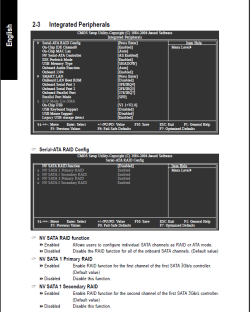
It would appear that your motherboard unfortunately does not support AHCI mode (I don't see it in the BIOS option). See the BIOS section of the manual linked here (and attached screen capture): GIGABYTE - Motherboard - Socket AM2 - GA-M61P-S3 (rev. 1.0)
I don't think you will see a significant downgrade in performance using the IDE controller, based on your description of the PC usage. I wouldn't be overly concerned about SSD performance.
Regards,
Golden | My System Specs | | Computer type PC/Desktop System Manufacturer/Model Number Golden Mk. I.3 OS Windows 7 Ultimate SP1 (x64) CPU Intel i7 860 @ 2.80 GHz Motherboard Gigabyte P55A-UD3R Rev.1. Award BIOS F13 Memory 16GB Corsair Vengance DDR3 @ 661 MHz Dual Channel (9-9-9-24) Graphics Card EVGA NVidia GTX 560 1024MB Sound Card Realtek Integrated Monitor(s) Displays Dual Samsung SyncMaster 2494HS Screen Resolution 1920*1080 and 1920*1080 Keyboard Logitech G110 Mouse Logitech MX518 PSU Thermaltake ToughPower QFan 750W Case Thermaltake Element S VK60001W2Z Cooling Corsair H60 Water Cooling, 2*230mm and 2*80mm case fans Hard Drives 1*OCZ Vertex 2 60GB SSD;
2*Samsung F3 SpinPoint 1TB in RAID0;
3*Samsung F1 SpinPoint 1TB in RAID5;
1*Western Digital 500GB External USB 3.0
1*Seagate 500GB External USB 2.0 Internet Speed Not fast enough!!! Antivirus MSE and Malwarebytes Pro Browser Chrome Version 25 Other Info Laptop: ASUS X54C, Intel Core i3-2330M @ 2.0Ghz, 4GB RAM, Intel HD on-board graphics, Windows 7 Professional SP1 (x64), LinuxMint 14 (x64), PepperMint 3 (x86) |
11 Feb 2011
|
#4 | | |
If you are using an SSD it can make a big difference. IDE mode does not support TRIM. AHCI does.
Unfortunately, from your Motherboard manual under limitations (and elsewhere):
"Does not support RAID/AHCI (class code 0104/0106) hard disks." | My System Specs | | Computer type PC/Desktop System Manufacturer/Model Number Home built (GeneO industries)/Model 3 OS Windows 7 64 bit SP1 CPU i5 2500k @ 4.5 GHz, 1.264V 124 GFlop (IBT with AVX) Motherboard ASUS P8Z68-V PRO/GEN3 Memory 16GB (4GBx4) 1600MHz G.skill Ripjaws X 8-8-8-24 Graphics Card MSI GTX 660 Ti PE/OC, 2GB 7160 MHz DDR5 clock, 1228 Mhz Core Sound Card Onboard Realtek HD Monitor(s) Displays NEC Spectraview 2490WUXi-SV Screen Resolution 1920 x 1200 Keyboard HP Wireless Mouse HP wireless PSU Seasonic X-850 (2012 KM3 model) Case Fractal Design "Define R3" Cooling CM TPC 812 push/pull, 3 120mm, 2 TY-140 case fans Hard Drives Samsung 128GB 840 Pro SSD (System), Crucial 128GB M4 SSD, 2x WD Caviar 1TB Black internal (data), 1x WD Blue 6Gb/s 1TB Internal, 1x 2TB eSata WD20EARS Green, 2x 500GB Seagate external USB, 1x 350GB exte Internet Speed 27.8 Mb/s down, 5.6 Mb/s up Other Info USB 3.0 x4 , SATA III x4, eSATA x3, SATA II x4, USB 2.0 x8. 2 Samsung DVD R/W drives.
WEI: CPU 7.7, Memory 7.8, Graphics 7.9, Disk 7.9 |
11 Feb 2011
|
#5 | | Windows 7 Ultimate SP1 (x64) South Australia |
Thanks Gene, I didn't know that. | My System Specs | | Computer type PC/Desktop System Manufacturer/Model Number Golden Mk. I.3 OS Windows 7 Ultimate SP1 (x64) CPU Intel i7 860 @ 2.80 GHz Motherboard Gigabyte P55A-UD3R Rev.1. Award BIOS F13 Memory 16GB Corsair Vengance DDR3 @ 661 MHz Dual Channel (9-9-9-24) Graphics Card EVGA NVidia GTX 560 1024MB Sound Card Realtek Integrated Monitor(s) Displays Dual Samsung SyncMaster 2494HS Screen Resolution 1920*1080 and 1920*1080 Keyboard Logitech G110 Mouse Logitech MX518 PSU Thermaltake ToughPower QFan 750W Case Thermaltake Element S VK60001W2Z Cooling Corsair H60 Water Cooling, 2*230mm and 2*80mm case fans Hard Drives 1*OCZ Vertex 2 60GB SSD;
2*Samsung F3 SpinPoint 1TB in RAID0;
3*Samsung F1 SpinPoint 1TB in RAID5;
1*Western Digital 500GB External USB 3.0
1*Seagate 500GB External USB 2.0 Internet Speed Not fast enough!!! Antivirus MSE and Malwarebytes Pro Browser Chrome Version 25 Other Info Laptop: ASUS X54C, Intel Core i3-2330M @ 2.0Ghz, 4GB RAM, Intel HD on-board graphics, Windows 7 Professional SP1 (x64), LinuxMint 14 (x64), PepperMint 3 (x86) |
11 Feb 2011
|
#6 | | |
Welcome!
Or at least that is what I had read (not owning an SSD yet). | My System Specs | | Computer type PC/Desktop System Manufacturer/Model Number Home built (GeneO industries)/Model 3 OS Windows 7 64 bit SP1 CPU i5 2500k @ 4.5 GHz, 1.264V 124 GFlop (IBT with AVX) Motherboard ASUS P8Z68-V PRO/GEN3 Memory 16GB (4GBx4) 1600MHz G.skill Ripjaws X 8-8-8-24 Graphics Card MSI GTX 660 Ti PE/OC, 2GB 7160 MHz DDR5 clock, 1228 Mhz Core Sound Card Onboard Realtek HD Monitor(s) Displays NEC Spectraview 2490WUXi-SV Screen Resolution 1920 x 1200 Keyboard HP Wireless Mouse HP wireless PSU Seasonic X-850 (2012 KM3 model) Case Fractal Design "Define R3" Cooling CM TPC 812 push/pull, 3 120mm, 2 TY-140 case fans Hard Drives Samsung 128GB 840 Pro SSD (System), Crucial 128GB M4 SSD, 2x WD Caviar 1TB Black internal (data), 1x WD Blue 6Gb/s 1TB Internal, 1x 2TB eSata WD20EARS Green, 2x 500GB Seagate external USB, 1x 350GB exte Internet Speed 27.8 Mb/s down, 5.6 Mb/s up Other Info USB 3.0 x4 , SATA III x4, eSATA x3, SATA II x4, USB 2.0 x8. 2 Samsung DVD R/W drives.
WEI: CPU 7.7, Memory 7.8, Graphics 7.9, Disk 7.9 |
11 Feb 2011
|
#7 | | Window 7 Professional 64bit Roseville, MI USA |
it supports raid and that is and i read in the gygabite forums that it is suppose to support achi, not overly concerned as i have been told that achi is only really needed for hot swapping and a few other "advanced" features i do not use. As for as the mb and chipset go, i am currently looking into replacing them in the next month or so. Want a newer and faster mb and processor...i have 2 mobo's in mind at this point and and amd am3 quad core black edition pcu | My System Specs | | System Manufacturer/Model Number custom OS Window 7 Professional 64bit CPU AMD Athlon 64 X2 4600+ Windsor 2.4GHz 2 x 512KB L2 Cache Soc Motherboard GIGABYTE GA-M61P-S3 AM2 NVIDIA GeForce 6100 / nForce 430 ATX Memory 8G G.Skill gaming ram ( 2G x 4 chips) Graphics Card Zotac NVidia GeForce 9500 GT 1.0G DDR3 Sound Card on-board from motherboard Monitor(s) Displays Acer AL2216W (22" widescreen lcd) Screen Resolution 1680x1050 Keyboard Razer Blackwidow (mechanical gaming keyboard) Mouse Razer Mamba (hybrid wired/wireless) Razer Naga (for gaming) Case PowerSpec Hard Drives OCZ Agility 2 120G (primary OS and software)
WDC WD4000AAKS (400G HDD)
WDC WD800JB (80G media storage)
WDC MyWorld Book (1.0T external network storage) Internet Speed Comcast broadband with powerboost, 16.83 Mbps/2.86 Mbps Gygabite mobo question problems? All times are GMT -5. The time now is 07:21 AM. | |