| Windows 7: DVD Optical Drive Not Recognized in Windows or BIOS |
15 Feb 2011
|
#1 | | Windows 7 Professional x64 |
DVD Optical Drive Not Recognized in Windows or BIOS I noticed that sometime after I installed windows 7 that my dvd optical drive was not showing up. I have done a lot of research on the matter and have yet to find a working solution. I checked my BIOS and the drive is not listed there, but I'm pretty sure it is properly connected. I have an HP Pavillion dv6000, so the drive just plugs into the slot directed connected to the motherboard, and can be removed by unscrewing a single screw. When the laptop is on I am able to open the drive, and it lights up, so I know it is getting power... I have tried everything under the sun to fix the problem - checking/cleaning the connection port, deleting the upperfilters value from the registry (which many people have said worked for them, however for me it only gave me an warning message in itunes telling me the registry files for burning/importing cd's was missing), reinstalling gear drivers, and running the microsoft fixit programs (they just tell me they can't find the drive or that it isn't there - thanks microsoft...). Nothing has worked, and it's driving me crazy not being able to use my dvd drive. Has anyone had this problem to the same degree as me?/found a solution to it? | My System Specs |
| OS Windows 7 Professional x64 |
15 Feb 2011
|
#2 | | Vista, Windows7, Mint Mate, Zorin, Windows 8 Florida in winter, Black Forest/Germany |
Of the BIOS cannot see it, no software fix will help including other drivers. It is probably a connection problem. If the disk works, then the mobo controller is OK because the optical drive uses the same controller in the chipset. | My System Specs | | System Manufacturer/Model Number HP, Dell, Gateway, Toshiba - 4 laptops and 2 desktops OS Vista, Windows7, Mint Mate, Zorin, Windows 8 CPU from 1.6GHz Duo to i7 Monitor(s) Displays 2x HP w2207 Keyboard with trackball - no mices Mouse Trackball mice Hard Drives 5x HDD, 7x SSD, 12x Externals Internet Speed DSL 6000 |
15 Feb 2011
|
#3 | | Windows 7 Professional x64 |
I don't understand where the connection issue would be though since the drive just plugs in...any thoughts? This would make sense though because on rare occasions I will notice the optical drive pop up for a short time in the "computer" window. | My System Specs | | OS Windows 7 Professional x64 |
15 Feb 2011
|
#4 | | Vista, Windows7, Mint Mate, Zorin, Windows 8 Florida in winter, Black Forest/Germany |
Could be anything - e.g. a bent pin or a loose something inside the box. Hard to tell from here. | My System Specs | | System Manufacturer/Model Number HP, Dell, Gateway, Toshiba - 4 laptops and 2 desktops OS Vista, Windows7, Mint Mate, Zorin, Windows 8 CPU from 1.6GHz Duo to i7 Monitor(s) Displays 2x HP w2207 Keyboard with trackball - no mices Mouse Trackball mice Hard Drives 5x HDD, 7x SSD, 12x Externals Internet Speed DSL 6000 |
15 Feb 2011
|
#5 | | Windows 7 Professional x64 The Wild West |
I'll bet it's the power. Either a bent pin or not enough power from your PSU. It could also be anywhere in the connection like whs says. Make sure your PSU has enough power to handle the new hardware. There are PSU calculators on the net. Newegg for example has one. | My System Specs | | System Manufacturer/Model Number Keeps changing - (Custom) OS Windows 7 Professional x64 CPU Intel Core i7 860 Motherboard Gigabyte GA-P55-UD4P Memory 4GB DDR3 Mushkin 1600Mhz @ 7-8-7-20 Graphics Card MSI GTS250 1GB DDR3 Twin Frozr Sound Card Onboard realtek Monitor(s) Displays Samsung SyncMaster 24" P2450 + Samsung 20" 2033 Screen Resolution 1920 X 1080 and 1600 X 900 (#2 system 1440 X 900) Keyboard Gigabyte USB keyboard Mouse Microsoft wireless laser mouse 5000 PSU Corsair 750 HX Modular Case Lancool PC-K62 Cooling Cooler Master TX3 CPU cooler and 4-140mm and 1-120mm case Hard Drives Patriot Inferno 120GB SSD + 3 WD Blue 640GB drives Internet Speed 7 Mb down 1.5 up Other Info System #2: AMD Phenom II X6 1055T (Freezer 7 Pro cooler) - Gigabyte 880GMA-UD2H - WD 500GB Black - 9500GT (1GB) 500W OCZ modular PSU - Antec 200 case. System #3 (LapTop) Core 2 Duo T6670 - 320GB 7200RPM HD - 4GB DDR3 RAM. |
15 Feb 2011
|
#6 | | Windows 7 ultimate 64 bit / XP Home sp3 Gulf Coast Texas |
As suggested the connection deal but it is showing power so it could be just that the drive has failed.
I would carefully remove the drive and check the connections and make sure their all lined up no bent pins etc as stated above if this is all OK.
You might consider buying a new drive, other than that I don't know what else to tell you.
Fabe | My System Specs | | System Manufacturer/Model Number Self Built OS Windows 7 ultimate 64 bit / XP Home sp3 CPU intel Core 2 Duo E8400 3.0ghz Motherboard Asus P5ND bios 1401 Memory 8 gigs 1066 OCZ Fata1ty Graphics Card EVGA GTX 580 Call of Duty Black Ops Edition Sound Card Creative Soundblaster Audigy 2zs Monitor(s) Displays Asus 24in LCD's 2MS X2 Screen Resolution 1920x1080p @60Hz Keyboard Logitech Bluetooth Wireless MX5000 Mouse Logitech Bluetooth Wireless MX1000 PSU OCZ 700W GameXtreme Case NZXT Apollo Cooling Corsair H50 CPU/120mm x3 /60mm x2 /Corsair Dominator Ram Hard Drives WD Caviar 500 Black/ WD Caviar 200 Blue Internet Speed Download 19.83 Upload 0.97 Other Info Logitech Z2300 Speakers/ Bose Noise Cancelling Headphones/Avermedia PCI-e Hybrid TV Bravo/Epson NX415 all in one/ 4 Port Powered USB Hub/ LG 10x Bluray Burner /TSST Corp DVDRW External |
15 Feb 2011
|
#7 | | Windows 7 Professional x64 |
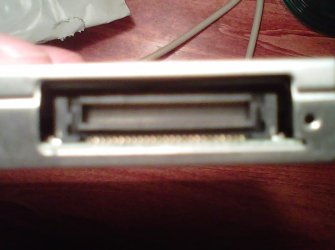
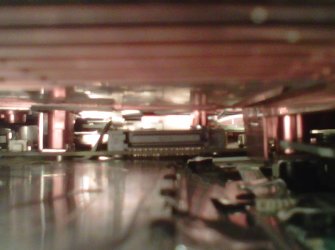
I just checked the connection again and it looks fine to me... They're not actually pins that connect the drive to the motherboard, its kinda just like a plug and port with metal fins. I took a few pictures for you guys to check out. | My System Specs | | OS Windows 7 Professional x64 |
07 Feb 2012
|
#8 | | |
Hi, my friend, did you actually resolve your issue? Because I have the same | My System Specs | | OS Windows 7 Ultimate x86 |
07 Feb 2012
|
#9 | | |
At first glance it actually looks ok. Just make sure it goes all the way in, not sticking out not even 1mm. | My System Specs | | System Manufacturer/Model Number Home brewed OS Windows 7 Ultimate 64bit CPU Core2Quad Q6600 Motherboard Asus P5N-E sli Memory 8GB DDR 2 Kingmax Graphics Card 2x GF9800GT 1024MB/256bit Sound Card Creative SB Live! 5.1 PCI Monitor(s) Displays LG Flatron W245 Screen Resolution 1920x1200 Keyboard Microsoft Wireless 800 Mouse Microsoft Wireless 1000 PSU FSP Blue Storm II 500W Case Antec Twelve Hundred Hard Drives 2x STM3250820AS; 2x SP2014N; ST310005AS; WD3200BEVT; WD10EARS; WD1600AAJB; 6Y200M0; ST9160310AS; |
07 Feb 2012
|
#10 | | Windows 7 Professional x64 |
Never solved the problem. I was going to buy a new drive but they're pretty expensive and I rarely need to use it so its not worth it to me... | My System Specs | | OS Windows 7 Professional x64 DVD Optical Drive Not Recognized in Windows or BIOS problems? All times are GMT -5. The time now is 11:15 PM. | |