
Solved Help! The selected fingerprint reader has no management application

RoloDman

HWIC
Pro User
Local time
1:03 PM
Messages
634
Location
New York City, New York
I am trying to get my notebooks fingerprint reader to work but I am getting an error message. Please see attached images :geek:

Is there a way to get the software?

thank you for your time :geek:
 

Attachments

  • Capture.PNG
    Capture.PNG
    7.9 KB · Views: 30
  • Capture2.PNG
    Capture2.PNG
    26.1 KB · Views: 39
  • Capture3.PNG
    Capture3.PNG
    24.3 KB · Views: 54

My Computer My Computer

At a glance

7 Ultimate 64 bit Service Pack 1Intel Core 2 Duo P9500 @ 2.53GHz (lower watta...4.0GB Dual-Channel DDR 2 @ 398MHz (5-5-5-18)512MB GeForce 9600M GT
Computer Manufacturer/Model Number
Sager NP2096
OS
7 Ultimate 64 bit Service Pack 1
CPU
Intel Core 2 Duo P9500 @ 2.53GHz (lower wattage chip)
Motherboard
JHL 90 (U2E1)
Memory
4.0GB Dual-Channel DDR 2 @ 398MHz (5-5-5-18)
Graphics Card(s)
512MB GeForce 9600M GT
Sound Card
Realtek High Definition Audio
Monitor(s) Displays
Generic PnP Monitor
Screen Resolution
1680x1050
Hard Drives
Hitachi 244GB @ 7200rpm (IDE)
Cooling
nature
Keyboard
generic
Mouse
Microsoft Wireless Mobile Mouse 3500
Internet Speed
30 megabits down, 5 megabits up
Other Info
1.)Staples 4-Port USB 2.0 Mobile Hub
2.)WNDR3700 - NETGEAR RangeMax Dual Band Wireless-N Gigabit Router
3.)Logitech Webcam C250
4.)Logitech M570
Did some digging, and while I see some threads with people with problems, they most suggest trying the drivers, which are not easy to locate! Go to

custom gaming laptops - Welcome to Sager Notebooks

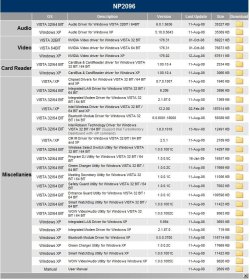
Click on driver downloads, accept the agreement, then click on your model#. You will see these choices. It might be the Entrance Guard, or Safety Guard, I just can't tell.

Sager.jpg

I'd suggest posting on their forum, or contacting support.

XOTICPC Forums - Powered by vBulletin

Right click that driver in device manager, and try to find an update. Good luck.

I also found this link when looking for the fingerprint reader driver, it is for Lenovo, but it's made by the company that makes the reader.

http://www.driverengine.com/asp/drvinfo.asp?driverid=1361901

A Guy
 

My Computer My Computer

At a glance

Windows 10 Home x64INTEL Core i5-750 Quad-Core 3.37GHzHyperX Fury Black Series 8GB (2 x 4GB) 1866MhzEVGA GeForce GTX 750 Superclocked 1GB 128-Bit...
Computer type
PC/Desktop
OS
Windows 10 Home x64
CPU
INTEL Core i5-750 Quad-Core 3.37GHz
Motherboard
ASUS P7P55D
Memory
HyperX Fury Black Series 8GB (2 x 4GB) 1866Mhz
Graphics Card(s)
EVGA GeForce GTX 750 Superclocked 1GB 128-Bit GDDR5
Monitor(s) Displays
LG 32MA68HY 32" IPS
Screen Resolution
1920 x 1080
Hard Drives
Samsung 840 Evo 120GB, SEAGATE 500GB Barracuda® 7200.12, SATA 3 Gb/s, 7200 RPM, 16MB cache
PSU
ANTEC TruePower New TP-550, 80 PLUS, 550W
Case
ANTEC Three Hundred Illusion
Cooling
COOLER MASTER Hyper 212 Plus, 4 x 120mm 1 x 140mm Noctua's
Internet Speed
85 + Mbps
Antivirus
Avast
Browser
Vivaldi
The last link you posted worked great. Thanks a bunch :party:

all I needed to do was create the directory path and place the "enroll.exe" in it. Now Windows is jiving nicely with the fingerprint software/hardware
 
Last edited:

My Computer My Computer

At a glance

7 Ultimate 64 bit Service Pack 1Intel Core 2 Duo P9500 @ 2.53GHz (lower watta...4.0GB Dual-Channel DDR 2 @ 398MHz (5-5-5-18)512MB GeForce 9600M GT
Computer Manufacturer/Model Number
Sager NP2096
OS
7 Ultimate 64 bit Service Pack 1
CPU
Intel Core 2 Duo P9500 @ 2.53GHz (lower wattage chip)
Motherboard
JHL 90 (U2E1)
Memory
4.0GB Dual-Channel DDR 2 @ 398MHz (5-5-5-18)
Graphics Card(s)
512MB GeForce 9600M GT
Sound Card
Realtek High Definition Audio
Monitor(s) Displays
Generic PnP Monitor
Screen Resolution
1680x1050
Hard Drives
Hitachi 244GB @ 7200rpm (IDE)
Cooling
nature
Keyboard
generic
Mouse
Microsoft Wireless Mobile Mouse 3500
Internet Speed
30 megabits down, 5 megabits up
Other Info
1.)Staples 4-Port USB 2.0 Mobile Hub
2.)WNDR3700 - NETGEAR RangeMax Dual Band Wireless-N Gigabit Router
3.)Logitech Webcam C250
4.)Logitech M570
The last link you posted worked great. Thanks a bunch :party:

all I needed to do was create the directory path and place the "enroll.exe" in it. Now Windows is jiving nicely with the fingerprint software/hardware

Sweet, glad you got it sorted :thumbsup:

A Guy
 

My Computer My Computer

At a glance

Windows 10 Home x64INTEL Core i5-750 Quad-Core 3.37GHzHyperX Fury Black Series 8GB (2 x 4GB) 1866MhzEVGA GeForce GTX 750 Superclocked 1GB 128-Bit...
Computer type
PC/Desktop
OS
Windows 10 Home x64
CPU
INTEL Core i5-750 Quad-Core 3.37GHz
Motherboard
ASUS P7P55D
Memory
HyperX Fury Black Series 8GB (2 x 4GB) 1866Mhz
Graphics Card(s)
EVGA GeForce GTX 750 Superclocked 1GB 128-Bit GDDR5
Monitor(s) Displays
LG 32MA68HY 32" IPS
Screen Resolution
1920 x 1080
Hard Drives
Samsung 840 Evo 120GB, SEAGATE 500GB Barracuda® 7200.12, SATA 3 Gb/s, 7200 RPM, 16MB cache
PSU
ANTEC TruePower New TP-550, 80 PLUS, 550W
Case
ANTEC Three Hundred Illusion
Cooling
COOLER MASTER Hyper 212 Plus, 4 x 120mm 1 x 140mm Noctua's
Internet Speed
85 + Mbps
Antivirus
Avast
Browser
Vivaldi
Back
Top