| Windows 7: USB2.0 to USB 3.0 ExpressCard help needed for new external HDD |
08 Mar 2011
|
#1 | | Windows 7 Ultimate -32 bit CT |
USB2.0 to USB 3.0 ExpressCard help needed for new external HDD Hi all, I hope I'm posting in the correct forum.
I also tried a search within this forum with no luck.
I'm looking to purchase a larger 3.5" external HDD for Imaging and storage. My current EXT HDD is 120GB which has become much too small for my current needs.
I've done some reading about usb 3.0 transfer rates and some articles say that the rate is much slower when using an Express card adapter.
I'd would really like to hear some advice on the performance of a 2.0 to 3.0 upgrade VIA an Express/54 laptop card or if there is another way to upgrade to USB 3.0... Possibly using an existing USB 2.0 port???
I'd also love to hear from members that have purchased 1TB or larger USB 3.0 EXT HDD's (I'm leaning towards a 1TB drive because of the cost) and how the transfer rate is with the 2.0 to 3.0 adapter card.
I have an HP DV6885SE laptop/Windows 7 Pro with the Express/54 card slot and 3 USB 2.0 slots.
I'll be using Acronis True Image for the backups.
Thanks to all for any help and hardware suggestions.
D.
Last edited by DianaD 74; 08 Mar 2011 at 03:42 PM..
| My System Specs |
| System Manufacturer/Model Number HP dv6885SE THRIVE (Special Edition) Notebook OS Windows 7 Ultimate -32 bit CPU Intel T8100 Duo 2.01 GB Memory 3gb Graphics Card nVidia GeForce 8400M GS Monitor(s) Displays Widescreen 15.4 in TFT active matrix Screen Resolution Max Resolution 1280 x 800 ( WXGA ) Case Notebook Hard Drives 250GB SATA- 5400.0 rpm Internet Speed 35MB down/6MB up Other Info CD-RW/DVD-RW/Light Scribe |
08 Mar 2011
|
#2 | | Windows 7 Ultimate x64 SP1 Philadelphia, PA |
Since you have a laptop, you'll only get USB 3.0 one of two ways. Either by a built-in USB 3.0 port, or an Express Card add-in. I would say that an Express Card add-in would still be quite a bit faster than a USB 2.0 port, so I wouldn't have any worries about it.
You definitely won't find an adapter for a USB 2.0 port, because the data still has to flow through the USB 2.0 port. I don't know iff hand the performance capabilities of Express Card, but you could easily compare the throughput of a USB 2.0 port to the stated throughput of the USB 3.0 Express Card. | My System Specs | | OS Windows 7 Ultimate x64 SP1 CPU Intel Core i7-2600 Motherboard Gigabyte GA-P67A-UD3P-B3 Memory 12 GB Patriot Extreme DDR3-1333 Graphics Card Nvidia GTX 470 Monitor(s) Displays Dell UltraSharp 2209WA PSU OCZ ModStream 700W Case CoolerMaster HAF 912 Advanced Cooling CoolerMaster Hyper 212 Plus Hard Drives OCZ Agility3 240 GB, WD5001AALS, WD7501AALS |
08 Mar 2011
|
#3 | | Windows 7 Ultimate x64 RTM + SP1 Cambridge, UK |
Unless you are going to to use a SSD inside the case, there really is not much point.
At the moment, there are no HDD's on the market that can fill all the bandwidth of USB 3.0.
IMO, i would stick with USB 2.0 unless you are going to purchase a big SSD (Which by the way, bigger than 250GB, is getting on about (In your money) probably $4 -500)
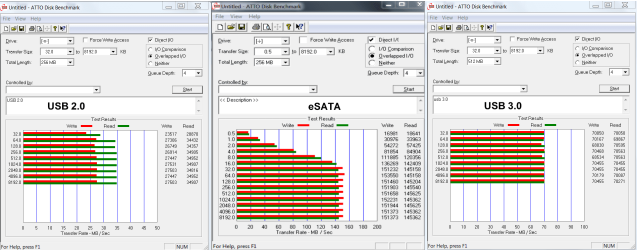
I have asked a similar question before - Transfer speed test - eSata vs USB 3.0
Sorry to burst your bubble -best go for something like this - My Passport Essential SE 1 TB External hard drive - 5.0 Gbps (SuperSpeed USB) that is my opinion.
Lucky | My System Specs | | System Manufacturer/Model Number The HAFmeister (Custom) OS Windows 7 Ultimate x64 RTM + SP1 CPU Intel Core i7 950 3.06GHZ (OC'd to 3.99Ghz) Motherboard Asus Rampage III Extreme x58 SATA 6GB & USB 3.0 Memory 6GB OCZ Reaper HPC Edition PC3-16000 (set 1606Mhz 8-8-8-26) Graphics Card EVGA Nvidia Geforce GTX 570 Sound Card Creative SB X-Fi Titanium Fatal1ty Professional Series Monitor(s) Displays Samsung SM2433BW 24" Widescreen Monitor Screen Resolution 1920x1200 Keyboard Logitech G510 Mouse Logitech G9 Gaming Mouse PSU Thermaltake Toughpower 1200w (Modular) Case CoolerMaster HAF-932 Cooling Zalman Reserator XT and ZM-WB5 Plus - GPU uses Stock coolers Hard Drives Western Digital Caviar Black 500GB 32Mb Buffer SATA II
Western Digital Caviar Black 750GB 32Mb Buffer SATA II
Western Digital Caviar Blue 500GB 16Mb Buffer SATA II
Western Digital My Book Essential Edition 750GB USB
Samsung Spinpoint 2TB SATA II Internet Speed 3MB Profile - 350-400kbs (Real-Speed) Other Info IcyBox Hot-Swap Bay,
Logitech G27 Steering Wheel,
Xbox 360 Wirless Elite Controller with Microsoft Reciever and
Play & Charge Kit,
Belkin USB Wireless Adaptor,
GAME Generic Controller (Playstation Looky-Likey),
Epson SX125 All-in-One. |
08 Mar 2011
|
#4 | | Windows 7 Ultimate -32 bit CT |

Quote: Originally Posted by DeaconFrost Since you have a laptop, you'll only get USB 3.0 one of two ways. Either by a built-in USB 3.0 port, or an Express Card add-in. I would say that an Express Card add-in would still be quite a bit faster than a USB 2.0 port, so I wouldn't have any worries about it.
You definitely won't find an adapter for a USB 2.0 port, because the data still has to flow through the USB 2.0 port. I don't know iff hand the performance capabilities of Express Card, but you could easily compare the throughput of a USB 2.0 port to the stated throughput of the USB 3.0 Express Card. 
Quote: Originally Posted by Luckystar Unless you are going to to use a SSD inside the case, there really is not much point.
At the moment, there are no HDD's on the market that can fill all the bandwidth of USB 3.0.
IMO, i would stick with USB 2.0 unless you are going to purchase a big SSD (Which by the way, bigger than 250GB, is getting on about (In your money) probably $4 -500)
I have asked a similar question before - Transfer speed test - eSata vs USB 3.0
Sorry to burst your bubble -best go for something like this - My Passport Essential SE 1 TB External hard drive - 5.0 Gbps (SuperSpeed USB) that is my opinion.
Lucky Thanks you both very much. The few 2.0 to 3.0 cards I've researched in general seem to be junk according to the reviews. Either they need an additional 5Volt supply to operate or they don't even work at all.
Can anybody recommend a reliable, inexpensive 1 or 2 TB USB 2.0 or USB 3.0 since 3.0 would still be a good idea in case the technology changes (or if I ever catch up with it) for use down the road.
I'd like to keep the price under $150.... is this unreasonable for a 1TB or possibly a 2TB drive?
Thanks again
Diana. | My System Specs | | System Manufacturer/Model Number HP dv6885SE THRIVE (Special Edition) Notebook OS Windows 7 Ultimate -32 bit CPU Intel T8100 Duo 2.01 GB Memory 3gb Graphics Card nVidia GeForce 8400M GS Monitor(s) Displays Widescreen 15.4 in TFT active matrix Screen Resolution Max Resolution 1280 x 800 ( WXGA ) Case Notebook Hard Drives 250GB SATA- 5400.0 rpm Internet Speed 35MB down/6MB up Other Info CD-RW/DVD-RW/Light Scribe |
08 Mar 2011
|
#5 | | |
[QUOTE=DianaD 74;1281555] 
Quote: Originally Posted by DeaconFrost ........Can anybody recommend a reliable, inexpensive 1 or 2 TB USB 2.0 or USB 3.0 since 3.0 would still be a good idea in case the technology changes (or if I ever catch up with it) for use down the road.
I'd like to keep the price under $150.... is this unreasonable for a 1TB or possibly a 2TB drive?
Thanks again
Diana. You may just have a look at my post here . I have a Seagate GoFlex 1.5TB Ultraportable USB external drive that comes with a GoFlex USB3 adapter/cable with which the trial was done. Western Digital also have a large USB3 external drive. I went in for Seagate GoFlex since interchangeable adapter/cables are available for esata,firewire, USB2 etc.,
Note: Since I have a desktop, I used a PCIe USB3 expansion card plugged into PCIe slot in the motherboard. | My System Specs | | System Manufacturer/Model Number self-assembled OS Windows 7 Ultimate 32bit CPU AMD Phenom II X3 720 Processor Motherboard Gigabyte GA-MA78GM-S2H Revision 1.0 Memory Transcend DDR2 (PC2 6400) 4 X 1GB Graphics Card Integrated + ATI Radeon 4550 Sound Card Integrated Realtek ALC 889A Monitor(s) Displays DELL 1704 FPT Screen Resolution 1280 x 1024 Keyboard Microsoft - wired Mouse Microsoft - wired PSU Coolermaster 400 W Case Zebronics Cube Cooling stock Hard Drives Western Digital Caviar SE16 250 GB x2 in RAID 0 Internet Speed ADSL 256-512Kbps |
10 Mar 2011
|
#6 | | Windows 7 Ultimate -32 bit CT |

Quote: Originally Posted by Ponmayilal You may just have a look at my post here . I'm no guru by any means but from what I read in your link it seems the express cards don't perform all that well.
Maybe I'll just buy a 1 or 2 TB USB 2.0 external HDD and live with it.
Thanks for the help all!
D. | My System Specs | | System Manufacturer/Model Number HP dv6885SE THRIVE (Special Edition) Notebook OS Windows 7 Ultimate -32 bit CPU Intel T8100 Duo 2.01 GB Memory 3gb Graphics Card nVidia GeForce 8400M GS Monitor(s) Displays Widescreen 15.4 in TFT active matrix Screen Resolution Max Resolution 1280 x 800 ( WXGA ) Case Notebook Hard Drives 250GB SATA- 5400.0 rpm Internet Speed 35MB down/6MB up Other Info CD-RW/DVD-RW/Light Scribe |
10 Mar 2011
|
#7 | | |

Quote: Originally Posted by Luckystar Unless you are going to to use a SSD inside the case, there really is not much point.
At the moment, there are no HDD's on the market that can fill all the bandwidth of USB 3.0. Huh....A standard mechanical hard drive might be able to provide 80MB-120MB/sec throughput. However, in a USB 2.0 port, it might get 30MB/sec at best. If USB 3.0 is available, that might become 60-90MB/sec. Thus going at least 2x-3X as fast as it was previously.
You don't need an SSD to take advantage of USB 3.0.
Have you considered adding a eSATA card to your laptop and then buying an eSATA external hard drive? These eSATA cards might perform better or be more stable as they have been around longer. | My System Specs | | System Manufacturer/Model Number Self-Built in July 2009 OS Windows 7 Ultimate x64 CPU Intel Q9550 2.83Ghz OC'd to 3.40Ghz Motherboard Gigabyte GA-EP45-UD3R rev. 1.1, F12 BIOS Memory 8GB G.Skill PI DDR2-800, 4-4-4-12 timings Graphics Card EVGA 1280MB Nvidia GeForce GTX570 Sound Card Realtek ALC899A 8 channel onboard audio Monitor(s) Displays 23" Acer x233H Screen Resolution 1920x1080 Keyboard ABS M1 Mechanical Mouse Logitech G9 Laser Mouse PSU Corsair 620HX modular Case Antec P182 Cooling stock Hard Drives Intel X25-M 80GB Gen 2 SSD
Western Digital 1TB Caviar Black, 32MB cache. WD1001FALS Internet Speed 15/2 cable modem Other Info Windows and Linux enthusiast. Logitech G35 Headset. |
10 Mar 2011
|
#8 | | Vista, Windows7, Mint Mate, Zorin, Windows 8 Florida in winter, Black Forest/Germany |
I would advise to stay with USB2. My comparisons making images with free Macrium showed only a 30% speed increase of USB3 over USB2 - and my USB3 ports came with the Viao laptop.
But then you run into another problem. The Linux recovery program that you run to recover from the image does not recognize USB3. So you are back to USB2 for the recovery. It's really not worth it. | My System Specs | | System Manufacturer/Model Number HP, Dell, Gateway, Toshiba - 4 laptops and 2 desktops OS Vista, Windows7, Mint Mate, Zorin, Windows 8 CPU from 1.6GHz Duo to i7 Monitor(s) Displays 2x HP w2207 Keyboard with trackball - no mices Mouse Trackball mice Hard Drives 5x HDD, 7x SSD, 12x Externals Internet Speed DSL 6000 |
10 Mar 2011
|
#9 | | |
I just ran a test, as I needed to grab an image anyway. I did the testing on a Dell Latitude E6400 with onboard USB 2.0 and eSATA connections to a ThermalTake BlacX dock that does both USB 2.0 and eSATA. And I just so happen to use Acronis True Image 2010 on my boxes. The hard drive I am using is a 2TB Samsung SpinPoint F4 at 5,400RPM.
My C drive on my computer has approx 70GB worth of stuff on it, and the System Reserved partition was included as well (100MB).
The following tests were performed with default settings, which include Normal Compression Level and a Backup Priority of Low.
Time to image using Acronis TIH with USB 2.0 connection: 40:16, file size of 47,098,308KB
Time to image using Acronis TIH with eSATA connection: 17:23, file size of 47,105,308KB
So, as you can see, the eSATA connection was 2.3x faster using USB 2. | My System Specs | | System Manufacturer/Model Number Self-Built in July 2009 OS Windows 7 Ultimate x64 CPU Intel Q9550 2.83Ghz OC'd to 3.40Ghz Motherboard Gigabyte GA-EP45-UD3R rev. 1.1, F12 BIOS Memory 8GB G.Skill PI DDR2-800, 4-4-4-12 timings Graphics Card EVGA 1280MB Nvidia GeForce GTX570 Sound Card Realtek ALC899A 8 channel onboard audio Monitor(s) Displays 23" Acer x233H Screen Resolution 1920x1080 Keyboard ABS M1 Mechanical Mouse Logitech G9 Laser Mouse PSU Corsair 620HX modular Case Antec P182 Cooling stock Hard Drives Intel X25-M 80GB Gen 2 SSD
Western Digital 1TB Caviar Black, 32MB cache. WD1001FALS Internet Speed 15/2 cable modem Other Info Windows and Linux enthusiast. Logitech G35 Headset. |
10 Mar 2011
|
#10 | | Windows 7x64 Home Premium SP1 x 2 Australia |
whs,
with imaging you have a mix of processing and link speed (ie. USB2/3) factors. If it was straight link speed then given ext HDD are typically sata drives I'd expect x2-3 speed increase. Your 30% figure suggests processing is a big factor.
If you're buying another usb ext hdd what would the general feeling be - only buy usb3 from now on? | My System Specs | | System Manufacturer/Model Number Own build (+ Recased Acer Aspire x1800) OS Windows 7x64 Home Premium SP1 x 2 CPU Intel i7 2600k Motherboard ASUS P8Z68 Deluxe Memory G.Skill Ripjaws (DDR3-1600) 2x4GB Graphics Card Nvidia GeForce GTS 450; Intel HD Graphics 3000(GT2+) Monitor(s) Displays Dell Ultrasharp IPS panel U2311H, Samsung SyncMaster P2350 Screen Resolution 1920x1080 Keyboard Logitech MK520 (wireless) Mouse Logitech MK520 PSU Seasonic M12II 520W Case Lian Li Lancool PC-K60 Cooling Case: 1x120mm, 3x140mm CPU: Hyper 212+ Hard Drives Crucial M4 128GB (000F), Seagates 1TB Barracuda ST31000528AS + Internet Speed 6-7 Mbps Antivirus Norton NIS, Malwarebytes on 2 (MSE on 3rd PC) Browser FireFox Other Info Audio: Logitech Z523 2.1 USB2.0 to USB 3.0 ExpressCard help needed for new external HDD problems? All times are GMT -5. The time now is 04:26 AM. | |