External hard drive not showing up when turned on?(reboot required)

Shockwave

New member
Member
Local time
12:52 AM
Messages
39
Location
NH
Hi

I have been having this problem for about a year now, I usually turn my external HD off (built my own with a WD hard drive and antec external case)

It will not show up after turning it on unless i reboot windows, I have gone into device manager and searched for new hardware but rarely that ever works.

Any ideas how to solve this?

Thanks!
 

My Computer My Computer

At a glance

Windows 7 ProffesionalQ6600 @ 3.6ghz8GB Kingston HyperX T1MSI 8800GTS 512
Computer Manufacturer/Model Number
My Own Build
OS
Windows 7 Proffesional
CPU
Q6600 @ 3.6ghz
Motherboard
Gigabyte P45-UD3P
Memory
8GB Kingston HyperX T1
Graphics Card(s)
MSI 8800GTS 512
Sound Card
Realtek ALC889A
Monitor(s) Displays
HP w2207
Screen Resolution
1650 x 1050
Hard Drives
OCZ Agility 60GB SSD
WD 6400AAKS
WD 1TB My Book
PSU
Corsair 650 watt
Case
Antec 900
Cooling
Thermaltake
Keyboard
Logitech Illuminated
Mouse
MX Revolution
Internet Speed
20/8
bump
 

My Computer My Computer

At a glance

Windows 7 ProffesionalQ6600 @ 3.6ghz8GB Kingston HyperX T1MSI 8800GTS 512
Computer Manufacturer/Model Number
My Own Build
OS
Windows 7 Proffesional
CPU
Q6600 @ 3.6ghz
Motherboard
Gigabyte P45-UD3P
Memory
8GB Kingston HyperX T1
Graphics Card(s)
MSI 8800GTS 512
Sound Card
Realtek ALC889A
Monitor(s) Displays
HP w2207
Screen Resolution
1650 x 1050
Hard Drives
OCZ Agility 60GB SSD
WD 6400AAKS
WD 1TB My Book
PSU
Corsair 650 watt
Case
Antec 900
Cooling
Thermaltake
Keyboard
Logitech Illuminated
Mouse
MX Revolution
Internet Speed
20/8
Not sure if it will help, but............
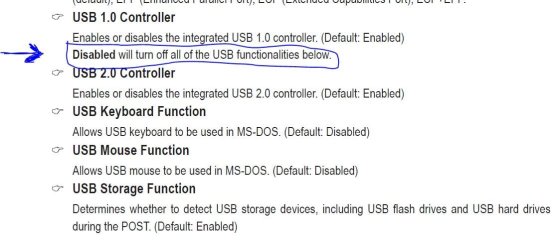
Make sure that you have all the important USB items enabled in the BIOS.
Don't disable USB 1.0.

Capture.JPG
 

My Computer My Computer

At a glance

Windows 7 Home Premium 64 bitIntel Core i7-4790G.SKILL 8GB (2 x 4GB) DDR3 F3-10666CL9D-8GBNTAMD Radeon R7 250
Computer type
PC/Desktop
Computer Manufacturer/Model Number
Custom Build
OS
Windows 7 Home Premium 64 bit
CPU
Intel Core i7-4790
Motherboard
GA-Z87X-D3H
Memory
G.SKILL 8GB (2 x 4GB) DDR3 F3-10666CL9D-8GBNT
Graphics Card(s)
AMD Radeon R7 250
Sound Card
Realtek ALC892
Monitor(s) Displays
Samsung UN32EH5000, Dell 1703FPT
Screen Resolution
1920 x 1080, 1280 x 1024
Hard Drives
WD5003AZEX
WD10EZEX
Samsung HD103SJ
Samsung 128 GB 840 PRO
PSU
SeaSonic M12II SS-500GM
Case
Fractal Design Define R4
Cooling
Zalman CNPS9900ALED
Keyboard
Logitech K800
Mouse
Logitech M705
Internet Speed
16 Mbps
Antivirus
Avast
Browser
Firefox
Other Info
Bose Companion 2 Multimedia Speakers
Sounds like the system is getting no interrupt from the disk. That is most likely a "mechanical" problem. Either the disk does not connect correctly in the enclosure or there is a problem with the USB cable.

Next time it does not connect, shake everything (enclosure and cable) and see what happens.
 

My Computer My Computer

At a glance

Vista, Windows7, Mint Mate, Zorin, Windows 8from 1.6GHz Duo to i7
Computer Manufacturer/Model Number
HP, Dell, Gateway, Toshiba - 4 laptops and 2 desktops
OS
Vista, Windows7, Mint Mate, Zorin, Windows 8
CPU
from 1.6GHz Duo to i7
Monitor(s) Displays
2x HP w2207
Hard Drives
5x HDD, 7x SSD, 12x Externals
Keyboard
with trackball - no mices
Mouse
Trackball mice
Internet Speed
DSL 6000
Hi Shockwave :)

Also check all the ports the cables push in to for dust / obstructions, and the cable plug ends. If you have any other cables also try swapping them.
 

My Computer My Computer

At a glance

Windows 7 Professional 64-bit SP1Intel E84004GB Crucial BallistixATI ASUS Radeon HD 4830
Computer Manufacturer/Model Number
Home Built
OS
Windows 7 Professional 64-bit SP1
CPU
Intel E8400
Motherboard
MSI P35 Neo
Memory
4GB Crucial Ballistix
Graphics Card(s)
ATI ASUS Radeon HD 4830
Sound Card
Realtek ALC888 on Board
Monitor(s) Displays
Asus 22-inch VH226H Widescreen
Screen Resolution
1920 x 1080
Hard Drives
Two Western Digital 500GB
PSU
Hiper HPU-4M 530W
Case
Thermaltake Tsunami Dream Black
Cooling
Air/Fans
Keyboard
Saitek Eclipse
Mouse
Razer
Internet Speed
Sky Broadband
Other Info
USB Hub/Card Reader - 2 Pen Drives, 1 Phone Dock
Back
Top