Windows 7 Forums Search
Welcome to Windows 7 Forums. Our forum is dedicated to helping you find solutions with any problems, errors or issues you are experiencing with Windows 7. The Windows 7 forum also covers news and updates and has an extensive Windows 7 tutorial section that covers a wide range of tips and tricks.


Windows 7 - 6 GB RAM installed 1.74 GB Usable

 
03-18-2011   #1


Windows 7 Home Premium 64-bit


6 GB RAM installed 1.74 GB Usable


I just recently replaced a 1GB RAM card for a 4GB RAM card. (I had one 1GB and one 2GB) And now I am having this issue of Windows not using my newly installed RAM.
I have been searching old forum posts and making sure everything is updated for about 2 days now, but nothing seems to be conclusive.
The most common "fix" is going into resource monitor and unchecking "Max Memory" and this was unchecked to begin with.
Another that I've tried is "Memory Remapping" in the BIOS.
Currently I'm running Insyde BIOS F.17 on a Compaq Presario CQ62-209WM Notebook PC and there is no such option.
I've ran the "Memory Test" that is available to run in the BIOS, it all checks as PASS and Windows cannot find any issues, it just isn't working.
I have also just ran with the 1GB and 4GB configuration, and it comes up as 5GB installed and 768MB usable, and took about 4 minutes to boot rather than the usual 1 minute.
Any other suggestions?
(other than reinstalling Windows)


Last edited by Llexum; 03-18-2011 at 03:08 PM.. Reason: Tested some stuff, still not working.
My System SpecsSystem Spec
03-18-2011   #2


Windows 7 Pro


Hi,

I think the display ATI Mobility Radeon HD 4250 is consuming the rest of the memory check the memory allocated for the graphics card...

Last edited by danielraja2; 03-18-2011 at 03:04 PM.. Reason: forgot to be specific
My System SpecsSystem Spec
03-18-2011   #3


Windows 7 Home Premium 64-bit


Quote   Quote: Originally Posted by danielraja2 View Post
Hi,

I think the display ATI Mobility Radeon HD 4250 is consuming the rest of the memory check the memory allocated for the graphics card...
I believe it's 893 MB
My System SpecsSystem Spec
.


03-18-2011   #4


Windows 7 Ultimate 32-bit & 64-bit both SP1


Hi Llexum and welcome to Windows 7 Forums

What happens if you just have the 4GB stick installed?
My System SpecsSystem Spec
03-18-2011   #5


Windows 7 Home Premium 64-bit


Quote   Quote: Originally Posted by Dwarf View Post
Hi Llexum and welcome to Windows 7 Forums

What happens if you just have the 4GB stick installed?
Failure to boot.
Just a black screen with LEDs blinking.

Last edited by Llexum; 03-18-2011 at 03:31 PM.. Reason: Elaborating
My System SpecsSystem Spec
03-18-2011   #6


Windows 7 Ultimate 32-bit & 64-bit both SP1


Is that with both memory slots?
My System SpecsSystem Spec
03-18-2011   #7


Windows 7 Home Premium 64-bit


Quote   Quote: Originally Posted by Dwarf View Post
Is that with both memory slots?
Yes, failure to boot with just the 4GB RAM card in either slot.
I even switched the 2GB place for this boot, and it booted just fine.
My System SpecsSystem Spec
03-18-2011   #8


Windows 7 Ultimate 32-bit & 64-bit both SP1


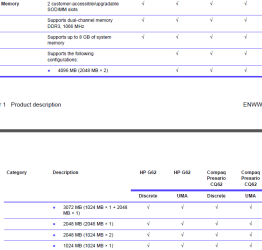
That would seem to indicate that the maximum RAM your system supports is 4GB in a 2GB + 2GB configuration, i.e. the maximum supported per slot is 2GB.
My System SpecsSystem Spec
03-18-2011   #9


Windows 7 Home Premium 64-bit


Quote   Quote: Originally Posted by Dwarf View Post
That would seem to indicate that the maximum RAM your system supports is 4GB in a 2GB + 2GB configuration, i.e. the maximum supported per slot is 2GB.
Not according to this Support document.
My System SpecsSystem Spec
03-18-2011   #10


Windows 7 Ultimate 32-bit & 64-bit both SP1


According to this, the maximum memory support is 8GB. However, that figure is usually what the chipset is capable of supporting, and is not necessarily what it can support in any given configuration. Looking at the chart in Chapter 1, you can see that the maximum amount of memory per slot is just 2GB.

Note: The attached file link is a PDF

6 GB RAM installed 1.74 GB Usable-capture.png

http://h10032.www1.hp.com/ctg/Manual/c02641795.pdf
My System SpecsSystem Spec
Reply

 6 GB RAM installed 1.74 GB Usable problems?


Thread Tools


Similar Threads for: 6 GB RAM installed 1.74 GB Usable
Thread Forum
Solved 8gb Installed Ram - Only 3.74 Usable (HELP!) Hardware & Devices
Installed 4Gb Ram, only 2 Gb usable Hardware & Devices
Solved RAM: 4GB installed and only 2.93 usable. Hardware & Devices
Solved 6 GB Installed (3 GB usable) Hardware & Devices
3 GB installed but only 1GB usable. General Discussion


All times are GMT -5. The time now is 09:38 AM.


Windows 7 Forums is an independent web site and has not been authorized,
sponsored, or otherwise approved by Microsoft Corporation.
"Windows 7" and related materials are trademarks of Microsoft Corp.
© Designer Media Ltd
  

1 2 3 4 5 6 7 8 9 10 11 12 13 14 15 16 17 18 19 20 21 22 23 24 25 26 27 28 29 30