| Windows 7: Brother MFC-210C & Win7 |
02 Apr 2011
|
#11 | | |
Quote: The registry cleaner could most certainly have "cleaned" needed keys. Quote: Can you find a restore point to go back to before you preformed the "registry cleaning"?
Have you tried to use a restore point to before you tried the cleaning?
Go to Services scroll down, and make sure Windows Image Acquisition (WIA) is started and set to Automatic.
This Provides image acquisition services for scanners and cameras I thought about that, but I can't go back to before I cleaned registry, it was month ago, I don't have this restore point anymore, I didn't think this would happen, it's not the first time I'm doing registry cleaning.
About the service, Windows Image Acquisition (WIA), that's one of the first things I have checked, tried to restart it, still here. | My System Specs |
| System Manufacturer/Model Number EP45-UD3P/Gigabyte Technology Co., Ltd. OS Windows 7 Ultimate x64 CPU ntel(R) Core(TM)2 Quad CPU Q9550 @ 2.83GHz Motherboard Gigabyte GA-EP45-UD3P v1.0/v1.1 Memory 4096MB RAM DDR2 Graphics Card ATI Radeon HD 4870 (RV770) Sound Card Realtek ALC889A @ Intel 82801JB ICH10 Case Cooler Master Centurion 590 Hard Drives WDC WD5001AALS-00L3B2 ATA Device |
02 Apr 2011
|
#12 | | Windows 7 Home Premium 64bit Stafford, England |
Try one or two simple things:
Turn off your printer and then UNPLUG IT from your computer and power.
Let it sit for at least 5 minutes then reconnect it to your PC and power. If the situation is still the same after restarting your MFC-210C:
Open a new page in Word and 'print' the blank page.
Next try the scanner again. | My System Specs | | Computer type PC/Desktop System Manufacturer/Model Number Packard Bell OS Windows 7 Home Premium 64bit CPU Intel(R) Core(TM) i3-2120 CPU @ 3.30GHz Motherboard Packard Bell IPISB-AG Memory 3.00 GB Graphics Card (1) Intel(R) HD Graphics (2) VNC Mirror Driver Sound Card Realtek High Definition Audio Monitor(s) Displays AIO LCD Screen Resolution 1920 x 1080 Keyboard Wireless Mouse Wireless Hard Drives WDC WD10EADX-22TDHB0 ATA Device
Fixed hard disk media
4 partitions
931.51 GB Antivirus Microsoft Security Essentials Browser IE; Firefox Other Info Also:
Samsung N220 Plus Netbook - Windows 7 Home
HP laptop
iPad 5 |
02 Apr 2011
|
#13 | | Win 7 Home Premium 64bit Ver 6.1.7600 Build 7601 - SP1 Central Pa. |

Quote: Originally Posted by Infiltrator I don't understand how this could be a driver issue, while the printer is working fine, and the scanner worked before, I just wanted to know if there is something in OS that could block incoming data from Brother Scanner. A missing OCR twain driver or key that is a separate entity from the printer drivers.
Unfortunately 7 is going more for WIA instead of Twain. 
Quote: Originally Posted by Anak Can you find a restore point to go back to before you preformed the "registry cleaning"? 
Quote: Originally Posted by Infiltrator I thought about that, but I can't go back to before I cleaned registry, it was month ago, I don't have this restore point anymore, I didn't think this would happen, it's not the first time I'm doing registry cleaning. Have you tried looking into Ccleaner there may be more listed there: Tools\System restore. Also programs like MSE, Superantispyware can save restore points when they check your system. 
Quote: Originally Posted by Infiltrator About the service, Windows Image Acquisition (WIA), that's one of the first things I have checked, tried to restart it, still here. This does not make sense to me, can you clarify?
You tried to restart it, still here. Did it start or not. Is it set to automatic?
Still here? Where? The usual procedure to update Brothers MFC-210c:
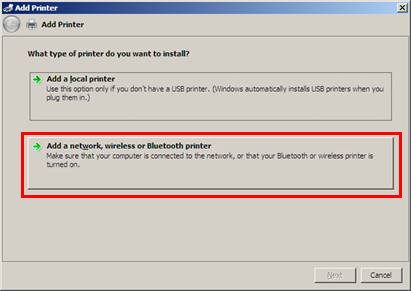
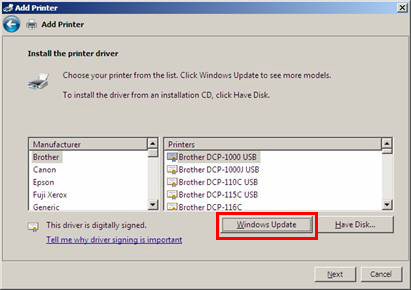
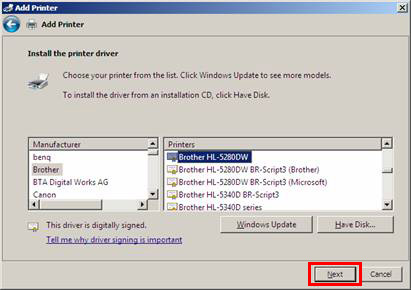
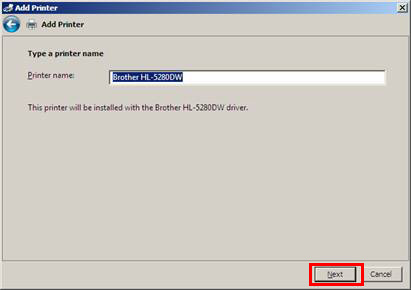
The MFC 210 Drivers for Win 7 are available through Win 7 Auto update.
Make sure that your Auto update is On and not blocked.
Also check in: Control Panel\All Control Panel Items\Windows Update\Change settings Look to the bottom make sure that  is checked.
Check the Control Panel, Device and Printers, delete the current entry for the MFC210 and its drivers, Do the same with the new entry that has the exclamation point. 
Then go to Programs and Features to make sure your machine does not have the 210 listed.
You could even try the Brother Uninstall Tools, but some users have had mixed results with them. Since you have had both vista and 7 I would use the first four: - Utilities/Windows® 7
- Utilities/Windows® 7 x64 Edition
- Utilities/Windows Vista®
- Utilities/Windows Vista® x64 Edition
If your really adventurous use regedit32 go to Edit >Find. Type in Brother or Brother-201c, then delete every key that pops up. Then reboot with the printer connected and On, let Win 7 get the drivers from the auto update site. | My System Specs | | Computer type PC/Desktop System Manufacturer/Model Number Gateway DX4831e (Mid-Tower Desktop) OS Win 7 Home Premium 64bit Ver 6.1.7600 Build 7601 - SP1 CPU Intel i3 530 2.93GHz, 2933MHz 2 Cores 4 Logical Processors Motherboard Gateway H57M01 133 megahertz Memory 6GB of 1,333MHz DDR3 SDRAM Graphics Card 32MB Intel Graphics Media Accelerator HD IGChip Sound Card Realtek High Definition Audio Monitor(s) Displays Gateway HX2000 20inch TFT active matrix TN Screen Resolution 1600 x 900 x 59 hertz Keyboard MS 'Natural' Standard PS/2 Enhanced 101-102 Key Mouse Gateway USB wired optical PSU 300watts. Case Mid-Tower Desktop Cooling Stock from Gateway Hard Drives WDC WD10EADS-00M2B0 [HDD] (1000.20 GB) -- drive 0,
HL-DT-ST DVDRAM GH41N [CD-ROM dr]
HP Photosmart Plus B210a e_series AIO Printer
Four card readers, and Four USB 2.0 Internet Speed Verizon FIOS 24.57Mbps Down - 5.68Mbps up Antivirus MSE Browser IE9.0.8112.16421-Upd ver 9.0.13, FireFox 19.2, Opera 12.14 Other Info BIOS: American Megatrends Inc. P01-A0 11/17/2009
System Specs by Belarc.
Join Date March 27th 2010 at 10:44:15 AM. |
02 Apr 2011
|
#14 | | |
Irene, did that, nothing. Anak Quote: Also programs like MSE, Superantispyware can save restore points when they check your system. They did offer me to backup my registry, I did that, I checked that everything is working fine, deleted the backup, didn't have an idea this can happen to my scanner. Quote: This does not make sense to me, can you clarify?
You tried to restart it, still here. Did it start or not. Is it set to automatic?
Still here? Where? Still here, on this forum, waiting for advice, a solution.
The service works, I stopped it, started again and it works fine, it's set to automatic. Quote: The usual procedure to update Brothers MFC-210c: I did all that, a dozen times already.
I used the uninstall tool from brother website, I removed registry keys for brother, I removed the entries for both MFC210 printer and the entry with the exclamation point, nothing helped.
I feel like I'm getting close to formatting my system, cause I really need the scanner | My System Specs | | System Manufacturer/Model Number EP45-UD3P/Gigabyte Technology Co., Ltd. OS Windows 7 Ultimate x64 CPU ntel(R) Core(TM)2 Quad CPU Q9550 @ 2.83GHz Motherboard Gigabyte GA-EP45-UD3P v1.0/v1.1 Memory 4096MB RAM DDR2 Graphics Card ATI Radeon HD 4870 (RV770) Sound Card Realtek ALC889A @ Intel 82801JB ICH10 Case Cooler Master Centurion 590 Hard Drives WDC WD5001AALS-00L3B2 ATA Device |
02 Apr 2011
|
#15 | | Win 7 Home Premium 64bit Ver 6.1.7600 Build 7601 - SP1 Central Pa. |
The more I research this problem from what information you have given. I am convinced it has something to do with your registry, and without knowing what was cleaned there is no setting that can recover from it.
There are probably CLSID keys along with High and/or Low filter keys that are missing that allow devices like Scanners to operate in conjunction with the OS, and without knowing those values a user can not even try to rebuild the registry.
I am not completely sure this will fix your problem, but it is worth a try.
Run this: SFC /SCANNOW Command - System File Checker
Take note of the "Notes" box after step #4. If it can not fix any files after the first run, follow those steps.
One way that has not been explored is installing the MFC in compatibility mode such as Vista or even XP, but you would have to do another "clean-up".
If you still can not fix the files from there or if the SFC scan did not find any errors you could try a Repair Install or as a last resort a Clean Install.
If you do go for either the repair or clean install then install the MFC like you did the first time, and hopefully it will return complete functionality to your Device.
Please let us know how you make out. | My System Specs | | Computer type PC/Desktop System Manufacturer/Model Number Gateway DX4831e (Mid-Tower Desktop) OS Win 7 Home Premium 64bit Ver 6.1.7600 Build 7601 - SP1 CPU Intel i3 530 2.93GHz, 2933MHz 2 Cores 4 Logical Processors Motherboard Gateway H57M01 133 megahertz Memory 6GB of 1,333MHz DDR3 SDRAM Graphics Card 32MB Intel Graphics Media Accelerator HD IGChip Sound Card Realtek High Definition Audio Monitor(s) Displays Gateway HX2000 20inch TFT active matrix TN Screen Resolution 1600 x 900 x 59 hertz Keyboard MS 'Natural' Standard PS/2 Enhanced 101-102 Key Mouse Gateway USB wired optical PSU 300watts. Case Mid-Tower Desktop Cooling Stock from Gateway Hard Drives WDC WD10EADS-00M2B0 [HDD] (1000.20 GB) -- drive 0,
HL-DT-ST DVDRAM GH41N [CD-ROM dr]
HP Photosmart Plus B210a e_series AIO Printer
Four card readers, and Four USB 2.0 Internet Speed Verizon FIOS 24.57Mbps Down - 5.68Mbps up Antivirus MSE Browser IE9.0.8112.16421-Upd ver 9.0.13, FireFox 19.2, Opera 12.14 Other Info BIOS: American Megatrends Inc. P01-A0 11/17/2009
System Specs by Belarc.
Join Date March 27th 2010 at 10:44:15 AM. |
02 Apr 2011
|
#16 | | Vista, Windows7, Mint Mate, Zorin, Windows 8 Florida in winter, Black Forest/Germany |
Quote: except registry cleaning few days ago This can ruin any good system.
Did you try to scan via Paint? Also Anak's suggestion (SFC) may work - although it is a long shot because there may be no mirrors for OEM products. | My System Specs | | System Manufacturer/Model Number HP, Dell, Gateway, Toshiba - 4 laptops and 2 desktops OS Vista, Windows7, Mint Mate, Zorin, Windows 8 CPU from 1.6GHz Duo to i7 Monitor(s) Displays 2x HP w2207 Keyboard with trackball - no mices Mouse Trackball mice Hard Drives 5x HDD, 7x SSD, 12x Externals Internet Speed DSL 6000 |
03 Apr 2011
|
#17 | | |
I tried the SFC, tried to run it few times, didn't find any problem.
I did not continue, it's starting to take more time than simply reinstall the system, everything works now after format and clean Windows 7 setup, plus solved a few small problems I had for a long time, I'll try not to knock my system like that again, I'll always keep backups for Registry.
Thanks to everybody in this topic for your advices, I hope this will help to somebody else with similar problem. | My System Specs | | System Manufacturer/Model Number EP45-UD3P/Gigabyte Technology Co., Ltd. OS Windows 7 Ultimate x64 CPU ntel(R) Core(TM)2 Quad CPU Q9550 @ 2.83GHz Motherboard Gigabyte GA-EP45-UD3P v1.0/v1.1 Memory 4096MB RAM DDR2 Graphics Card ATI Radeon HD 4870 (RV770) Sound Card Realtek ALC889A @ Intel 82801JB ICH10 Case Cooler Master Centurion 590 Hard Drives WDC WD5001AALS-00L3B2 ATA Device |
03 Apr 2011
|
#18 | | Windows 7 64 Bit Home Premium SP1 In The Woods |
Congrats. Glad you got it working.
Just be careful with the registry cleaners. Running them automatically is always dodgy. At least look to see what changes they are proposing and uncheck any that seem to be for active programs and devices.
For me I only "clean" my registry manually. I want any change to be deliberate and to be sure of what is being changed. | My System Specs | | Computer type PC/Desktop System Manufacturer/Model Number Home Built - Jan 2013 OS Windows 7 64 Bit Home Premium SP1 CPU i7-3820 Motherboard Asus P9X79-PRO - Bios 3305 Memory GSkill F3-14900CL9Q - 16GB Graphics Card EVGA GeForce GTX660 - Driver 310.90 Sound Card On board Realtek ALC898 Monitor(s) Displays Acer S271HL Screen Resolution 1920 x 1080 Keyboard MS KC-0405 Mouse Intellimouse 5-button PSU Corsair CMPSU-850TX-V2 - 850 watt (by Seasonic) Case Corsair Obsidian 550D Cooling Standard 3 120mm case fans, Cooler Master Hyper 212 EVO Hard Drives #1- Samsung 840 Pro Series
#2- Western Digital WD1002FAEX Sata3 Black
#3- Western Digital WD1002FAEX Sata3 Black Internet Speed 25Mbits/Sec (on a good day) Antivirus Avast & Malwarebytes Browser Firefox Other Info Asus DVD - DRW-24B1ST 24X |
03 Apr 2011
|
#19 | | Win 7 Home Premium 64bit Ver 6.1.7600 Build 7601 - SP1 Central Pa. |
Your welcome Infiltrator. Thank you for posting back to let us know how you made out, glad to hear you have it sorted out now!
It would help other users if you would click on the red triangle in the upper right corner of your OP, and ask the moderators to mark this one solved.
Users tend to check threads that are marked with a green check mark. | My System Specs | | Computer type PC/Desktop System Manufacturer/Model Number Gateway DX4831e (Mid-Tower Desktop) OS Win 7 Home Premium 64bit Ver 6.1.7600 Build 7601 - SP1 CPU Intel i3 530 2.93GHz, 2933MHz 2 Cores 4 Logical Processors Motherboard Gateway H57M01 133 megahertz Memory 6GB of 1,333MHz DDR3 SDRAM Graphics Card 32MB Intel Graphics Media Accelerator HD IGChip Sound Card Realtek High Definition Audio Monitor(s) Displays Gateway HX2000 20inch TFT active matrix TN Screen Resolution 1600 x 900 x 59 hertz Keyboard MS 'Natural' Standard PS/2 Enhanced 101-102 Key Mouse Gateway USB wired optical PSU 300watts. Case Mid-Tower Desktop Cooling Stock from Gateway Hard Drives WDC WD10EADS-00M2B0 [HDD] (1000.20 GB) -- drive 0,
HL-DT-ST DVDRAM GH41N [CD-ROM dr]
HP Photosmart Plus B210a e_series AIO Printer
Four card readers, and Four USB 2.0 Internet Speed Verizon FIOS 24.57Mbps Down - 5.68Mbps up Antivirus MSE Browser IE9.0.8112.16421-Upd ver 9.0.13, FireFox 19.2, Opera 12.14 Other Info BIOS: American Megatrends Inc. P01-A0 11/17/2009
System Specs by Belarc.
Join Date March 27th 2010 at 10:44:15 AM. |
03 Apr 2011
|
#20 | | |
Anak Quote: It would help other users if you would click on the red triangle in the upper right corner of your OP, and ask the moderators to mark this one solved. No problem, done.
Also added some rep for a few guys here, great responses in the topic. TVeblen Quote: For me I only "clean" my registry manually. I want any change to be deliberate and to be sure of what is being changed. Yeah, usually I'm doing the same, it's just I had a problem with some software, and I solved it with Windows 7 Manager, it has registry cleaner, I had a problem with some Key and I didn't know what key exactly I'm having problem with.
It solved the problem I had with the software, but caused a serious problem with my scanner, it's the first time asked help on forums, usually I'm the one who is giving advices.
Thanks again. | My System Specs | | System Manufacturer/Model Number EP45-UD3P/Gigabyte Technology Co., Ltd. OS Windows 7 Ultimate x64 CPU ntel(R) Core(TM)2 Quad CPU Q9550 @ 2.83GHz Motherboard Gigabyte GA-EP45-UD3P v1.0/v1.1 Memory 4096MB RAM DDR2 Graphics Card ATI Radeon HD 4870 (RV770) Sound Card Realtek ALC889A @ Intel 82801JB ICH10 Case Cooler Master Centurion 590 Hard Drives WDC WD5001AALS-00L3B2 ATA Device Brother MFC-210C & Win7 problems? All times are GMT -5. The time now is 07:28 AM. | |