Windows 7 Forums Search
Welcome to Windows 7 Forums. Our forum is dedicated to helping you find solutions with any problems, errors or issues you are experiencing with Windows 7. The Windows 7 forum also covers news and updates and has an extensive Windows 7 tutorial section that covers a wide range of tips and tricks.


Windows 7 - How to rebuild RAID 5 within W7

 
04-02-2011   #1


Windows 7 Professional x64


How to rebuild RAID 5 within W7

A few days after initial installation, I had a single drive error with my RAID 5 config. I am running three WD 500GB HDs in a RAID 5, with no other internal drives. I verified the questionable drive with slow scans. I used my Intel BIOS to add the drive back into my RAID. So far everything looked great.

But, my BIOS shows all three drives in a good RAID 5 with a status of "Rebuild." There is also a comment on the BIOS screen that "RAID 5 will be rebuilt within the operating system." I looked in Windows 7 for rebuild opportunities, but I did not finding any. So I assumed that the rebuild would be an automatic/background rebuild. I have had my system on for 1 week with no joy. BIOS status still shows "rebuild."

My question is: Am I OK? The Computer Management shows a single healthy partition at full allocation (1,031GB, with "no" Fault Tolerance)? How do you rebuild a RAID 5 with Windows 7?

My System SpecsSystem Spec
04-02-2011   #2


Windows 7 Ultimate x64 SP1, LinuxMint 9 LTS x64, Debian 6, Ubuntu 10.04 LTS x64


Hi,

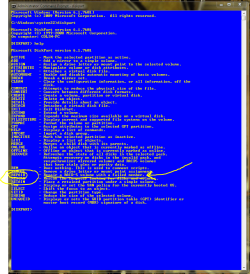
I believe there is an option to do this using the DISKPART command (run that from an elevated CMD window). I have never used it, so unfortunately I can't help with the details of the command.

How to rebuild RAID 5 within W7-capture.png

Let us know how you get on with it.

Regards,
Golden
My System SpecsSystem Spec
06-24-2011   #3


Windows 7 Professional x64


No joy... The "Repair" command is not active in Windows 7 DISKPART. "The command you selected is not available with this version of Windows."

It's a little hard to believe that MS has not figured out how to manage RAIDs yet. Time to move back to LINUX... This time for good.
My System SpecsSystem Spec
.


07-30-2011   #4


Windows 7 Professional x64


The fix is in!!! I stumbled on this before giving up:
1. After replacing the bad drive, complete a complete disc scan. This will not show any improvement, but must be done before the next step.
2. Do a full defragmentation for the RAID 5 volume. No short-cuts, it must be a full defrag. This will take a long time, do not stop it. Mine took 44 hours. But, it now works great.

I know this is a big step; doing a defrag on an already damaged RAID 5 takes a lot of faith. If it goes wrong all hope is lost. But mine went fine and everything recovered nicely, all programs and files...

You would think that MS would make this common knowledge...

Last edited by rextrons; 07-30-2011 at 05:50 PM.. Reason: More info
My System SpecsSystem Spec
Reply

 How to rebuild RAID 5 within W7 problems?


Thread Tools


Similar Threads for: How to rebuild RAID 5 within W7
Thread Forum
Solved RAID 5 switched from single storage to raid 5, lost drive letter General Discussion
A Rebuild Gone Bad Crashes and Debugging
Data recovery on RAID auto rebuild on wrong HDD Hardware & Devices
Can't rebuild BCD Hardware & Devices
rebuild of OEM/HP Chillout Room


All times are GMT -5. The time now is 09:42 AM.


Windows 7 Forums is an independent web site and has not been authorized,
sponsored, or otherwise approved by Microsoft Corporation.
"Windows 7" and related materials are trademarks of Microsoft Corp.
© Designer Media Ltd
  

1 2 3 4 5 6 7 8 9 10 11 12 13 14 15 16 17 18 19 20 21 22 23 24 25 26 27 28 29 30