| Windows 7: 2 Extra Storage Devices? |
08 Apr 2011
|
#1 | | 7 Ultimate x64 On my chair, in my room |
2 Extra Storage Devices? I have 2 hard drives, 1 of which has 2 partitions. I have these two extra ones for some reason.  I think the Local Disk Q is from my USB which I disconnected when I powered off the system. Now whenever I click it, I get this 
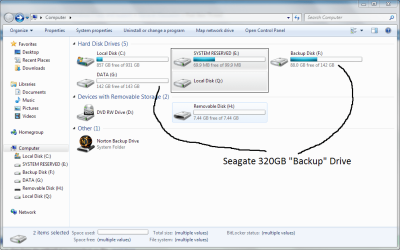
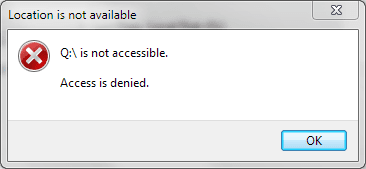
Anyone know how/if I can fix this? | My System Specs |
| Computer type PC/Desktop OS 7 Ultimate x64 CPU AMD Phenom II X6 1090T Motherboard Asus M4A89GTD Pro Memory Corsair XMS3 8GB DDr3 1600MHz Graphics Card EVGA GeForce GTX 670 2GB Sound Card Asus Xonar DX Monitor(s) Displays Acer H236HLbmjd Screen Resolution 1920x1080 Keyboard Mionix Zibal 60 Mouse Mionix Naos 5000 PSU Cooler Master GX650 Case Silverstone Raven 3 RV03B-W Cooling Akasa AK-CCX-4002HP Venom Hard Drives Seagate 320GB - WD Caviar Black 1TB @ SATA III 6Gb/s - WD Caviar Blue 500GB SATA-III 6Gb/s Internet Speed 60+MB/s Down, 2.8MB/s Up Antivirus Bitdefender Internet Security 2013 Browser Internet Explorer |
08 Apr 2011
|
#2 | | |
I believe the E and Q drives are part of your main drive. Partitions of the physical drive the C drive is on.
The H drive is a USB stick.
Not sure why the Q drive is not accessible other then it is a small partition and it is not formatted. But then it shouldn't show up.
The E drive is a normal system partition but it is usually at the front of the drive and normally does not have a drive letter assigned to it. Win 7 creates this area to store the BOOT loader files and some other system files.
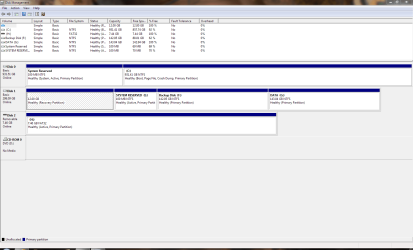
Open Disk Management and post a screen shot of that. | My System Specs | | System Manufacturer/Model Number Built be Me OS Windows 7 Pro x64 CPU i5 760 Motherboard Asus P7P55D-E Pro Memory 16GB Graphics Card Nvidia GTS450 Sound Card On board Monitor(s) Displays Dell 2007WFP Dell 1800FP Screen Resolution 1680x1050 1280x1024 Keyboard IBM Mouse MS PSU Antec 750 Case In Win Cooling Cooler Master Hyper 212+ Hard Drives Seagate 250GB & 750GB
WD 1TB |
08 Apr 2011
|
#3 | | 7 Ultimate x64 On my chair, in my room |

Quote: Originally Posted by Shootist I believe the E and Q drives are part of your main drive. Partitions of the physical drive the C drive is on.
The H drive is a USB stick.
Not sure why the Q drive is not accessible other then it is a small partition and it is not formatted. But then it shouldn't show up.
The E drive is a normal system partition but it is usually at the front of the drive and normally does not have a drive letter assigned to it. Win 7 creates this area to store the BOOT loader files and some other system files.
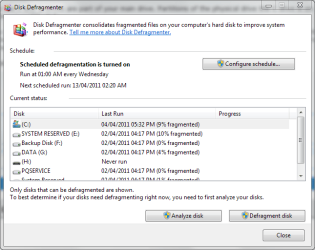
Open Disk Management and post a screen shot of that. I wasn't sure what you meant by 'Disk Management', so I opened up 'Disk Defragmenter'. | My System Specs | | Computer type PC/Desktop OS 7 Ultimate x64 CPU AMD Phenom II X6 1090T Motherboard Asus M4A89GTD Pro Memory Corsair XMS3 8GB DDr3 1600MHz Graphics Card EVGA GeForce GTX 670 2GB Sound Card Asus Xonar DX Monitor(s) Displays Acer H236HLbmjd Screen Resolution 1920x1080 Keyboard Mionix Zibal 60 Mouse Mionix Naos 5000 PSU Cooler Master GX650 Case Silverstone Raven 3 RV03B-W Cooling Akasa AK-CCX-4002HP Venom Hard Drives Seagate 320GB - WD Caviar Black 1TB @ SATA III 6Gb/s - WD Caviar Blue 500GB SATA-III 6Gb/s Internet Speed 60+MB/s Down, 2.8MB/s Up Antivirus Bitdefender Internet Security 2013 Browser Internet Explorer |
08 Apr 2011
|
#4 | | Windows 7 Pro x64 SP1 Philadelphia |

Quote: Originally Posted by Shootist The H drive is a USB stick. Right. Unless your USB flash drive is an ungodly large amount, they should always show up here under "Removable Media."
To get to "Disk Management," press WindowsKey+R (to open Run), then type "diskmgmt.msc" and hit enter. | My System Specs | | OS Windows 7 Pro x64 SP1 CPU AMD Phenom II x6 1090T Black Edition 3.2GHz Motherboard ASUS M4A88TD-V EVO/USB3 Memory Patriot G ‘Sector 5’ Edition 8GB (2 x 4GB) 1600MHz Sound Card (onboard) Realtek® ALC 892 8-Channel High Definition Audio Monitor(s) Displays ViewSonic VX2253 22", Dell circa-2002 CRT Screen Resolution 1920x1080, 1024x768 Keyboard Verbatim 97472 Mini Wireless Slim Mouse bundled Verbatim 97472 Wireless PSU CORSAIR TX Series 950W ATX12V 80 Plus Bronze Case Cooler Master HAF X NVidia Edition; 5 Green LED Fans! Cooling CORSAIR A70 120mm Dual-Fan Hard Drives Transcend SSD720 2.5" SATAIII 64GB SSD; Western Digital Caviar Green WD20EARS 2TB 64MB 3.5" HDD
LG WH10LS30 10X Blu-ray Burner with LightScribe Other Info Ultraportable/Desktop Replacement Laptop:
circa Oct 2006,
Dell XPS M1210,
Windows 7 Professional 32-bit,
Intel Core 2 Duo T7200 2.0GHz,
3.25 (4) GB of RAM,
NVidia GeForce Go 7400,
500GB Seagate Momentus 7200RPM HDD -- IT'S ALIVE AGAIN! |
08 Apr 2011
|
#5 | | 7 Ultimate x64 On my chair, in my room |

Quote: Originally Posted by Miranova23 
Quote: Originally Posted by Shootist The H drive is a USB stick. Right. Unless your USB flash drive is an ungodly large amount, they should always show up here under "Removable Media."
To get to "Disk Management," press WindowsKey+R (to open Run), then type "diskmgmt.msc" and hit enter. | My System Specs | | Computer type PC/Desktop OS 7 Ultimate x64 CPU AMD Phenom II X6 1090T Motherboard Asus M4A89GTD Pro Memory Corsair XMS3 8GB DDr3 1600MHz Graphics Card EVGA GeForce GTX 670 2GB Sound Card Asus Xonar DX Monitor(s) Displays Acer H236HLbmjd Screen Resolution 1920x1080 Keyboard Mionix Zibal 60 Mouse Mionix Naos 5000 PSU Cooler Master GX650 Case Silverstone Raven 3 RV03B-W Cooling Akasa AK-CCX-4002HP Venom Hard Drives Seagate 320GB - WD Caviar Black 1TB @ SATA III 6Gb/s - WD Caviar Blue 500GB SATA-III 6Gb/s Internet Speed 60+MB/s Down, 2.8MB/s Up Antivirus Bitdefender Internet Security 2013 Browser Internet Explorer |
08 Apr 2011
|
#6 | | Windows 7 Pro x64 SP1 Philadelphia |
By process of elimination, I believe "Q" is the recovery partition of your Seagate backup drive, the hashed-out 12gb one. "E" is also part of this drive. I don't know why or how those partitions are showing up in explorer, especially since Q isn't usable (hence the hash-out). | My System Specs | | OS Windows 7 Pro x64 SP1 CPU AMD Phenom II x6 1090T Black Edition 3.2GHz Motherboard ASUS M4A88TD-V EVO/USB3 Memory Patriot G ‘Sector 5’ Edition 8GB (2 x 4GB) 1600MHz Sound Card (onboard) Realtek® ALC 892 8-Channel High Definition Audio Monitor(s) Displays ViewSonic VX2253 22", Dell circa-2002 CRT Screen Resolution 1920x1080, 1024x768 Keyboard Verbatim 97472 Mini Wireless Slim Mouse bundled Verbatim 97472 Wireless PSU CORSAIR TX Series 950W ATX12V 80 Plus Bronze Case Cooler Master HAF X NVidia Edition; 5 Green LED Fans! Cooling CORSAIR A70 120mm Dual-Fan Hard Drives Transcend SSD720 2.5" SATAIII 64GB SSD; Western Digital Caviar Green WD20EARS 2TB 64MB 3.5" HDD
LG WH10LS30 10X Blu-ray Burner with LightScribe Other Info Ultraportable/Desktop Replacement Laptop:
circa Oct 2006,
Dell XPS M1210,
Windows 7 Professional 32-bit,
Intel Core 2 Duo T7200 2.0GHz,
3.25 (4) GB of RAM,
NVidia GeForce Go 7400,
500GB Seagate Momentus 7200RPM HDD -- IT'S ALIVE AGAIN! |
08 Apr 2011
|
#7 | | 7 Ultimate x64 On my chair, in my room |

Quote: Originally Posted by Miranova23 By process of elimination, I believe "Q" is the recovery partition of your Seagate backup drive, the hashed-out 12gb one. "E" is also part of this drive. I don't know why or how those partitions are showing up in explorer, especially since Q isn't usable (hence the hash-out). OK, thanks for the info. Maybe I'll come on some time and it will have disappeared | My System Specs | | Computer type PC/Desktop OS 7 Ultimate x64 CPU AMD Phenom II X6 1090T Motherboard Asus M4A89GTD Pro Memory Corsair XMS3 8GB DDr3 1600MHz Graphics Card EVGA GeForce GTX 670 2GB Sound Card Asus Xonar DX Monitor(s) Displays Acer H236HLbmjd Screen Resolution 1920x1080 Keyboard Mionix Zibal 60 Mouse Mionix Naos 5000 PSU Cooler Master GX650 Case Silverstone Raven 3 RV03B-W Cooling Akasa AK-CCX-4002HP Venom Hard Drives Seagate 320GB - WD Caviar Black 1TB @ SATA III 6Gb/s - WD Caviar Blue 500GB SATA-III 6Gb/s Internet Speed 60+MB/s Down, 2.8MB/s Up Antivirus Bitdefender Internet Security 2013 Browser Internet Explorer |
08 Apr 2011
|
#8 | | Win 7 Ultimate x64 Etobicoke, Ontario |
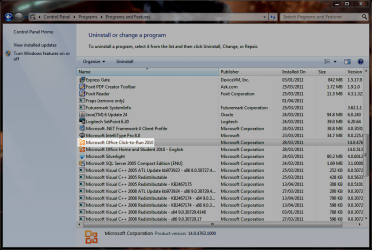
Didn't happen to install Office 2010 with the "Click to Run" option enabled did you? If so that would be where the mysterious drive Q came from, Mystery Drive (Q:) Office 2010 Drive Q
Drive E is exactly what it says it is. You can delete it if you want, System Reserved Partition - Delete
A better idea might be to go into Disk management and remove the drive letter for it and then you won't see it in Explorer. | My System Specs | | System Manufacturer/Model Number Me OS Win 7 Ultimate x64 CPU Phenom II x4 955 @ 4 GHz. Motherboard Asus M5A97 EVO Memory 2x2 GB Kingston HyperX DDR3 1600 Graphics Card Sapphire HD 6850 Sound Card Xonar DGX w/ Logitech X-530 Monitor(s) Displays Acer S232HL Abid Screen Resolution 1920x1080 Keyboard Logitech Wave Mouse Logitech G5 v2 PSU Antec Earthwatts 650W Green Case Antec Three Hundred Cooling Cooler Master 212 EVO Hard Drives 120 GB OCZ Vertex 3
500 GB Seagate 7200.12 Internet Speed 24000/1000 |
08 Apr 2011
|
#9 | | |
At one time was there only one physical disk in this system?
It looks like you added a drive and installed the OS on it. The Drive that has the C partition and the hidden (No drive letter) 100MB system reserve partition.
And the other drive was originally in the system with the 12GB Recovery partition, the second System Reserve partition Drive E, and then those other 2 partitions F & G.
Is that the way it was/is.
Oh and I think the Q drive you see in Win Explorer is the 12GB recovery partition. Although in Disk management I don't see anything with a Q. But if that recovery partition isn't marked Hidden Win Explorer might assign a drive letter to it.
In any event everything looks normal to me. There are no extra storage devices. Just a bunch of partitions that don't need to be there and misaligned drive letters ( I hate when CD/DVD drives are before the hard drives).
You might think about redoing your drive/partition setup | My System Specs | | System Manufacturer/Model Number Built be Me OS Windows 7 Pro x64 CPU i5 760 Motherboard Asus P7P55D-E Pro Memory 16GB Graphics Card Nvidia GTS450 Sound Card On board Monitor(s) Displays Dell 2007WFP Dell 1800FP Screen Resolution 1680x1050 1280x1024 Keyboard IBM Mouse MS PSU Antec 750 Case In Win Cooling Cooler Master Hyper 212+ Hard Drives Seagate 250GB & 750GB
WD 1TB |
08 Apr 2011
|
#10 | | 7 Ultimate x64 On my chair, in my room |

Quote: Originally Posted by stormy13 Didn't happen to install Office 2010 with the "Click to Run" option enabled did you? If so that would be where the mysterious drive Q came from, Mystery Drive (Q:) Office 2010 Drive Q
Drive E is exactly what it says it is. You can delete it if you want, System Reserved Partition - Delete
A better idea might be to go into Disk management and remove the drive letter for it and then you won't see it in Explorer. I'm not sure, but that is a possibility because I have Office 2010 installed. | My System Specs | | Computer type PC/Desktop OS 7 Ultimate x64 CPU AMD Phenom II X6 1090T Motherboard Asus M4A89GTD Pro Memory Corsair XMS3 8GB DDr3 1600MHz Graphics Card EVGA GeForce GTX 670 2GB Sound Card Asus Xonar DX Monitor(s) Displays Acer H236HLbmjd Screen Resolution 1920x1080 Keyboard Mionix Zibal 60 Mouse Mionix Naos 5000 PSU Cooler Master GX650 Case Silverstone Raven 3 RV03B-W Cooling Akasa AK-CCX-4002HP Venom Hard Drives Seagate 320GB - WD Caviar Black 1TB @ SATA III 6Gb/s - WD Caviar Blue 500GB SATA-III 6Gb/s Internet Speed 60+MB/s Down, 2.8MB/s Up Antivirus Bitdefender Internet Security 2013 Browser Internet Explorer 2 Extra Storage Devices? problems? All times are GMT -5. The time now is 09:13 PM. | |