Windows 7 Forums


Windows 7: Chassis Fan Control

12 Apr 2011   #1

MS Windows 7 Ultimate 64-bit
Cairo, Egypt
 
 
Chassis Fan Control

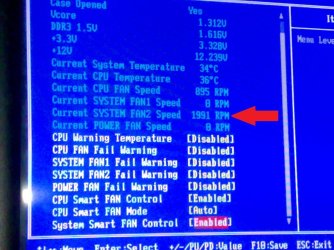
Hello, I bought a new rear case fan (CoolerMaster 120mm Blue Led), The problem that it is always running @ max RPM all the time, Can i control its speed? to make it 1000 RPM or less.. There's a screenshot of my BIOS (Gigabyte GA-MA770T-UD3P), Is there anyway to control this fan speed? Thank you in Advance.

Attached Thumbnails
Chassis Fan Control-smartfancontrol.jpg  
My System SpecsSystem Spec

12 Apr 2011   #2

Windows 7 Ultimate x64 SP1


Hi ...
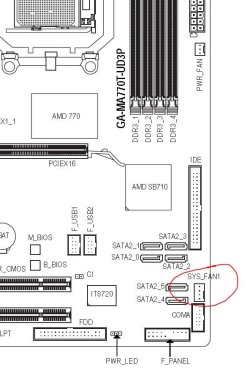
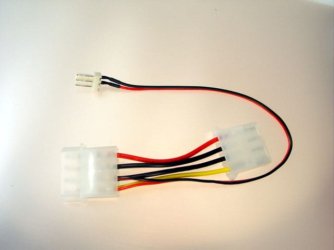
If you have knowledge of electronics - or know someone who has - you can make use of a resistor. Otherwise, you can use SpeedFan, but since the fan is connected to the motherboard. Remember to use 3 to 4 pin adapter and plug it in where shown below.
Hope it helps!

Attached Thumbnails
Chassis Fan Control-capturar.jpg  
My System SpecsSystem Spec
12 Apr 2011   #3

windows 7 ultimate


You could always manually drop your fans voltage to 7v or possibly even 5v. I'd expect in your case this would bugger up your LED display though.
Good article describing the methods at Hardware Secrets
My System SpecsSystem Spec
.


12 Apr 2011   #4

Windows 7 Pro x64


Quote   Quote: Originally Posted by Un4GiVeN78 View Post
Hello, I bought a new rear case fan (CoolerMaster 120mm Blue Led), The problem that it is always running @ max RPM all the time, Can i control its speed? to make it 1000 RPM or less.. There's a screenshot of my BIOS (Gigabyte GA-MA770T-UD3P), Is there anyway to control this fan speed? Thank you in Advance.
Is there any other option below System Smart Fan Control?
Or if it is set to manual, off Auto, does another option show underneath that control.

On my Asus board there is Enable/Disable for CPU and system fans. Set to disable ther is not other options displayed. If set to Enable another box appears that has other options.
Those options are Standard/Turbo/Silent.

Or on you board if you highlight that Auto setting and hit the enter key what other option are available.
My System SpecsSystem Spec
12 Apr 2011   #5

MS Windows 7 Ultimate 64-bit
Cairo, Egypt


Quote   Quote: Originally Posted by Wallonn7 View Post
Hi ...
If you have knowledge of electronics - or know someone who has - you can make use of a resistor. Otherwise, you can use SpeedFan, but since the fan is connected to the motherboard. Remember to use 3 to 4 pin adapter and plug it in where shown below.
Hope it helps!


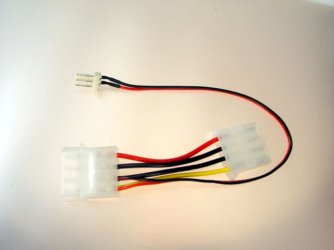
I'm afraid i don't have a very good knowledge of electronics so i got an adapter that came with the fan.. just like this pic
I'll try the SpeedFan software it may work.
Thank you
Attached Thumbnails
Chassis Fan Control-3-4-pin.jpg  

Last edited by Un4GiVeN78; 12 Apr 2011 at 11:44 AM..
My System SpecsSystem Spec
12 Apr 2011   #6

MS Windows 7 Ultimate 64-bit
Cairo, Egypt


Quote   Quote: Originally Posted by fimble View Post
You could always manually drop your fans voltage to 7v or possibly even 5v. I'd expect in your case this would bugger up your LED display though.
Good article describing the methods at Hardware Secrets
Thank you.
My System SpecsSystem Spec
12 Apr 2011   #7

MS Windows 7 Ultimate 64-bit
Cairo, Egypt


Quote   Quote: Originally Posted by Shootist View Post
Is there any other option below System Smart Fan Control?
Or if it is set to manual, off Auto, does another option show underneath that control.

On my Asus board there is Enable/Disable for CPU and system fans. Set to disable ther is not other options displayed. If set to Enable another box appears that has other options.
Those options are Standard/Turbo/Silent.

Or on you board if you highlight that Auto setting and hit the enter key what other option are available.
There's no other options about Fans except the ones in the screenshot i sent, Nothing happens if i select " Disabled " or " Enabled " on System Smart Fan Control,
In fact i suspect having any fan control on my BIOS maybe by software or another way.
My System SpecsSystem Spec
12 Apr 2011   #8

MS Windows 7 Ultimate 64-bit
Cairo, Egypt


Quote   Quote: Originally Posted by Wallonn7 View Post
Hi ...
If you have knowledge of electronics - or know someone who has - you can make use of a resistor. Otherwise, you can use SpeedFan, but since the fan is connected to the motherboard. Remember to use 3 to 4 pin adapter and plug it in where shown below.
Hope it helps!

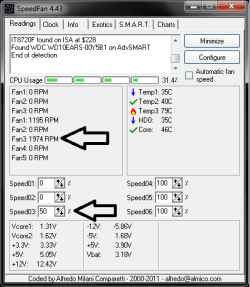
I tried to lower the percentage to 50% but it is not working and lower fan speed from the config. and still not working(look at the pic).
Attached Thumbnails
Chassis Fan Control-untitled.png  

Last edited by Un4GiVeN78; 12 Apr 2011 at 11:46 AM..
My System SpecsSystem Spec
12 Apr 2011   #9

Windows 7 Pro x64


They sell fan speed controllers and fans with speed control knobs.
Newegg.com - Fan speed control

Newegg.com - ZALMAN FAN MATE 2 Fan Controller
My System SpecsSystem Spec
12 Apr 2011   #10

MS Windows 7 Ultimate 64-bit
Cairo, Egypt


Quote   Quote: Originally Posted by Shootist View Post
They sell fan speed controllers and fans with speed control knobs.
Newegg.com - Fan speed control

Newegg.com - ZALMAN FAN MATE 2 Fan Controller
Ohh, It's good. Thank you
My System SpecsSystem Spec
Reply

 Chassis Fan Control problems?


Thread Tools


Similar help and support threads for: Chassis Fan Control
Thread Forum
cpu chassis fan configuration. which is correct? Overclocking and Case Mods
Solved chassis fan starts when waking up Hardware & Devices
Where to buy a level 10 chassis ? Overclocking and Case Mods
NZXT Phantom Chassis HELP! Hardware & Devices
new chassis fan Hardware & Devices


All times are GMT -5. The time now is 10:15 PM.


Seven Forums Android App Seven Forums IOS App Follow us on Facebook

Windows 7 Forums is an independent web site and has not been authorized,
sponsored, or otherwise approved by Microsoft Corporation.
"Windows 7" and related materials are trademarks of Microsoft Corp.
© Designer Media Ltd
  

1 2 3 4 5 6 7 8 9 10 11 12 13 14 15 16 17 18 19 20 21 22 23 24 25 26 27 28 29 30 31 32