|  | | |
18 Apr 2011
|
#1 | | Vista Home Premium SP1 64-bit |
SSD Problems? I have a Lenovo x201 running windows 7 64-bit SP1 with 8GB DDR3 Ram with a 256 GB Crucial C300 SSD installed. I did a clean install back in December and upgraded the firmware on the SSD to Crucial's version 06. I also performed many of lightninggltd's tweaks (disabled superfetch, boottrace, prefetcher, etc) after I installed. (thanks lightningltd!). Everything was running fine until recently. I have begun to get random shutdowns and freezes while idle. Each time it happens I have to use the power switch to re boot and each time I need to restart 2 or three times before it will recognize the HD and boot.
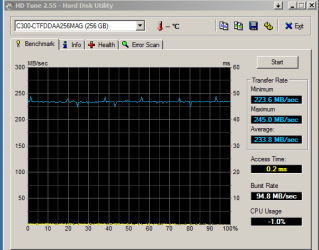
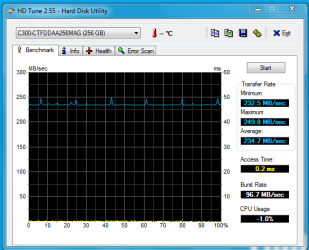
Performance is still great with the SSD. December and April shots below:
HD Tune: C300-CTFDDAA256MAG Benchmark
Transfer Rate Minimum : 234.1 MB/sec
Transfer Rate Maximum : 257.3 MB/sec
Transfer Rate Average : 236.6 MB/sec
Access Time : 0.2 ms
Burst Rate : 98.7 MB/sec
CPU Usage : -1.0%
Any ideas on what might be going on? Is there a good utility to test the health of my SSD? | My System Specs |
| System Manufacturer/Model Number Home Built OS Vista Home Premium SP1 64-bit CPU Intel Core 2 Quad Q9550 Motherboard ASUS P5Q Pro Memory CORSAIR 4GB DDR2 SDRAM DDR2 800 (PC2 6400) Graphics Card Radeon HD 4870 X2 2GB Monitor(s) Displays Acer AL2216Wbd Black 22" PSU PC Power & Cooling Silencer PPCS750QBL 750W Case COOLER MASTER COSMOS 1000 Cooling Tuniq Tower 120 Hard Drives SAMSUNG Spinpoint 1TB 7200
Western Digital Caviar 500GB 7200 Other Info SAMSUNG 22X DVD Burner Black |
18 Apr 2011
|
#2 | | |
Change the Cable see if that helps | My System Specs | | System Manufacturer/Model Number MSI OS Ultimate 7 CPU 1055T @ 3.7 Motherboard MSI Memory 16g Corsair Graphics Card HD5770 Sound Card Onboard Monitor(s) Displays FLat 23 PSU 850 Thermaltake Hard Drives SSD 64g Kingston
500 Gig Western |
18 Apr 2011
|
#3 | | Windows 7 Home Premium 64 bit SP1 Gallifrey |
Try testing your memory. Windows 7 Forums > Windows 7 help and support > Tutorials » Memory Diagnostics Tool | My System Specs | | Computer type PC/Desktop System Manufacturer/Model Number Custom Build OS Windows 7 Home Premium 64 bit SP1 CPU Intel i7 3770k Motherboard Asus P8Z77-V LK Memory 8 GB Patriot G2 1600MHz DDR3 Graphics Card Sapphire Radeon 7870 Sound Card None Monitor(s) Displays Gateway FHX2402L Screen Resolution 1920 X 1080 Keyboard Logitech K800 Mouse Logitech T620 PSU Corsair 750 TX Case Cooler Master Cooling Stock fan Hard Drives OCZ Vertex 4 256 GB Internet Speed 15.20 Mb/s download 2.09 Mb/s upload (Speedtest.net) Other Info First Computer used: A Commodore Pet of course
Love using LinuxMint 14 Cinnamon and Windows 7 |
18 Apr 2011
|
#4 | | Vista, Windows7, Mint Mate, Zorin, Windows 8 Florida in winter, Black Forest/Germany |
I don't think that this is a specific SSD problem. There could be a cable problem as suggested, but most likely you are victim of all your tweaking - some of which is obviously counterproductive. I run 5 SSDs in 5 systems (some since 2 years) and never had any problem. The only "tweak" I did was to shut off defrag and delete the hiberfile. I would suggest you reinstall your system (save your data first as far as it is on the SSD) and refrain from any tweaking. | My System Specs | | System Manufacturer/Model Number HP, Dell, Gateway, Toshiba - 4 laptops and 2 desktops OS Vista, Windows7, Mint Mate, Zorin, Windows 8 CPU from 1.6GHz Duo to i7 Monitor(s) Displays 2x HP w2207 Keyboard with trackball - no mices Mouse Trackball mice Hard Drives 5x HDD, 7x SSD, 12x Externals Internet Speed DSL 6000 |
19 Apr 2011
|
#5 | | Windows 7 Ultimate x64 SP1 Philadelphia, PA |
Why would you ever disable superfetch? That's counter-productive, and stripping away one of Windows 7's greatest advantages. As WHS said, shut off automatic defrag is about the only real important tweak, and to make sure the alignment is correct and TRIM is enabled. | My System Specs | | OS Windows 7 Ultimate x64 SP1 CPU Intel Core i7-2600 Motherboard Gigabyte GA-P67A-UD3P-B3 Memory 12 GB Patriot Extreme DDR3-1333 Graphics Card Nvidia GTX 470 Monitor(s) Displays Dell UltraSharp 2209WA PSU OCZ ModStream 700W Case CoolerMaster HAF 912 Advanced Cooling CoolerMaster Hyper 212 Plus Hard Drives OCZ Agility3 240 GB, WD5001AALS, WD7501AALS |
19 Apr 2011
|
#6 | | Windows 7 Ultimate x64 SP1 Hampton VA |

Quote: Originally Posted by whs I don't think that this is a specific SSD problem. There could be a cable problem as suggested, but most likely you are victim of all your tweaking - some of which is obviously counterproductive. I run 5 SSDs in 5 systems (some since 2 years) and never had any problem. The only "tweak" I did was to shut off defrag and delete the hiberfile. I would suggest you reinstall your system (save your data first as far as it is on the SSD) and refrain from any tweaking. 
Quote: Originally Posted by DeaconFrost Why would you ever disable superfetch? That's counter-productive, and stripping away one of Windows 7's greatest advantages. As WHS said, shut off automatic defrag is about the only real important tweak, and to make sure the alignment is correct and TRIM is enabled. +1 Agree that you may be a victim of all those tweaks. BTW I thought Windows "automatically" disabled Defrag on SSD drives. I know I saw that on OCZ's site, and it was true in my case (Defrag turned off automatically). At any rate if it doesn't, yeah turn it off. | My System Specs | | Computer type PC/Desktop System Manufacturer/Model Number Built by me OS Windows 7 Ultimate x64 SP1 CPU Intel Core i7-950 (3.06GHz) OC to 3.8GHz Motherboard Gigabyte GA-X58A-UD5 rev 1, F6 Bios Memory 12 gig Corsair DDR3 Dominator GT Memory (3X 4GB) Graphics Card AMD Radeon HD6950 2gig (Sapphire) Sound Card X-Fi Titanium Fatality Pro Monitor(s) Displays HP ZR22w 22" LCD Monitor Screen Resolution 1920 x 1080 Keyboard Logitech Wireless Wave Mouse Logitech Performance MX PSU Antec Signature - SG-850 Case Cooler Master HAF X Cooling Noctua NH-C12P SE14 Hard Drives Primary - OCZ Vertex 4 SSD (256GB). Storage - OCZ Vertex 2 SSD (120GB) & 2TB WD Caviar Black. Internet Speed High Speed Cable Other Info Memory Timings - 1600MHz @ 8-8-8-20-1T @ 1.640 volts |
19 Apr 2011
|
#7 | | Vista Home Premium SP1 64-bit |
SSD Problems? Thanks for the suggestions.
On replacing the cable, not possible on the laptop
Tested the memory using several different utilities-no errors
You may be right on the tweaking but not sure which it might be. As I understand the rationale for disabling superfetch you want to minimize unnecessary writes to the SSD. Pre-loading is not needed on a fast read SSD, same with boottrace, prefetcher, etc.
I had to actively turn off defrag since mine was an aftermarket install.
I can try reversing all of them and see it the problem persists. It is a very intermittent problem. For example there has been no freeze since I first posted this and the x201 has been mostly inactive. | My System Specs | | System Manufacturer/Model Number Home Built OS Vista Home Premium SP1 64-bit CPU Intel Core 2 Quad Q9550 Motherboard ASUS P5Q Pro Memory CORSAIR 4GB DDR2 SDRAM DDR2 800 (PC2 6400) Graphics Card Radeon HD 4870 X2 2GB Monitor(s) Displays Acer AL2216Wbd Black 22" PSU PC Power & Cooling Silencer PPCS750QBL 750W Case COOLER MASTER COSMOS 1000 Cooling Tuniq Tower 120 Hard Drives SAMSUNG Spinpoint 1TB 7200
Western Digital Caviar 500GB 7200 Other Info SAMSUNG 22X DVD Burner Black |
19 Apr 2011
|
#8 | | Vista, Windows7, Mint Mate, Zorin, Windows 8 Florida in winter, Black Forest/Germany |
Quote: BTW I thought Windows "automatically" disabled Defrag on SSD drives
Yes it does, but I always check it. Quote: As I understand the rationale for disabling superfetch you want to minimize unnecessary writes to the SSD. That is true if you want the SSD to last 100 years. But I bet, in 4 years you have a new one. And a few more writes will not hurt it in that timeframe.
And turning the tweaks off now, may not get you back to the original state. But that has to be looked at one by one. | My System Specs | | System Manufacturer/Model Number HP, Dell, Gateway, Toshiba - 4 laptops and 2 desktops OS Vista, Windows7, Mint Mate, Zorin, Windows 8 CPU from 1.6GHz Duo to i7 Monitor(s) Displays 2x HP w2207 Keyboard with trackball - no mices Mouse Trackball mice Hard Drives 5x HDD, 7x SSD, 12x Externals Internet Speed DSL 6000 |
19 Apr 2011
|
#9 | | Windows 7 Home Premium 64bit Southern Ohio |
Superfetch/Pre-Fetch actualy writes very little to the drive. The large majority are reads. It really is insignificant and will not hurt the drive, nor will it cause accelerated wear.
I agree with the others. Too much tweaking is bad.
I too just disable the built in defrag & Hiberfile and leave it alone. (Other than turn Superfetch back On)
Honestly .. everything runs smoother and faster this way. Or at least my system seems to.
I wish I could find the article about this .. Intel themselves said you could write 100GB to one of thier SSDs and it would still last 5yrs.
Granted we are not talking about a Intel Drive here, but I would excpect similar results from most modern SSDs. | My System Specs | | System Manufacturer/Model Number Custom (Self Build) OS Windows 7 Home Premium 64bit CPU Intel Core i7 2700k Motherboard eVGA P67 SLI Memory 8GB Mushkin Redline Ridgebacks @1866 Graphics Card EVGA GTX570 SC Sound Card XiFi Titanium HD Monitor(s) Displays LG W2453V Screen Resolution 1920x1080 Keyboard Saitek Cyborg PSU Seasonic x750 Case Corsair 600T SE White Cooling eVGA Superclocked CPU Cooler Hard Drives Intel 320 80GB -- Intel X25-V 40GB --WD Black 1TB x2 -- WD Blue 640GB Antivirus Kaspersky Browser IE Other Info LG BD/DVD |
19 Apr 2011
|
#10 | | Vista, Windows7, Mint Mate, Zorin, Windows 8 Florida in winter, Black Forest/Germany |
This drive (a 1st Gen Intel) has been up and runing for 3320 hours and 2049GBs have been written to it. And the health is still excellent. | My System Specs | | System Manufacturer/Model Number HP, Dell, Gateway, Toshiba - 4 laptops and 2 desktops OS Vista, Windows7, Mint Mate, Zorin, Windows 8 CPU from 1.6GHz Duo to i7 Monitor(s) Displays 2x HP w2207 Keyboard with trackball - no mices Mouse Trackball mice Hard Drives 5x HDD, 7x SSD, 12x Externals Internet Speed DSL 6000 All times are GMT -5. The time now is 10:29 AM. | |