Windows 7 Forums Search
Welcome to Windows 7 Forums. Our forum is dedicated to helping you find solutions with any problems, errors or issues you are experiencing with Windows 7. The Windows 7 forum also covers news and updates and has an extensive Windows 7 tutorial section that covers a wide range of tips and tricks.


Windows 7 - 3.0 usb code 10

 
04-27-2011   #1


windows 7 home premium 64bit


3.0 usb code 10

Iwas wonder about a code 10 will not start... My 3.0 usb is not working .. it was at one time i think i never had anything that was 3.0 capable... I bought a 1t external drive for my media.. Windows keeps telling me it will run faster if i use my 3.0 , but when i plug it in to my 3.0 usb it tells me its a code 10....I know this probaly a novice question but i would really appreciate some help... I'm not sure about this uninstalling it...

My System SpecsSystem Spec
04-27-2011   #2


Windows 7 Ultimate 64-bit


What motherboard do you have? (or if your PC was pre-built, what make/model?) I ask because my first suggestion is to update your USB/Mass Storage drivers for your motherboard. Also make sure your BIOS is up to date.

If you have more than one USB 3.0 port, try using the other. If it works, then it's a bad port.
My System SpecsSystem Spec
04-27-2011   #3


windows 7 home premium 64bit


Quote   Quote: Originally Posted by Johnathan Lyman View Post
What motherboard do you have? (or if your PC was pre-built, what make/model?) I ask because my first suggestion is to update your USB/Mass Storage drivers for your motherboard. Also make sure your BIOS is up to date.

If you have more than one USB 3.0 port, try using the other. If it works, then it's a bad port.
Asus P7P55-E-LX INTEL it was a home build... both ports r code 10.. i have updated my usb mass storage drivers..i use driver boost, and it tells me to uninsaltt then re install.. but i'm a little unclear on how to do that... I'm woried about not being able to reinstall.... the how to part , for example where to find it after its been unistalled....
My System SpecsSystem Spec
.


04-27-2011   #4


Windows 7 Ultimate 64-bit


Quote   Quote: Originally Posted by Kodiak420 View Post
Quote   Quote: Originally Posted by Johnathan Lyman View Post
What motherboard do you have? (or if your PC was pre-built, what make/model?) I ask because my first suggestion is to update your USB/Mass Storage drivers for your motherboard. Also make sure your BIOS is up to date.

If you have more than one USB 3.0 port, try using the other. If it works, then it's a bad port.
Asus P7P55-E-LX INTEL it was a home build... both ports r code 10.. i have updated my usb mass storage drivers..i use driver boost, and it tells me to uninsaltt then re install.. but i'm a little unclear on how to do that... I'm woried about not being able to reinstall.... the how to part , for example where to find it after its been unistalled....
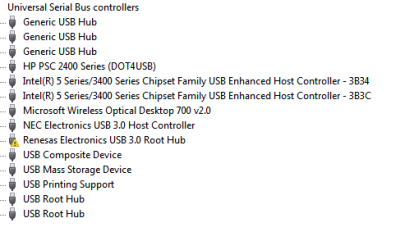
To un-install/re-install these drivers, open your start menu and type "Device Manager" in the search bar and press enter. Your USB 3.0 port bus should be under Universal Serial Bus Controllers, the last one on the list. Right click the one with the ! and choose UNINSTALL. Most of the time, you can go up to Action > Scan for Hardware Changes or just restart and the drivers should re-install. If not, uninstall them and run the latest installer from Asus' Web site for your motherboard.
My System SpecsSystem Spec
04-27-2011   #5


windows 7 home premium 64bit


thanx i will try that
My System SpecsSystem Spec
04-27-2011   #6


windows 7 home premium 64bit


Reneasas Electronics usb3.0 Root hub FAILED
My System SpecsSystem Spec
04-27-2011   #7


Windows 7 Home Premium 64 bit SP1


Please post a picture of device manager with Universal Serial Bus Controllers open.
My System SpecsSystem Spec
04-27-2011   #8


windows 7 home premium 64bit


Quote   Quote: Originally Posted by Commodore Pet View Post
Please post a picture of device manager with Universal Serial Bus Controllers open.
wish i could dont no how to do a screen shot
My System SpecsSystem Spec
04-27-2011   #9


Windows 7 Home Premium 64 bit SP1


I use the "Snipping Tool". Start Button-All Programs-Accessories-Snipping Tool. Just have device manager open with universal serial bus controllers open before you start it, then highlight it with snipping tools to capture it and save it. Then just attach it with your next post using the paperclip.
My System SpecsSystem Spec
04-27-2011   #10


windows 7 home premium 64bit


it'll take abit i just f&?%k somthing else up... this is why i shouldn't try to fix things my self...
My System SpecsSystem Spec
Reply

 3.0 usb code 10 problems?


Thread Tools


Similar Threads for: 3.0 usb code 10
Thread Forum
Windows Update errors Code 800B0100 and Code 8007065E, tried everythin Windows Updates & Activation
Win7 Firewall won't turn on error code 0x6D9 and error code 0x80070424 System Security
Microsoft Virtual Miniport Adapter code 10 and code 43 Drivers
Help! Code 43 Graphic Cards
(Code 43) Drivers


All times are GMT -5. The time now is 09:44 AM.


Windows 7 Forums is an independent web site and has not been authorized,
sponsored, or otherwise approved by Microsoft Corporation.
"Windows 7" and related materials are trademarks of Microsoft Corp.
© Designer Media Ltd
  

1 2 3 4 5 6 7 8 9 10 11 12 13 14 15 16 17 18 19 20 21 22 23 24 25 26 27 28 29 30