
| Windows 7: Old working slave drive no longer showing up |
14 May 2011
|
#1 | | Windows 7 Home Premium 32bit, Windows 7 Ultimate 32bit A hole in the bottom of the sea |
Old working slave drive no longer showing up I recently upgraded windows 7 to x64, and now my slave drive is no longer showing up in My Computer. It shows up in the bios, and in Disk manager.
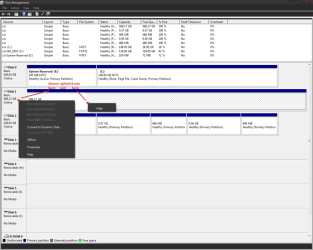
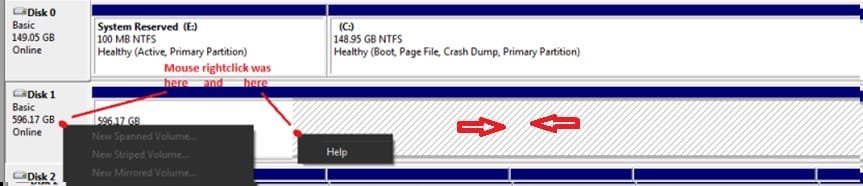
I have tried assigning it a drive letter, but my only option is "help." I have tried uninstalling the driver for it, then restarting, and reinstalling the driver, but it seems like it auto-installs the driver on startup because when i go back into properties, it says its already installed.
I know I can format it to get it to work again, but I have over 300gb worth of stuff on there I don't want to lose.
INFO:
drive is a Western Digital 640gb Caviar Blue
Running Windows 7 Ultimate x64
drive worked before on windows 7 x86
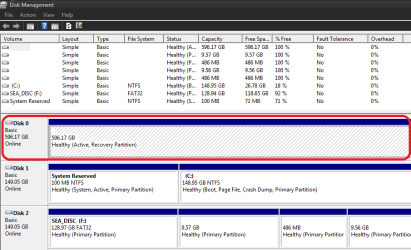
screenshot of disk manager here
Is there any way for me to get this drive working again without formating? | My System Specs |
| System Manufacturer/Model Number Compaq and custom OS Windows 7 Home Premium 32bit, Windows 7 Ultimate 32bit |
14 May 2011
|
#2 | | Win7 Enterprise, Win7 x86 (Ult 7600), Win7 x64 Ult 7600, TechNet RTM on AMD x64 (2.8Ghz) SomeWhere in the HOT Arizona Desert ! |
Hi AOTA
Can you tell us the make & model of your slave HD ? IDE or SATA ?
Also a screen snip of Disk Management will help, too | My System Specs | | Computer type PC/Desktop System Manufacturer/Model Number Built them myself, Science Experiments ! OS Win7 Enterprise, Win7 x86 (Ult 7600), Win7 x64 Ult 7600, TechNet RTM on AMD x64 (2.8Ghz) CPU AMD fx8350 4ghz, AMD-32 2400mhz, AMD-64 3200mhz, AMDx64 2.8G Motherboard SIS 755, ECS-K8M890M-M (Ult 7600), GigaByte & others Memory 2gb, 4gb on the Ult 7600, 4gb on Technet RTM, 32gb on FX8350 Graphics Card Draw my own Graphics, several nVidia cards Sound Card on motherboard Monitor(s) Displays 19" flat scr, 28" I-Inc widescr,22" Emprex Widescr, 23" Acer Screen Resolution 1280 x 1024, 1440 x 900, 1920 x 1080 Keyboard Compaq & Dell recycled from GoodWill Mouse Made in China Optical Wired Mouse PSU 430w, 550w, 600w, 700, 800, etc Case All Generic Full Towers Cooling Open Air & a few fans, some w/ colored LEDs Hard Drives 6 pata Ide HD's & 2 Sata HD's
added 80gb external on Ult 7600 computer,
numerous extra 1tb, 2TB, 3Tb SATA HD's
A collection of ext HD Docks w/ HDs Internet Speed Fast Cable InterNet Antivirus AVG Free on 24 different Desktops, NO Problems! Browser IE 8 is preferred, but use FireFox sometimes Other Info Linksys Routers, switches, & Hubs
Too Many USB Flash Drives to count, Biggest is 64GB !
Eight computers in my home network.
Sixteen computers at my business network.
Linked via TeamViewer !
Lots of old used spare computer parts everywhere! |
14 May 2011
|
#3 | | Windows 7 Home Premium 32bit, Windows 7 Ultimate 32bit A hole in the bottom of the sea |

Quote: Originally Posted by DocBrown Hi AOTA
Can you tell us the make & model of your slave HD ? IDE or SATA ?
Also a screen snip of Disk Management will help, too  Yeah, I forgot about that. see my above post for the updated info.
also, model # is: WD6400AAKS
Drive is SATA | My System Specs | | System Manufacturer/Model Number Compaq and custom OS Windows 7 Home Premium 32bit, Windows 7 Ultimate 32bit |
14 May 2011
|
#4 | | Win7 Enterprise, Win7 x86 (Ult 7600), Win7 x64 Ult 7600, TechNet RTM on AMD x64 (2.8Ghz) SomeWhere in the HOT Arizona Desert ! |
I am trying to figure out why this HD is showing up as
Healthy (Active, Recovery Partition )
which seems to mean that it is hidden | My System Specs | | Computer type PC/Desktop System Manufacturer/Model Number Built them myself, Science Experiments ! OS Win7 Enterprise, Win7 x86 (Ult 7600), Win7 x64 Ult 7600, TechNet RTM on AMD x64 (2.8Ghz) CPU AMD fx8350 4ghz, AMD-32 2400mhz, AMD-64 3200mhz, AMDx64 2.8G Motherboard SIS 755, ECS-K8M890M-M (Ult 7600), GigaByte & others Memory 2gb, 4gb on the Ult 7600, 4gb on Technet RTM, 32gb on FX8350 Graphics Card Draw my own Graphics, several nVidia cards Sound Card on motherboard Monitor(s) Displays 19" flat scr, 28" I-Inc widescr,22" Emprex Widescr, 23" Acer Screen Resolution 1280 x 1024, 1440 x 900, 1920 x 1080 Keyboard Compaq & Dell recycled from GoodWill Mouse Made in China Optical Wired Mouse PSU 430w, 550w, 600w, 700, 800, etc Case All Generic Full Towers Cooling Open Air & a few fans, some w/ colored LEDs Hard Drives 6 pata Ide HD's & 2 Sata HD's
added 80gb external on Ult 7600 computer,
numerous extra 1tb, 2TB, 3Tb SATA HD's
A collection of ext HD Docks w/ HDs Internet Speed Fast Cable InterNet Antivirus AVG Free on 24 different Desktops, NO Problems! Browser IE 8 is preferred, but use FireFox sometimes Other Info Linksys Routers, switches, & Hubs
Too Many USB Flash Drives to count, Biggest is 64GB !
Eight computers in my home network.
Sixteen computers at my business network.
Linked via TeamViewer !
Lots of old used spare computer parts everywhere! |
14 May 2011
|
#5 | | Windows 7 Home Premium 32bit, Windows 7 Ultimate 32bit A hole in the bottom of the sea |

Quote: Originally Posted by DocBrown I am trying to figure out why this HD is showing up as
Healthy (Active, Recovery Partition )
which seems to mean that it is hidden  Yeah, I noticed that. I dont remember it being that way before, and have not found any way to make it not be set as a recovery.
I remember when I was upgrading, I had some issues, and had to install x64 using the custom (advanced) option. When it came up with the screen asking which partition to install to, the slave drive was first on the list, and there was an error below it saying that windows could not install to that drive b/c is was a recovery disk, even though I had just been using it now 10min before | My System Specs | | System Manufacturer/Model Number Compaq and custom OS Windows 7 Home Premium 32bit, Windows 7 Ultimate 32bit |
14 May 2011
|
#6 | | Win7 Enterprise, Win7 x86 (Ult 7600), Win7 x64 Ult 7600, TechNet RTM on AMD x64 (2.8Ghz) SomeWhere in the HOT Arizona Desert ! |
Are the other 2 HD's SATA or IDE ? I'm thinking that HD needed to be disconnected during the install | My System Specs | | Computer type PC/Desktop System Manufacturer/Model Number Built them myself, Science Experiments ! OS Win7 Enterprise, Win7 x86 (Ult 7600), Win7 x64 Ult 7600, TechNet RTM on AMD x64 (2.8Ghz) CPU AMD fx8350 4ghz, AMD-32 2400mhz, AMD-64 3200mhz, AMDx64 2.8G Motherboard SIS 755, ECS-K8M890M-M (Ult 7600), GigaByte & others Memory 2gb, 4gb on the Ult 7600, 4gb on Technet RTM, 32gb on FX8350 Graphics Card Draw my own Graphics, several nVidia cards Sound Card on motherboard Monitor(s) Displays 19" flat scr, 28" I-Inc widescr,22" Emprex Widescr, 23" Acer Screen Resolution 1280 x 1024, 1440 x 900, 1920 x 1080 Keyboard Compaq & Dell recycled from GoodWill Mouse Made in China Optical Wired Mouse PSU 430w, 550w, 600w, 700, 800, etc Case All Generic Full Towers Cooling Open Air & a few fans, some w/ colored LEDs Hard Drives 6 pata Ide HD's & 2 Sata HD's
added 80gb external on Ult 7600 computer,
numerous extra 1tb, 2TB, 3Tb SATA HD's
A collection of ext HD Docks w/ HDs Internet Speed Fast Cable InterNet Antivirus AVG Free on 24 different Desktops, NO Problems! Browser IE 8 is preferred, but use FireFox sometimes Other Info Linksys Routers, switches, & Hubs
Too Many USB Flash Drives to count, Biggest is 64GB !
Eight computers in my home network.
Sixteen computers at my business network.
Linked via TeamViewer !
Lots of old used spare computer parts everywhere! |
14 May 2011
|
#7 | | Windows 7 Home Premium 32bit, Windows 7 Ultimate 32bit A hole in the bottom of the sea |
Quote: Originally Posted by DocBrown Are the other 2 HD's SATA or IDE ? I'm thinking that HD needed to be disconnected during the install  One is SATA the other is an external HDD so im not sure.
does this mean I can re-install Windows 7 just make sure the drive is disconnected? or does it mean I am stuck with this drive since I had it connected during installation? | My System Specs | | System Manufacturer/Model Number Compaq and custom OS Windows 7 Home Premium 32bit, Windows 7 Ultimate 32bit |
14 May 2011
|
#8 | | Win7 Enterprise, Win7 x86 (Ult 7600), Win7 x64 Ult 7600, TechNet RTM on AMD x64 (2.8Ghz) SomeWhere in the HOT Arizona Desert ! |
I'm not real sure at this point. I think we need to get some other members opinions on this.
The way I see your Disk Management is that your 640gb Sata HD is connected to your MB as Disk 0.
Your Boot (C  Sata HD is connected to the MB as Disk 1.
Your Ext HD is Disk 2.
Are you comfortable with possibly changing the SATA Data cables ? Because I'm thinking the Boot HD should be on Disk 0, but I don't want to loose anything on the 640gb if it can be saved. | My System Specs | | Computer type PC/Desktop System Manufacturer/Model Number Built them myself, Science Experiments ! OS Win7 Enterprise, Win7 x86 (Ult 7600), Win7 x64 Ult 7600, TechNet RTM on AMD x64 (2.8Ghz) CPU AMD fx8350 4ghz, AMD-32 2400mhz, AMD-64 3200mhz, AMDx64 2.8G Motherboard SIS 755, ECS-K8M890M-M (Ult 7600), GigaByte & others Memory 2gb, 4gb on the Ult 7600, 4gb on Technet RTM, 32gb on FX8350 Graphics Card Draw my own Graphics, several nVidia cards Sound Card on motherboard Monitor(s) Displays 19" flat scr, 28" I-Inc widescr,22" Emprex Widescr, 23" Acer Screen Resolution 1280 x 1024, 1440 x 900, 1920 x 1080 Keyboard Compaq & Dell recycled from GoodWill Mouse Made in China Optical Wired Mouse PSU 430w, 550w, 600w, 700, 800, etc Case All Generic Full Towers Cooling Open Air & a few fans, some w/ colored LEDs Hard Drives 6 pata Ide HD's & 2 Sata HD's
added 80gb external on Ult 7600 computer,
numerous extra 1tb, 2TB, 3Tb SATA HD's
A collection of ext HD Docks w/ HDs Internet Speed Fast Cable InterNet Antivirus AVG Free on 24 different Desktops, NO Problems! Browser IE 8 is preferred, but use FireFox sometimes Other Info Linksys Routers, switches, & Hubs
Too Many USB Flash Drives to count, Biggest is 64GB !
Eight computers in my home network.
Sixteen computers at my business network.
Linked via TeamViewer !
Lots of old used spare computer parts everywhere! |
14 May 2011
|
#9 | | Windows 7 Home Premium 32bit, Windows 7 Ultimate 32bit A hole in the bottom of the sea |
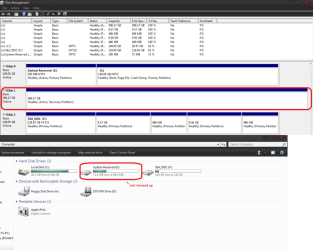
OK, so i switched around the cables, and now its kind of working... a new drive is now showing up, with the drive letter of the original, but its not showing up in disk manager, and the original slave drive is still there without a letter.
see here for a better idea of what im talking about
EDIT: the "system reserved" drive is showing up in disk manager as a partition on drive c:
however, the slave drive is still not showing up in my computer, and will not let me assign a drive letter to it. | My System Specs | | System Manufacturer/Model Number Compaq and custom OS Windows 7 Home Premium 32bit, Windows 7 Ultimate 32bit |
14 May 2011
|
#10 | | Win7 Enterprise, Win7 x86 (Ult 7600), Win7 x64 Ult 7600, TechNet RTM on AMD x64 (2.8Ghz) SomeWhere in the HOT Arizona Desert ! |
E: is now showing as the Un-hidden 100mb partition that is normally created by a Windows 7 install. Which is showing as the 1st partition on Disk 0 now. What happens when you right click on the 640gb HD now ?
Last edited by DocBrown; 14 May 2011 at 10:57 PM..
Reason: added pic
| My System Specs | | Computer type PC/Desktop System Manufacturer/Model Number Built them myself, Science Experiments ! OS Win7 Enterprise, Win7 x86 (Ult 7600), Win7 x64 Ult 7600, TechNet RTM on AMD x64 (2.8Ghz) CPU AMD fx8350 4ghz, AMD-32 2400mhz, AMD-64 3200mhz, AMDx64 2.8G Motherboard SIS 755, ECS-K8M890M-M (Ult 7600), GigaByte & others Memory 2gb, 4gb on the Ult 7600, 4gb on Technet RTM, 32gb on FX8350 Graphics Card Draw my own Graphics, several nVidia cards Sound Card on motherboard Monitor(s) Displays 19" flat scr, 28" I-Inc widescr,22" Emprex Widescr, 23" Acer Screen Resolution 1280 x 1024, 1440 x 900, 1920 x 1080 Keyboard Compaq & Dell recycled from GoodWill Mouse Made in China Optical Wired Mouse PSU 430w, 550w, 600w, 700, 800, etc Case All Generic Full Towers Cooling Open Air & a few fans, some w/ colored LEDs Hard Drives 6 pata Ide HD's & 2 Sata HD's
added 80gb external on Ult 7600 computer,
numerous extra 1tb, 2TB, 3Tb SATA HD's
A collection of ext HD Docks w/ HDs Internet Speed Fast Cable InterNet Antivirus AVG Free on 24 different Desktops, NO Problems! Browser IE 8 is preferred, but use FireFox sometimes Other Info Linksys Routers, switches, & Hubs
Too Many USB Flash Drives to count, Biggest is 64GB !
Eight computers in my home network.
Sixteen computers at my business network.
Linked via TeamViewer !
Lots of old used spare computer parts everywhere! Old working slave drive no longer showing up problems? All times are GMT -5. The time now is 09:17 PM. | |