Windows 7 Forums Search
Welcome to Windows 7 Forums. Our forum is dedicated to helping you find solutions with any problems, errors or issues you are experiencing with Windows 7. The Windows 7 forum also covers news and updates and has an extensive Windows 7 tutorial section that covers a wide range of tips and tricks.


Windows 7 - Who do I believe - Windows or CPUZ

 
05-24-2011   #1


W7 X-64 RTM,SUSE 11.1, XP PRO SP3 as a VM, VMware ESXi


Who do I believe - Windows or CPUZ

Hi all

I put a 4GB module into my Acer netbook -- works just fine but :

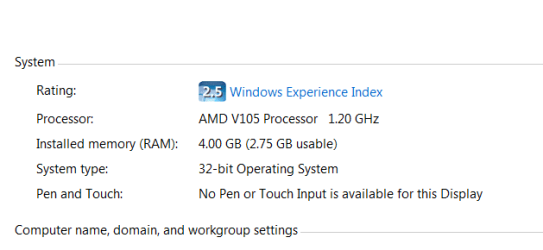
Windows 7 says I have 4 GB RAM in the computer

BIOS says I have 4 GB RAM in the computer


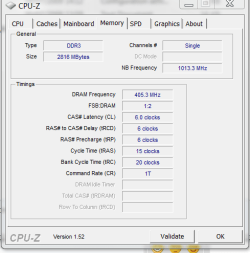
CPU-Z says I have 2 GB RAM in the computer

What gives ???


Judging by performance even on this farly low powered machine I can bring up 2 XP Virtual machines on it concurrently with reasonable performance !!!! which I couldn't do before upgrading the memory. I assume it IS using 4 GB.

However CPU_Z is usually reliable so is there an INFALLIBLE test to see how much Windows is actually seeing and using.

screenshots enc.

Attached Thumbnails
Who do I believe - Windows or CPUZ-cpuz.png   Who do I believe - Windows or CPUZ-w7.png  
My System SpecsSystem Spec
05-24-2011   #2


Windows 7 x64 pro/ Windows 7 x86 Pro/ XP SP3 x86


Try SIW.
My System SpecsSystem Spec
05-24-2011   #3


Windows 7 Ultimate x64 SP1


Quote   Quote: Originally Posted by jimbo45 View Post
so is there an INFALLIBLE test to see how much Windows is actually seeing and using.

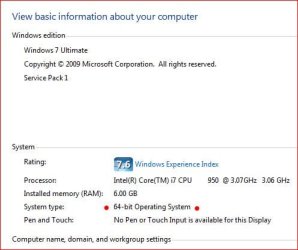
Yeah. It's called msinfo32.exe.

Who do I believe - Windows or CPUZ-capture.jpg
My System SpecsSystem Spec
.


05-24-2011   #4


W7 X-64 RTM,SUSE 11.1, XP PRO SP3 as a VM, VMware ESXi


Thanks


Cheers
jimbo
My System SpecsSystem Spec
05-24-2011   #5


Windows 7 Ultimate x64


CPUZ and Windows aren't disagreeing. Notice that Windows says "2.75GB usable?"

If you look at the SPD info on the 4GB module, it probably says "4GB."

You can only address 2.75GB (which is something like 2816MB, if not exactly) of RAM in Windows for whatever reason. You may be using a 32-bit operating system. It could be anything.
My System SpecsSystem Spec
05-24-2011   #6


Windows 7 Ultimate x64


Quote   Quote: Originally Posted by pantsaregood View Post
CPUZ and Windows aren't disagreeing. Notice that Windows says "2.75GB usable?"
I actually think they are disagreeing . . the only reason for the discrepancy I can think of is if you have on on-board graphics adapter and a portion of your system RAM is being used by the adapter . .
My System SpecsSystem Spec
05-24-2011   #7


Windows 7 X64 Professional/Windows 8


Quote   Quote: Originally Posted by Airbot View Post
Quote   Quote: Originally Posted by jimbo45 View Post
so is there an INFALLIBLE test to see how much Windows is actually seeing and using.

Yeah. It's called msinfo32.exe.

Attachment 156160
Yes. CPUz I believe. It is showing what windows is seeing. Cpuz is showing 2818MB of ram. If it was onlt\y showing 2GB it would be 2048MB. So, it is showing the amount windows is seeing as useable. Thats my opinion.
My System SpecsSystem Spec
05-24-2011   #8


Windows 7 Home Premium 64 bit


I don't think they are disagreeing at all it's showing 2gb's single channel, not dual channel.
My System SpecsSystem Spec
05-24-2011   #9


Windows 7 Ultimate x64 SP1


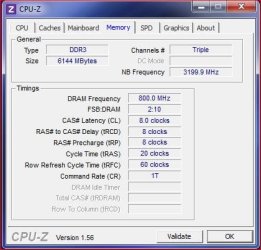
Actually CPU-Z is not correct. Why is the question??? Here's my CPU-Z showing my 6gig of memory installed.

Who do I believe - Windows or CPUZ-mem-speed.jpg

Jimbo update to CPU-Z version 1.56. Notice you have v1.52

Also notice is says single channel. Don't know anything about notebook memory so it's possible CPU-Z could be confused? But that's just a guess as I can't see how CPU-Z wouldn't read a notebook correctly (again, a guess).

Anyway updating to the latest version should confirm.

My two cents.
My System SpecsSystem Spec
05-24-2011   #10


Windows 7 Ultimate x64


Quote   Quote: Originally Posted by sygnus21 View Post
Actually CPU-Z is NOT correct. Why is the question??? Here's my CPU-Z showing my 6gig of memory installed.
Exactly. That field in CPU-Z shows installed memory, not available memory . . . hence why I'm curious to know if you are using on on-board graphics adapter jimbo45?
My System SpecsSystem Spec
Reply

 Who do I believe - Windows or CPUZ problems?


Thread Tools


Similar Threads for: Who do I believe - Windows or CPUZ
Thread Forum
CPUZ reporting wrong CPU? Software
CPUZ processor readings Hardware & Devices


All times are GMT -5. The time now is 09:48 AM.


Windows 7 Forums is an independent web site and has not been authorized,
sponsored, or otherwise approved by Microsoft Corporation.
"Windows 7" and related materials are trademarks of Microsoft Corp.
© Designer Media Ltd
  

1 2 3 4 5 6 7 8 9 10 11 12 13 14 15 16 17 18 19 20 21 22 23 24 25 26 27 28 29 30