Welcome to Windows 7 Forums. Our forum is dedicated to helping you find solutions with any problems, errors or issues you are experiencing with Windows 7. The Windows 7 forum also covers news and updates and has an extensive Windows 7 tutorial section that covers a wide range of tips and tricks.
Hey guys, so today I received my My 1GB Kingston memory module;
which I thoroughly checked that it was compatible for my laptop before purchase,
My Laptop has two memory module slots.
The previous RAM setup I had was 512MB + 256MB = 768 (759 Usable)
After implementation of the 1GB RAM = 512MB + 1GB = 1.50GB (768 Usable)
These were/are from on my system properties info.
IS the 1GB memory Module defected?
OR is should I have nothing to worry about?
Additional info:
Toshiba Satellite Pro U200 (Notebook)
OP: Windows 7 Home Premium 32bit
Processor: Genuine Intel(R) CPU T1300 @ 1.66GHz
Graphics Card: Mobile Intel(R) 945 Express Chipset Family
Plus the Motherboard can handle upto 4GB of memory installed; (2GB for each slot).
------------------------
You guys reckon swaping the memory modules around would help?
Since the 512MB module was the main one from the start...
Last edited by Brian Yates; 05-29-2011 at 03:34 AM..
System Manufacturer/Model Number HP, Dell, Gateway - 2 laptops and 2 desktops OS Vista and Windows7, sometimes Ubuntu and Fedora CPU from 1.6GHz Duo to 2.5GHz Quad Monitor(s) Displays 2x HP w2207
Keyboard with trackball - no mices Mouse terrible devices, who wants them Hard Drives 5x HDD, 2x SSD, 6x Externals Internet Speed DSL 6000
System Manufacturer/Model Number Built them myself, Science Experiments ! OS Xp Pro SP3 x64, Win7 x86 (Ult 7600), Win7 x64 Ult 7600, TechNet RTM on AMD x64 (2.8Ghz) CPU AMD-64 3000mhz, AMD-32 2400mhz, AMD-64 3200mhz, AMDx64 2.8G Motherboard SIS 755, ECS-K8M890M-M (Ult 7600), & others Memory 2gb, 4gb on the Ult 7600, 4gb on Technet RTM Graphics Card Draw my own Graphics, several nVidia cards Sound Card on motherboard Monitor(s) Displays 19" flat scr, 19" Acer widescr, 22" Emprex Widescr, 23" Acer Screen Resolution 1280 x 1024, 1440 x 900, 1920 x 1080
Keyboard Compaq & Dell recycled from GoodWill Mouse Made in China Optical Wired Mouse PSU 430w, 550w, 600w, etc Case All Generic Full Towers Cooling Open Air & a few fans Hard Drives 6 pata Ide HD's & 2 Sata HD's
added 80gb external on Ult 7600 computer,
several extra 1tb & 2TB SATA HD's Internet Speed Fast Cable InterNet Other Info Linksys Routers, switches, & Hubs
Too Many USB Flash Drives to count, Biggest is 64GB !
Eight computers in my home network.
Twelve computers at my business network.
Linked via TeamViewer !
Lots of old used spare computer parts everywhere!
Thanks for posting the snip. Looks like you have mis-matched Brands & speeds of ram memory. You will do best with a matched pair, Same Brand, speed, & size of ram
System Manufacturer/Model Number Built them myself, Science Experiments ! OS Xp Pro SP3 x64, Win7 x86 (Ult 7600), Win7 x64 Ult 7600, TechNet RTM on AMD x64 (2.8Ghz) CPU AMD-64 3000mhz, AMD-32 2400mhz, AMD-64 3200mhz, AMDx64 2.8G Motherboard SIS 755, ECS-K8M890M-M (Ult 7600), & others Memory 2gb, 4gb on the Ult 7600, 4gb on Technet RTM Graphics Card Draw my own Graphics, several nVidia cards Sound Card on motherboard Monitor(s) Displays 19" flat scr, 19" Acer widescr, 22" Emprex Widescr, 23" Acer Screen Resolution 1280 x 1024, 1440 x 900, 1920 x 1080
Keyboard Compaq & Dell recycled from GoodWill Mouse Made in China Optical Wired Mouse PSU 430w, 550w, 600w, etc Case All Generic Full Towers Cooling Open Air & a few fans Hard Drives 6 pata Ide HD's & 2 Sata HD's
added 80gb external on Ult 7600 computer,
several extra 1tb & 2TB SATA HD's Internet Speed Fast Cable InterNet Other Info Linksys Routers, switches, & Hubs
Too Many USB Flash Drives to count, Biggest is 64GB !
Eight computers in my home network.
Twelve computers at my business network.
Linked via TeamViewer !
Lots of old used spare computer parts everywhere!
System Manufacturer/Model Number Me :) It's a model No. 3.1415926 OS Windows 7 Ultimate AMD64 CPU AMD Phenom II X4 980 Black Edition Deneb 3.7GHz Motherboard Asus M4N68T-M V2 µATX Motherboard Memory 8GB 4GBx2 Kingston PC10600 DDR3 1333 Memory Graphics Card BFG NVIDIA Geforce 220GT 1 Gig DDR2 PCIe Sound Card VIA VT1708s High Definition Audio 8-channel Onboard Monitor(s) Displays 2 x 19" I-INC AG191D TFT Flat Panel Screen Resolution 1280x1024 x 2
Keyboard Logitech Internet 600 Mouse Logitech Wireless Trackman Wheel PSU Extreme ATX 450 Watt Model No. RSY-645 Case Power Up Black ATX Mid-Tower Case Cooling Stock heatsink and fan Hard Drives 500 Gig WesternDigital SATA-300 Drive Internet Speed 20 Mbps Down 1 Mbps Up Other Info HP DVD1040e Lightscribe - External USB2
Hey guys, so today I received my My 1GB Kingston memory module; which I thoroughly checked that it was compatible for my laptop before purchase,
My Laptop has two memory module slots.
The previous RAM setup I had was 512MB + 256MB = 768 (759 Usable)
After implementation of the 1GB RAM = 512MB + 1GB = 1.50GB (768 Usable)
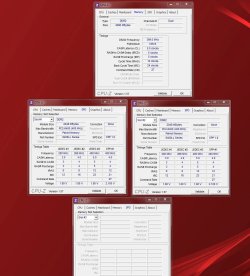
Note that your new 1GB memory (PC2-5300, 333Mhz) is faster (PC2-4300, 266Mhz) than your old 512MB memory.
Looks from your screenshot like the CPU has dropped down to the slower of the two speeds, namely 266Mhz. So you're not really getting the speed benefit from the newer memory, if you thought you were going to.
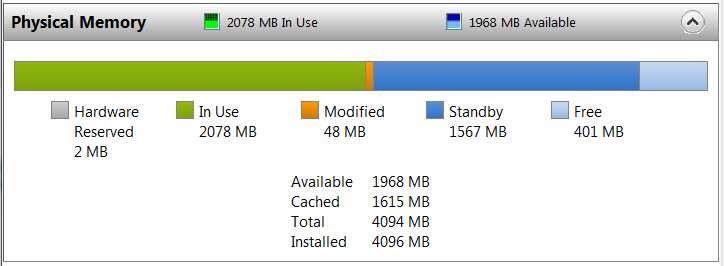
Please post a screenshot from Taskmgr -> Performance tab, push Resource Monitor button, -> Memory tab. Something like this:
Hard to believe you could replace a 512MB piece of memory with a 1GB piece of memory and essentially get zero addition to your "available", unless all the rest of it got gobbled up by your video graphics chip (as would be visible and apparent in a large "hardware reserved" item of the screenshot).
It's never a good idea to have mismatched memory sticks, either on manufacturer, size, speed, etc.
Thought about just going with a matched 2x2GB kit?
Looking up the Toshiba Satellite U200 series on the Crucial site, here's a PC2-5300 2x2GB kit for $66 from Crucial that I believe is right for your U200 laptop.
System Manufacturer/Model Number Home-built, two systems (1) and (2) OS Windows 7 Pro x64 / WinXP Pro x86 on (1), Win7 Pro X64 / WinXP Pro x86 on (2) CPU E6850 3.0Ghz/4MB-cache (1); E8400 3.0Ghz/6MB-cache (2) Motherboard SuperMicro C2SBX (1); ASUS P5Q3 (2) Memory 4GB PC3-8500 DDR3 (1); 4GB PC3-10600 DDR3 (2) Graphics Card ATI HD4850 (1); ATI HD5770 (dual-DVI) (2) (see TV cards) Sound Card Realtek ALC883 HD Audio (1); Realtek ALC1200 HD Audio (2) Monitor(s) Displays Eizo 24" S2433W (1); Eizo HD2441W LCD, Eizo S2433W (2) Screen Resolution 1920x1200 (1); 1920x1200, 1920x1200 (2)
Keyboard IBM PS/2 (1) and (2) Mouse Microsoft wired (1); Logitech MX Revolution wireless (2) PSU Nesteq ECS-6001 600W (1); Nesteq ECS-5001 500W (2) Case Acousti-Case 360 (1) and (2) Cooling Zalman CNPS9700-NT for CPU, 2x120mm case fans (1) and (2) Hard Drives (1) 1x1TB SATA (7200 RPM), 1x300GB U320 SCSI (10000RPM), 1x750GB SATA (7200RPM), 1x150GB SATA (10000RPM) for OS;
(2) 1x320GB SATA (7200RPM), 1x140GB SCSI 10000RPM U320, 1x150GB SATA (10000RPM) for OS Internet Speed 15mbps down / 2mbps up Other Info Ceton InfiniTV 4-tuner cablecard-enabled TV card as well as ATI TV Wonder 650 Combo PCIe OTA/ATSC 2-tuner TV card in (2), running under Win7 WMC
System Manufacturer/Model Number HP Pavilion Elite 495UK OS Windows 7 Ultimate SP1 64-Bit CPU Intel Core i7 870 @ 2.93GHz Motherboard MSI 2A9C (CPU1) Memory 8Gb Dual-Channel DDR3 @ 664MHz Graphics Card nVidia GeForce GTX 460 1024MB dedicated RAM Sound Card Realtek HD Audio Monitor(s) Displays HP2310i Screen Resolution 1920 x 1080
Keyboard Logitech K750 solar-powered keyboard Mouse Logitech Wireless M180 mouse PSU 460W Case HP Elite Cooling Air cooled Hard Drives 1x1954GB Hitachi HDS22020ALA 330 (RAID), 1x1954GB Hitachi External for backup and storage Internet Speed 2Mb Other Info Pure Avanti Flow Internet Radio with iPod Dock, 64Gb iPod, HP USB Speakers, Sony MDR-V500 Headphones, Sony Vaio F-Series Laptop
Oh... now I see. You edited your original post to add the screenshot I requested.
Incidentally, I looked further into your U200 laptop. The graphics chip in it is actually Intel Graphics Media Accelerator 950. According to Intel:
Dynamic Video Memory Technology (DVMT) 3.0 supports up to 224MB of video memory; system memory is allocated where it is needed dynamically.
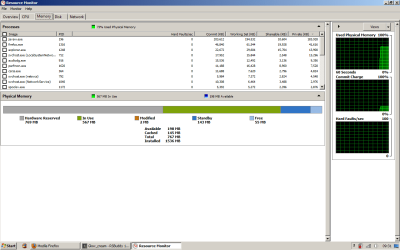
That screenshot from Task Manager -> Performance tab, Resource Monitor button -> Memory tab shows that Windows definitely recognizes all the 1.5GB of physical memory you have installed. It shows "1536 MB installed", which is what we would have expected. So all of it is actually in use.
Yes, the two memory cards are of different size and different speeds, but apparently both the BIOS and Windows were willing to accept those differences and still make all 1.5GB available.
I'm still certain that the BIOS has chosen to run the CPU/memory at the slower speed of your two cards, so you're not getting any performance boost on that side, if you thought you were going to. But as I mentioned in my earlier reply, it's never recommended to have (a) different size memory, (b) different speed memory, and (c) different manufacturer's memory.
For the low prices of a matched set of two memory cards for your Toshiba U200 laptop from Crucial that I noted above (i.e. $66 for 2x2GB kit, or $36 for 2x1GB kit, or $18 for a single 1GB card... all at PC2-5300, like your current faster new 1GB card) it seems that this would be a good idea for another upgrade, if you wanted to go that route.
Anyway, back to your new memory allocation screenshot.
It shows a full 769MB of the 1536MB installed going to "hardware reserved", and thus completely unavailable to Windows 7. That leaves 767MB of the 1536MB actually available, which is what you stated in your original post even without the screenshot.
So... obviously the new physical memory has been allocated for use by your Intel Media Accelerator 950 graphics chip, in my opinion (i.e. "hardware reserved).
Before the additional 768MB physical memory was present, it would appear that the graphics chip realized it could not grab all of the physical memory it really wanted, and thus reverted to operation with whatever minimal memory it may have actually come with. The spec says "up to 224MB of video memory" but the Toshiba documentation is not specific as to what really may have been installed.
Anyway, my guess is that since you say you previously had 759MB usable out of the 768MB of memory previously installed, obviously there could only have been about 9MB previously allocated to "hardware reserved". And now that you've added another 768MB of memory, almost all of it has seemingly been grabbed by your Intel Media Accelerator 950 graphics chip for its own use!
My guess is that video performance before you upgraded the memory, where the graphics chip had whatever little video memory it had to work with, plus no more than 9MB of RAM carved out, may have been fairly poor. Now that it's grabbed 768MB of memory (which is probably the maximum it's going to grab, no matter how much physical memory you now add additionally) my guess is that its performance is much much much better.
That's my guess. Your current situation is simply what your U200 hardware wants to do.
My real suggestion is that if you want to improve your current situation, spend $66 and buy the 2x2GB PC2-5300 memory kit from Crucial, and put 4GB of the somewhat faster memory into your laptop. Even if you take out the 768MB of "hardware reserved" (which in my opinion will still be the case, and nothing more will be removed) that will leave you with 3.3GB of memory available to Windows 7.
And since you're running the 32-bit version of Windows 7 anyway, that is pretty much the maximum amount of memory the OS can physically make use of.
So a 4GB machine will give you (a) optimal video performance for your Intel 950 graphics chip, using 768MB of memory, and (b) optimal 32-bit Windows 7 performance, with 3.3GB available.
That's my recommendation. There's nothing else you can do when your graphics chip is taking 768MB for itself.

System Manufacturer/Model Number Home-built, two systems (1) and (2) OS Windows 7 Pro x64 / WinXP Pro x86 on (1), Win7 Pro X64 / WinXP Pro x86 on (2) CPU E6850 3.0Ghz/4MB-cache (1); E8400 3.0Ghz/6MB-cache (2) Motherboard SuperMicro C2SBX (1); ASUS P5Q3 (2) Memory 4GB PC3-8500 DDR3 (1); 4GB PC3-10600 DDR3 (2) Graphics Card ATI HD4850 (1); ATI HD5770 (dual-DVI) (2) (see TV cards) Sound Card Realtek ALC883 HD Audio (1); Realtek ALC1200 HD Audio (2) Monitor(s) Displays Eizo 24" S2433W (1); Eizo HD2441W LCD, Eizo S2433W (2) Screen Resolution 1920x1200 (1); 1920x1200, 1920x1200 (2)
Keyboard IBM PS/2 (1) and (2) Mouse Microsoft wired (1); Logitech MX Revolution wireless (2) PSU Nesteq ECS-6001 600W (1); Nesteq ECS-5001 500W (2) Case Acousti-Case 360 (1) and (2) Cooling Zalman CNPS9700-NT for CPU, 2x120mm case fans (1) and (2) Hard Drives (1) 1x1TB SATA (7200 RPM), 1x300GB U320 SCSI (10000RPM), 1x750GB SATA (7200RPM), 1x150GB SATA (10000RPM) for OS;
(2) 1x320GB SATA (7200RPM), 1x140GB SCSI 10000RPM U320, 1x150GB SATA (10000RPM) for OS Internet Speed 15mbps down / 2mbps up Other Info Ceton InfiniTV 4-tuner cablecard-enabled TV card as well as ATI TV Wonder 650 Combo PCIe OTA/ATSC 2-tuner TV card in (2), running under Win7 WMC
WoW such a great community that is commited to help newbies like meh
If only I was rich enough to give each and everyone of you of you a medal
"A GOLD One coz all of you deserve one"
It's nice to know there's still decent people in this world, willing to invest time & effort
into helping others.
A Big Thank You all the way down here from England.