|
Welcome to Windows 7 Forums. Our forum is dedicated to helping you find solutions with any problems, errors or issues you are experiencing with Windows 7. The Windows 7 forum also covers news and updates and has an extensive Windows 7 tutorial section that covers a wide range of tips and tricks.
Windows 7 - How to format a USB drive safely? |
06-02-2011
|
#1 | | Windows 7 Ultimate x64 SP1 |
[SOLVED] How to format a USB drive safely? Hi,
I searched in many web pages and I learned that secure formatting (DoD, NSA, Gutman, etc...) doesn't works with USB drives. Is it true? So, how can I secure delete a USB drive preventing a recovery data? What software I need?
Last edited by seventrad; 06-03-2011 at 09:42 PM..
Reason: Solved
| My System Specs | | OS Windows 7 Ultimate x64 SP1 |
06-03-2011
|
#3 | | Windows 7 Ultimate x64 SP1 |
The correct way I searched in web and I found the correct way:
1º) Install Eraser 6 or above:
Link: Eraser :: Downloads
2º) VERY IMPORTANT STEP: Delete all data in USB device with DELETE key or FORMAT it with the Windows Explorer! The USB device need to be completely empty.
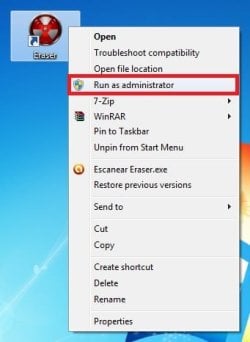
3º) Run Eraser 6 as Administrator (very important for Windows Vista/7 users). Right-click mouse and choose "Run as administrator".
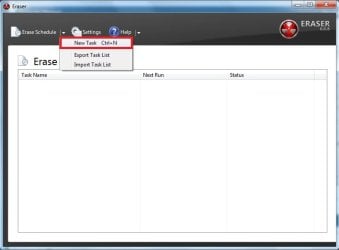
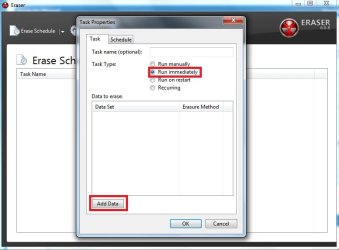
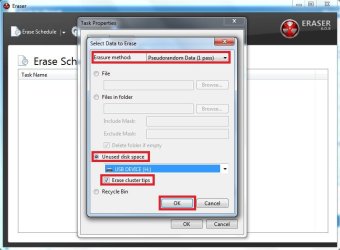
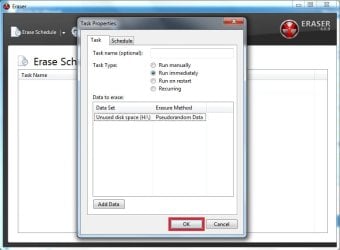
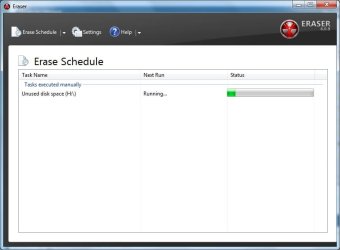
4º) Choose the options below: 1 - Create a "New Task" 2 - Choose "Run immediately" and click in "Add Data" 3 - Choose the "Erasure Method" (the correct option is "Pseudorandom Data 1 Pass" - only 1 pass. For more detail see reference (*)) and check "Unused disk space", then select the USB drive. Check "Erase cluster tips". 4 - Click "Ok" and the erase will be run immediately! 5 - During the task, all unused bytes in USB device will be overwritten by random data! Only 1 pass is necessary (*). (*) Reference: Heidi Computers Ltd Support - View topic - Erasing USB key Drives (for understand I recommend the read all topics)
Last edited by seventrad; 06-03-2011 at 10:57 PM..
| My System Specs | | OS Windows 7 Ultimate x64 SP1 |
06-03-2011
|
#4 | | Windows 7 Ultimate X86 SP1 |
CCleaner also has the option of a secure wipe of a drive. You can choose only free space or wipe the entire drive.
Did Eraser6 wipe the entire drive or only free space? Your snip shows only unused space being overwritten. | My System Specs | | System Manufacturer/Model Number Brittechnologies II OS Windows 7 Ultimate X86 SP1 CPU i5-2550K differing speeds depending on the day Motherboard ASUS P8X68-V PRO/GEN3 Memory 16GB G.Skill Sniper 2133MHz, 4X4GB Graphics Card ASUS ENGTX460 DirectCU/2DI/1GD5 GeForce GTX 460 Sound Card Onboard Realtek 5-1 Monitor(s) Displays Samsung P2570HD Screen Resolution 1920x1080 Keyboard Old Dell USB From 10 yrs Ago Mouse Gigabyte m6900 wired PSU Corsair HX650W Case Inwin Dragon rider Cooling Hyper 212 EVO w/two Noctua fans @1300 RPM Hard Drives TBA Internet Speed 8-19 Mbs down, 3-4 Mbs up Comcast Cable Other Info 5 fans, LG Bluray/R/RE, ASUS DVD/R/RW |
06-03-2011
|
#5 | | Windows 7 Ultimate x64 SP1 |

Quote: Originally Posted by Britton30 CCleaner also has the option of a secure wipe of a drive. You can choose only free space or wipe the entire drive.
Did Eraser6 wipe the entire drive or only free space? Your snip shows only unused space being overwritten. 1º) In Eraser 6 the only available option is "Unused disk space"! But, deleting all data in USB device before or formatting it, entire drive will be overwritten!
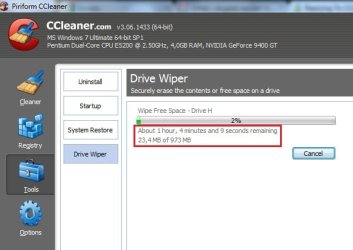
2º) CCleaner Driver Wiper is very, very slow! Example for one USB device with only 1GB! | My System Specs | | OS Windows 7 Ultimate x64 SP1 |
06-04-2011
|
#6 | | Windows 7 Ultimate X86 SP1 |
In CCLeaner Options/settings where do you have the overwrite settings? It has the options od 1,3,7, or 35 passes. for A USB flash drive, 1 pass should be enough. | My System Specs | | System Manufacturer/Model Number Brittechnologies II OS Windows 7 Ultimate X86 SP1 CPU i5-2550K differing speeds depending on the day Motherboard ASUS P8X68-V PRO/GEN3 Memory 16GB G.Skill Sniper 2133MHz, 4X4GB Graphics Card ASUS ENGTX460 DirectCU/2DI/1GD5 GeForce GTX 460 Sound Card Onboard Realtek 5-1 Monitor(s) Displays Samsung P2570HD Screen Resolution 1920x1080 Keyboard Old Dell USB From 10 yrs Ago Mouse Gigabyte m6900 wired PSU Corsair HX650W Case Inwin Dragon rider Cooling Hyper 212 EVO w/two Noctua fans @1300 RPM Hard Drives TBA Internet Speed 8-19 Mbs down, 3-4 Mbs up Comcast Cable Other Info 5 fans, LG Bluray/R/RE, ASUS DVD/R/RW |
06-04-2011
|
#7 | | MS Windows 7 Ultimate 64-bit SP1 |

Quote: Originally Posted by Britton30 In CCLeaner Options/settings where do you have the overwrite settings? It has the options od 1,3,7, or 35 passes. for A USB flash drive, 1 pass should be enough.  i agree with britton, i done that probably hundred times already. in the office we had to secure our files as not to be retrieved by any undelete/recovery software. 1 pass is enough. | My System Specs | | System Manufacturer/Model Number Dell inspiron 1564 OS MS Windows 7 Ultimate 64-bit SP1 CPU Intel Core i5 @ 2.27GHz Arrandale 32nm Technology Motherboard Dell Inc. 0M9XW4 (U2E1) Memory 6.0GB Dual-Channel DDR3 @ 532MHz (7-7-7-20) Graphics Card ATI Mobility Radeon HD 4300 Series (Dell) Sound Card Realtek High Definition Audio Monitor(s) Displays Generic PnP Monitor on ATI Mobility Radeon HD 4330 Screen Resolution 1366x768 pixels Keyboard built-in Mouse Dell Touchpad/Microsoft Arc Mouse PSU built-in Case Dell Laptop Cooling built-in Hard Drives 625GB TOSHIBA TOSHIBA MK6459GSX ATA Device (SATA) Other Info Snake Laptop Skin, Detachable Alfa USB wifi with custom 15dbi antenna (for better signal range) |
06-04-2011
|
#8 | | Windows 7 Ultimate x64 SP1 |

Quote: Originally Posted by Britton30 In CCLeaner Options/settings where do you have the overwrite settings? It has the options od 1,3,7, or 35 passes. for A USB flash drive, 1 pass should be enough.  
Quote: Originally Posted by rbeldua i agree with britton, i done that probably hundred times already. in the office we had to secure our files as not to be retrieved by any undelete/recovery software. 1 pass is enough.  I use CC's Drive Wiper with only 1 pass, see: CC Drive Wiper.rar | My System Specs | | OS Windows 7 Ultimate x64 SP1 |
06-04-2011
|
#9 | | Windows 7 Ultimate X86 SP1 |
How long did CCleaner take in actuality? Many program give an estimate which is high then completes in a much shorter time. I trust CCleaner to do a good job, if a program says it wipes and takes a few seconds, not so trustworthy. A wipe is CPU-intensive too and will be slower with other programs running at the same time. | My System Specs | | System Manufacturer/Model Number Brittechnologies II OS Windows 7 Ultimate X86 SP1 CPU i5-2550K differing speeds depending on the day Motherboard ASUS P8X68-V PRO/GEN3 Memory 16GB G.Skill Sniper 2133MHz, 4X4GB Graphics Card ASUS ENGTX460 DirectCU/2DI/1GD5 GeForce GTX 460 Sound Card Onboard Realtek 5-1 Monitor(s) Displays Samsung P2570HD Screen Resolution 1920x1080 Keyboard Old Dell USB From 10 yrs Ago Mouse Gigabyte m6900 wired PSU Corsair HX650W Case Inwin Dragon rider Cooling Hyper 212 EVO w/two Noctua fans @1300 RPM Hard Drives TBA Internet Speed 8-19 Mbs down, 3-4 Mbs up Comcast Cable Other Info 5 fans, LG Bluray/R/RE, ASUS DVD/R/RW |
06-04-2011
|
#10 | | Windows 7 Ultimate x64 SP1 |

Quote: Originally Posted by Britton30 How long did CCleaner take in actuality? Many program give an estimate which is high then completes in a much shorter time. I trust CCleaner to do a good job, if a program says it wipes and takes a few seconds, not so trustworthy. A wipe is CPU-intensive too and will be slower with other programs running at the same time. Eraser spends only 6 minutes to do the same job. See: Eraser.rar | My System Specs | | OS Windows 7 Ultimate x64 SP1 How to format a USB drive safely? problems? All times are GMT -5. The time now is 06:39 AM. |  |