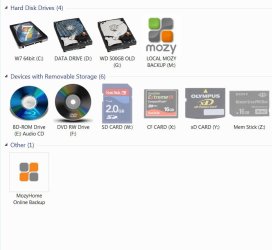
I have this Card Reader, and have installed it on multi machines. No Special Driver is required in W7. This is likely a Drive letter issue. First go to Control Panel>Admin Tools>Computer Management>Click on "Disk Manager" in the L hand Column> Your Card Reader Drives SHOULD show up individually as "Removable" with "No Media" listed For Each type of “Storage Device” on your machine.
* Here I always Change each of the types of card reader drives to say for example "W" "X" "Y" and "Z" This Helps you not have “drive letter interference” with other drives on your machine. (Remembering that your "C" drive is typically your OS,etc.)
Note* I have taken mine a step further. I go to "Computer" and R Click and Name Each one of the Card Reader Drives what it is, AND I change the icon to represent THAT kind of Card. Not only that, but what's nice in Win 7 is the fact that the card icons appear slightly transparent until a specific type of card is installed and then they are bold.
See Screen Shot.
Hope this helps!