Windows 7 Forums Search
Welcome to Windows 7 Forums. Our forum is dedicated to helping you find solutions with any problems, errors or issues you are experiencing with Windows 7. The Windows 7 forum also covers news and updates and has an extensive Windows 7 tutorial section that covers a wide range of tips and tricks.


Windows 7 - Printer Services Haywire & "Add Printer" Broken

 
06-06-2011   #1


Windows 7 Ultimate


Printer Services Haywire & "Add Printer" Broken

Hi. I'm running Windows 7 Ultimate 64-bit. Suddenly, my printer no longer receives recognition from the computer. It worked just fine for over 6 months, and simply won't be recognized any longer. Re-installing drivers doesn't help. Any ideas?

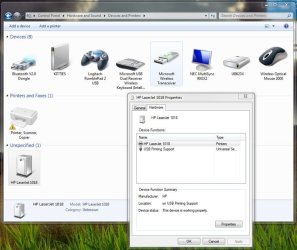
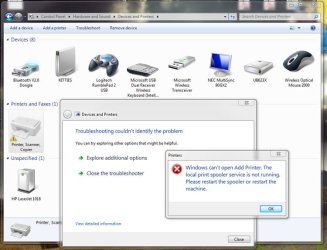
I have attached some pictures for reference. It seems the computer recognizes the hardware is there, and that it is an HP Laserjet 1018 installed. The services that normally run in the background responsible for printing seem to be haywire, though.

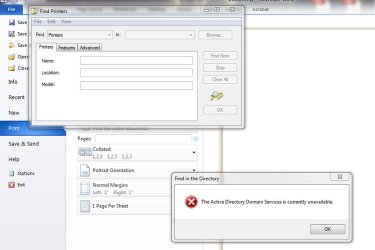
One dialogue says that the "print spooler service" is not running. Huh? Another said, "The Active Directory Domain Services is currently unavailable."

Attached Thumbnails
Printer Services Haywire & "Add Printer" Broken-1.jpg   Printer Services Haywire & "Add Printer" Broken-2.jpg   Printer Services Haywire & "Add Printer" Broken-3.jpg  
My System SpecsSystem Spec
06-06-2011   #2


Windows 7 Professional 64 bit


Have you tried completely removing the printer software ?? HP used to have a utility for some of its printers that went beyond a normal uninstall and removed all traces of the printer. You might look for that. Once removed, install the latest from HP again, making sure to follow any specifics about when the printer should be plugged in.

Have you restarted the spooler or the computer as prompted ??

If you're not part of an Active Directory domain, the service shouldn't be running.
My System SpecsSystem Spec
06-06-2011   #3


Windows 7 Ultimate


I have run services.msc and restarted the print spooling service repeatedly. It just crashes again soon after.

I have re-installed the HP printer driver numerous times. It's not a driver issue, I'm pretty sure... It's a print services issue and it just doesn't work. I have also uninstalled a bunch of other software to see if it was conflicting... Still hasn't helped.

Yes, I have changed settings and restarted the computer over a dozen times now.

Still, no idea what to do.
My System SpecsSystem Spec
.


Reply

 Printer Services Haywire & "Add Printer" Broken problems?


Thread Tools


Similar Threads for: Printer Services Haywire & "Add Printer" Broken
Thread Forum
Solved Cannot install HP printer drivers - "Access is denied" in Windows 7 Drivers
Solved Samsung Smart Panel stating "Printer status not available" Hardware & Devices
Computer isnt seeing wireless printer when trying to add "New Printer" Network & Sharing
lxeacoms.exe "Printer Communication System" CPU usage Hardware & Devices
Can you use Windows 7 Pro + XP mode to make your "older" Printer work? Drivers


All times are GMT -5. The time now is 06:45 AM.


Windows 7 Forums is an independent web site and has not been authorized,
sponsored, or otherwise approved by Microsoft Corporation.
"Windows 7" and related materials are trademarks of Microsoft Corp.
© Designer Media Ltd
  

1 2 3 4 5 6 7 8 9 10 11 12 13 14 15 16 17 18 19 20 21 22 23 24 25 26 27 28 29 30