Windows 7 Forums


Windows 7: Need quick help about new hard disk partition on win 7 disk management

08 Jun 2011   #1

Windows 7 SP1 Ultimate x32
 
 
Need quick help about new hard disk partition on win 7 disk management

Hi to all seven forums.
I bought a new 1tb hard disk, and I connected it to my pc as slave, and when I creating the partition in windows seven disk management and right click to creates new partition, it had four option.
1. simple volume
2. spanned volume
3. stripped volume
4. mirrored volume.
plz tell me quickly which option will I click for creating partition..
I want this partitions..
C: 30gb
D:30gb
and the remaining space is equally divided to 3 partition..
plz hurry guys..
I m waiting and stick on this..

My System SpecsSystem Spec

08 Jun 2011   #3

W7 Professional x64
Portland, OR


Simple volume is probably the best option here, and from there it will take you to sizing. Choose what sizes you want and away you go.

Out of curiosity, why so many partitions?
My System SpecsSystem Spec
.


08 Jun 2011   #4

Windows 7 SP1 Ultimate x32


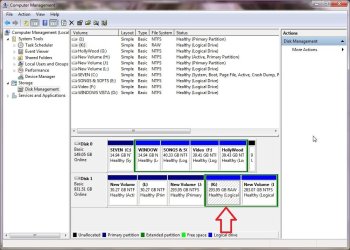
thanks for quick reply.. I m doing Simple volume to creating all partition.. all partition creates as well.. but one drive is didn't format.. why is that.? and tell me am I doing right to click simple volume to creating all partitions.?
@LiquidSnak.
I think 5 partitions not many for a 1tb hard disk..
Need quick help about new hard disk partition on win 7 disk management-3.jpg
My System SpecsSystem Spec
08 Jun 2011   #5

W7 Professional x64
Portland, OR


It was formatted into a different file system, RAW, rather than NTFS. I would just reformat it into NTFS and see if that works.
My System SpecsSystem Spec
08 Jun 2011   #6

Windows 7 SP1 Ultimate x32


Quote   Quote: Originally Posted by LiquidSnak View Post
It was formatted into a different file system, RAW, rather than NTFS. I would just reformat it into NTFS and see if that works.
yep dear,, I reformat it, and it done.. tell me one thing, is my partition created well.?
and why is this that in Disk 1 first three Primary and last two is logical..?
although, it should first is primary and and the remaining is logical.. as my above hard disk..
am i right..?
Need quick help about new hard disk partition on win 7 disk management-4.jpg
My System SpecsSystem Spec
08 Jun 2011   #7

ME/XP/Vista/Win7
uk Hampshire


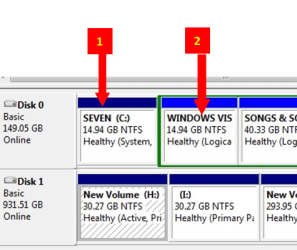
Looking at your partitioning, Windows 7 on a 15gb partition is not good.
Why do you want so many partitions?
My System SpecsSystem Spec
08 Jun 2011   #8

ME/XP/Vista/Win7
uk Hampshire


You can only have 4 Primary partitions.
My System SpecsSystem Spec
08 Jun 2011   #9

Windows 7 SP1 Ultimate x32


Quote   Quote: Originally Posted by theog View Post
Looking at your partitioning, Windows 7 on a 15gb partition is not good.
Why do you want so many partitions?
.
this is my older hard disk,, that's why I bought new 1tb hard disk. plz tell me is my partitions creating all right.?
and what you says about primary, logical thing which I posted above..?
is it ok that first 3 primary and last 2 logical..? (in Disk 1, new hard disk.)
My System SpecsSystem Spec
08 Jun 2011   #10

ME/XP/Vista/Win7
uk Hampshire


I personally I make folders, not partitions.
One of my PC's.
Need quick help about new hard disk partition on win 7 disk management-me.png
My System SpecsSystem Spec
Reply

 Need quick help about new hard disk partition on win 7 disk management problems?


Thread Tools


Similar help and support threads for: Need quick help about new hard disk partition on win 7 disk management
Thread Forum
New partition does not appear in Disk Management General Discussion
Solved hard disk changed to dynamic type after using disk management General Discussion
Extra Partition (Disk Management) General Discussion
Disk management healthly partition Hardware & Devices
disk management wont allow me to extend my partition Hardware & Devices


All times are GMT -5. The time now is 07:58 AM.


Seven Forums Android App Seven Forums IOS App Follow us on Facebook

Windows 7 Forums is an independent web site and has not been authorized,
sponsored, or otherwise approved by Microsoft Corporation.
"Windows 7" and related materials are trademarks of Microsoft Corp.
© Designer Media Ltd
  

1 2 3 4 5 6 7 8 9 10 11 12 13 14 15 16 17 18 19 20 21 22 23 24 25 26 27 28 29 30 31 32