Windows 7 Forums Search
Welcome to Windows 7 Forums. Our forum is dedicated to helping you find solutions with any problems, errors or issues you are experiencing with Windows 7. The Windows 7 forum also covers news and updates and has an extensive Windows 7 tutorial section that covers a wide range of tips and tricks.


Windows 7 - "Safely remove hardware" not showing drive letter/label

 
06-08-2011   #1


w7


"Safely remove hardware" not showing drive letter/label

From my "Safely remove hardware and eject media" I get a dialog that says:

Code:
Open Devices and Printers
-------------------------
Ian's pc
- Eject ST320005 42A2 SCSI Disk Device
All the screen shots of this dialog I've seen have the drive letter and/or the drive volume volume label, never the hardware string.

Needless to say this makes it tricky to eject the correct device...

How do I get the drive letter or label there please?

i

My System SpecsSystem Spec
06-09-2011   #2


Windows 7 Pro x64 SP1


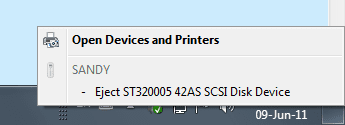
Could you post a screen capture of what the notification tray icon shows when you click on it?

("Print Screen" key, paste into Paint. The snipping tool won't pick that up.)
My System SpecsSystem Spec
06-09-2011   #3


w7


Sure.

Only one drive mounted at the moment, but you get the idea:


i
My System SpecsSystem Spec
.


06-09-2011   #4


Hi Ian. Welcome.

Is there a drive letter assigned in Device Manager? What about Windows Explorer?
My System SpecsSystem Spec
06-09-2011   #5


w7


Yep. All drives have letters assigned.

i
My System SpecsSystem Spec
06-09-2011   #6


BTW, your image doesn't show up here. Do you know how to post screenshots to the forum?
My System SpecsSystem Spec
06-09-2011   #7


Have you tried assigning a different drive letter to those drives to see what happens? Try reassigning the drive letter in Disk Management (I should ask...is there a letter assigned in Disk Management?)
My System SpecsSystem Spec
06-09-2011   #8


One other thought...does all look normal in Control Panel/Notification Area Icons?
My System SpecsSystem Spec
06-09-2011   #9


Windows 7 Pro x64 SP1


I can see the image fine in Chrome. Anyway, for removable drives, don't assign each one their own letter yourself. It is best to let the system assign each its own letter each time you plug it in to avoid any interference-- probably what happened here. Unassign the drive letters and see if that helps.
My System SpecsSystem Spec
06-09-2011   #10


w7


Quote   Quote: Originally Posted by James Colbert View Post
BTW, your image doesn't show up here. Do you know how to post screenshots to the forum?
If it doesn't embed properly for you, you can see it at:

http://s3.postimage.org/dlebrdfwq/Untitled.png

It looks just like my text version above though.

i
My System SpecsSystem Spec
Reply

 "Safely remove hardware" not showing drive letter/label problems?


Thread Tools


Similar Threads for: "Safely remove hardware" not showing drive letter/label
Thread Forum
How can I launch "Safely Remove Hardware and Eject Media"? Hardware & Devices
"Safely Remove Hardware" horrendously slow Performance & Maintenance
Why does my hard disk appear in "Safely Remove Hardware" ? Hardware & Devices
How to disable Systray icon "Safely remove hardware and eject media"? General Discussion
Show icon for "safely remove hardware" General Discussion


All times are GMT -5. The time now is 06:49 AM.


Windows 7 Forums is an independent web site and has not been authorized,
sponsored, or otherwise approved by Microsoft Corporation.
"Windows 7" and related materials are trademarks of Microsoft Corp.
© Designer Media Ltd
  

1 2 3 4 5 6 7 8 9 10 11 12 13 14 15 16 17 18 19 20 21 22 23 24 25 26 27 28 29 30