Windows 7 Forums Search
Welcome to Windows 7 Forums. Our forum is dedicated to helping you find solutions with any problems, errors or issues you are experiencing with Windows 7. The Windows 7 forum also covers news and updates and has an extensive Windows 7 tutorial section that covers a wide range of tips and tricks.


Windows 7 - SATA DVD not bootable in BIOS

 
06-10-2011   #1


Windows 7 Home Premium x64


SATA DVD not bootable in BIOS

Hi All:

I recently got a new SATA DVD drive.

I have an IDE optical installed as well.

The IDE DVD shows up in BIOS as a bootable device, but not the SATA DVD.

FYI: I have two SSDs installed with one as the boot drive.

TIA!
Richard

My System SpecsSystem Spec
06-10-2011   #2


Win 7 Ultimate x64


Is the controller that the new drive is connected too set as SATA mode or IDE mode? If SATA mode set it to run in IDE mode and it will likely show up as a boot device.
My System SpecsSystem Spec
06-10-2011   #3


Windows 7 Home Premium x64


stormy13:

Thanks for the quick reply.

Doesn't that kind of defeat the purpose of buying a SATA drive?
Will I lose throughput? Any other negative side-effects?

Just asking,
Richard
My System SpecsSystem Spec
.


06-10-2011   #4


Win 7 Ultimate x64


Other than a smaller cable SATA is of little to no benefit on an optical drive as they are still far too slow to take advantage of it. In fact,

LG DVD Burner GSA-H62N SATA vs GSA-H50N IDE - Overclockers Club
My System SpecsSystem Spec
06-10-2011   #5


Windows 7 Home Premium x64


Informative and thanks stormy13!
I'll give it a try,
My System SpecsSystem Spec
06-10-2011   #6


Windows7 Pro 64bit SP-1; Windows XP Pro 32bit


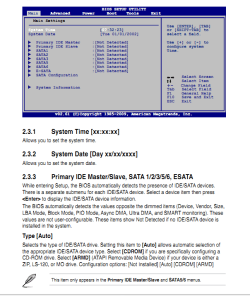
From your moboard manual.

ASUSTeK Computer Inc. - Motherboards- ASUS M4A785TD-V EVO/U3S6

2.3.3 TYPE - The note under this by pen or feather? whatever it is.

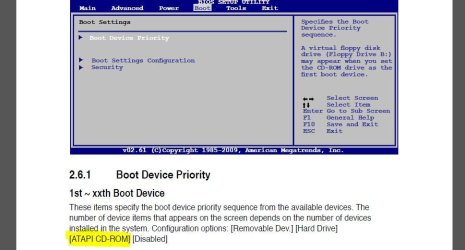
It would appear you need the CD drive plugged into SATA port 5 or 6 then select is as CD/Rom.

Then of course select it in Boot options to use it for the boot CD drive if wanted.

That is what I understand from reading through the manual. It isn't as straightforward in explanations as it could be.
I could be wrong.

Yes I downloaded manual. I have Asus board myself and the manuals are a bit ???? on some info. Sometimes need a decrypter to understand them.
Attached Thumbnails
SATA DVD not bootable in BIOS-cd-rom.png  
My System SpecsSystem Spec
06-10-2011   #7


Windows 7 Home Premium x64


@Hopalong X:
You're surely right about those lousy things they call manuals these days.
The reason I never look at them is because they end up confusing more than helping.

I see what you're saying in the settings and I will do that.

My manual is so thin I could use it as a spark plug gapping tool.

Thanks!
My System SpecsSystem Spec
06-10-2011   #8


Windows7 Pro 64bit SP-1; Windows XP Pro 32bit


I had to decipher my manual when I built this last August.

I have learned to decipher their manuals better as I have learned here on the forum.
Even so it is often a guess as to the meaning or action to take.

Now all you have to do is find 5 and 6 on the board. On mine 1-2 are marked and seperate but 3-6 are in a 4 plug array and individually unmarked.

Let us know if that works.
Mike
My System SpecsSystem Spec
06-12-2011   #9


Windows 7 Home Premium x64


I marked this as solved prematurely and don't know how to 'Unsolve' it.

In any case, I tried various combinations of the IDE vs AHCI and Auto vs CD-ROM settings in BIOS- to no avail.
In fact, when I set the CD-ROM option I got an error at boot-up telling me about ATAPI incompatibility.

So, I'm still at a loss on how to boot from my SATA DVD.
My System SpecsSystem Spec
06-12-2011   #10


Windows7 Pro 64bit SP-1; Windows XP Pro 32bit


I didn't find anything useful to me to help you further from the manual.

So I am at a loss at the moment also.

I'll post back if I think or find any additional info.

Mike

Last edited by Hopalong X; 06-12-2011 at 07:48 AM..
My System SpecsSystem Spec
Reply

 SATA DVD not bootable in BIOS problems?


Thread Tools


Similar Threads for: SATA DVD not bootable in BIOS
Thread Forum
Solved BIOS will recognize SATA HDD but Windows 7 installer will not :/ Hardware & Devices
Trouble making ARCA 1210 Raid Card Bootable with existing sata IDE HD Installation & Setup
Win 7 - Second SATA or IDE disk unaccessible - shows in BIOS and DM Hardware & Devices
Sata DVD Drive not bootable during start up Installation & Setup
Bootable SATA Controller Card Hardware & Devices


All times are GMT -5. The time now is 06:52 AM.


Windows 7 Forums is an independent web site and has not been authorized,
sponsored, or otherwise approved by Microsoft Corporation.
"Windows 7" and related materials are trademarks of Microsoft Corp.
© Designer Media Ltd
  

1 2 3 4 5 6 7 8 9 10 11 12 13 14 15 16 17 18 19 20 21 22 23 24 25 26 27 28 29 30