|
Welcome to Windows 7 Forums. Our forum is dedicated to helping you find solutions with any problems, errors or issues you are experiencing with Windows 7. The Windows 7 forum also covers news and updates and has an extensive Windows 7 tutorial section that covers a wide range of tips and tricks.
Windows 7 - Win7 x64 only seeing 1 of 2 CPUs installed |
06-11-2011
|
#1 | | |
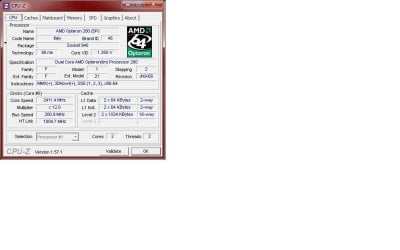
Win7 x64 only seeing 1 of 2 CPUs installed Hello: I have a custom built system: MoBo: Tyan S2895 Thunder K8WE CPU: Dual, Opteron 280 2.4 MHz Dual Core RAM: 12GB DDR 400 ECC Registered Corsair HDD: C: WD VelociRaptor 150GB D: WD VelociRaptor 300GB E: WD VelociRaptor 300GB Various external HHD's GPU: NVidia GeForce 7900 GT/GTE O/S: Windows 7 x64 Ultimate I've set up a dual-boot system. the C drive is partitioned and the other O/S is XP Pro SP3 x86. I did this to test audio programs to confirm they are compatible with 7 & with an x64 evniro. Everything has passed testing & I'd like to get rid of XP. However a new issue has come up over the last 3-4 days. When I boot 7 I'm getting some very odd behavior. The most critical issue is it is suddenly only "seeing" or reporting that I only have 1 CPU (see attached screen-shot 1 & 2). Prior to this it has been reporting 2 CPU's, 4 cores. The BIOS reports 2 CPU's & if I boot XP it also reports 2 CPU's, 4 cores. The 2nd issue that I'm experiencing is with RAM. 7 is reporting 32.5GB installed on 12GB usable. I only have 12GB installed. The BIOS passes & reports the full 12GB installed. I have not set any over clocking features in BIOS & the MoBo is old enough that it does not have options to have over clocking controlled/config'd via software. Previously 7 had been reporting 12GB installed/usable. And of course XP only reports 3GB due to limitations of x86. This computer is primarily used for audio recording/production. There are no out of the ordinary programs installed or used. There have not been any hardware of software changes made for 4-6 wks. The only errors in Event Viewer since 05/17/2011 are in the application log and are regarding SideBySide & VSS. I've been researching the issues but have not found anything regarding the CPU's. The only info I've found for the RAM is about the O/S not seeing all installed RAM. Has anyone else experienced this or have any ideas?
| My System Specs | | System Manufacturer/Model Number custom built OS Win7 x64 Ultimate CPU Dual AMD Opteron 280 2.4 MHz w/HT Motherboard Tyan S2895 Thunder K8WE Memory 12GB DDR 400 ECC Reg Graphics Card Nvidia GeForce 7900 GT/GTO Sound Card No on-board card. M-Audio ProFire 2626 Monitor(s) Displays Dual 23" Gateway's PSU Enermax Case CoolerMaster Cooling N/A Hard Drives C: WD VelociRaptor 74GB
D: WD VelociRaptor 300GB
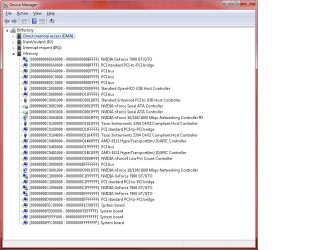
E: WD VelociRaptor 300 GB |
06-11-2011
|
#2 | | Windows 7 Pro x64 / WinXP Pro x86 on (1), Win7 Pro X64 / WinXP Pro x86 on (2) |
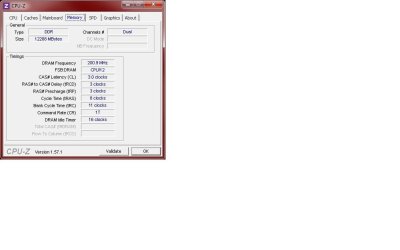
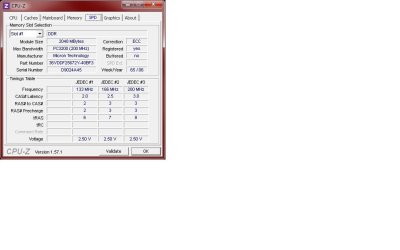
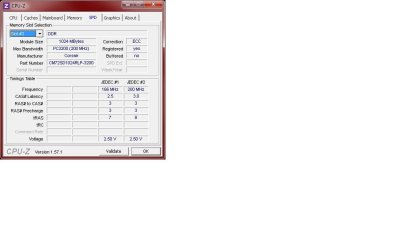
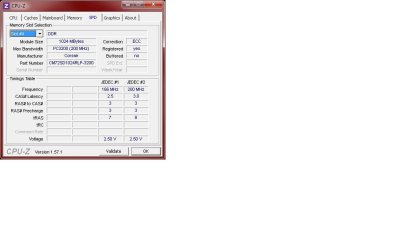
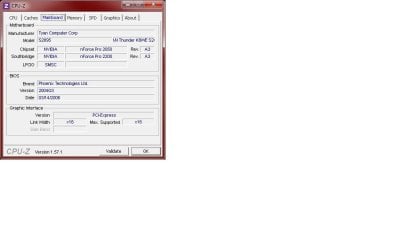
Please provide screenshots from CPU-Z, from the tabs for CPU, Mainboard, Memory, and all the SPD slots.
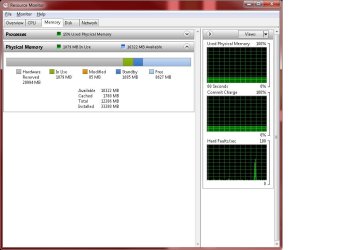
Also, can you please provide a screenshot from task manager: Start -> Run -> Taskmgr, then select Performance tab, and push Resource Monitor button. Then select the Memory tab, and take the screenshot of the bottom of the screen where it shows the color-coded and numeric value memory allocations... including "hardware reserved".
Also, please simply attach your JPG screenshots here directly as "attachments" (using the paperclip button to add them), rather than imbedding them inside of a Word document and posting the word document as the attachment. | My System Specs | | System Manufacturer/Model Number Home-built, two systems (1) and (2) OS Windows 7 Pro x64 / WinXP Pro x86 on (1), Win7 Pro X64 / WinXP Pro x86 on (2) CPU E6850 3.0Ghz/4MB-cache (1); E8400 3.0Ghz/6MB-cache (2) Motherboard SuperMicro C2SBX (1); ASUS P5Q3 (2) Memory 4GB PC3-8500 DDR3 (1); 4GB PC3-10600 DDR3 (2) Graphics Card ATI HD4850 (1); ATI HD5770 (dual-DVI) (2) (see TV cards) Sound Card Realtek ALC883 HD Audio (1); Realtek ALC1200 HD Audio (2) Monitor(s) Displays Eizo 24" S2433W (1); Eizo HD2441W LCD, Eizo S2433W (2) Screen Resolution 1920x1200 (1); 1920x1200, 1920x1200 (2) Keyboard IBM PS/2 (1) and (2) Mouse Microsoft wired (1); Logitech MX Revolution wireless (2) PSU Nesteq ECS-6001 600W (1); Nesteq ECS-5001 500W (2) Case Acousti-Case 360 (1) and (2) Cooling Zalman CNPS9700-NT for CPU, 2x120mm case fans (1) and (2) Hard Drives (1) 1x1TB SATA (7200 RPM), 1x300GB U320 SCSI (10000RPM), 1x750GB SATA (7200RPM), 1x150GB SATA (10000RPM) for OS;
(2) 1x320GB SATA (7200RPM), 1x140GB SCSI 10000RPM U320, 1x150GB SATA (10000RPM) for OS Internet Speed 15mbps down / 2mbps up Other Info Ceton InfiniTV 4-tuner cablecard-enabled TV card as well as ATI TV Wonder 650 Combo PCIe OTA/ATSC 2-tuner TV card in (2), running under Win7 WMC |
06-12-2011
|
#3 | | |
Updates & Requested Screen Shots I grabbed another HDD, a 74GB WD Raptor I happen to have handy & installed 7 on it w/all the same programs and settings as the dual-boot HDD. It reported dual, dual core CPU's and reported 12GB RAM installed & usable (however its giving me a BSOD error of X0124 which I will research independantly from this thread).
Would running Win Repair resolve the CPU/RAM issue?
I was incorrect on the RAM. I have both Micron & Corsair installed. Just loaded the box up for testing purposes. I will be ordering new RAM once I have all the issues/bugs sorted out.
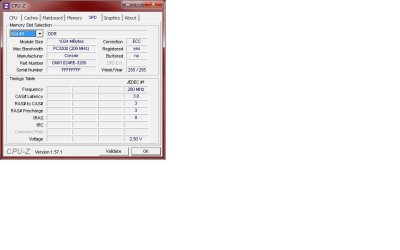
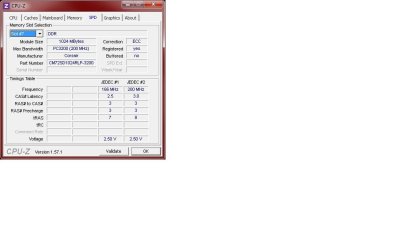
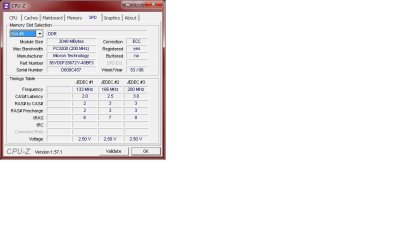
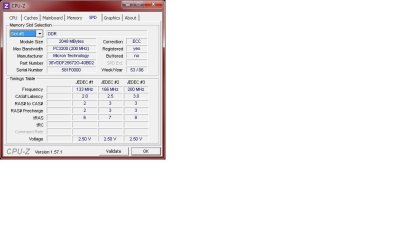
All requested SS's are included. Thanks for taking a look. | My System Specs | | System Manufacturer/Model Number custom built OS Win7 x64 Ultimate CPU Dual AMD Opteron 280 2.4 MHz w/HT Motherboard Tyan S2895 Thunder K8WE Memory 12GB DDR 400 ECC Reg Graphics Card Nvidia GeForce 7900 GT/GTO Sound Card No on-board card. M-Audio ProFire 2626 Monitor(s) Displays Dual 23" Gateway's PSU Enermax Case CoolerMaster Cooling N/A Hard Drives C: WD VelociRaptor 74GB
D: WD VelociRaptor 300GB
E: WD VelociRaptor 300 GB |
06-12-2011
|
#4 | | |
I came across this RAM problem very recently and I believe it is due to a mismatch of the installed RAM could it be that you have 1gig and 2gig working together in dual channel? best to consult your MB manual reference installing the RAM
I do not believe that the different manufacturers are playing a role here other than what I have written above. I still recommend using identical sticks tho
I hope this makes sense | My System Specs | | System Manufacturer/Model Number Something I threw together OS Windows 7 Ultimate x64 CPU Intel Core i7-2600K Motherboard Asus P8P67 Memory 16 GB G Skill F3-10666 CL9D-4GBRL Graphics Card ATI Radeon HD 6870 Sound Card ATI Radeon HDMI / Realtek ALC892 Monitor(s) Displays 2 x 22" standard monitors / LG32LC56v TV to watch films Screen Resolution 1920 x1080 Keyboard Microsoft Comfort Curve Keyboard 2000 Mouse Hama M3110 / Logitech M305 PSU Thermaltake Toughpower Cable Management 750W Case Antec 300 Cooling Noctua NH-U12P SE2 and 5 120mm Case fans Hard Drives 2 x OCZ Vertex2 111.79GB
3 x Samsung103SJ
1 x Samsung103UJ
1 x WD3200BEVT
1 x Hitachi5K320-160 Internet Speed 16000 Other Info I have also used Fedora, Suse, Ubuntu Linux
And all other Windows from 95 to date except ME |
06-12-2011
|
#5 | | Vista and Windows7, sometimes Ubuntu and Fedora |
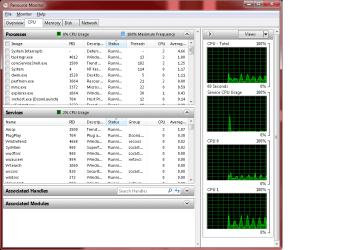
The most reliable information you will get from the Resource Monitor. Go to the CPU tab and see how many CPU graphs you have on the right side. Then go to the Memory tab and the colored bar will show you the RAM story. | My System Specs | | System Manufacturer/Model Number HP, Dell, Gateway - 2 laptops and 2 desktops OS Vista and Windows7, sometimes Ubuntu and Fedora CPU from 1.6GHz Duo to 2.5GHz Quad Monitor(s) Displays 2x HP w2207 Keyboard with trackball - no mices Mouse terrible devices, who wants them Hard Drives 5x HDD, 2x SSD, 6x Externals Internet Speed DSL 6000 |
06-12-2011
|
#6 | | Windows 7 Pro x64 / WinXP Pro x86 on (1), Win7 Pro X64 / WinXP Pro x86 on (2) |

Quote: Originally Posted by whs The most reliable information you will get from the Resource Monitor. Go to the CPU tab and see how many CPU graphs you have on the right side. Then go to the Memory tab and the colored bar will show you the RAM story. He already posted that screenshot in response to the original request. It's the last one shown.
Bizarrely, it shows: hardware reserved - 20994MB
available - 10322MB
cached - 1780MB
total - 12286MB
installed - 33280MB Something's clearly wrong, and it's obviously at the BIOS/hardware level. Obviously, the motherboard manual should be referenced for memory usage information.
I think it is tied to the mismatch in slots #7 and #8 for those two 1GB Corsair cards which are actually different part numbers, and have different sets of JDEC timing numbers.
The pairs of memory cards in #1/#2 seem matched, #3/#4 seem matched, and #5/#6 seem matched.
But #7/#8 seem to be incompatible. Can't help but believe this is directly a factor. These only add up to 2GB anyway, so losing them wouldn't be a major issue in the short term.
It would be worth an experiment to remove the two cards in slots #7 and #8, just to see if things clean themselves up.
Also, the 20994MB "hardware reserved" item in Resource Monitor is obviously bogus. But it would be interesting to see where this memory is theoretically reserved.
Start -> Run -> DEVMGMT.MSC, to get Device Manager. Then View -> Resources by type, and close up any expanded categories except for Memory which should be expanded. The information shown is by hardware device, showing a low-high 64-bit hex address range.
Unfortunately, the subtraction is not shown in a separate column or item which would be very helpful and user-friendly. But it's not. So it's not obvious without using Calculator to do the required hex arithmetic (unless you're familiar with hex in your normal life) and can spot the "culprit" somehow primarily responsible for 20GB "hardware reserved" which should really stand out I would imagine... since only 12GB is actually installed.
Anyway, looking at this memory assignment should be very interesting.
But first, I'd pull the two mismatched 1GB Corsair memory cards in slots #7 and #8 and see what happens. | My System Specs | | System Manufacturer/Model Number Home-built, two systems (1) and (2) OS Windows 7 Pro x64 / WinXP Pro x86 on (1), Win7 Pro X64 / WinXP Pro x86 on (2) CPU E6850 3.0Ghz/4MB-cache (1); E8400 3.0Ghz/6MB-cache (2) Motherboard SuperMicro C2SBX (1); ASUS P5Q3 (2) Memory 4GB PC3-8500 DDR3 (1); 4GB PC3-10600 DDR3 (2) Graphics Card ATI HD4850 (1); ATI HD5770 (dual-DVI) (2) (see TV cards) Sound Card Realtek ALC883 HD Audio (1); Realtek ALC1200 HD Audio (2) Monitor(s) Displays Eizo 24" S2433W (1); Eizo HD2441W LCD, Eizo S2433W (2) Screen Resolution 1920x1200 (1); 1920x1200, 1920x1200 (2) Keyboard IBM PS/2 (1) and (2) Mouse Microsoft wired (1); Logitech MX Revolution wireless (2) PSU Nesteq ECS-6001 600W (1); Nesteq ECS-5001 500W (2) Case Acousti-Case 360 (1) and (2) Cooling Zalman CNPS9700-NT for CPU, 2x120mm case fans (1) and (2) Hard Drives (1) 1x1TB SATA (7200 RPM), 1x300GB U320 SCSI (10000RPM), 1x750GB SATA (7200RPM), 1x150GB SATA (10000RPM) for OS;
(2) 1x320GB SATA (7200RPM), 1x140GB SCSI 10000RPM U320, 1x150GB SATA (10000RPM) for OS Internet Speed 15mbps down / 2mbps up Other Info Ceton InfiniTV 4-tuner cablecard-enabled TV card as well as ATI TV Wonder 650 Combo PCIe OTA/ATSC 2-tuner TV card in (2), running under Win7 WMC |
06-12-2011
|
#7 | | Windows 7 Pro x64 / WinXP Pro x86 on (1), Win7 Pro X64 / WinXP Pro x86 on (2) |

Quote: Originally Posted by pooch I came across this RAM problem very recently and I believe it is due to a mismatch of the installed RAM could it be that you have 1gig and 2gig working together in dual channel? The MEMORY tab screenshot shows DDR, not DDR2.
All his memory sticks are also shown as just DDR.
I don't think this memory configuration is working as expected (obviously!). | My System Specs | | System Manufacturer/Model Number Home-built, two systems (1) and (2) OS Windows 7 Pro x64 / WinXP Pro x86 on (1), Win7 Pro X64 / WinXP Pro x86 on (2) CPU E6850 3.0Ghz/4MB-cache (1); E8400 3.0Ghz/6MB-cache (2) Motherboard SuperMicro C2SBX (1); ASUS P5Q3 (2) Memory 4GB PC3-8500 DDR3 (1); 4GB PC3-10600 DDR3 (2) Graphics Card ATI HD4850 (1); ATI HD5770 (dual-DVI) (2) (see TV cards) Sound Card Realtek ALC883 HD Audio (1); Realtek ALC1200 HD Audio (2) Monitor(s) Displays Eizo 24" S2433W (1); Eizo HD2441W LCD, Eizo S2433W (2) Screen Resolution 1920x1200 (1); 1920x1200, 1920x1200 (2) Keyboard IBM PS/2 (1) and (2) Mouse Microsoft wired (1); Logitech MX Revolution wireless (2) PSU Nesteq ECS-6001 600W (1); Nesteq ECS-5001 500W (2) Case Acousti-Case 360 (1) and (2) Cooling Zalman CNPS9700-NT for CPU, 2x120mm case fans (1) and (2) Hard Drives (1) 1x1TB SATA (7200 RPM), 1x300GB U320 SCSI (10000RPM), 1x750GB SATA (7200RPM), 1x150GB SATA (10000RPM) for OS;
(2) 1x320GB SATA (7200RPM), 1x140GB SCSI 10000RPM U320, 1x150GB SATA (10000RPM) for OS Internet Speed 15mbps down / 2mbps up Other Info Ceton InfiniTV 4-tuner cablecard-enabled TV card as well as ATI TV Wonder 650 Combo PCIe OTA/ATSC 2-tuner TV card in (2), running under Win7 WMC |
06-12-2011
|
#8 | | |
RAM is not the reason for the dropped CPU I appreciate the help with this but I'm not a newbie. Prior to posting I did begin troubleshooting this. The RAM isn't the issue. I've already pulled all RAM from the MoBo and booted to XP & 7, 1 stick at a time. All work just fine. When I take out the Corsair RAM, 7 reports 8GB installed & usable. The RAM is not the issue as to why suddenly 7 is not reporting/"seeing" both CPU's. Keep in mind until just a day or two ago 7 in the current config was reporting both CPU’s & all 4 cores. And yes all RAM is DDR. This is an older MoBo by Tyan and older Opteron CPU's. I guess I worded the RAM part incorrectly in my initial post. For that part I just wanted to know why 7 is reporting 32GB installed but only 12GB usable. Why wouldn’t' it just error out or not even been reported by 7? I know all about miss-matched RAM, MoBo settings, etc. I loaded all compatible (with MoBo) RAM just until I'm done testing. This is really getting some distance from the really critical issue of my initial post. Hopefully to direct this the right way; I need some help or direction as to what the next step should be to get both CPU's recognized & usable by 7. I did run the win repair earlier today and it didn't find anything to fix. As already stated, if I boot to XP, both CPU's & all 4 cores are reported. If I boot to 7 on the other HDD I installed it on today, both CPU's & all 4 cores are reported. It doesn't matter if I have only the Micron or the Corsair or mixed sticks of RAM on the board. It still boots up just fine and reports both CPU's are there and usable. And just in case I've included an SS of the CPU tab in RM.
Last edited by bitfiend; 06-12-2011 at 08:59 PM..
Reason: added ss
| My System Specs | | System Manufacturer/Model Number custom built OS Win7 x64 Ultimate CPU Dual AMD Opteron 280 2.4 MHz w/HT Motherboard Tyan S2895 Thunder K8WE Memory 12GB DDR 400 ECC Reg Graphics Card Nvidia GeForce 7900 GT/GTO Sound Card No on-board card. M-Audio ProFire 2626 Monitor(s) Displays Dual 23" Gateway's PSU Enermax Case CoolerMaster Cooling N/A Hard Drives C: WD VelociRaptor 74GB
D: WD VelociRaptor 300GB
E: WD VelociRaptor 300 GB |
06-12-2011
|
#9 | | |
It's not BIOS/Hardware level 
Quote: Originally Posted by dsperber Something's clearly wrong, and it's obviously at the BIOS/hardware level. Obviously, the motherboard manual should be referenced for memory usage information. I'm not seeing how it's "obviously" BIOS/HW level. The only change that I've deviated from in the default BIOS config/settings has been changing the setting for O/S type from x86 to x64. This was done per the manual so "obviously" the manual has been referenced along with Tyan's website. Additionally I've attached SS of DM, By Type, Memory. | My System Specs | | System Manufacturer/Model Number custom built OS Win7 x64 Ultimate CPU Dual AMD Opteron 280 2.4 MHz w/HT Motherboard Tyan S2895 Thunder K8WE Memory 12GB DDR 400 ECC Reg Graphics Card Nvidia GeForce 7900 GT/GTO Sound Card No on-board card. M-Audio ProFire 2626 Monitor(s) Displays Dual 23" Gateway's PSU Enermax Case CoolerMaster Cooling N/A Hard Drives C: WD VelociRaptor 74GB
D: WD VelociRaptor 300GB
E: WD VelociRaptor 300 GB |
06-13-2011
|
#10 | | |
might sound weird but if you have a spare hdd you could install windows 7 to that and see what happens.
i know it's not the most techy of idea's but if your windows install is gibbed then at least you'll know. | My System Specs | | System Manufacturer/Model Number me OS windows 7 pro 64 bit CPU i7 2600 Motherboard intel DP67BG Memory 8 gb ddr3 1600 corsair vengence Graphics Card AMD HD 6850 Monitor(s) Displays 2 Screen Resolution 1920 x 1080 Keyboard logitech ergonomic Mouse logitech trackball PSU 850w coolermaster silent pro Case thermaltake Cooling 3x 12 cm fan 2 x 8 cm fans, cpu arctic cooler Hard Drives 320 wd
2 x 1tb Internet Speed 16mb Win7 x64 only seeing 1 of 2 CPUs installed problems? All times are GMT -5. The time now is 06:53 AM. |  |