Sony Vaio Motion Eye Webcam no longer working in Windows 7

roddypiper

New member
Hi,

I have a Sony Vaio VGN-NS30E, on which I am running Windows 7. All of a sudden I am getting an error message that one of the USB devices is not recognised and this device appears to be the Sony Visual Communication Camera (Motion Eye) webcam, which has worked before on Windows 7.

It uses the following drivers:
ArcSoftKsUFilter.sys
usbvideo.sys

I would appreciate if someone could help with this issue as Sony are washing their hands off it (my laptop is 2 years old and therefore out of warranty).

Any help would be much appreciated.
 

My Computer

OS
Windows 7 Home Premium 32-bit
Hello roddy and welcome to Seven Forums.

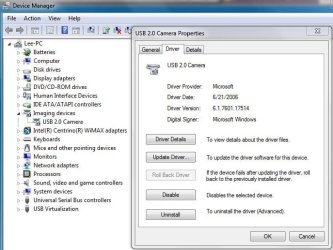
Couple of possibilities. You could go to the start menu and type in Device Manager and then click on Device Manager. A dialog box will open. Look for Imaging Devices in the left column and click the little arrow to the left. Then double click on the camera and click the Driver tab. Try updating your driver.

DevMgr.JPG

Or you could go to the Sony eSupport website, enter your country and model number, and look for the necessary driver(s).

Sony eSupport - Electronics - Select Your Model

Please post back and let us know if this helps.
 

My Computer

Computer type
Laptop
Computer Manufacturer/Model Number
Sony Vaio VPCEB47GM Laptop
OS
Win 7 Pro 64-bit
CPU
Intel i5 2.4 Ghz
Memory
8GB DDR3
Graphics Card(s)
Intel HD 3000
Sound Card
IDT High Definition
Monitor(s) Displays
15.6 WGXA Anti-Glare LED
Screen Resolution
1280x800
Hard Drives
640Gb 7200rpm
Antivirus
MSE
Browser
Opera (primary) with IE9 backup
Thanks for your response.

I have tried updating the driver, but apparently I have the latest one already installed. :confused:

I have tried the EU Sony support (I'm in the UK), but no help there as my model is out of warranty and can't use US support as it is an EU model.

Any more ideas are greatly appreciated.
 

My Computer

OS
Windows 7 Home Premium 32-bit
Sorry to hear you're still having problems. Even if your lappy is out of warranty you should still be able to access drivers for the webcam and all other components like BIOS, audio, etc. You could also try uninstalling the driver from Device Manager and let either Windows Updates find/reinstall or get them from Sony eSupport. Something could have corrupted the existing driver.

http://www.sevenforums.com/tutorials/2803-device-installation-settings.html
 

My Computer

Computer type
Laptop
Computer Manufacturer/Model Number
Sony Vaio VPCEB47GM Laptop
OS
Win 7 Pro 64-bit
CPU
Intel i5 2.4 Ghz
Memory
8GB DDR3
Graphics Card(s)
Intel HD 3000
Sound Card
IDT High Definition
Monitor(s) Displays
15.6 WGXA Anti-Glare LED
Screen Resolution
1280x800
Hard Drives
640Gb 7200rpm
Antivirus
MSE
Browser
Opera (primary) with IE9 backup

My Computer

Computer type
Laptop
Computer Manufacturer/Model Number
Sony Vaio VPCEB47GM Laptop
OS
Win 7 Pro 64-bit
CPU
Intel i5 2.4 Ghz
Memory
8GB DDR3
Graphics Card(s)
Intel HD 3000
Sound Card
IDT High Definition
Monitor(s) Displays
15.6 WGXA Anti-Glare LED
Screen Resolution
1280x800
Hard Drives
640Gb 7200rpm
Antivirus
MSE
Browser
Opera (primary) with IE9 backup
Hope the problem gets resolved. In the meantime I'll see if there's anything else that could be affecting the webcam.
 

My Computer

Computer type
Laptop
Computer Manufacturer/Model Number
Sony Vaio VPCEB47GM Laptop
OS
Win 7 Pro 64-bit
CPU
Intel i5 2.4 Ghz
Memory
8GB DDR3
Graphics Card(s)
Intel HD 3000
Sound Card
IDT High Definition
Monitor(s) Displays
15.6 WGXA Anti-Glare LED
Screen Resolution
1280x800
Hard Drives
640Gb 7200rpm
Antivirus
MSE
Browser
Opera (primary) with IE9 backup
I managed to get the camera working again, but it has now stopped working again. :(

SFC/Scannow says there are no problems.
 

My Computer

OS
Windows 7 Home Premium 32-bit
Did the laptop take a fall or hard hit to the lid? Damaged webcam?
 

My Computer

Computer type
Laptop
Computer Manufacturer/Model Number
Sony Vaio VPCEB47GM Laptop
OS
Win 7 Pro 64-bit
CPU
Intel i5 2.4 Ghz
Memory
8GB DDR3
Graphics Card(s)
Intel HD 3000
Sound Card
IDT High Definition
Monitor(s) Displays
15.6 WGXA Anti-Glare LED
Screen Resolution
1280x800
Hard Drives
640Gb 7200rpm
Antivirus
MSE
Browser
Opera (primary) with IE9 backup
No, nothing like that. It is really strange. I do a system restore to a few weeks back and it works again and then all of a sudden it stops working again...
 

My Computer

OS
Windows 7 Home Premium 32-bit
About how many days between the system restore and when it stops working again? Anything done to the laptop during that time period (updates, add new programs, delete old programs, anything at all?)

It doesn't seem logical that it would start working with a system restore and then suddenly die again ... unless there's something physically wrong with the webcam. :confused:
 

My Computer

Computer type
Laptop
Computer Manufacturer/Model Number
Sony Vaio VPCEB47GM Laptop
OS
Win 7 Pro 64-bit
CPU
Intel i5 2.4 Ghz
Memory
8GB DDR3
Graphics Card(s)
Intel HD 3000
Sound Card
IDT High Definition
Monitor(s) Displays
15.6 WGXA Anti-Glare LED
Screen Resolution
1280x800
Hard Drives
640Gb 7200rpm
Antivirus
MSE
Browser
Opera (primary) with IE9 backup
It is most peculiar. I think the culprit is Windows 7 updates. Although when I do a system restore and get it working again, I get the updates and it is fine until the next lot of updates (I think).
 

My Computer

OS
Windows 7 Home Premium 32-bit
Back
Top