justmey2k
New member
- Local time
- 10:25 PM
- Messages
- 20
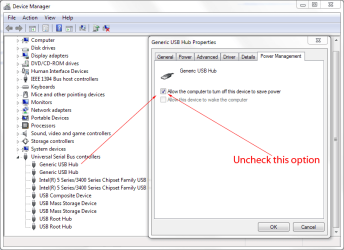
I believe Windows 7 is turning off power to my USB hub when it goes to sleep. I have both my keyboard and mouse in this hub, for wiring convenience. I will move one or both to direct connect, and see if that's it.
Anyone heard of this? Is there a setting I need to check?
(Preparing sig): Windows 7 Ultimate, SP1,2g RAM, .........more later
Anyone heard of this? Is there a setting I need to check?
(Preparing sig): Windows 7 Ultimate, SP1,2g RAM, .........more later
My Computer
At a glance
Windows 7 Ultimate x322.8ghzCrucial 4GB SDRAM DDR2 667 (PC2 5300)HIS H467QR1GH Radeon HD 4670 1GB 128-bit DDR3...
- Computer Manufacturer/Model Number
- Home Brewed
- OS
- Windows 7 Ultimate x32
- CPU
- 2.8ghz
- Motherboard
- ASRock 775DUAL-VSTA
- Memory
- Crucial 4GB SDRAM DDR2 667 (PC2 5300)
- Graphics Card(s)
- HIS H467QR1GH Radeon HD 4670 1GB 128-bit DDR3 PCI Express
- Sound Card
- 7.1 CH Premium Level HD Audio (ALC888 Audio)
- Monitor(s) Displays
- Samsung SyncMaster B1940W
- Screen Resolution
- 1440 x 900
- PSU
- 600w
- Case
- Home made
- Cooling
- standard 80mm twin fans
- Internet Speed
- 6g DSL
- Other Info
- New card!!!!!
HIS H467QR1GH Radeon HD 4670 1GB 128-bit DDR3 PCI Express 2.0 x16 HDCP Ready CrossFireX Support Video Card