How many people own more than one monitor?

My Computer My Computer

At a glance

Windows 10 Education 64 bitAMD Phenom II X4 980 Black Edition Deneb 3.7GHz8GB 4GBx2 Kingston PC10600 DDR3 1333 MemoryZotac NVIDIA Geforce GT640 2 Gig DDR3 PCIe
Computer type
PC/Desktop
Computer Manufacturer/Model Number
Home Built
OS
Windows 10 Education 64 bit
CPU
AMD Phenom II X4 980 Black Edition Deneb 3.7GHz
Motherboard
Asus M4N68T-M V2 µATX Motherboard
Memory
8GB 4GBx2 Kingston PC10600 DDR3 1333 Memory
Graphics Card(s)
Zotac NVIDIA Geforce GT640 2 Gig DDR3 PCIe
Sound Card
VIA VT1708s High Definition Audio 8-channel Onboard
Monitor(s) Displays
22" LG E2242 1080p and 2 19" I-INC AG191D
Screen Resolution
1280x1024 - 1920x1080 - 1280x1024
Hard Drives
Crucial M100 256 GB SSD and 500 GB WD Blue SATA
PSU
Thermaltake TR 620
Case
Power Up Black ATX Mid-Tower Case
Cooling
Stock heatsink and fan
Keyboard
Logitech Wireless K350 Wave
Mouse
Logitech Wireless M570 Trackman Wheel
Internet Speed
80 Mbps Down 30 Mbps Up
Antivirus
Windows Defender
Browser
Internet Explorer 11
Other Info
HP DVD1040e Lightscribe - External USB2
So I've got the monitors set up. They look very stylish and modern looking. Even have these LEDs on the bezel.

Now am I to understand that if I want to run these in resolutions past 1080p that I would need another graphics card? Even though I don't plan on setting up a triple monitor display?

As for the power usage, I know there's power supply calculators. However I'm not sure whether if I could find out how much power my system is using through the use of a program. I probably don't need another GTX 570, probably could scrounge my old 8800 GTS which does 1080p or more, I think.
 

My Computer My Computer

At a glance

Windows 10 Pro 64-bitIntel Core i7 6700K 4.5 GHz w/TurboBoost & HT...16 GB DDR4 RAM 2133 MHzEVGA GTX 1080 Ti 11 GB
Computer type
PC/Desktop
Computer Manufacturer/Model Number
Custom
OS
Windows 10 Pro 64-bit
CPU
Intel Core i7 6700K 4.5 GHz w/TurboBoost & HT enabled
Motherboard
Asus ROG Strix Z270E
Memory
16 GB DDR4 RAM 2133 MHz
Graphics Card(s)
EVGA GTX 1080 Ti 11 GB
Sound Card
Realtek
Monitor(s) Displays
Acer S243HL
Screen Resolution
1920x1080
Hard Drives
WD Caviar Black 2 TB, WD Black 4 TB, WD Caviar Green 2 TB (x3), WD Caviar Green 3 TB, Crucial M4 256 GB SSD, Samsung 850 Pro SSD
PSU
Corsair 850W
Case
Fractal Design Define R5
Cooling
Cooler Master Hyper 212 Evo
Internet Speed
300 Mbps Shaw Broadband 300
using 2 here, for games like supreme commander the second monitor acts is used for overview mapping which just increases the imerrsion.

for work it massivly increases productivity and is an absolute must for anyone doing multitasking or using multiple apps side by side.

for most games dual monitor is fine as long as you don't try to display it over both putting the centre picture in the middle is horrible, 3 screens using eyefinity is amazing for that though.
 

My Computer My Computer

At a glance

....
Computer Manufacturer/Model Number
.
OS
.
CPU
.
Motherboard
.
Memory
.
Graphics Card(s)
.
Monitor(s) Displays
.
Screen Resolution
.
Hard Drives
.
PSU
.
Case
.
Cooling
.
Keyboard
.
Mouse
.
Internet Speed
.
Other Info
.
I own 4 LCD's and have 3 hooked to my PC.
 

My Computer My Computer

At a glance

Windows 7 Ultimate 64bitIntel i7 3770K16GB DDR3 1333 Corsair XMS3XFX HD6950 2GB EyeFinity
Computer Manufacturer/Model Number
HAL-9000
OS
Windows 7 Ultimate 64bit
CPU
Intel i7 3770K
Motherboard
Asus Sabertooth Z77
Memory
16GB DDR3 1333 Corsair XMS3
Graphics Card(s)
XFX HD6950 2GB EyeFinity
Sound Card
Logitech G35 & Sennheiser PC135 & VIA HD
Monitor(s) Displays
23" HP 2310e, 23" Samsung B2230, 21.5" Viewsonic
Screen Resolution
5760x1080
Hard Drives
16TB of Storage
128GB & 256GB Crucial M4 SSD's, 2X 1TB WD Black, 3x 2TB WD, 3x 2TB Samsung F4, 1.5TB Seagate, WD 500GB,
PSU
Antec True Power New 650watt
Case
Cooler Master HAF-932
Cooling
Corsair H60 Hydro Cooler, 3x 230mm Fans, 2x120mm Fan
Keyboard
Logitech G15 and G13
Mouse
Logitech G700 Gaming Mouse
Internet Speed
50/10 Mbit
Other Info
Speakers : Alesis M1 Active Mk2 Studio Monitors , APC RS 1200 UPS, HP 4500DN Color Laser, HP P1006 mono Laser, Kodak 8500 Dye-Sub, Epson 1280 inkjet, Epson Worforce 610 MFC

My Computer My Computer

At a glance

Windows 7 Ultimate 64bitIntel i7 3770K16GB DDR3 1333 Corsair XMS3XFX HD6950 2GB EyeFinity
Computer Manufacturer/Model Number
HAL-9000
OS
Windows 7 Ultimate 64bit
CPU
Intel i7 3770K
Motherboard
Asus Sabertooth Z77
Memory
16GB DDR3 1333 Corsair XMS3
Graphics Card(s)
XFX HD6950 2GB EyeFinity
Sound Card
Logitech G35 & Sennheiser PC135 & VIA HD
Monitor(s) Displays
23" HP 2310e, 23" Samsung B2230, 21.5" Viewsonic
Screen Resolution
5760x1080
Hard Drives
16TB of Storage
128GB & 256GB Crucial M4 SSD's, 2X 1TB WD Black, 3x 2TB WD, 3x 2TB Samsung F4, 1.5TB Seagate, WD 500GB,
PSU
Antec True Power New 650watt
Case
Cooler Master HAF-932
Cooling
Corsair H60 Hydro Cooler, 3x 230mm Fans, 2x120mm Fan
Keyboard
Logitech G15 and G13
Mouse
Logitech G700 Gaming Mouse
Internet Speed
50/10 Mbit
Other Info
Speakers : Alesis M1 Active Mk2 Studio Monitors , APC RS 1200 UPS, HP 4500DN Color Laser, HP P1006 mono Laser, Kodak 8500 Dye-Sub, Epson 1280 inkjet, Epson Worforce 610 MFC
Like wise I just moved from one 26" 720p LCD TV/Monitor to dual 23" LED. Productivity was a main concern but power consumption also played a big part as these are on for the better part of 18 hrs./day. The link here shows what can be done to enhance the gaming experience. I especially dig the system shown with all 5 in portrait, massive gaming advantages.
https://channel9.msdn.com/shows/techwithtina/e3-2011-amd-and-the-new-eyefinitiy-technology
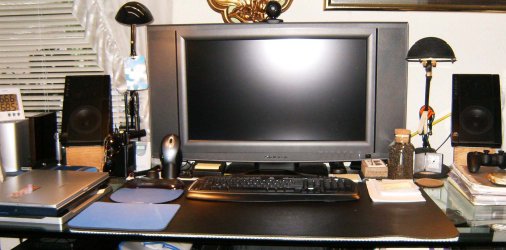
Here's my original single 26" LDC setup and it didn't suck but so much real estate wasted with the built in speakers which greatly sucked!
HPIM0931.JPG
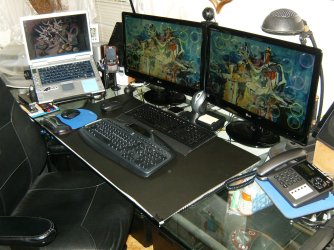
Now with the addition of the two 23" LED's and a new laptop riser I'm the model of productivity...at least in my own mind ! lol

HPIM1301.JPG
 

My Computer My Computer

At a glance

Windows 7 Ultimate 64i7 3770k OC'd 4.6 @ 1.17v, also FX 8120 & i5 ...32 gb G.Skill Sniper DDR3 10-12-12-31 @ 2133XFX Radeon 7870 2GB DDR5
Computer type
PC/Desktop
Computer Manufacturer/Model Number
A blend of brains, brawn and dumb luck.
OS
Windows 7 Ultimate 64
CPU
i7 3770k OC'd 4.6 @ 1.17v, also FX 8120 & i5 miniITX
Motherboard
MSI P67A-GD80 b3
Memory
32 gb G.Skill Sniper DDR3 10-12-12-31 @ 2133
Graphics Card(s)
XFX Radeon 7870 2GB DDR5
Sound Card
Sound Blaster Z Series Card
Monitor(s) Displays
(2) LG LED 23" 1920 x 1080 2ms Monitors via mini d-port
Screen Resolution
1680 X 1050 p
Hard Drives
Samsung 256 gb 830 SSD sata III
(1) 1 tb WD Black
(2) 1 tb Hitachi deskmates/sata II
(2) 1 tb WD green/sata II
(2) 3 tb Seagate Barracuda
(1) 120 gb OCZ Vertex SS
(1) Drobo 5N w/5 Seagate 3tb
PSU
EVGA modular 1000G2 80% gold rating & APC 1200 RS
Case
CoolerMaster Storm Styker
Cooling
7 case fans 140mm & 120mm, NZXT Kraken X60
Keyboard
(2) Logitech Illuminated Keyboards (1) usb (1) wireless
Mouse
Logitech G700 & T-BC21 - nano nx for the laptop
Internet Speed
Basic 120mbps down
Antivirus
Trend Micro Titanium Max Security & Malwarebytes Premium
Browser
Chrome and IE 10
Other Info
5 Noctua case fans + 3 Noctua in p/p on NZXT cooler
Integrated hot swap drive bays for 2.5" Drives
(2) Lite-on dvd/cd/Blu Ray optical 22X
Integrated fan controller and led on/off
HP Officejet Pro 8630 all-n-one
Hot-swappable 3.5" hard drive bay
Netgear Nighthawk router
Asus USB 3 & sata 6 PCIe card
Vantec IDE to sata adptr./Ultra sata adptr
Lenovo L420 i5 lappy with m sata
Drobo 5N advanced NAS
I always switch to single display for playing games. I put two shortcuts on my taskbar so I can do it with one mouse click. http://www.sevenforums.com/tutorials/37625-display-switch-shortcut-create.html
One for single (computer only), and one for dual (extend).

Why do you do that for? When you are running Dual Extended, game will automatically run only on the Primary screen (unless you play Supreme commander).

I like having my video card devoted to only playing the game. The second monitor is turned off anyway, and with the shortcuts its just a mouse click to switch back and forth. Its just something I like to do when playing games. Everybody has their way of doing things. ;)
 

My Computer My Computer

At a glance

Windows 10 Education 64 bitAMD Phenom II X4 980 Black Edition Deneb 3.7GHz8GB 4GBx2 Kingston PC10600 DDR3 1333 MemoryZotac NVIDIA Geforce GT640 2 Gig DDR3 PCIe
Computer type
PC/Desktop
Computer Manufacturer/Model Number
Home Built
OS
Windows 10 Education 64 bit
CPU
AMD Phenom II X4 980 Black Edition Deneb 3.7GHz
Motherboard
Asus M4N68T-M V2 µATX Motherboard
Memory
8GB 4GBx2 Kingston PC10600 DDR3 1333 Memory
Graphics Card(s)
Zotac NVIDIA Geforce GT640 2 Gig DDR3 PCIe
Sound Card
VIA VT1708s High Definition Audio 8-channel Onboard
Monitor(s) Displays
22" LG E2242 1080p and 2 19" I-INC AG191D
Screen Resolution
1280x1024 - 1920x1080 - 1280x1024
Hard Drives
Crucial M100 256 GB SSD and 500 GB WD Blue SATA
PSU
Thermaltake TR 620
Case
Power Up Black ATX Mid-Tower Case
Cooling
Stock heatsink and fan
Keyboard
Logitech Wireless K350 Wave
Mouse
Logitech Wireless M570 Trackman Wheel
Internet Speed
80 Mbps Down 30 Mbps Up
Antivirus
Windows Defender
Browser
Internet Explorer 11
Other Info
HP DVD1040e Lightscribe - External USB2
Some people seem to use monitors in lieu of wallpaper. That would confuse the hell out of me. Besides the fact that I have no space to put a second monitor, I am quite happy with one 22".
 

My Computer My Computer

At a glance

Vista, Windows7, Mint Mate, Zorin, Windows 8from 1.6GHz Duo to i7
Computer Manufacturer/Model Number
HP, Dell, Gateway, Toshiba - 4 laptops and 2 desktops
OS
Vista, Windows7, Mint Mate, Zorin, Windows 8
CPU
from 1.6GHz Duo to i7
Monitor(s) Displays
2x HP w2207
Hard Drives
5x HDD, 7x SSD, 12x Externals
Keyboard
with trackball - no mices
Mouse
Trackball mice
Internet Speed
DSL 6000
Nice setup innemeyerhere. I don't think I could do it though. I have enough trouble keeping up with my 24".
 

My Computers My Computers

  • At a glance

    Windows 11 ProRyzen 9 5900X32GB G Skill DDR4-3600EVGA RTX 3080 FTW 3 Ultra
    Computer type
    PC/Desktop
    Computer Manufacturer/Model Number
    ALWAYS UNDER CONSTRUCTION
    OS
    Windows 11 Pro
    CPU
    Ryzen 9 5900X
    Motherboard
    Asus X570 Crosshair Viii Hero
    Memory
    32GB G Skill DDR4-3600
    Graphics Card(s)
    EVGA RTX 3080 FTW 3 Ultra
    Sound Card
    On Board/Sennheiser PC37X Headset
    Monitor(s) Displays
    3 X Asus 27"
    Screen Resolution
    2560x1440
    Hard Drives
    2 X 1 TB NVME drives
    PSU
    EVGA 850
    Case
    Phanteks Eclipse P400A
    Cooling
    EVGA 280 AIO
    Keyboard
    Logitech G510s/ Logitech G13
    Mouse
    Logitech G502
    Internet Speed
    24/1
    Antivirus
    ESET/MBAM Pro/SAS Pro
    Browser
    Chrome/ Firefox/ Edge
  • At a glance

    Windows 11 ProIntel Ultra 9 288V32 GB LPDDR5X 8533
    Computer type
    Laptop
    System Manufacturer/Model Number
    Dell 16 Plus
    OS
    Windows 11 Pro
    CPU
    Intel Ultra 9 288V
    Memory
    32 GB LPDDR5X 8533
    Monitor(s) Displays
    16" Mini-LED HDR600 Touch 90 Hz
    Screen Resolution
    2560X1600
    Hard Drives
    1 TB NVME
I always switch to single display for playing games. I put two shortcuts on my taskbar so I can do it with one mouse click. http://www.sevenforums.com/tutorials/37625-display-switch-shortcut-create.html
One for single (computer only), and one for dual (extend).

Why do you do that for? When you are running Dual Extended, game will automatically run only on the Primary screen (unless you play Supreme commander).

I like having my video card devoted to only playing the game. The second monitor is turned off anyway, and with the shortcuts its just a mouse click to switch back and forth. Its just something I like to do when playing games. Everybody has their way of doing things. ;)

Ya, I have my CPU usage and temp monitor as well as network monitor on the right screen that I glance at when I game.
 

My Computer My Computer

At a glance

Windows 7 Ultimate 64bitIntel i7 3770K16GB DDR3 1333 Corsair XMS3XFX HD6950 2GB EyeFinity
Computer Manufacturer/Model Number
HAL-9000
OS
Windows 7 Ultimate 64bit
CPU
Intel i7 3770K
Motherboard
Asus Sabertooth Z77
Memory
16GB DDR3 1333 Corsair XMS3
Graphics Card(s)
XFX HD6950 2GB EyeFinity
Sound Card
Logitech G35 & Sennheiser PC135 & VIA HD
Monitor(s) Displays
23" HP 2310e, 23" Samsung B2230, 21.5" Viewsonic
Screen Resolution
5760x1080
Hard Drives
16TB of Storage
128GB & 256GB Crucial M4 SSD's, 2X 1TB WD Black, 3x 2TB WD, 3x 2TB Samsung F4, 1.5TB Seagate, WD 500GB,
PSU
Antec True Power New 650watt
Case
Cooler Master HAF-932
Cooling
Corsair H60 Hydro Cooler, 3x 230mm Fans, 2x120mm Fan
Keyboard
Logitech G15 and G13
Mouse
Logitech G700 Gaming Mouse
Internet Speed
50/10 Mbit
Other Info
Speakers : Alesis M1 Active Mk2 Studio Monitors , APC RS 1200 UPS, HP 4500DN Color Laser, HP P1006 mono Laser, Kodak 8500 Dye-Sub, Epson 1280 inkjet, Epson Worforce 610 MFC
I used to use a dual monitor setup back in the late 80's. One monitor was text only and the other was for graphics. I would be able to have a spreadsheet displayed on one with a graph of the data displayed on the other. That was high tech back then. LOL!

Presently, I have 5 monitors about the house but they are attached to separate computers (one is attached to a KVM and shared between 3 computers). I don't have room at any one workspace to be able to use more than 1 monitor at a time.
 

My Computer My Computer

At a glance

W10 Pro desktop, W11 laptop, W11 Pro tablet (...3.7Ghz 8700K i7, i7-11800H, i7-1065G716G desktop, 16G laptop, 4G tabletAMD Radeon RX580, RTX 3060, Intel Iris Plus
Computer type
PC/Desktop
Computer Manufacturer/Model Number
Home Built desktop, Dell G15 5511 Gaming laptop,MS Surface Pro 7 tablet
OS
W10 Pro desktop, W11 laptop, W11 Pro tablet (all 64-bit)
CPU
3.7Ghz 8700K i7, i7-11800H, i7-1065G7
Motherboard
ASUS TUF Z370-Pro Gaming in desktop
Memory
16G desktop, 16G laptop, 4G tablet
Graphics Card(s)
AMD Radeon RX580, RTX 3060, Intel Iris Plus
Sound Card
High Definition Audio (Built-in to mobo)
Monitor(s) Displays
Samsung U32J59 32" (2x), 15.6", 12"
Screen Resolution
3840x2160, 3840x2160, 1920x1080, 2160x1440
Hard Drives
500G SSD for OS; 2T, 10T & 15T HDDs for Data on Desktop, 1TB SSD laptop, 128G SSD tablet.
PSU
Corsair CX 750M
Case
Antec 100
Cooling
CM 212+
Keyboard
IBM Model M - used continuously since 1986
Mouse
Microsoft Pro IntelliMouse
Internet Speed
400M down 8M up
Antivirus
Windows Defender
Browser
FireFox
Other Info
Built my first computer (8Mhz 8088cpu, 640K RAM, 20MB HDD, 2 360K floppy drives) in 1985 and have been building them for myself, relatives and friends ever since.
I think three 22"-24" monitors turned to portrait in eyefinity assuming you have a little more real estate would be off the hook perfect. Set up in a three monitor single post stand would give you a wicked clean look and usable space under the monitors and with it's gentle curve and portrait configuration it's really not that much space....but not for everyone.
 

My Computer My Computer

At a glance

Windows 7 Ultimate 64i7 3770k OC'd 4.6 @ 1.17v, also FX 8120 & i5 ...32 gb G.Skill Sniper DDR3 10-12-12-31 @ 2133XFX Radeon 7870 2GB DDR5
Computer type
PC/Desktop
Computer Manufacturer/Model Number
A blend of brains, brawn and dumb luck.
OS
Windows 7 Ultimate 64
CPU
i7 3770k OC'd 4.6 @ 1.17v, also FX 8120 & i5 miniITX
Motherboard
MSI P67A-GD80 b3
Memory
32 gb G.Skill Sniper DDR3 10-12-12-31 @ 2133
Graphics Card(s)
XFX Radeon 7870 2GB DDR5
Sound Card
Sound Blaster Z Series Card
Monitor(s) Displays
(2) LG LED 23" 1920 x 1080 2ms Monitors via mini d-port
Screen Resolution
1680 X 1050 p
Hard Drives
Samsung 256 gb 830 SSD sata III
(1) 1 tb WD Black
(2) 1 tb Hitachi deskmates/sata II
(2) 1 tb WD green/sata II
(2) 3 tb Seagate Barracuda
(1) 120 gb OCZ Vertex SS
(1) Drobo 5N w/5 Seagate 3tb
PSU
EVGA modular 1000G2 80% gold rating & APC 1200 RS
Case
CoolerMaster Storm Styker
Cooling
7 case fans 140mm & 120mm, NZXT Kraken X60
Keyboard
(2) Logitech Illuminated Keyboards (1) usb (1) wireless
Mouse
Logitech G700 & T-BC21 - nano nx for the laptop
Internet Speed
Basic 120mbps down
Antivirus
Trend Micro Titanium Max Security & Malwarebytes Premium
Browser
Chrome and IE 10
Other Info
5 Noctua case fans + 3 Noctua in p/p on NZXT cooler
Integrated hot swap drive bays for 2.5" Drives
(2) Lite-on dvd/cd/Blu Ray optical 22X
Integrated fan controller and led on/off
HP Officejet Pro 8630 all-n-one
Hot-swappable 3.5" hard drive bay
Netgear Nighthawk router
Asus USB 3 & sata 6 PCIe card
Vantec IDE to sata adptr./Ultra sata adptr
Lenovo L420 i5 lappy with m sata
Drobo 5N advanced NAS
Like wise I just moved from one 26" 720p LCD TV/Monitor to dual 23" LED. Productivity was a main concern but power consumption also played a big part as these are on for the better part of 18 hrs./day. The link here shows what can be done to enhance the gaming experience. I especially dig the system shown with all 5 in portrait, massive gaming advantages.
https://channel9.msdn.com/shows/techwithtina/e3-2011-amd-and-the-new-eyefinitiy-technology
Here's my original single 26" LDC setup and it didn't suck but so much real estate wasted with the built in speakers which greatly sucked!
View attachment 161587
Now with the addition of the two 23" LED's and a new laptop riser I'm the model of productivity...at least in my own mind ! lol
Looks really nice wish mine was that tidy
View attachment 161588
Looks really nice, wish mine was that tidy :roflmao:

Ps I couldn't live without two monitors
 

Attachments

  • 100_2927.jpg
    100_2927.jpg
    540.7 KB · Views: 10
Last edited:

My Computer My Computer

At a glance

Windows 7 Ultimate x64Intel Core i7-2600K16 GB G Skill F3-10666 CL9D-4GBRLATI Radeon HD 6870
Computer Manufacturer/Model Number
Something I threw together
OS
Windows 7 Ultimate x64
CPU
Intel Core i7-2600K
Motherboard
Asus P8P67
Memory
16 GB G Skill F3-10666 CL9D-4GBRL
Graphics Card(s)
ATI Radeon HD 6870
Sound Card
ATI Radeon HDMI / Realtek ALC892
Monitor(s) Displays
2 x 22" standard monitors / LG32LC56v TV to watch films
Screen Resolution
1920 x1080
Hard Drives
2 x OCZ Vertex2 111.79GB
3 x Samsung103SJ
1 x Samsung103UJ
1 x WD3200BEVT
1 x Hitachi5K320-160
PSU
Thermaltake Toughpower Cable Management 750W
Case
Antec 300
Cooling
Noctua NH-U12P SE2 and 5 120mm Case fans
Keyboard
Microsoft Comfort Curve Keyboard 2000
Mouse
Hama M3110 / Logitech M305
Internet Speed
16000
Other Info
I have also used Fedora, Suse, Ubuntu Linux
And all other Windows from 95 to date except ME
I own 0 monitors and use my laptops built in 17 inch display.
 

My Computer My Computer

At a glance

Windows Home premium 64bitpheonom triple core 2.20 ghz4GB DDR 3mobilty Radeon 4250
Computer Manufacturer/Model Number
HP envy laptop
OS
Windows Home premium 64bit
CPU
pheonom triple core 2.20 ghz
Memory
4GB DDR 3
Graphics Card(s)
mobilty Radeon 4250
Sound Card
beats auido
Screen Resolution
1900x600
I've got about 15 monitors, but only use 6 on my PC.
 

My Computer My Computer

At a glance

Windows 11
Computer type
PC/Desktop
OS
Windows 11

My Computer My Computer

At a glance

Windows 7 Ultimate x64Intel Core i7-2600K16 GB G Skill F3-10666 CL9D-4GBRLATI Radeon HD 6870
Computer Manufacturer/Model Number
Something I threw together
OS
Windows 7 Ultimate x64
CPU
Intel Core i7-2600K
Motherboard
Asus P8P67
Memory
16 GB G Skill F3-10666 CL9D-4GBRL
Graphics Card(s)
ATI Radeon HD 6870
Sound Card
ATI Radeon HDMI / Realtek ALC892
Monitor(s) Displays
2 x 22" standard monitors / LG32LC56v TV to watch films
Screen Resolution
1920 x1080
Hard Drives
2 x OCZ Vertex2 111.79GB
3 x Samsung103SJ
1 x Samsung103UJ
1 x WD3200BEVT
1 x Hitachi5K320-160
PSU
Thermaltake Toughpower Cable Management 750W
Case
Antec 300
Cooling
Noctua NH-U12P SE2 and 5 120mm Case fans
Keyboard
Microsoft Comfort Curve Keyboard 2000
Mouse
Hama M3110 / Logitech M305
Internet Speed
16000
Other Info
I have also used Fedora, Suse, Ubuntu Linux
And all other Windows from 95 to date except ME

My Computer My Computer

At a glance

Windows 10 Pro 64-bitIntel Core i7 6700K 4.5 GHz w/TurboBoost & HT...16 GB DDR4 RAM 2133 MHzEVGA GTX 1080 Ti 11 GB
Computer type
PC/Desktop
Computer Manufacturer/Model Number
Custom
OS
Windows 10 Pro 64-bit
CPU
Intel Core i7 6700K 4.5 GHz w/TurboBoost & HT enabled
Motherboard
Asus ROG Strix Z270E
Memory
16 GB DDR4 RAM 2133 MHz
Graphics Card(s)
EVGA GTX 1080 Ti 11 GB
Sound Card
Realtek
Monitor(s) Displays
Acer S243HL
Screen Resolution
1920x1080
Hard Drives
WD Caviar Black 2 TB, WD Black 4 TB, WD Caviar Green 2 TB (x3), WD Caviar Green 3 TB, Crucial M4 256 GB SSD, Samsung 850 Pro SSD
PSU
Corsair 850W
Case
Fractal Design Define R5
Cooling
Cooler Master Hyper 212 Evo
Internet Speed
300 Mbps Shaw Broadband 300
Back
Top