| Windows 7: Change System Drive letter without breaking PC |
25 Jun 2011
|
#1 | | Windows 7 Profesional x86, Mac OS X 10.6 Snow Leopard England |
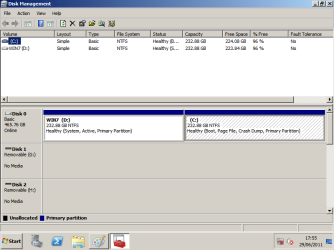
Change System Drive letter without breaking PC I installed Windows Server 2008 R2 onto a computer that was running Windows 7. I installed it onto the secondary partition, D:\. I assumed Windows would automatically switch the drive letters around to make the System Drive C:\. It didn't.
How can I change the system drive letter without breaking everything and without a complete reinstall? I've tried the obvious method of 'just' changing the drive letter but that ended with the PC not being able to boot at all.
If some one can enlighten me I would really appreciate it.
Thanks in advance  .
osholt | My System Specs |
| System Manufacturer/Model Number Apple MacBook 5,1 OS Windows 7 Profesional x86, Mac OS X 10.6 Snow Leopard CPU Intel Core 2 Duo 2.4Ghz Memory 4GB DDR3 Graphics Card Nvidia 9400m Monitor(s) Displays 13.3" Internal + 22" DVI + 21.5" USB Screen Resolution 1280x800 + 1920x1080 + 1920x1080 Keyboard Apple Late 2009 Wireless Keyboard (US) Mouse Apple Magic Mouse Case Aluminium Unibody Hard Drives Internal SATA 2.5" 500GB (395GB Mac HFS+, 105GB Windows NTFS)
2.48TB RAID consisting of 5 disks (HFS+) Internet Speed 6.33Mb/s up. 0.36Mb/s down. Other Info Harman Kardon Soundsticks II Speakers |
25 Jun 2011
|
#2 | | Windows 7 64 Bit Home Premium SP1 In The Woods |
I would try changing the Drive letter to C: and then run Startup Repair - you may need to run it up to 3 times. Startup Repair | My System Specs | | Computer type PC/Desktop System Manufacturer/Model Number Home Built - Jan 2013 OS Windows 7 64 Bit Home Premium SP1 CPU i7-3820 Motherboard Asus P9X79-PRO - Bios 3305 Memory GSkill F3-14900CL9Q - 16GB Graphics Card EVGA GeForce GTX660 - Driver 310.90 Sound Card On board Realtek ALC898 Monitor(s) Displays Acer S271HL Screen Resolution 1920 x 1080 Keyboard MS KC-0405 Mouse Intellimouse 5-button PSU Corsair CMPSU-850TX-V2 - 850 watt (by Seasonic) Case Corsair Obsidian 550D Cooling Standard 3 120mm case fans, Cooler Master Hyper 212 EVO Hard Drives #1- Samsung 840 Pro Series
#2- Western Digital WD1002FAEX Sata3 Black
#3- Western Digital WD1002FAEX Sata3 Black Internet Speed 25Mbits/Sec (on a good day) Antivirus Avast & Malwarebytes Browser Firefox Other Info Asus DVD - DRW-24B1ST 24X |
25 Jun 2011
|
#3 | | Windows 7 Ultimate SP1 64-Bit Peterborough, England |
I found this article that may or may not offer a solution to your dilemma: Dual Boot from VHD Using Windows 7 and Windows Server 2008 R2 - Keith Combs' Blahg - Site Home - TechNet Blogs
If the existing C drive is active then would that explain why you couldn't change the drive letter? | My System Specs | | System Manufacturer/Model Number HP Pavilion Elite 495UK OS Windows 7 Ultimate SP1 64-Bit CPU Intel Core i7 870 @ 2.93GHz Motherboard MSI 2A9C (CPU1) Memory 8Gb Dual-Channel DDR3 @ 664MHz Graphics Card nVidia GeForce GTX 460 1024MB dedicated RAM Sound Card Realtek HD Audio Monitor(s) Displays HP2310i Screen Resolution 1920 x 1080 Keyboard Logitech K750 solar-powered keyboard Mouse Logitech Wireless M180 mouse PSU 460W Case HP Elite Cooling Air cooled Hard Drives 1x1954GB Hitachi HDS22020ALA 330 (RAID), 1x1954GB Hitachi External for backup and storage Internet Speed 2Mb Other Info Pure Avanti Flow Internet Radio with iPod Dock, 64Gb iPod, HP USB Speakers, Sony MDR-V500 Headphones, Sony Vaio F-Series Laptop |
26 Jun 2011
|
#4 | | Windows 7 Profesional x86, Mac OS X 10.6 Snow Leopard England |
I changed the drive letter of the seven partition the first time but I will look into it again.
I'm more concerned with all the programs and, more importantly, user accounts being accessible without some serious reinstalling.
I will look into the start up repair idea further.
thanks.
osholt | My System Specs | | System Manufacturer/Model Number Apple MacBook 5,1 OS Windows 7 Profesional x86, Mac OS X 10.6 Snow Leopard CPU Intel Core 2 Duo 2.4Ghz Memory 4GB DDR3 Graphics Card Nvidia 9400m Monitor(s) Displays 13.3" Internal + 22" DVI + 21.5" USB Screen Resolution 1280x800 + 1920x1080 + 1920x1080 Keyboard Apple Late 2009 Wireless Keyboard (US) Mouse Apple Magic Mouse Case Aluminium Unibody Hard Drives Internal SATA 2.5" 500GB (395GB Mac HFS+, 105GB Windows NTFS)
2.48TB RAID consisting of 5 disks (HFS+) Internet Speed 6.33Mb/s up. 0.36Mb/s down. Other Info Harman Kardon Soundsticks II Speakers |
26 Jun 2011
|
#5 | | ME/XP/Vista/Win7 uk Hampshire |
If you dual Vista & Windows 7 will always see the OS partition as C:, in each OS. | My System Specs | | |
26 Jun 2011
|
#6 | | Vista, Windows7, Mint Mate, Zorin, Windows 8 Florida in winter, Black Forest/Germany |

Quote: Originally Posted by theog If you dual Vista & Windows 7 will always see the OS partition as C:, in each OS. Exactly - I wonder why it is different with Server 2008. | My System Specs | | System Manufacturer/Model Number HP, Dell, Gateway, Toshiba - 4 laptops and 2 desktops OS Vista, Windows7, Mint Mate, Zorin, Windows 8 CPU from 1.6GHz Duo to i7 Monitor(s) Displays 2x HP w2207 Keyboard with trackball - no mices Mouse Trackball mice Hard Drives 5x HDD, 7x SSD, 12x Externals Internet Speed DSL 6000 |
26 Jun 2011
|
#7 | | Windows 7 64 Bit Home Premium SP1 In The Woods |
My understanding is the Startup Repair only recreates the boot files and Master Boot Record for Windows. Barefoot Kid describes it well in the first paragraph here: Startup Repair - Run 3 Separate Times . It only corrects the path errors caused when the OS is moved or the drive structure changes.
I never got the impression that the process changes any other settings of the OS, but I defer to the Windows 7 OS experts here on those details.
You are running Windows 7 in a VHD (I assume) on a Mac so I don't know if that has any bearing on the partition structure in the virtual environment, but I doubt it since I believe Windows just ignores non-NTFS partitions anyway. Not my cup of tea. | My System Specs | | Computer type PC/Desktop System Manufacturer/Model Number Home Built - Jan 2013 OS Windows 7 64 Bit Home Premium SP1 CPU i7-3820 Motherboard Asus P9X79-PRO - Bios 3305 Memory GSkill F3-14900CL9Q - 16GB Graphics Card EVGA GeForce GTX660 - Driver 310.90 Sound Card On board Realtek ALC898 Monitor(s) Displays Acer S271HL Screen Resolution 1920 x 1080 Keyboard MS KC-0405 Mouse Intellimouse 5-button PSU Corsair CMPSU-850TX-V2 - 850 watt (by Seasonic) Case Corsair Obsidian 550D Cooling Standard 3 120mm case fans, Cooler Master Hyper 212 EVO Hard Drives #1- Samsung 840 Pro Series
#2- Western Digital WD1002FAEX Sata3 Black
#3- Western Digital WD1002FAEX Sata3 Black Internet Speed 25Mbits/Sec (on a good day) Antivirus Avast & Malwarebytes Browser Firefox Other Info Asus DVD - DRW-24B1ST 24X |
28 Jun 2011
|
#8 | | ME/XP/Vista/Win7 uk Hampshire |

Quote: Originally Posted by whs 
Quote: Originally Posted by theog If you dual Vista & Windows 7 will always see the OS partition as C:, in each OS. Exactly - I wonder why it is different with Server 2008. Exactly, it is the same.
Have you been using 3rd Party Partitioning tools? | My System Specs | | |
02 Aug 2011
|
#9 | | Windows 7 Profesional x86, Mac OS X 10.6 Snow Leopard England |
Sorry for the MASSIVE delay. I've been out of the country for various reasons.
To clear up any issues about hardware etc.The Hardware in question is an Acer Veriton X275 which came with a pre-partitioned hard disk like many PCs these days. One partition showed up in Windows 7 as C:\ and one as D:\. I installed Server 2008 R2 on the second partition, D:/. It just seems to have kept the original drive letter for reasons I don't know.
I now finally have time to give these solutions a go.
I will report back soonish.
Sorry again for the massive delay. | My System Specs | | System Manufacturer/Model Number Apple MacBook 5,1 OS Windows 7 Profesional x86, Mac OS X 10.6 Snow Leopard CPU Intel Core 2 Duo 2.4Ghz Memory 4GB DDR3 Graphics Card Nvidia 9400m Monitor(s) Displays 13.3" Internal + 22" DVI + 21.5" USB Screen Resolution 1280x800 + 1920x1080 + 1920x1080 Keyboard Apple Late 2009 Wireless Keyboard (US) Mouse Apple Magic Mouse Case Aluminium Unibody Hard Drives Internal SATA 2.5" 500GB (395GB Mac HFS+, 105GB Windows NTFS)
2.48TB RAID consisting of 5 disks (HFS+) Internet Speed 6.33Mb/s up. 0.36Mb/s down. Other Info Harman Kardon Soundsticks II Speakers |
02 Aug 2011
|
#10 | | Windows 7 Profesional x86, Mac OS X 10.6 Snow Leopard England |
I think I've found out why it was on D:\ and not C:\ now. I originally started the installation through the Windows 7 install which shows the drive letters Windows 7 uses when selecting an install disk. As I installed it on D:\ it thought that the drive letter should stay the same.
Starting the installation straight from the disk, however, does not give you the list of drive letters so whatever partition you choose it installs on C:\.
I decided to backup all the stuff I use on the server and just do a clean install (IIS was giving me grief as well about me completely changing how I wanted it to host my websites) and hopefully I can put this problem behind me now; trying to fix it "properly" is just to much of a pain.
Thanks. | My System Specs | | System Manufacturer/Model Number Apple MacBook 5,1 OS Windows 7 Profesional x86, Mac OS X 10.6 Snow Leopard CPU Intel Core 2 Duo 2.4Ghz Memory 4GB DDR3 Graphics Card Nvidia 9400m Monitor(s) Displays 13.3" Internal + 22" DVI + 21.5" USB Screen Resolution 1280x800 + 1920x1080 + 1920x1080 Keyboard Apple Late 2009 Wireless Keyboard (US) Mouse Apple Magic Mouse Case Aluminium Unibody Hard Drives Internal SATA 2.5" 500GB (395GB Mac HFS+, 105GB Windows NTFS)
2.48TB RAID consisting of 5 disks (HFS+) Internet Speed 6.33Mb/s up. 0.36Mb/s down. Other Info Harman Kardon Soundsticks II Speakers Change System Drive letter without breaking PC problems? All times are GMT -5. The time now is 01:36 AM. | |