Windows 7 Forums Search
Welcome to Windows 7 Forums. Our forum is dedicated to helping you find solutions with any problems, errors or issues you are experiencing with Windows 7. The Windows 7 forum also covers news and updates and has an extensive Windows 7 tutorial section that covers a wide range of tips and tricks.


Windows 7 - Disabled internal Mic/no audio devices installed

 
06-26-2011   #1


Windows 7 Home Premium


Disabled internal Mic/no audio devices installed

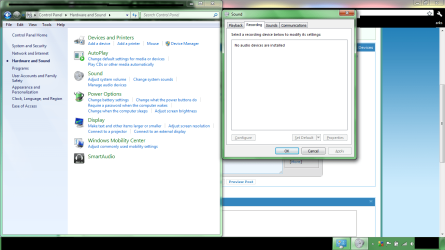
Hey I'm new, and I disabled my internal microphone by: Control panel>hardware and sound>manage audio devices>recording tab> and disabled it. I would like to turn it back on now. but it's saying No audio devices are installed please help

Attached Thumbnails
Disabled internal Mic/no audio devices installed-help.png  
My System SpecsSystem Spec
06-26-2011   #2


Windows 7 Ultimate x64/Windows 8 Consumer Preview x64/Ubuntu 11.04


Hi GuyWithProblems,

Could you please Fill Out Your System Specs? It would really help. Also, are you using a desktop or a laptop? What sound card are you using?

Thanks,
Jaidyn

Last edited by JaidynM; 06-26-2011 at 05:20 AM..
My System SpecsSystem Spec
06-26-2011   #3


Windows 7 Home Premium


Laptop
My System SpecsSystem Spec
.


06-26-2011   #4


Windows 7 Ultimate x64/Windows 8 Consumer Preview x64/Ubuntu 11.04


And the sound card you have?
My System SpecsSystem Spec
06-26-2011   #5


Windows 7 Home Premium


Not sure, how do I find that?
My System SpecsSystem Spec
06-26-2011   #6


Windows 7 Ultimate x64/Windows 8 Consumer Preview x64/Ubuntu 11.04


The link in my first post should explain everything

By the way, I will not be able to reply until tomorrow. I'm going to sleep in about 5 minutes. Nite.
My System SpecsSystem Spec
06-26-2011   #7


Windows 7 Ultimate x64


Hello GuyWithProblems, Welcome to the forum.

Right click on the blank space just underneath where it says No audio devices are installed and left click on Show Disabled Devices and Show Disconnected Devices you should now be able to Activate your device.

Let us know how you get on as this post may help others with similar problems.

Last edited by pooch; 06-26-2011 at 05:37 AM.. Reason: added more
My System SpecsSystem Spec
06-26-2011   #8


Windows 7 Home Premium


wow, that easy haha Thank you alot
My System SpecsSystem Spec
06-26-2011   #9


Windows 7 Ultimate x64


No problem If you would just " Mark this thread as solved" it will then help others with the same problem
My System SpecsSystem Spec
06-27-2011   #10


Windows 7 Ultimate x64/Windows 8 Consumer Preview x64/Ubuntu 11.04


Woah, thought it was a hardware problem. Sorry.
My System SpecsSystem Spec
Reply

 Disabled internal Mic/no audio devices installed problems?


Thread Tools


Similar Threads for: Disabled internal Mic/no audio devices installed
Thread Forum
Solved No audio devices are installed Sound & Audio
No Audio Devices Installed, Help !~! Sound & Audio
Recording: no Audio devices are installed. Sound & Audio
No audio devices are installed. Please help. Sound & Audio
No audio devices are installed. Sound & Audio


All times are GMT -5. The time now is 10:02 AM.


Windows 7 Forums is an independent web site and has not been authorized,
sponsored, or otherwise approved by Microsoft Corporation.
"Windows 7" and related materials are trademarks of Microsoft Corp.
© Designer Media Ltd
  

1 2 3 4 5 6 7 8 9 10 11 12 13 14 15 16 17 18 19 20 21 22 23 24 25 26 27 28 29 30