caspian915
New member
- Local time
- 12:29 PM
- Messages
- 11
Hi all,
I know this is a topic that generates questions all the time, but I haven't yet found a solution that works from all the searching I've done. My external hard drive (1TB Seagate FreeAgent GoFlex) is, as far as I can tell, corrupted in some manner. I don't remember exactly the circumstances involved--from when it was fine to when it was no longer recognized--but suffice it to say that Windows was involved (never had a drive become unreadable under OS X or Linux, this is the second time while using Windows that it's happened).
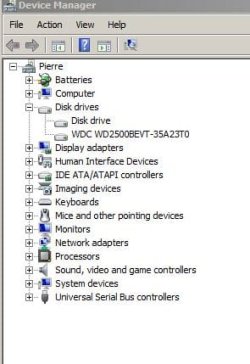
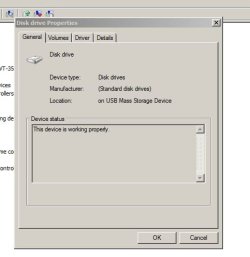
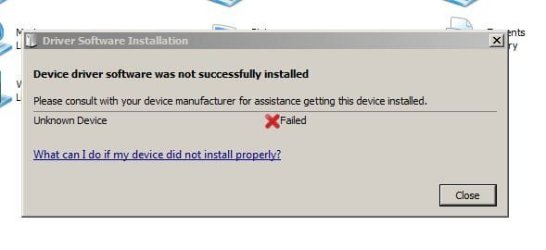
I've attached some relevant screenshots. When I connect the drive, it doesnt' appear in Explorer. It also doesn't appear when I connect in Ubuntu (I currently dual boot, Win7 and Ubuntu 10.04). However, when I look it up in Device Manager, sometimes it appears, sometimes it doesn't. When it does appear, it is listed as "Disk Drive". I've tried a number of things, but nothing seems to get it working.
Oh, also, when I turn on the external hard drive, even if it is not plugged into the USB port, I can feel the disk spinning and every few seconds (5 or 6 seconds), I can feel it grind (that's the best way to describe it). It doesn't make noise, it's just a consistent spin spin spin grind, spin spin spin grind, at 5-7 second intervals, as if it's stuck in a pattern of not locating a file and just spinning mindlessly.
What else can I use? I'd rather use something free than have to pay. I tried KNOPPIX before realizing it was for internal drives.
Any help is appreciated. I want to rescue the data and get the drive functioning again. I'm upgrading my computer and need to back everything up.
I know this is a topic that generates questions all the time, but I haven't yet found a solution that works from all the searching I've done. My external hard drive (1TB Seagate FreeAgent GoFlex) is, as far as I can tell, corrupted in some manner. I don't remember exactly the circumstances involved--from when it was fine to when it was no longer recognized--but suffice it to say that Windows was involved (never had a drive become unreadable under OS X or Linux, this is the second time while using Windows that it's happened).
I've attached some relevant screenshots. When I connect the drive, it doesnt' appear in Explorer. It also doesn't appear when I connect in Ubuntu (I currently dual boot, Win7 and Ubuntu 10.04). However, when I look it up in Device Manager, sometimes it appears, sometimes it doesn't. When it does appear, it is listed as "Disk Drive". I've tried a number of things, but nothing seems to get it working.
Oh, also, when I turn on the external hard drive, even if it is not plugged into the USB port, I can feel the disk spinning and every few seconds (5 or 6 seconds), I can feel it grind (that's the best way to describe it). It doesn't make noise, it's just a consistent spin spin spin grind, spin spin spin grind, at 5-7 second intervals, as if it's stuck in a pattern of not locating a file and just spinning mindlessly.
What else can I use? I'd rather use something free than have to pay. I tried KNOPPIX before realizing it was for internal drives.
Any help is appreciated. I want to rescue the data and get the drive functioning again. I'm upgrading my computer and need to back everything up.
Last edited:
My Computer
At a glance
Windows 7 Ultimate 32 bit
- OS
- Windows 7 Ultimate 32 bit