Windows 7 Forums Search
Welcome to Windows 7 Forums. Our forum is dedicated to helping you find solutions with any problems, errors or issues you are experiencing with Windows 7. The Windows 7 forum also covers news and updates and has an extensive Windows 7 tutorial section that covers a wide range of tips and tricks.


Windows 7 - SB Hub Power Exceeded - error

 
06-27-2011   #1


Windows 7 64-bit


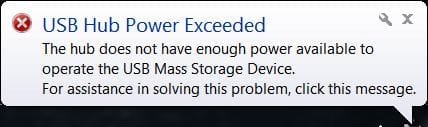
USB Hub Power Exceeded - error

This isn't a big deal but one of those you wonder how to fix.

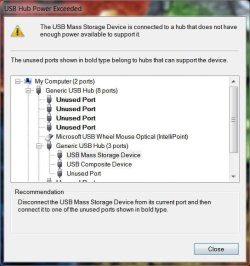
I had an extra Apple wired keyboard (model # MB110LL/A) so I decided to use it on my new built PC (Windows 7 64-bit). I get this error when plugging in my USB flash memory into the keyboard's side USB port; USB Hub Power Exceeded. I never get this error on my iMac with the same keyboard so I'm thinking it might be the generic driver Windows installed when I plugged it in (HID Keyboard Device 6.1.7601.17514 Microsoft 2006).

I've searched Google a number of ways but not finding Apple drives for Windows other than, possibly, their Bootcamp option. I do have my iMac install disc & the driver might be on the disc. I don't know if that disc would work on my new PC.

It's not that big of a deal since I have several other USB ports, though not as convenient, but just wondering why I get the error.

As always, I appreciate your help.

Attached Thumbnails
SB Hub Power Exceeded - error-capture.jpg   SB Hub Power Exceeded - error-capture-2.jpg  
My System SpecsSystem Spec
06-27-2011   #2


Windows 7 HP 64bit, Windows 8 64bit


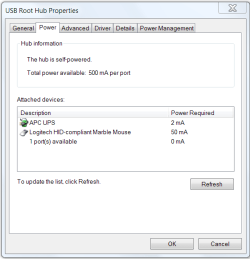
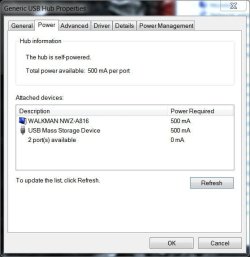
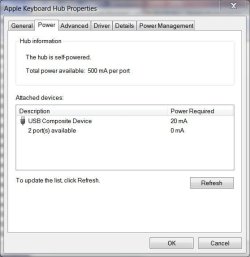
In Device Manager look at the properties of your Root Hubs and check the Power tab and it will show what each device is drawing and what is available.

SB Hub Power Exceeded - error-usb-power.png

Jim
My System SpecsSystem Spec
06-28-2011   #3


Windows 7 64-bit


Quote   Quote: Originally Posted by Phone Man View Post
In Device Manager look at the properties of your Root Hubs and check the Power tab and it will show what each device is drawing and what is available.

Attachment 161985

Jim
Thanks Jim,

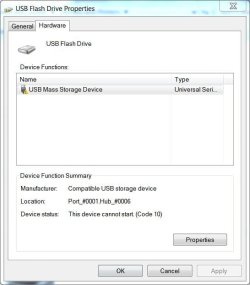
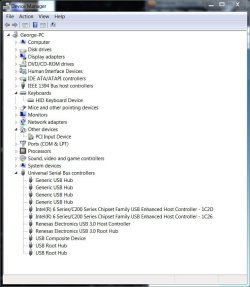
The keyboard is a USB type & has 2 extra USB ports - one located on each side. As soon as the flash drive is plugged in, that port is disabled so it only shows the yellow exclamation point & zero power. It's listed as Port_#0001.Hub_#0006 (see attached). I do have USB 3.0 but don't know if that would make a difference.

My monitor has 4 USBs & the last pic shows the flash drive & a Walkman plugged in - both @ the max of 500mA per port. If this is correct why would a port on the keyboard port that accepts 500mA crash?
Attached Thumbnails
SB Hub Power Exceeded - error-capture3.jpg   SB Hub Power Exceeded - error-capture4.jpg   SB Hub Power Exceeded - error-capture5.jpg  
My System SpecsSystem Spec
.


06-28-2011   #4


Windows 7 64-bit


I've been thinking about this USB Hub Power Exceeded error. The issue must be in the keyboard driver. That is, the keyboard is the hub in question. This must be a driver issue.

Here's the thing. My monitor acts as a hub; it has 4 USB outlets. It's plugged into the motherboard's USB port just like the keyboard is. But, I don't get an error plugging the flash drive into the monitor's USB. It registers 500mA. But, plug the flash into the keyboard & I get USB Hub Power Exceeded - error.

This must be a driver issue.
My System SpecsSystem Spec
06-28-2011   #5


Windows 7 HP 64bit, Windows 8 64bit


The port that the keyboard is plugged into, what does it show before plugging anything into the keyboard ports? And what does it show afterwards?
Also I would think that the monitor is furnishing the power to its ports while the keyboard is drawing power from the port it is plugged into.

Jim
My System SpecsSystem Spec
06-28-2011   #6


Windows 7 64-bit


Quote   Quote: Originally Posted by Phone Man View Post
Also I would think that the monitor is furnishing the power to its ports while the keyboard is drawing power from the port it is plugged into.

Jim
Thanks,

So, on a Mac, this keyboard works perfectly because the Mac OS supplies power to it? And, on Windows it doesn't? Wouldn't that have something to do with the driver for the keyboard?

I installed a driver for the keyboard from my Mac install CD but it's a .sys file whereas Windows wants an .inf file. I'm not sure how to fix that (rename maybe?). Not sure what the differences are.

Quote   Quote: Originally Posted by Phone Man View Post
The port that the keyboard is plugged into, what does it show before plugging anything into the keyboard ports? And what does it show afterwards?
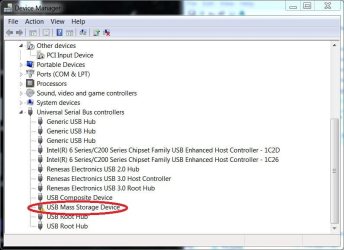
I've attached 2 before & after photos, the one with a red circle is what pops up after plugging in the flash drive. As I said, the hub powers off & it doesn't read anything unless it's plugged into a powered USB port.
Attached Thumbnails
SB Hub Power Exceeded - error-capture4.jpg   SB Hub Power Exceeded - error-capture6.jpg  
My System SpecsSystem Spec
06-28-2011   #7


Windows 7 HP 64bit, Windows 8 64bit


What I am saying is that the monitor has AC power and furnishes its usb ports with power. The keyboard draws its power from the motherboard usb port which is limited to 500ma and shares that power with itself and its ports. The keyboard uses part of that 500ma to power itself and so less then that is available to its ports so you can not use a 500ma flash drive on the keyboard. I do not know what a MAC supplies.

Jim
My System SpecsSystem Spec
06-28-2011   #8


Windows 7 64-bit


Quote   Quote: Originally Posted by Phone Man View Post
What I am saying is that the monitor has AC power and furnishes its usb ports with power. The keyboard draws its power from the motherboard usb port which is limited to 500ma and shares that power with itself and its ports. The keyboard uses part of that 500ma to power itself and so less then that is available to its ports so you can not use a 500ma flash drive on the keyboard. I do not know what a MAC supplies.

Jim
Thanks Jim,

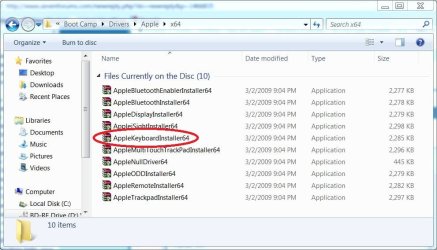
This looks to be unresolvable. Somehow, Mac OS driver (or whatever) supplies power to this keyboard & the generic Microsoft driver does not. On my Mac OS X Install DVD I was able to find & install a Bootcamp Windows 64-bit keyboard driver called KeyMagic.sys. But, I cannot replace the generic Windows driver because Windows wants an .inf file. It was worth a try.
Attached Thumbnails
SB Hub Power Exceeded - error-apple.jpg   SB Hub Power Exceeded - error-apple2.jpg  
My System SpecsSystem Spec
06-28-2011   #9


Windows 7 HP 64bit, Windows 8 64bit


I don't think the keyboard driver has anything to do with it. It is a limit of what the usb ports can supply.

Jim
My System SpecsSystem Spec
06-28-2011   #10


Windows 7 64-bit


I checked to see if the mouse would work if plugged into the keyboard's side USB & it does. Windows must power their USBs differently than Mac because it works like a charm on a Mac.

In fairness, this keyboard is not listed as a Windows compatible.

Windows 7 Compatibility for apple: Drivers, Updates, Downloads

I can type; I'm happy. No point kicking a dead horse anymore!
Thanks.
My System SpecsSystem Spec
Reply

 SB Hub Power Exceeded - error problems?


Thread Tools


Similar Threads for: SB Hub Power Exceeded - error
Thread Forum
Hard Drive exceeded normal parameter? Hardware & Devices
Solved usb controller bandwidth exceeded Hardware & Devices
GFWL- CD Key Usage Exceeded!!!!!!!!! Gaming
still need help Power dvd error 1334 and error 1603 Installation & Setup
Power dvd error 1334 and error 1603 Installation & Setup


All times are GMT -5. The time now is 10:03 AM.


Windows 7 Forums is an independent web site and has not been authorized,
sponsored, or otherwise approved by Microsoft Corporation.
"Windows 7" and related materials are trademarks of Microsoft Corp.
© Designer Media Ltd
  

1 2 3 4 5 6 7 8 9 10 11 12 13 14 15 16 17 18 19 20 21 22 23 24 25 26 27 28 29 30