
Windows 7 Forums Search
Welcome to Windows 7 Forums. Our forum is dedicated to helping you find solutions with any problems, errors or issues you are experiencing with Windows 7. The Windows 7 forum also covers news and updates and has an extensive Windows 7 tutorial section that covers a wide range of tips and tricks.


Windows 7 - PC just went dead randomly after fixing NIC issue...

 
07-02-2011   #1


windows 7 home premium 64 bit


PC just went dead randomly after fixing NIC issue...

Hi, I'm back here on this amazingly helpful windows 7 forum which was able to help me fix a very confusing problem I had with my NIC card which was caused by lightning...Just about a wk later the same PC just simply went dead while I was composing an email. No other part of my set up was affected; printer, scanner, monitor. There was no weather issues either. Could this be because of the earlier problem with the NIC being zapped by the lightning? PLease if anyone has any ideas for me I would so appriciape some feedback. It was so great to have my PC back and now it's completely dead. I've unplugged it and replugged it no reponse. It's like a toy without batteries. NO power. THe only clue is that the little bulb in the back next to the power cord flashes very slowly on and off green. But the machine will not go on at all. Any ideas? Thank you for any and all all thoughts in advance.

Original thread is here ....

windows 7 can't reconize with local network interface driver software

Bob


Last edited by Barman58; 07-02-2011 at 08:27 AM.. Reason: Moved post with link to original problems
My System SpecsSystem Spec
07-02-2011   #2


Windows 7 Ultimate x64 + x86 + Windows 8 x64


Hi Bob,

I've moved this to it's own thread to give the most chance of being seen

You could have a problem with the motherboard due to your original lightning issue.

to help the helpers could you please post the details of you actual motherboard or pc system so that the flashing lights can be investigated
My System SpecsSystem Spec
07-02-2011   #3


windows 7 home premium 64 bit


Hi, my bad, I should have posted details on my desktop PC.
Dell windows 7 home premium
64-bit
Studio XPS 8100
6 ram
750 hard drive
Please let me know if you need more info?
Bob
My System SpecsSystem Spec
.


07-02-2011   #4


Windows 7 Ultimate x64 + x86 + Windows 8 x64


The dell diagnostic codes are here .....

Documentation

the LEDs are marked ABCD and should provide a clue to the issue
My System SpecsSystem Spec
07-02-2011   #5


Win 7 Home Premium 64bit Ver 6.1.7600 Build 7601 - SP1


Hi! Bob, welcome to 7F

It would be better if you could fill out your System Specs. (See How to System Specs) But, just going by Studio XPS that you have listed I came up with this.

Quote:
Q For what use is the strip of LED lights on my battery?

A Most Dell batteries have an LED indicator that allows users to see how much run time and how much overall battery life are available at the touch of a button.

To check battery charge, press the button and the number of lights that appear will tell you charge status. If all lights appear, you have a fully charged battery. Each light that appears accounts for approximately 20% charge.

To check the battery health, press and hold the status button on the battery charge gauge for at least 3 seconds. If no lights appear, the battery is in good condition and approximately more than 80 percent of its original charge capacity remains. Each light represents incremental degradation. If five lights appear, approximately less than 60 percent of the charge capacity remains, and you should consider replacing the battery.

Q
What are the LED lights on my battery?

A To check battery charge, press the button and the number of LED lights that appear will tell you charge status. If all lights appear, you have a fully charged battery. Each light that appears accounts for approximately 20% charge.

Q What does it mean when I push the button on the battery to determine the amount of charge, and alternating LED lights flash?

A This is an indication that the battery is not working properly. The battery should be replaced.
Source...Dell Official Site: Laptop Battery FAQ | Dell


Your only clue
Quote:
THe only clue is that the little bulb in the back next to the power cord flashes very slowly on and off green.
Would mean to me that you are having a battery problem.

You may have had enough power to run after the NIC card incident, but it does not even have enough power now to run the LED lights.

Try recharging the battery. Use the FAQs page at the link above to decide the best way to proceed.

If you have a local PC shop they may be able to test the battery to see if is still good or not.
Do not tell them it was hit by lighting until after it is tested otherwise it could bias the test.


EDIT:
Good Link Nigel!
My System SpecsSystem Spec
07-02-2011   #6


windows 7 home premium 64 bit


HI,thanks for your help. My pc is a desktop so is it possible to be a battery issue? As it's always powered by the powercord/electicity? Also the flashing bulb clue is located at the back of the machine under the power cord. Not the power button itself and none of the diagnostic codes are flashing or anything I'm gooing to also fill in the system specs also...
Bob
My System SpecsSystem Spec
07-02-2011   #7


Windows 7 Ultimate x64 + x86 + Windows 8 x64


The only green flashing light that shows for the DELL range is for the front power button that would indicate a suspend state, which is not the one here from your description

With the history of this system I would advise a diagnostic test removing all but the essential components, not sure if this is something you feel comfortable with yourself but instructions are given on the link I posted above
My System SpecsSystem Spec
07-02-2011   #8


Win 7 Home Premium 64bit Ver 6.1.7600 Build 7601 - SP1


Quote   Quote: Originally Posted by caldom View Post
HI,thanks for your help. My pc is a desktop so is it possible to be a battery issue? As it's always powered by the powercord/electicity?
Your welcome, No it should not be a battery issuse unless it is the CMOS battery. In trying to help I jumped the gun not realizing there are desk/laptop models for the Studio XPS.
This comes from not having complete information, my bad.
Quote   Quote: Originally Posted by caldom View Post
Also the flashing bulb clue is located at the back of the machine under the power cord. Not the power button itself and none of the diagnostic codes are flashing or anything
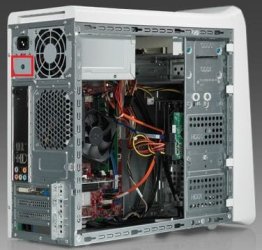
Is this what yours looks like? Notice the red squares.

PC just went dead randomly after fixing NIC issue...-dell81001.jpgPC just went dead randomly after fixing NIC issue...-de8100.jpg

I have tried looking for an explanation for that light, but have yet to find one. Bob, can you see in your manuals if it describes what it does?

Quote   Quote: Originally Posted by caldom View Post
I'm gooing to also fill in the system specs also...
Bob
Thank you Bob, it is very helpful to do so.
My System SpecsSystem Spec
07-02-2011   #9


Win 7 Home Premium 64bit Ver 6.1.7600 Build 7601 - SP1


The only thing I can find about that light is it is an indicator for the PSU, your only clue
Quote:
THe only clue is that the little bulb in the back next to the power cord flashes very slowly on and off green.
Would mean to me that you are having a PSU problem.
My System SpecsSystem Spec
07-02-2011   #10


windows 7 home premium 64 bit


HI, ok thats kinda what I was thinking. would it be a matter of replacing the PCU or...
Bob
My System SpecsSystem Spec
Reply

 PC just went dead randomly after fixing NIC issue... problems?


Thread Tools


Similar Threads for: PC just went dead randomly after fixing NIC issue...
Thread Forum
Issue: Multiple BSOD NTIO.SYS errors randomly generated when browsing Crashes and Debugging
Monitors and Mouse/Keyboard randomly shut off - DVI & USB port issue? Crashes and Debugging
Fixing Dual Boot Issue after System Restore Crashes and Debugging
Windows 7 Media Center Updates Fixing Reliability Issue Windows Updates & Activation
laptop randomly wakes, and wireless issue Hardware & Devices


All times are GMT -5. The time now is 10:09 AM.


Windows 7 Forums is an independent web site and has not been authorized,
sponsored, or otherwise approved by Microsoft Corporation.
"Windows 7" and related materials are trademarks of Microsoft Corp.
© Designer Media Ltd
  

1 2 3 4 5 6 7 8 9 10 11 12 13 14 15 16 17 18 19 20 21 22 23 24 25 26 27 28 29 30