|
Welcome to Windows 7 Forums. Our forum is dedicated to helping you find solutions with any problems, errors or issues you are experiencing with Windows 7. The Windows 7 forum also covers news and updates and has an extensive Windows 7 tutorial section that covers a wide range of tips and tricks.
Windows 7 - Rosewell Challenger help. |
07-02-2011
|
#1 | | Windows 7 x64 Home Edition |
Rosewell Challenger help. I bought a new case the Rosewell Challenger to be specific to replace my NXZT Hush, because it was falling apart, so I got the new case today and I swapped everything inside the new case but the problem is simply this it won't start up and I am unsure of what is going on, I have the P5Q Pro by asus mother board I was wondering if any one had the Challenger and knew where about everything plugs into the only thing that is different that I have not plugged in was the pin that said AC-97 I couldn't find that labeled anywhere on my motherboard, and the main on the motherboard I am uncertain if it is supposed to cover the entire pins because it seems to me it leaves 4 pins short, but it has main written on the pin box, I can't remember help would be great right about now thanks a lot.
| My System Specs | | System Manufacturer/Model Number Custom OS Windows 7 x64 Home Edition CPU Intel Quad core 6600 Motherboard P5Q Pro Memory 6gb DDR2 Graphics Card Radeon Sapphire HD 6950 Monitor(s) Displays 26" Fluid (The source brand TV) Keyboard Razer Lycosa Mouse Razer Deathadder PSU OCZ Stealth 700watt Case Rosewill Challenger Cooling Fan Hard Drives 1TB
500GB |
07-02-2011
|
#2 | | Windows 7 X64 Professional/Windows 8 |
The AC-97 is the audio plugin for the front panel. It should be plugged in to the audio connector usually located on the bottom of the motherboard.The Main, is probably the 24 pin power to the motherboard. Most PSU's have a 20+4 pin connector to accomidate motherboards with either a 20 pin or 24 pin connector. You motherboard manual should show what kind and where each pin is located. | My System Specs | | System Manufacturer/Model Number Home Brew - Always under construction OS Windows 7 X64 Professional/Windows 8 CPU intel i7-2600K Motherboard Asus P8Z68 V-Pro/GEN 3 Memory 8GB G.Skill Sniper DDR3-2133 (2X4GB) Graphics Card EVGA 670 2GB Sound Card Asus Xonar Monitor(s) Displays Asus 24" LCD VW246H Screen Resolution 1920X1080 Keyboard Logitech G510 Mouse Logitech G500/Logitech Wireless PSU CORSAIR HX850W Case Cooler Master HAF X Cooling Corsair H100 w/ 4 noctua fans in push/pull. Hard Drives Crucial M4 128GB,Crucial M4 64GB,Samsung HD103SJ 1TB, 1TB WD FAEX,Samsung 1.5TB, EXTERNAL HD- 2X Rosewill case esata w/ 1TB Samsung spinpoints & Black X esata 1TB Spinpoint, Rosewill USB 3.0 dock 1TB Spinpoint, Seagate GOFlex Pro 500GB & 750GB USB Internet Speed Foot Messenger speed Other Info 2nd Computer- Samsung RF711-SO1 17" Laptop i5-2310M, 8GB DDR3-1333, Crucial M4 and OCZ vertex2, Nvidia GT540M.Win 7 HP X64. |
07-02-2011
|
#3 | | Windows 7 X64 Professional/Windows 8 |
If you don't have the manual it can be downloaded here. It appears that it has a 24 pin connector. Your PSU does have a 20+4 pin connector. If it has been seperated it will have a 20 pin connector and another 4 pin connector on the same cable. Put the 20 pin and 4 pin together and insert it into the 24 pin receptical. | My System Specs | | System Manufacturer/Model Number Home Brew - Always under construction OS Windows 7 X64 Professional/Windows 8 CPU intel i7-2600K Motherboard Asus P8Z68 V-Pro/GEN 3 Memory 8GB G.Skill Sniper DDR3-2133 (2X4GB) Graphics Card EVGA 670 2GB Sound Card Asus Xonar Monitor(s) Displays Asus 24" LCD VW246H Screen Resolution 1920X1080 Keyboard Logitech G510 Mouse Logitech G500/Logitech Wireless PSU CORSAIR HX850W Case Cooler Master HAF X Cooling Corsair H100 w/ 4 noctua fans in push/pull. Hard Drives Crucial M4 128GB,Crucial M4 64GB,Samsung HD103SJ 1TB, 1TB WD FAEX,Samsung 1.5TB, EXTERNAL HD- 2X Rosewill case esata w/ 1TB Samsung spinpoints & Black X esata 1TB Spinpoint, Rosewill USB 3.0 dock 1TB Spinpoint, Seagate GOFlex Pro 500GB & 750GB USB Internet Speed Foot Messenger speed Other Info 2nd Computer- Samsung RF711-SO1 17" Laptop i5-2310M, 8GB DDR3-1333, Crucial M4 and OCZ vertex2, Nvidia GT540M.Win 7 HP X64. |
07-02-2011
|
#4 | | Windows 7 x64 Home Edition |
I have done that and it still will not start up I can hear a humming noise when the AC cable is plugged in. | My System Specs | | System Manufacturer/Model Number Custom OS Windows 7 x64 Home Edition CPU Intel Quad core 6600 Motherboard P5Q Pro Memory 6gb DDR2 Graphics Card Radeon Sapphire HD 6950 Monitor(s) Displays 26" Fluid (The source brand TV) Keyboard Razer Lycosa Mouse Razer Deathadder PSU OCZ Stealth 700watt Case Rosewill Challenger Cooling Fan Hard Drives 1TB
500GB |
07-02-2011
|
#5 | | Windows 7 X64 Professional/Windows 8 |
Do you have the 4 / 8 pin plugged in? | My System Specs | | System Manufacturer/Model Number Home Brew - Always under construction OS Windows 7 X64 Professional/Windows 8 CPU intel i7-2600K Motherboard Asus P8Z68 V-Pro/GEN 3 Memory 8GB G.Skill Sniper DDR3-2133 (2X4GB) Graphics Card EVGA 670 2GB Sound Card Asus Xonar Monitor(s) Displays Asus 24" LCD VW246H Screen Resolution 1920X1080 Keyboard Logitech G510 Mouse Logitech G500/Logitech Wireless PSU CORSAIR HX850W Case Cooler Master HAF X Cooling Corsair H100 w/ 4 noctua fans in push/pull. Hard Drives Crucial M4 128GB,Crucial M4 64GB,Samsung HD103SJ 1TB, 1TB WD FAEX,Samsung 1.5TB, EXTERNAL HD- 2X Rosewill case esata w/ 1TB Samsung spinpoints & Black X esata 1TB Spinpoint, Rosewill USB 3.0 dock 1TB Spinpoint, Seagate GOFlex Pro 500GB & 750GB USB Internet Speed Foot Messenger speed Other Info 2nd Computer- Samsung RF711-SO1 17" Laptop i5-2310M, 8GB DDR3-1333, Crucial M4 and OCZ vertex2, Nvidia GT540M.Win 7 HP X64. |
07-02-2011
|
#6 | | Windows 7 X64 Professional/Windows 8 |
A humming noise sounds like the PSU or a short somewhere. Recheck all of the wires and connections make sure they are securely connected. Read your manuel on the front pin connectors, there is a + side and a = side to the pins make sure they are properly connected. Also make sure your CPU cooler is plugged into the CPU fan plug. Failing that It would seem that ther may be a PSU issue.
EDIT: Also some PSU's have a selection as to which type current the are connected to. See if yours does and make sure it is set right for your current. | My System Specs | | System Manufacturer/Model Number Home Brew - Always under construction OS Windows 7 X64 Professional/Windows 8 CPU intel i7-2600K Motherboard Asus P8Z68 V-Pro/GEN 3 Memory 8GB G.Skill Sniper DDR3-2133 (2X4GB) Graphics Card EVGA 670 2GB Sound Card Asus Xonar Monitor(s) Displays Asus 24" LCD VW246H Screen Resolution 1920X1080 Keyboard Logitech G510 Mouse Logitech G500/Logitech Wireless PSU CORSAIR HX850W Case Cooler Master HAF X Cooling Corsair H100 w/ 4 noctua fans in push/pull. Hard Drives Crucial M4 128GB,Crucial M4 64GB,Samsung HD103SJ 1TB, 1TB WD FAEX,Samsung 1.5TB, EXTERNAL HD- 2X Rosewill case esata w/ 1TB Samsung spinpoints & Black X esata 1TB Spinpoint, Rosewill USB 3.0 dock 1TB Spinpoint, Seagate GOFlex Pro 500GB & 750GB USB Internet Speed Foot Messenger speed Other Info 2nd Computer- Samsung RF711-SO1 17" Laptop i5-2310M, 8GB DDR3-1333, Crucial M4 and OCZ vertex2, Nvidia GT540M.Win 7 HP X64. |
07-02-2011
|
#7 | | Windows 7 x64 Home Edition |
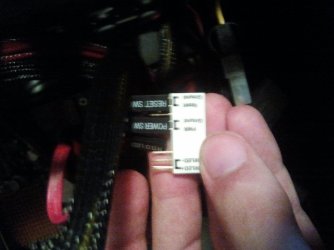
Everything is connected properly as I can see everything is the same as it was in my last case the only thing I am weary about is this white box I am not sure if it was included with my previous case or not, but here is a picture. | My System Specs | | System Manufacturer/Model Number Custom OS Windows 7 x64 Home Edition CPU Intel Quad core 6600 Motherboard P5Q Pro Memory 6gb DDR2 Graphics Card Radeon Sapphire HD 6950 Monitor(s) Displays 26" Fluid (The source brand TV) Keyboard Razer Lycosa Mouse Razer Deathadder PSU OCZ Stealth 700watt Case Rosewill Challenger Cooling Fan Hard Drives 1TB
500GB |
07-02-2011
|
#8 | | Windows 7 X64 Professional/Windows 8 |
I am not sure. I don't have an Asus board, but I know they have a Q connector which is what I think that is. It should plug into the front panel connection on the motherboard. It should only be able to plug in in one direction. You will notice that the MB connection is missing 1 pin and the connector is aligned accordingly. | My System Specs | | System Manufacturer/Model Number Home Brew - Always under construction OS Windows 7 X64 Professional/Windows 8 CPU intel i7-2600K Motherboard Asus P8Z68 V-Pro/GEN 3 Memory 8GB G.Skill Sniper DDR3-2133 (2X4GB) Graphics Card EVGA 670 2GB Sound Card Asus Xonar Monitor(s) Displays Asus 24" LCD VW246H Screen Resolution 1920X1080 Keyboard Logitech G510 Mouse Logitech G500/Logitech Wireless PSU CORSAIR HX850W Case Cooler Master HAF X Cooling Corsair H100 w/ 4 noctua fans in push/pull. Hard Drives Crucial M4 128GB,Crucial M4 64GB,Samsung HD103SJ 1TB, 1TB WD FAEX,Samsung 1.5TB, EXTERNAL HD- 2X Rosewill case esata w/ 1TB Samsung spinpoints & Black X esata 1TB Spinpoint, Rosewill USB 3.0 dock 1TB Spinpoint, Seagate GOFlex Pro 500GB & 750GB USB Internet Speed Foot Messenger speed Other Info 2nd Computer- Samsung RF711-SO1 17" Laptop i5-2310M, 8GB DDR3-1333, Crucial M4 and OCZ vertex2, Nvidia GT540M.Win 7 HP X64. |
07-02-2011
|
#9 | | Windows 7 x64 Home Edition |
I have had that plugged in as well, the only other one that isn't was the H.D Light I believe I couldn't figure out where on that it went so I left it off, although I don't believe it is that important and it does go on one way, but I can't figure out why my computer isn't starting up everything is simply the same. | My System Specs | | System Manufacturer/Model Number Custom OS Windows 7 x64 Home Edition CPU Intel Quad core 6600 Motherboard P5Q Pro Memory 6gb DDR2 Graphics Card Radeon Sapphire HD 6950 Monitor(s) Displays 26" Fluid (The source brand TV) Keyboard Razer Lycosa Mouse Razer Deathadder PSU OCZ Stealth 700watt Case Rosewill Challenger Cooling Fan Hard Drives 1TB
500GB |
07-02-2011
|
#10 | | Windows 7 X64 Professional/Windows 8 |
There is very little that the case could do to cause the computer to not start. This is a dumb question, but have you attached the motherboard to all of the motherboard standoffs in the case? I only ask this because if everything is plugged in properly, either there is a dead short somewhere or your PSU is not working. Those are the only two things that I know of that would make your PSU just humm. | My System Specs | | System Manufacturer/Model Number Home Brew - Always under construction OS Windows 7 X64 Professional/Windows 8 CPU intel i7-2600K Motherboard Asus P8Z68 V-Pro/GEN 3 Memory 8GB G.Skill Sniper DDR3-2133 (2X4GB) Graphics Card EVGA 670 2GB Sound Card Asus Xonar Monitor(s) Displays Asus 24" LCD VW246H Screen Resolution 1920X1080 Keyboard Logitech G510 Mouse Logitech G500/Logitech Wireless PSU CORSAIR HX850W Case Cooler Master HAF X Cooling Corsair H100 w/ 4 noctua fans in push/pull. Hard Drives Crucial M4 128GB,Crucial M4 64GB,Samsung HD103SJ 1TB, 1TB WD FAEX,Samsung 1.5TB, EXTERNAL HD- 2X Rosewill case esata w/ 1TB Samsung spinpoints & Black X esata 1TB Spinpoint, Rosewill USB 3.0 dock 1TB Spinpoint, Seagate GOFlex Pro 500GB & 750GB USB Internet Speed Foot Messenger speed Other Info 2nd Computer- Samsung RF711-SO1 17" Laptop i5-2310M, 8GB DDR3-1333, Crucial M4 and OCZ vertex2, Nvidia GT540M.Win 7 HP X64. Rosewell Challenger help. problems? All times are GMT -5. The time now is 10:09 AM. |  |