Windows 7 Forums Search
Welcome to Windows 7 Forums. Our forum is dedicated to helping you find solutions with any problems, errors or issues you are experiencing with Windows 7. The Windows 7 forum also covers news and updates and has an extensive Windows 7 tutorial section that covers a wide range of tips and tricks.


Windows 7 - Ram does not show right speed. HMMMM

 
07-05-2011   #1


Windows 7 64Bit Ultimate Edition SP1


Ram does not show right speed. HMMMM

Please have a look at my CPU-Z validation which shows you my current sys specs.

Why are both my ram sticks under clocked, it is meant to be 800MHz?

CPU-Z Validation >>> http://valid.canardpc.com/show_oc.php?id=1895577

Mobo Info >>>>>>>> http://www.asrock.com/mb/overview.as...l=n68c-s%20ucc

My System SpecsSystem Spec
07-05-2011   #2


Windows 7 Ultimate 32-bit & 64-bit both SP1


What does SPD say for both sticks? I notice that you are running with 2 different makes and sizes.
My System SpecsSystem Spec
07-05-2011   #3


Win 7 Ultimate x64


Might have something to do with it running on a 3:4 multiplier. Go into the bios and set it to either auto or 1:1 (400MHzDDR2_800 as it shows in the manual) to get it to the correct speed.
My System SpecsSystem Spec
.


07-05-2011   #4


Windows 7 x64 sp1


I can see that board has bios updates, but I can't for the life of me find out where you actually get them as they are not listed on the normal download page.
ASRock > Products > Motherboard > N68C-S UCC > Download
My System SpecsSystem Spec
07-05-2011   #5


Win 7 Ultimate x64


My System SpecsSystem Spec
07-05-2011   #6


Windows 7 Ultimate X86 SP1


True, mismatched RAM stick can cause problems. Try removing the 2GB one and see what it rates. Then put it back and use the 4GB stick, test again. Try bumping your bus up one or two Mhz at a time to see if you are still stable.
Your board specs say it supports DDR3 but you're using DDR2.
My System SpecsSystem Spec
07-05-2011   #7


Win 7 Ultimate x64


Both actually Britton,

Quote:
- Dual Channel DDR3/DDR2 memory technology*
- 2 x DDR3 DIMM slots**
- Supports DDR3 1600/1333/1066/800 non-ECC, un-buffered memory
- Max. capacity of system memory: 8GB***
- 2 x DDR2 DIMM slots
- Supports DDR2 1066****/800/667/533 non-ECC, un-buffered memory
- Max. capacity of system memory: 8GB***
Asrock is funny (or innovative depending on your point of view) for that sort of thing. Sort of like their old AMD socket 939 board (939Dual-SATA2) that had a 939 socket on and DDR slots on it, and a slot for putting in a daughter board to use with an AM2 CPU (as well as changing a bunch of jumpers) and DDR2.
My System SpecsSystem Spec
07-05-2011   #8


Windows 7 Ultimate X86 SP1


Thanks Stormy, I'll put my glasses on. ...and check the spec page too.
That is funny though.
Maybe the sticks are in the wrong slot, or one at least. hmm, maybe it wouldn't POST if that were the case.
My System SpecsSystem Spec
07-05-2011   #9


Win 7 Ultimate x64


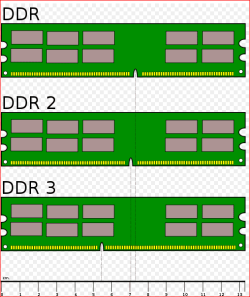
Would fit anyway, they're notched differently,

Ram does not show right speed.  HMMMM-ddr.png
My System SpecsSystem Spec
07-05-2011   #10


Windows 7 64Bit Ultimate Edition SP1


Quote   Quote: Originally Posted by stormy13 View Post
Might have something to do with it running on a 3:4 multiplier. Go into the bios and set it to either auto or 1:1 (400MHzDDR2_800 as it shows in the manual) to get it to the correct speed.
Just done what you said, and now look lol.

Cheers m8 http://valid.canardpc.com/show_oc.php?id=1895722
My System SpecsSystem Spec
Reply

 Ram does not show right speed. HMMMM problems?


Thread Tools


Similar Threads for: Ram does not show right speed. HMMMM
Thread Forum
speed up windows photo viewer slide show? Music, Pictures & Video
Show Speed When Moving Files Performance & Maintenance
Hmmmm, coloured cases Chillout Room
Microsoft's own speed tests show IE beating Chrome, Firefox News


All times are GMT -5. The time now is 10:13 AM.


Windows 7 Forums is an independent web site and has not been authorized,
sponsored, or otherwise approved by Microsoft Corporation.
"Windows 7" and related materials are trademarks of Microsoft Corp.
© Designer Media Ltd
  

1 2 3 4 5 6 7 8 9 10 11 12 13 14 15 16 17 18 19 20 21 22 23 24 25 26 27 28 29 30