Windows 7 Forums Search
Welcome to Windows 7 Forums. Our forum is dedicated to helping you find solutions with any problems, errors or issues you are experiencing with Windows 7. The Windows 7 forum also covers news and updates and has an extensive Windows 7 tutorial section that covers a wide range of tips and tricks.


Windows 7 - How can i format this partition

 
07-07-2011   #1


Windows 7 Ultimate x64


How can i format this partition

Hi, I'm trying to format a partition with a windows7 install on it.
The windows7 installed on it BSOD every boot so is useless.
I managed to get a fresh windows7 install on drive (C) which is working and I'm currently using.

The partition I'm trying to format is (E). See screenshot.
I have deleted the boot in msconfig, but I believe I cant format the partition because it is marked 'system'???

Disk management won't let me format the partition nor will the two partition management programs I've tried.
I just want to use the drive as storage and rid all windows off it.

Any help greatly appreciated thanks.
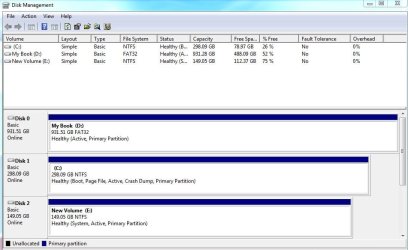
How can i format this partition-disk_management.jpg

My System SpecsSystem Spec
07-07-2011   #2


Windows 7 x64 pro/ Windows 7 x86 Pro/ XP SP3 x86


Hello, just physically disconnect the E: disk from the computer, then boot from the Windows 7 install dvd or a system repair disk and run startup repair.

Startup Repair - Run 3 Separate Times

Then reboot (not from the dvd). Once you are in windows, you can reattach the E: disk and format it.
My System SpecsSystem Spec
07-07-2011   #3


Windows 7 Ultimate x64


Such a long drawn out process and hasn't got me anywhere so far.

I first made (D) and (E) drives inactive and disconnected them, and proceeded to do the startup repair with just (C) drive connected and with a windows 7 dvd. The first time i got to the System Recovery Options screen there was no OS listed, i continued with the process and selected Startup Repair. The repair was unsuccesful, but in the View diagnostic and repair detail tab I was able to see that it identified the correct problem, it just didnt fix it.

I went through this process three times to no change. Then I'm not exactly sure what happened, but it got into the Windows Boot Manager screen and came up with a winload.exe error. It was trying to load an old install of vista (which i thought all traces of had been deleted). Now everytime I get to the System Recovery Options screen with just (C) drive connected Windows Vista comes up as the OS. And I'm unable to select Next because I have the windows 7 dvd in the drive.

Not sure what to try next.
My System SpecsSystem Spec
.


07-07-2011   #4


Windows 7 x64 pro/ Windows 7 x86 Pro/ XP SP3 x86


My System SpecsSystem Spec
07-07-2011   #5


ME/XP/Vista/Win7


1) Unplug the cable from disk0 the 931gb HD
2) The cable you have unpluged, plug in to disk1 the 298gb HD.
3) Unplug the cable from disk2 the 149gb HD

How can i format this partition-move-boot-001.png
4) Do a Startup Repair.
Startup Repair
Note: You may need to do startup repair 3 to 4 times.
Startup Repair - Run 3 Separate Times
How can i format this partition-move-boot-002.png

When Windows 7 is booting OK, replace the aother Hd's, leaving the 298gb C; as Disk0.
How can i format this partition-move-boot-003.png
My System SpecsSystem Spec
07-07-2011   #6


XP, Vista, W7 64bit Home Premium


Quote   Quote: Originally Posted by defpony View Post
Such a long drawn out process and hasn't got me anywhere so far.

I first made (D) and (E) drives inactive and disconnected them, and proceeded to do the startup repair with just (C) drive connected and with a windows 7 dvd. The first time i got to the System Recovery Options screen there was no OS listed, i continued with the process and selected Startup Repair. The repair was unsuccesful, but in the View diagnostic and repair detail tab I was able to see that it identified the correct problem, it just didnt fix it.

I went through this process three times to no change. Then I'm not exactly sure what happened, but it got into the Windows Boot Manager screen and came up with a winload.exe error. It was trying to load an old install of vista (which i thought all traces of had been deleted). Now everytime I get to the System Recovery Options screen with just (C) drive connected Windows Vista comes up as the OS. And I'm unable to select Next because I have the windows 7 dvd in the drive.

Not sure what to try next.
Why didnt you just delete the partition in disc management to start with, then create a new partition and format it - that will automatically remove it from the boot menu and your ready to go under normal circumstances this will work.

Im not sure what you have done but with Sea tools dos for seagate drives you can zero drives, which wipes them so they behave the same as a new drive, then the drive needs to initialized before it can be used. Sea tools dos (iso) can also be used with other drives if the manufactures of the drives dont have a utility.

To fix the problem if you havet got anything you need on the 2 Windows 7 drives concerned (C AND E) you could do that, and you would be sweet - then throw the Windows 7 install dvd in the drive - it will locate the drives in custom install - from memory it initializes the drives automatically - well the one your going to install Windows 7 to, and all you have to do is create a partition or just select it and it will do that also. Firstly, in the bios, make sure the drive you need to install Windows 7 to is selected as the first drive to boot to. Under drives in the bios - you will see three drives, select the top one, and then in its options, select the drive you want to install to then save and exit the bios. The other drive may need to be initialized after your up and running in disk management. No boot problems as everything has been scrubbed.

Just try this if theog's solution fails, but i doubt it, my method takes a fair while to zero the drives if you choose the safest option to grind them completely to zero - im not sure of the risk in taking the short-cut zeros, but they all there - basically they grind less of the drive and some corrupted files may be left.
My System SpecsSystem Spec
07-07-2011   #7


Windows 7 Ultimate x64


I finally got rid of the 'system' tag on (E) drive and able to format it by following theog's advice and rearranging the cables so my boot drive was disk 0. I also created and used a windows recovery cd instead of using the windows install dvd.

The only side effect from this process is now msconfig says im booting Microsoft Windows Vista (C:\Windows) : Current OS; Default OS. And it says Vista in the System Recovery Options screen too.
Even though its clearly booting windows7 and winver confirms this.
I think the only solution to this is to do a 'upgrade' install of windows7 so i might just ignore it for the time being.

Thanks for all your help.
My System SpecsSystem Spec
07-08-2011   #8


ME/XP/Vista/Win7


Quote   Quote: Originally Posted by Bill2 View Post
Hello, just physically disconnect the E: disk from the computer, then boot from the Windows 7 install dvd or a system repair disk and run startup repair.

Startup Repair - Run 3 Separate Times

Then reboot (not from the dvd). Once you are in windows, you can reattach the E: disk and format it.
As Bill2 said, physically disconnect.

Well done.
My System SpecsSystem Spec
Reply

 How can i format this partition problems?


Thread Tools


Similar Threads for: How can i format this partition
Thread Forum
Solved Windows lost partition letter and don't recognize format partition Crashes and Debugging
Format partition C damages the hidden partition? Hardware & Devices
Help Partition format - RAW Hardware & Devices
Cant Format Partition...... General Discussion
Why can't I format this partition??? Performance & Maintenance


All times are GMT -5. The time now is 10:14 AM.


Windows 7 Forums is an independent web site and has not been authorized,
sponsored, or otherwise approved by Microsoft Corporation.
"Windows 7" and related materials are trademarks of Microsoft Corp.
© Designer Media Ltd
  

1 2 3 4 5 6 7 8 9 10 11 12 13 14 15 16 17 18 19 20 21 22 23 24 25 26 27 28 29 30