|
Welcome to Windows 7 Forums. Our forum is dedicated to helping you find solutions with any problems, errors or issues you are experiencing with Windows 7. The Windows 7 forum also covers news and updates and has an extensive Windows 7 tutorial section that covers a wide range of tips and tricks.
Windows 7 - external hard drive file corruption? |
07-10-2011
|
#1 | | |
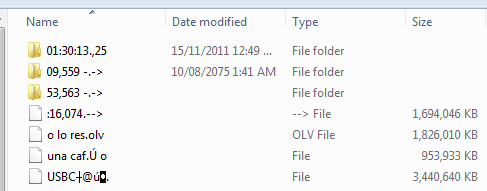
external hard drive file corruption? We have an external hard drive for back ups. Usually it is in storage, or it is connected to my machine via usb. Occasionally my husband connects it to his xp machine to do back ups or copy a file. After he uses it, when i next connect it to my machine, windows asks me if i want to scan and fix the drive, or open it without scanning. I have always said just open it. I thought win xp left some artifacts on the drive maybe.
Now i see some mysterious files have appeared on the drive, and i can't delete them. I tried doing it from the command prompt, but unless i'm doing something wrong, i get the same error i get when i try deleting them from windows explorer - the file names aren't valid.
Is this indeed because of the sharing of the drive across systems? Is it normal for Windows 7 to ask for a scan and fix of a drive after it has been on a win xp system? How do i delete these files? Should i be concerned about a larger issue?
| My System Specs | | OS windows 7 x64 CPU intel core i7 920 Motherboard gigabyte x58a-ud3r Memory 6 Gb ocz pc3 12800 DDR3, 1600mHz, set @ 1066mHz Graphics Card nvidia geforce gt240 Hard Drives 2x80 Gb western digital Other Info wacom intuos 3 |
07-10-2011
|
#2 | | Windows 7 Ultimate x64 SP1, LinuxMint 9 LTS x64, Debian 6, Ubuntu 10.04 LTS x64 |
Hi,
Those do look odd. Please do the following before you go any further:
Download, install, update and run a FULL scan of all your hard drives and your external USB drives using Malwarebytes. Please post back the log that is created once the scan is finished.
What ant-virus software is currently installed on:
1. Your PC; and
2. Your husbands XP PC?
Regards,
Golden | My System Specs | | System Manufacturer/Model Number Golden Mk. I.3 OS Windows 7 Ultimate x64 SP1, LinuxMint 9 LTS x64, Debian 6, Ubuntu 10.04 LTS x64 CPU Intel i7 860 @ 2.80 GHz Motherboard Gigabyte P55A-UD3R Rev.1. Award BIOS F13 Memory 16GB Corsair Vengance DDR3 @ 661 MHz Dual Channel (9-9-9-24) Graphics Card EVGA NVidia GTX 560 1024MB Sound Card Realtek Integrated Monitor(s) Displays Dual Samsung SyncMaster 2494HS Screen Resolution 1920*1080 and 1920*1080 Keyboard Logitech G110 Mouse Logitech MX518 PSU Thermaltake ToughPower QFan 750W Case Thermaltake Element S VK60001W2Z Cooling Corsair H60 Water Cooling, 2*230mm and 2*80mm case fans Hard Drives 1*OCZ Vertex 2 60GB SSD;
2*Samsung F3 SpinPoint 1TB in RAID0;
2*Samsung F1 SpinPoint 1TB in RAID1;
1*Western Digital WD10EARS 1TB
1*Western Digital 500GB External USB 3.0
1*Seagate 500GB External USB 2.0 Internet Speed Not fast enough!!! |
07-10-2011
|
#3 | | MS Windows 7 Ultimate SP1 64-bit |
What did MalwareBytes report? | My System Specs | | System Manufacturer/Model Number Toshiba Satellite L305D laptop OS MS Windows 7 Ultimate SP1 64-bit CPU AMD Athlon X2 Dual-Core QL-64, 2100 Mhz, 2 Cores Motherboard TOSHIBA Portable PC (Socket M2/S1G1) Memory 4.0GB (2x2GB) DDR2 @ 333MHz 5-5-5-15 Graphics Card ATI Radeon 3100 Graphics (Toshiba) Sound Card Realtek High Definition Audio Monitor(s) Displays Generic PnP Monitor @ 1280x800 Screen Resolution 1280 x 800 Keyboard standard PS/2 Keyboard Mouse HP Wireless Optical Mobile Mouse Model FHA-3410 Hard Drives 125.03GB Corsair CSSD-V128GB2 ATA Device (IDE)
Depending upon testing, organized as 1,2, or 3 partitions with/without a 100mb system partition at the front. Internet Speed What the local pub, local coffee shop offers. Other Info Optical Drives HL-DT-ST DVDRAM GSA-T50N ATA Device
Synaptics PS/2 Port TouchPad
Speakers (Realtek High Definition Audio)
Atheros AR5007EG Wireless Network Adapter
Also have an Asus ha1002xp netbook with Win 7 Ultimate installed. |
07-11-2011
|
#4 | | |
Hi - sorry for not getting back earlier. I'm in a Mexican town, we lose our internet connection regularly.
Both of our computers have Avast, the free version. I just let Avast run in the background, i haven't done a scan in quite a while  . Hubby's computer never gets scanned unless i run it for him.
I'll go get malwarebytes now and do that scan. | My System Specs | | OS windows 7 x64 CPU intel core i7 920 Motherboard gigabyte x58a-ud3r Memory 6 Gb ocz pc3 12800 DDR3, 1600mHz, set @ 1066mHz Graphics Card nvidia geforce gt240 Hard Drives 2x80 Gb western digital Other Info wacom intuos 3 |
07-11-2011
|
#5 | | |
Avast caught ElistarA on hubby's machine, then i ran it again during boot and it caught 3 PUP's and 1 malware, although it didn't specify what - i could check the report to find out.
Avast run during boot didn't find anything on my machine. I also had it check the external drive from within Windows because i didn't know if that was part of the boot scan - nothing. Malwarebytes had previously found 2 old keygens, which i deleted. I'm happier with Avast, i think i'm going to stick with it, so i took Malwarebytes off the machine again.
So i tried running CCleaner. It looked like it was going to take a few hours to wipe the free space on drive F: (the external), so i shut it down and took another look at F: to decide if the free space wipe was a good time investment. The drive no longer lists the mystery files that were causing me concern. I had moved them to a folder of there own in my attempts to delete them, and that folder is now a 32kb file, it's no longer a folder. The first time i tried to delete it, Windows said its recycle bin was corrupted (what recycle bin?) and i terminated the process from task manager when it hung. I just went back and tried to delete it again, this time there was no problem.
So... for the moment everything seems fine... but do i need to worry about this happening again? | My System Specs | | OS windows 7 x64 CPU intel core i7 920 Motherboard gigabyte x58a-ud3r Memory 6 Gb ocz pc3 12800 DDR3, 1600mHz, set @ 1066mHz Graphics Card nvidia geforce gt240 Hard Drives 2x80 Gb western digital Other Info wacom intuos 3 |
07-11-2011
|
#6 | | MS Windows 7 Ultimate SP1 64-bit |
next time you run CCleaner.
Just use its default settings. Wipe is an unusual situation, and yes, does require much time.
MSE is FREE! Updated very regularly. The same anti-virus that Microsoft uses in Forefront, the enterprise security software.
MSE is the only anti-virus that I will and do install on my own and other computers. | My System Specs | | System Manufacturer/Model Number Toshiba Satellite L305D laptop OS MS Windows 7 Ultimate SP1 64-bit CPU AMD Athlon X2 Dual-Core QL-64, 2100 Mhz, 2 Cores Motherboard TOSHIBA Portable PC (Socket M2/S1G1) Memory 4.0GB (2x2GB) DDR2 @ 333MHz 5-5-5-15 Graphics Card ATI Radeon 3100 Graphics (Toshiba) Sound Card Realtek High Definition Audio Monitor(s) Displays Generic PnP Monitor @ 1280x800 Screen Resolution 1280 x 800 Keyboard standard PS/2 Keyboard Mouse HP Wireless Optical Mobile Mouse Model FHA-3410 Hard Drives 125.03GB Corsair CSSD-V128GB2 ATA Device (IDE)
Depending upon testing, organized as 1,2, or 3 partitions with/without a 100mb system partition at the front. Internet Speed What the local pub, local coffee shop offers. Other Info Optical Drives HL-DT-ST DVDRAM GSA-T50N ATA Device
Synaptics PS/2 Port TouchPad
Speakers (Realtek High Definition Audio)
Atheros AR5007EG Wireless Network Adapter
Also have an Asus ha1002xp netbook with Win 7 Ultimate installed. |
07-12-2011
|
#7 | | Windows 7 Ultimate x64 SP1, LinuxMint 9 LTS x64, Debian 6, Ubuntu 10.04 LTS x64 |
Hi,
You need to consider keeping Malwarebytes on your PC, and updating and running it regularly. This is why:
There isn't a single anti-virus software that will cover every possible bit of malicious code, so by having both and doing scans regularly you minimise your exposure to most (but not all) the evil code out there. We refer to this as a layered security approach : its the simplest and easiest way to protect yourself from this stuff. The same needs to go for your husbands PC, since you swap USB storage devices between yours and his PC.
I'm not entirely sure, but Elistara appears to be either:
1. A legitimate Spanish based anti-virus product, or
2. Fakeware anti-virus product
A lot of my google hits produce poorly rated sites, or my Spanish isn't up to scratch. To be on the safe side, I recommend attempting to uninstall this (unless someone else that is familiar with this product can offer better advice), and re-running scans using free Microsoft Stand Alone System Sweeper.
This tutorial by Brink will show you how to burn the download to a DVD, and use the tool to scan your systems: http://www.sevenforums.com/tutorials...m-sweeper.html
Do this on:
1. Your PC,
2. Your husband's PC
3. Any and all external USB devices.
If it comes up clean, then ensure both your PC's have current and up-to-date anti-virus products (Avast or MSE will be just fine, don't forget Malwarebytes!). Until you do this, you continue to run the risk of cross-infection between your PC's
Post back here if you need more help.
Regards,
Golden | My System Specs | | System Manufacturer/Model Number Golden Mk. I.3 OS Windows 7 Ultimate x64 SP1, LinuxMint 9 LTS x64, Debian 6, Ubuntu 10.04 LTS x64 CPU Intel i7 860 @ 2.80 GHz Motherboard Gigabyte P55A-UD3R Rev.1. Award BIOS F13 Memory 16GB Corsair Vengance DDR3 @ 661 MHz Dual Channel (9-9-9-24) Graphics Card EVGA NVidia GTX 560 1024MB Sound Card Realtek Integrated Monitor(s) Displays Dual Samsung SyncMaster 2494HS Screen Resolution 1920*1080 and 1920*1080 Keyboard Logitech G110 Mouse Logitech MX518 PSU Thermaltake ToughPower QFan 750W Case Thermaltake Element S VK60001W2Z Cooling Corsair H60 Water Cooling, 2*230mm and 2*80mm case fans Hard Drives 1*OCZ Vertex 2 60GB SSD;
2*Samsung F3 SpinPoint 1TB in RAID0;
2*Samsung F1 SpinPoint 1TB in RAID1;
1*Western Digital WD10EARS 1TB
1*Western Digital 500GB External USB 3.0
1*Seagate 500GB External USB 2.0 Internet Speed Not fast enough!!! |
07-12-2011
|
#8 | | MS Windows 7 Ultimate SP1 64-bit |
Golden,
good advice.
I do recommend putting the System Sweeper on a USB stick because updating of the System Sweeper is much easier when using a USB stick.
since new malware / root kits / viruses are continually appearing, then updating of the System Sweeper before use is rather much a necessity. | My System Specs | | System Manufacturer/Model Number Toshiba Satellite L305D laptop OS MS Windows 7 Ultimate SP1 64-bit CPU AMD Athlon X2 Dual-Core QL-64, 2100 Mhz, 2 Cores Motherboard TOSHIBA Portable PC (Socket M2/S1G1) Memory 4.0GB (2x2GB) DDR2 @ 333MHz 5-5-5-15 Graphics Card ATI Radeon 3100 Graphics (Toshiba) Sound Card Realtek High Definition Audio Monitor(s) Displays Generic PnP Monitor @ 1280x800 Screen Resolution 1280 x 800 Keyboard standard PS/2 Keyboard Mouse HP Wireless Optical Mobile Mouse Model FHA-3410 Hard Drives 125.03GB Corsair CSSD-V128GB2 ATA Device (IDE)
Depending upon testing, organized as 1,2, or 3 partitions with/without a 100mb system partition at the front. Internet Speed What the local pub, local coffee shop offers. Other Info Optical Drives HL-DT-ST DVDRAM GSA-T50N ATA Device
Synaptics PS/2 Port TouchPad
Speakers (Realtek High Definition Audio)
Atheros AR5007EG Wireless Network Adapter
Also have an Asus ha1002xp netbook with Win 7 Ultimate installed. |
07-12-2011
|
#9 | | Windows 7 Ultimate x64 SP1, LinuxMint 9 LTS x64, Debian 6, Ubuntu 10.04 LTS x64 |
Excellent advice - thanks Karl | My System Specs | | System Manufacturer/Model Number Golden Mk. I.3 OS Windows 7 Ultimate x64 SP1, LinuxMint 9 LTS x64, Debian 6, Ubuntu 10.04 LTS x64 CPU Intel i7 860 @ 2.80 GHz Motherboard Gigabyte P55A-UD3R Rev.1. Award BIOS F13 Memory 16GB Corsair Vengance DDR3 @ 661 MHz Dual Channel (9-9-9-24) Graphics Card EVGA NVidia GTX 560 1024MB Sound Card Realtek Integrated Monitor(s) Displays Dual Samsung SyncMaster 2494HS Screen Resolution 1920*1080 and 1920*1080 Keyboard Logitech G110 Mouse Logitech MX518 PSU Thermaltake ToughPower QFan 750W Case Thermaltake Element S VK60001W2Z Cooling Corsair H60 Water Cooling, 2*230mm and 2*80mm case fans Hard Drives 1*OCZ Vertex 2 60GB SSD;
2*Samsung F3 SpinPoint 1TB in RAID0;
2*Samsung F1 SpinPoint 1TB in RAID1;
1*Western Digital WD10EARS 1TB
1*Western Digital 500GB External USB 3.0
1*Seagate 500GB External USB 2.0 Internet Speed Not fast enough!!! |
07-12-2011
|
#10 | | |
Avast removed ElistarA.exe. So my guess is it was fakeware.
I wonder at what point the mystery files on F: disappeared. It wasn't during the virus scans. It was connected to my machine the whole time. I ran CCleaner's file and registry cleaning programs before i got into the free memory wipe thing, and memory wipe ran for a few minutes before i decided to cancel it. I suppose one of those processes got rid of the weird files.
The layered security approach makes a lot of sense. I worry a bit about different antivirus programs interfering with each other or slowing down my machine. I like it that Avast runs in the background, but i don't know that i would want another antivirus running in the background too. Won't they gum each other up and slow everything down? Malwarebytes seems to run only when intentionally opened, so adding it wouldn't seem to be a problem. MSE? I don't know. I'm going to try to find some more info. Normally, Windows products don't play nice with rival products. | My System Specs | | OS windows 7 x64 CPU intel core i7 920 Motherboard gigabyte x58a-ud3r Memory 6 Gb ocz pc3 12800 DDR3, 1600mHz, set @ 1066mHz Graphics Card nvidia geforce gt240 Hard Drives 2x80 Gb western digital Other Info wacom intuos 3 external hard drive file corruption? problems? All times are GMT -5. The time now is 10:18 AM. |  |