|
Welcome to Windows 7 Forums. Our forum is dedicated to helping you find solutions with any problems, errors or issues you are experiencing with Windows 7. The Windows 7 forum also covers news and updates and has an extensive Windows 7 tutorial section that covers a wide range of tips and tricks.
Windows 7 - Why is only half of my RAM usable? |
07-11-2011
|
#1 | | |
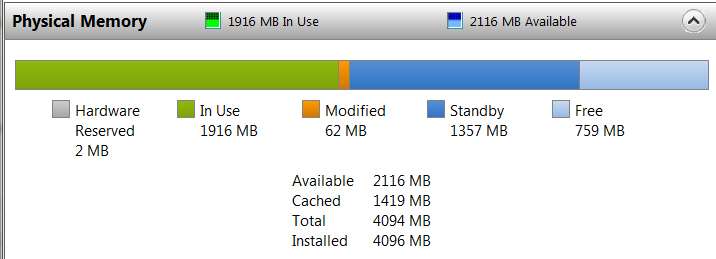
Why is only half of my RAM usable? I have performance problems. Even though I have 4GB RAM installed physically, my harddisk runs like crazy. A moment ago, I encountered the system report below, which says that only 2GB of my RAM is usable.
What is the meaning of this?
Here is the screenshot: | My System Specs | | OS Windows 7 Ultimate x64 CPU Intel i5 750 Motherboard Gigabyte P55A U3DR Memory 2x2GB DDR3 Dual-kit Graphics Card ATI Radeon HD4670 Sound Card Onboard Monitor(s) Displays Samsung SyncMaster P2350 PSU 400W rated, 460W max Case CoolerMaster Cooling Air Hard Drives Western Digital 1TB, 64MB cache, internal
Samsung Story 1.5TB, external |
07-11-2011
|
#2 | | Win7 Ultimate SP1 x64 / Windows 8 CP / Android |
Uncheck Max mem from msconfig (Windows Key+R>msconfig>Boot>Advanced options)
Post a screen shot of the Memory Tab in Resource Monitor
You can view this in Resource Monitor. Start > type "resource" > Open Resource Monitor > Memory Tab > Physical Memory.
Enable memory remap in your BIOS if it is supported | My System Specs | | System Manufacturer/Model Number Custom Build OS Win7 Ultimate SP1 x64 / Windows 8 CP / Android CPU Intel Core 2 Quad Q8200 OC'd 3.08GHz Motherboard Asus Rampage formula LGA775 Memory 8GB DDR2 900Mhz Graphics Card Zotac GTX 460OC 2GB GDDR5/Asus EN9600GT 1GB DDR3 PhyX Sound Card Supreme FX2 Monitor(s) Displays AOC 22' Screen Resolution 1680x1050 Keyboard Prolink keyboard Mouse Prolink optical mouse PSU Cooler Master GX 650W Cooling Cooler Master V6 + 3X fans Hard Drives 3X500GB hitachi, 2TB internal, 500GB Seagate FreeAgent, 640GB Samsung Internet Speed 1MiB/s Other Info 5.1 System + 2.1 System |
07-11-2011
|
#3 | | |

Quote: Originally Posted by yowanvista Uncheck Max mem from msconfig (Windows Key+R>msconfig>Boot>Advanced options) It is already unchecked. 
Quote: Originally Posted by yowanvista Post a screen shot of the Memory Tab in Resource Monitor
You can view this in Resource Monitor. Start > type "resource" > Open Resource Monitor > Memory Tab > Physical Memory. 
Quote: Originally Posted by yowanvista Enable memory remap in your BIOS if it is supported I'm editing BIOS now... | My System Specs | | OS Windows 7 Ultimate x64 CPU Intel i5 750 Motherboard Gigabyte P55A U3DR Memory 2x2GB DDR3 Dual-kit Graphics Card ATI Radeon HD4670 Sound Card Onboard Monitor(s) Displays Samsung SyncMaster P2350 PSU 400W rated, 460W max Case CoolerMaster Cooling Air Hard Drives Western Digital 1TB, 64MB cache, internal
Samsung Story 1.5TB, external |
07-11-2011
|
#4 | | Win7 Ultimate SP1 x64 / Windows 8 CP / Android |
2053MB of your RAM is allocated to the hardware, probably to your Radeon HD4670. That amount cannot be used at all. But if you want more memory just add more RAM | My System Specs | | System Manufacturer/Model Number Custom Build OS Win7 Ultimate SP1 x64 / Windows 8 CP / Android CPU Intel Core 2 Quad Q8200 OC'd 3.08GHz Motherboard Asus Rampage formula LGA775 Memory 8GB DDR2 900Mhz Graphics Card Zotac GTX 460OC 2GB GDDR5/Asus EN9600GT 1GB DDR3 PhyX Sound Card Supreme FX2 Monitor(s) Displays AOC 22' Screen Resolution 1680x1050 Keyboard Prolink keyboard Mouse Prolink optical mouse PSU Cooler Master GX 650W Cooling Cooler Master V6 + 3X fans Hard Drives 3X500GB hitachi, 2TB internal, 500GB Seagate FreeAgent, 640GB Samsung Internet Speed 1MiB/s Other Info 5.1 System + 2.1 System |
07-11-2011
|
#5 | | Windows 7 Home Premium SP1, clean install, upgrade disc |
Just to be sure that your memory is not having problems (I tend to agree with yowanavista), take memtest86 Guide to using Memtest86+ - Geeks to Go Forums | My System Specs | | System Manufacturer/Model Number Dell XPS 420 OS Windows 7 Home Premium SP1, clean install, upgrade disc CPU Intel Core2 processsor Q8200(2.33Ghz 1333FSB) Quad Core Tech Motherboard Dell Memory 6 gb Graphics Card ATI Radeon 256MB HD3650 Sound Card Intergrated 7.1 Channel Audio Monitor(s) Displays Dell SP2009W 20" Keyboard Dell USB Keyboard Mouse Dell Premium Optical USB Cooling Fan Hard Drives 640 GB Serial ATA Hard drive Internet Speed DSL 2.85 |
07-11-2011
|
#6 | | |
Some things to try here, Asus X58 + 6/12GB memory overclocking - detecting less memory than installed - i4memory.com - different look at memory Quote: 2053MB of your RAM is allocated to the hardware, probably to your Radeon HD4670. Unless there is a major hardware glitch somewhere, no it isn't. | My System Specs | | System Manufacturer/Model Number Me OS Win 7 Ultimate x64 CPU Phenom II x4 955 @ 4 GHz. Motherboard Asus M5A97 EVO Memory 2x2 GB Kingston HyperX DDR3 1600 Graphics Card Sapphire HD 6850 Sound Card X-Fi Xtreme Music w/ Logitech X-530 Monitor(s) Displays Acer S232HL Abid Screen Resolution 1920x1080 Keyboard Logitech Wave Mouse Logitech G5 v2 PSU Antec Earthwatts 650W Green Case Antec Three Hundred Cooling Cooler Master 212 EVO Hard Drives 120 GB OCZ Vertex 3
500 GB Seagate 7200.12 Internet Speed 24000/1000 |
07-11-2011
|
#7 | | Windows 7 X64 Professional/Windows 8 |
The 4670 should have it's own memory. there may be a bios setting to turn off dedicated graphics memory. | My System Specs | | System Manufacturer/Model Number Home Brew - Always under construction OS Windows 7 X64 Professional/Windows 8 CPU intel i7-2600K Motherboard Asus P8Z68 V-Pro/GEN 3 Memory 8GB G.Skill Sniper DDR3-2133 (2X4GB) Graphics Card EVGA 670 2GB Sound Card Asus Xonar Monitor(s) Displays Asus 24" LCD VW246H Screen Resolution 1920X1080 Keyboard Logitech G510 Mouse Logitech G500/Logitech Wireless PSU CORSAIR HX850W Case Cooler Master HAF X Cooling Corsair H100 w/ 4 noctua fans in push/pull. Hard Drives Crucial M4 128GB,Crucial M4 64GB,Samsung HD103SJ 1TB, 1TB WD FAEX,Samsung 1.5TB, EXTERNAL HD- 2X Rosewill case esata w/ 1TB Samsung spinpoints & Black X esata 1TB Spinpoint, Rosewill USB 3.0 dock 1TB Spinpoint, Seagate GOFlex Pro 500GB & 750GB USB Internet Speed Foot Messenger speed Other Info 2nd Computer- Samsung RF711-SO1 17" Laptop i5-2310M, 8GB DDR3-1333, Crucial M4 and OCZ vertex2, Nvidia GT540M.Win 7 HP X64. |
07-11-2011
|
#8 | | |
My problem is solved after taking RAM out of its socket and then replugging it. I think there was a physical disconnection in the RAM socket. Now my system works fine. | My System Specs | | OS Windows 7 Ultimate x64 CPU Intel i5 750 Motherboard Gigabyte P55A U3DR Memory 2x2GB DDR3 Dual-kit Graphics Card ATI Radeon HD4670 Sound Card Onboard Monitor(s) Displays Samsung SyncMaster P2350 PSU 400W rated, 460W max Case CoolerMaster Cooling Air Hard Drives Western Digital 1TB, 64MB cache, internal
Samsung Story 1.5TB, external |
07-11-2011
|
#9 | | |

Quote: Originally Posted by essenbe The 4670 should have it's own memory. there may be a bios setting to turn off dedicated graphics memory. Doesn't matter if it has its own memory. It will need PCI-e address space and will map to the upper part of the 4GB unless memory remapping is available and enabled. It doesn't need physical memory but it does need address space, which it will take away from that being used by physical RAM.
That is a huge amount of reserved ddress space though. Did you move your graphics card from one PCI-E slot to another? | My System Specs | | System Manufacturer/Model Number Home built (GeneO industries)/Model 2 OS Windows 7 64 bit SP1 CPU i5 2500k @ 4.5 GHz, 1.256V 120 GFlop (with AVX) Motherboard ASUS P8Z68-V PRO/GEN3 Memory 16GB (4GBx4) 1600MHz G.skill Ripjaws X 8-8-8-24 Graphics Card Asus Nvidia ENGTS450, 1GB 4030 MHz DDR5 clock, 915 Mhz GPU Sound Card Onboard Realtek HD Monitor(s) Displays NEC Spectraview 2490WUXi-SV Screen Resolution 1920 x 1200 Keyboard HP Wireless Mouse HP wireless PSU Antec TruePower New 650W Case Fractal Design "Define R3" Cooling CM Hyper 212+ push/pull, 5 120mm, 1 140mm case fans Hard Drives Crucial 128GB M4 (system), 2x WD Caviar 1TB Black internal (data), 1x Seagate 750G Barracuda Internal (backups), 1x WD Blue 6Gb/s 320GB Internal, 1x Corsair F40 SSD for cache, 1x 2TB eSata WD20EARS Green, 2x 500GB Seagate external USB, 1x 350GB exte Internet Speed 25.7 Mb/s down, 4.5 Mb/s up Other Info USB 3.0 x4 , SATA III x4, eSATA x3, SATA II x4, USB 2.0 x8. 2 Samsung DVD R/W drives.
WEI: CPU 7.7, Memory 7.9, Graphics 7.4, Disk 7.9 |
07-11-2011
|
#10 | | Windows 7 Pro x64 / WinXP Pro x86 on (1), Win7 Pro X64 / WinXP Pro x86 on (2) |

Quote: Originally Posted by GeneO 
Quote: Originally Posted by essenbe The 4670 should have it's own memory. there may be a bios setting to turn off dedicated graphics memory. Doesn't matter if it has its own memory. It will need PCI-e address space and will map to the upper part of the 4GB unless memory remapping is available and enabled. It doesn't need physical memory but it does need address space, which it will take away from that being used by physical RAM. Just in passing, I have a 512MB HD4670 card in my ASUS P5Q3 motherboard, and it takes zero memory from my 4GB of RAM. | My System Specs | | System Manufacturer/Model Number Home-built, two systems (1) and (2) OS Windows 7 Pro x64 / WinXP Pro x86 on (1), Win7 Pro X64 / WinXP Pro x86 on (2) CPU E6850 3.0Ghz/4MB-cache (1); E8400 3.0Ghz/6MB-cache (2) Motherboard SuperMicro C2SBX (1); ASUS P5Q3 (2) Memory 4GB PC3-8500 DDR3 (1); 4GB PC3-10600 DDR3 (2) Graphics Card ATI HD4850 (1); ATI HD5770 (dual-DVI) (2) (see TV cards) Sound Card Realtek ALC883 HD Audio (1); Realtek ALC1200 HD Audio (2) Monitor(s) Displays Eizo 24" S2433W (1); Eizo HD2441W LCD, Eizo S2433W (2) Screen Resolution 1920x1200 (1); 1920x1200, 1920x1200 (2) Keyboard IBM PS/2 (1) and (2) Mouse Microsoft wired (1); Logitech MX Revolution wireless (2) PSU Nesteq ECS-6001 600W (1); Nesteq ECS-5001 500W (2) Case Acousti-Case 360 (1) and (2) Cooling Zalman CNPS9700-NT for CPU, 2x120mm case fans (1) and (2) Hard Drives (1) 1x1TB SATA (7200 RPM), 1x300GB U320 SCSI (10000RPM), 1x750GB SATA (7200RPM), 1x150GB SATA (10000RPM) for OS;
(2) 1x320GB SATA (7200RPM), 1x140GB SCSI 10000RPM U320, 1x150GB SATA (10000RPM) for OS Internet Speed 15mbps down / 2mbps up Other Info Ceton InfiniTV 4-tuner cablecard-enabled TV card as well as ATI TV Wonder 650 Combo PCIe OTA/ATSC 2-tuner TV card in (2), running under Win7 WMC Why is only half of my RAM usable? problems? All times are GMT -5. The time now is 10:18 AM. |  |