Windows 7 Forums Search
Welcome to Windows 7 Forums. Our forum is dedicated to helping you find solutions with any problems, errors or issues you are experiencing with Windows 7. The Windows 7 forum also covers news and updates and has an extensive Windows 7 tutorial section that covers a wide range of tips and tricks.


Windows 7 - WD- 2TB Caviar Green won't initialize

 
07-11-2011   #1


Windows 7 home premium 64 bit


WD- 2TB Caviar Green won't initialize

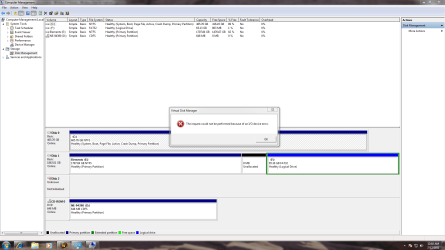
Ok so first time posting here but i'm very hopeful for assistance in this. I have a 2tbWD Caviar Green hard drive SATA connection in a brand new system new install of windows etc. Also have a 500g WD hard drive with windows on it that works perfectly. So the problem is the bios sees the 2TB HD device manager has it listed as fine and it shows up in Disk Management however, when i try to initialize it i get "The request could not be performed because of an I/O device error." I have tried multiple ports and multiple cables ensuring that they are connected tight. I have ensured that my motherboard drivers are fully updated etc. I have tried running the diagnostic tools from WD and it passes everything only because the program reads it as 0.00 size due to the fact its not initialized. It also makes an intersting kind of beeping sound when i turn the system on bare with me but it goes (don dooon doon) for a bit and stops hard to describe it but whatever. I find it hard to believe that the drive is bad considering its read by windows and bios as fine just cannot initialize it. Any assistance is greatly appreciated due to the fact that it is driving me insane.

Thank you

My System SpecsSystem Spec
07-11-2011   #2


MS Windows 7 Ultimate SP1 64-bit


Stalke,
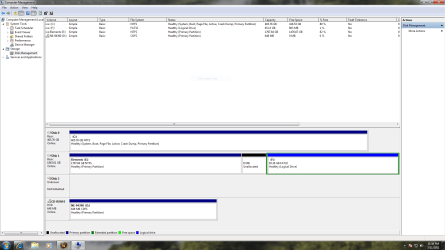
Post the output of Disk Management please. I expect the solution to be simple but need info first.


HOW TO POST A SNAPSHOT OF DISK MANAGEMENT DISPLAY

Run disk management:
WIN | type DISKMGMT.MSC | ENTER
WIN is the key with the wavy flag.

Maximize the output of Disk Management:
ALT-Spacebar key combo (this pops up a menu) |
X key (selects Maximize) |
Drag the field separators (such as between Status and Capacity) to show entire field. This is very important, otherwise, needed info is not visible.

Make a snapshot:
WIN | type SNIPPING | ENTER
Click the New button.
Drag the cursor around the area you want to snip.
File | Save as | select save location and name | Save button

Post the snapshot:
· Click on the paperclip icon in that row of icons at the top of the message box.
· Click on a BROWSE button. There are 5 of them.
· Navigate to the folder containing the snapshot.
· Click on the snapshot.
· Click on the OPEN button.
· Click on the UPLOAD button adjacent to the 5th BROWSE button.
· Close the MANAGE ATTACHMENTS window.
· Position the cursor at the spot in the message where you want the
snapshot to appear.
· Click on the PaperClip again.
· Click on the file which you want to insert
· Attach code will be inserted into your message.
My System SpecsSystem Spec
07-11-2011   #3


Windows 7 home premium 64 bit


Ok I have uploaded the requested information if you need anything else please let me know i'll be up all night working on this anyways.

Thank you,
Attached Thumbnails
WD- 2TB Caviar Green won't initialize-devicemngr.png   WD- 2TB Caviar Green won't initialize-dskmng.png   WD- 2TB Caviar Green won't initialize-error.png  
My System SpecsSystem Spec
.


07-11-2011   #4


MS Windows 7 Ultimate SP1 64-bit


The 2 TB drive--do you have any data there that you want to save?
My System SpecsSystem Spec
07-11-2011   #5


Windows 7 home premium 64 bit


not at all its a brand new drive lol. Its the drive that says "not initialized" the other one with 1.7tb free is an external drive.
My System SpecsSystem Spec
07-11-2011   #6


MS Windows 7 Ultimate SP1 64-bit


does your bios see the drive? Yes or no.
My System SpecsSystem Spec
07-11-2011   #7


Windows 7 home premium 64 bit


Yes bios see's the drive as does windows device mnger, Well let me elaborate on that i can see it in CMOSS but if i try to get to it using cmd. i am unable to because it does not have a drive letter.
My System SpecsSystem Spec
07-11-2011   #8


Windows 7 Home Premium 64 bit


Try an XP or VISTA disk if you have one, preferably XP, to partition the drive.
Go through the install process until you get to the partition screen.
Partition the drive as one partition, then exit.
Restart Windows 7.

I doubt that you won't be able to restart 7, but if you cannot, insert your Windows 7 disk and use startup repair.
Startup Repair
My System SpecsSystem Spec
07-11-2011   #9


Windows 7 home premium 64 bit


the problem with that is the installation does not recognize the drive for some unknown reason lol.
My System SpecsSystem Spec
07-11-2011   #10


Windows 7 home premium 64 bit


I honestly am starting to think that I just had bad luck on the draw and got a bum drive but the fact that it shows up in device manager and disk management leads me to believe otherwise.
My System SpecsSystem Spec
Reply

 WD- 2TB Caviar Green won't initialize problems?


Thread Tools


Similar Threads for: WD- 2TB Caviar Green won't initialize
Thread Forum
Solved WD caviar black 32 or 64 MB cache Chillout Room
WD Caviar Green HDDs Suffer from a Critical Design Flaw News
WD Caviar Black problem Hardware & Devices
SATA 6 WD Caviar Black 1TB Hardware & Devices
WD Caviar Black noisy? Hardware & Devices


All times are GMT -5. The time now is 10:19 AM.


Windows 7 Forums is an independent web site and has not been authorized,
sponsored, or otherwise approved by Microsoft Corporation.
"Windows 7" and related materials are trademarks of Microsoft Corp.
© Designer Media Ltd
  

1 2 3 4 5 6 7 8 9 10 11 12 13 14 15 16 17 18 19 20 21 22 23 24 25 26 27 28 29 30